Supply and Demand Entry
- 지표
- 버전: 1.0

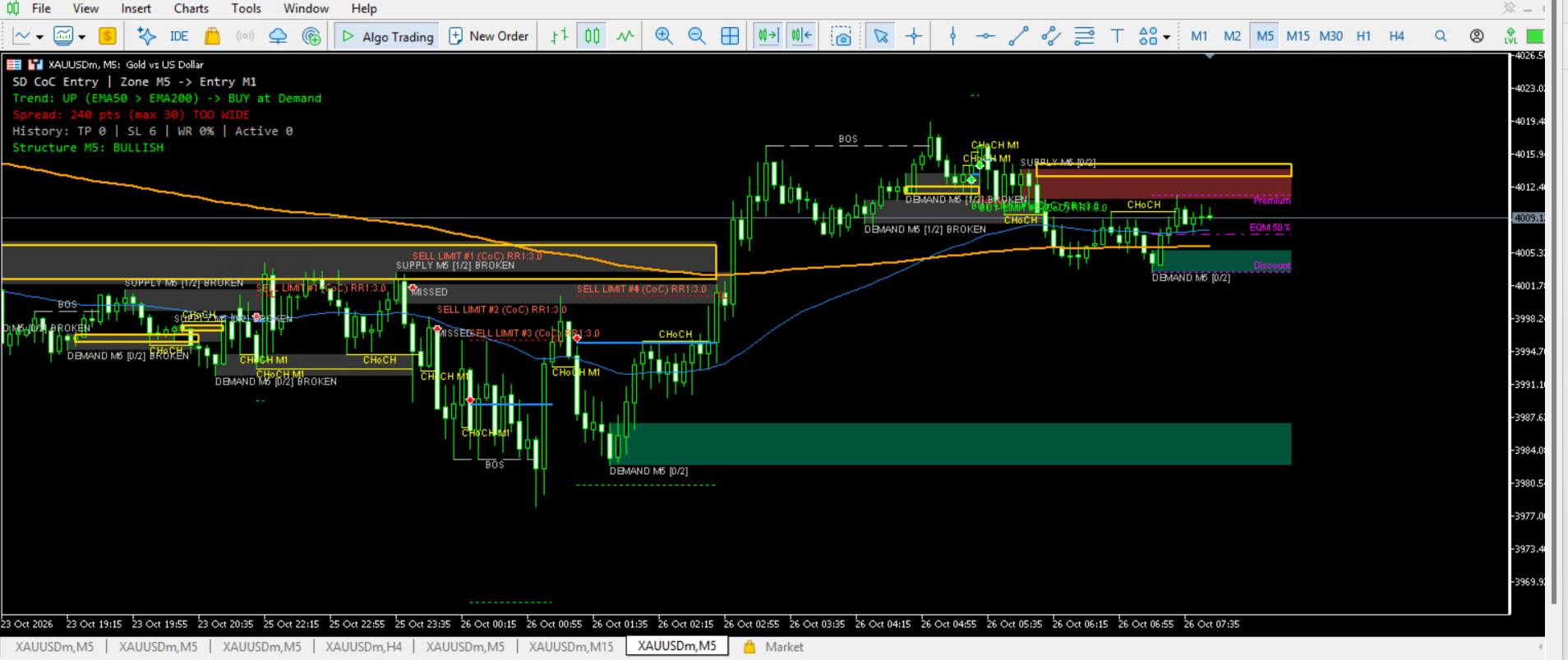
Supply and Demand Entry – Supply & Demand Zones with Lower-Timeframe CHoCH Confirmation
SND CHoCH Entry finds Supply and Demand zones on your chart timeframe and waits
for a Change of Character (CHoCH) on a lower timeframe before showing an entry.
Instead of placing orders as soon as price touches a zone, it asks the market
to confirm the reversal first. This helps filter out zones that price simply
runs through.
The indicator shows the entry, Stop Loss and Take Profit levels on the chart.
It does NOT open or manage trades.
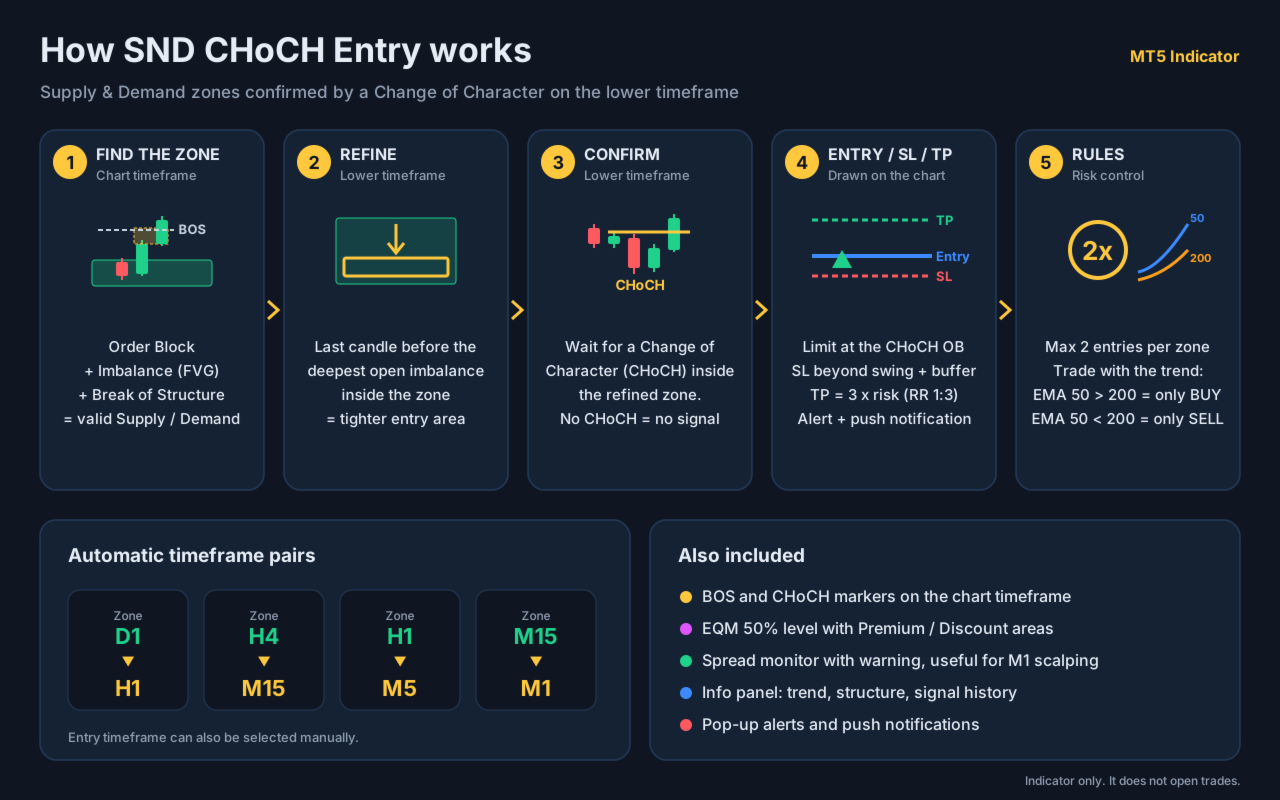
HOW IT WORKS
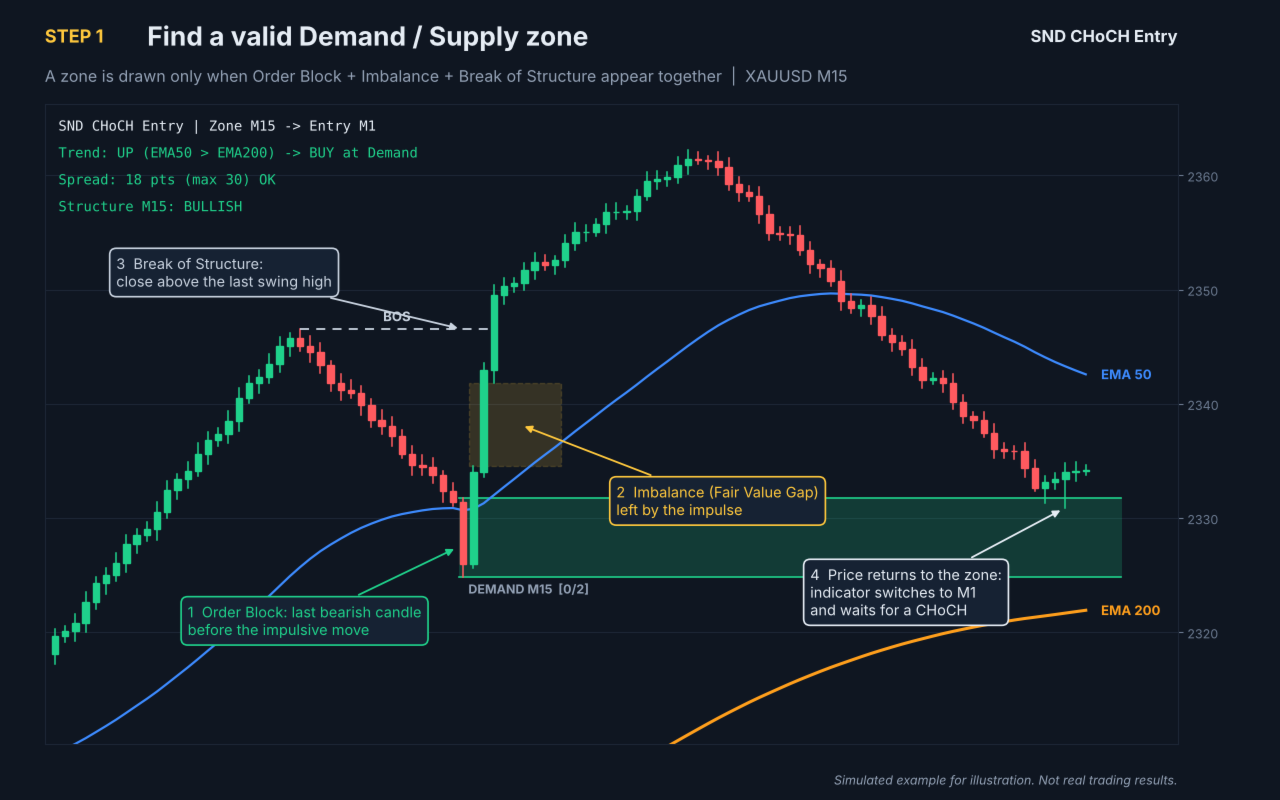
1. Zone detection (chart timeframe)
A zone is only drawn when three conditions appear together:
- Order Block: the last opposite candle before an impulsive move
- Imbalance: a Fair Value Gap left behind by that move
- Break of Structure: the move closes beyond the last swing high/low
Demand zones are drawn in green, Supply zones in red.
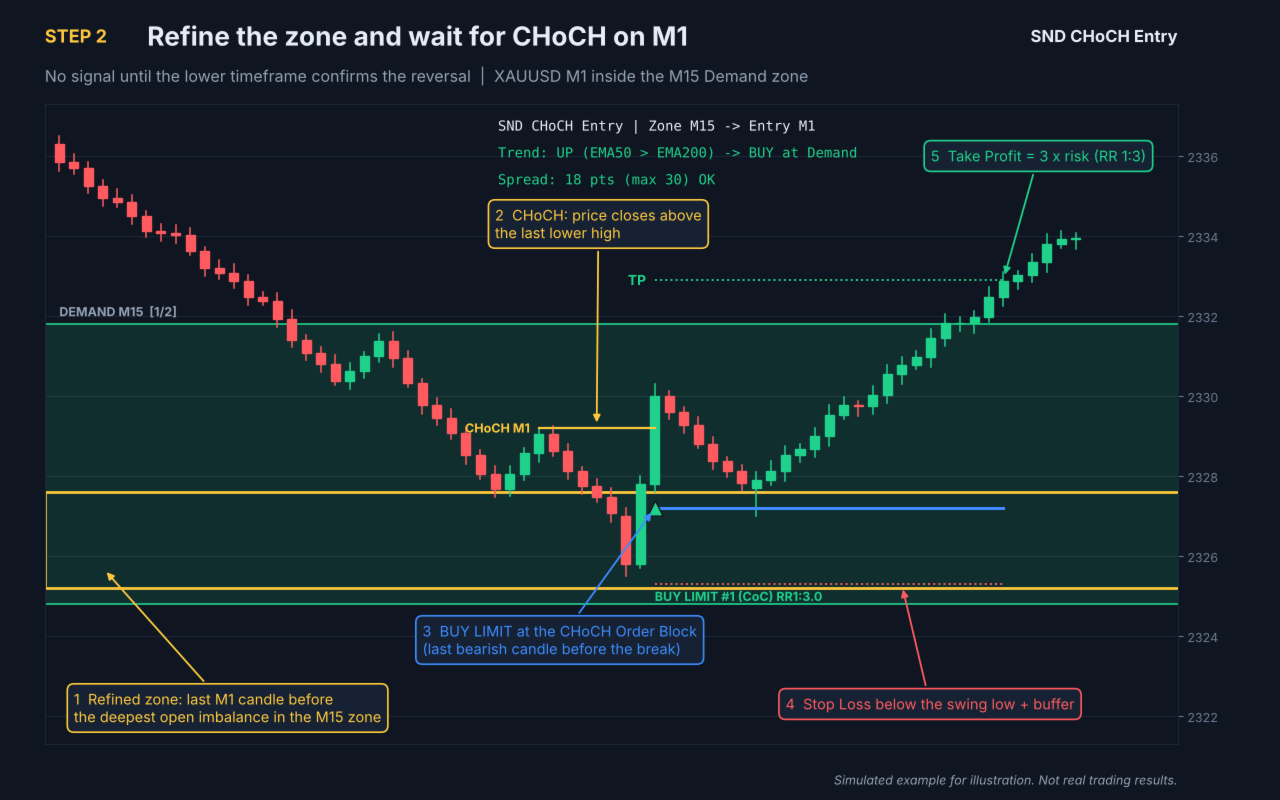
2. Zone refinement (lower timeframe)
When price returns to a zone, the indicator looks inside it on the lower
timeframe. It finds the deepest imbalance that is still open and marks the
last candle before it as the refined zone (gold box). This gives a tighter
area and avoids entering too early.
3. CHoCH confirmation (lower timeframe)
Inside the refined zone, the indicator waits for price to break the last
lower-timeframe swing against the previous move (a Change of Character).
Without a valid CHoCH, no signal is shown.
4. Entry, Stop Loss and Take Profit
- Entry: limit order at the CHoCH Order Block (edge or 50%, selectable)
- Stop Loss: beyond the swing low/high, plus a buffer in points
- Take Profit: Risk:Reward multiple of the risk (default 1:3)
Each signal is marked with an arrow and lines, and is labelled with its
result: TP, SL, MISSED, EXPIRED or still PENDING/RUNNING.
5. Zone rules
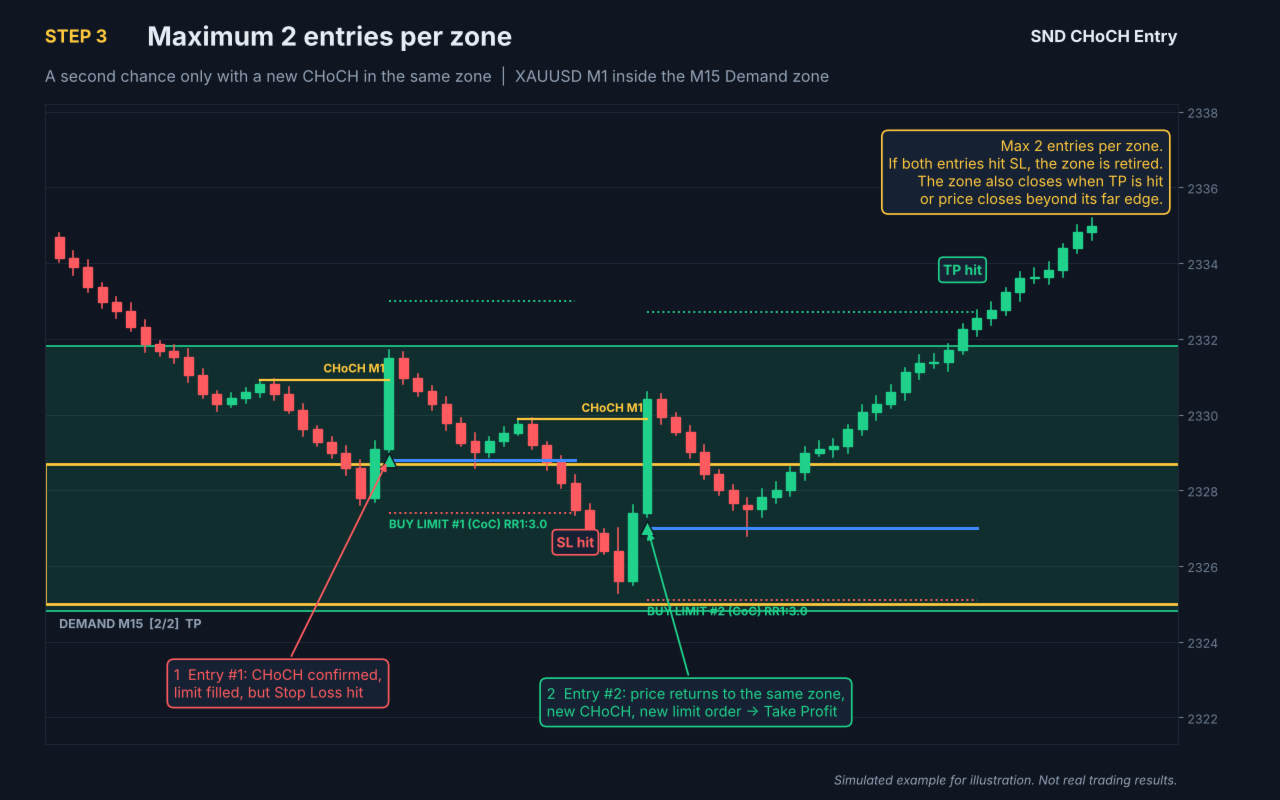
- Maximum 2 entries per zone (adjustable). After the limit is reached
with losses, the zone is retired.
- A zone is closed when Take Profit is reached, or when price closes
beyond its far edge (BROKEN).
6. Trend filter
- EMA 50 above EMA 200: only BUY signals at Demand zones
- EMA 50 below EMA 200: only SELL signals at Supply zones
The filter can be turned off.
TIMEFRAME PAIRS
The confirmation timeframe is selected automatically:
Chart D1 -> confirmation H1
Chart H4 -> confirmation M15
Chart H1 -> confirmation M5
Chart M15 -> confirmation M1
You can also choose the confirmation timeframe manually.
MARKET STRUCTURE TOOLS
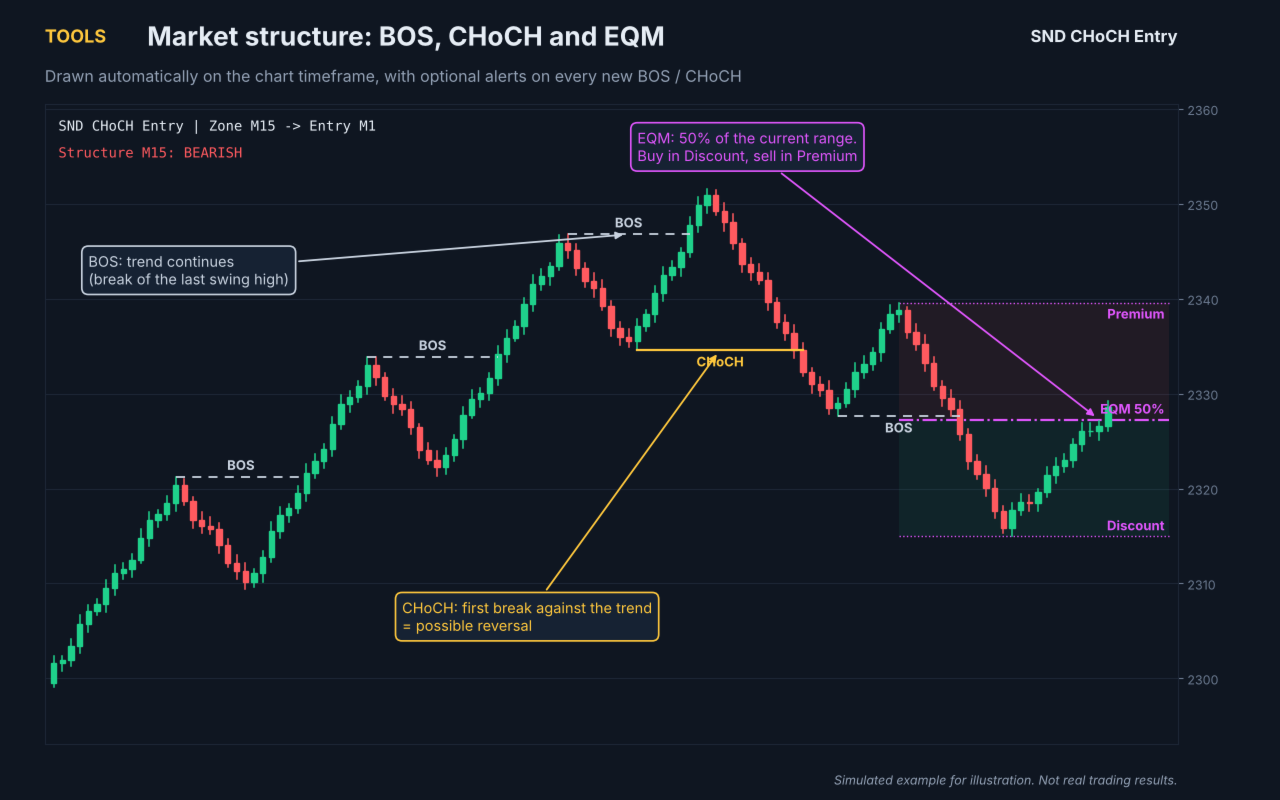
- BOS and CHoCH markers on the chart timeframe
- The lower-timeframe CHoCH that triggered each entry
- EQM (Equilibrium): the 50% level of the current range, with Premium and
Discount areas, to help you buy in Discount and sell in Premium
INFO PANEL
- Zone timeframe and confirmation timeframe
- Current trend from the EMA filter
- Market structure direction (Bullish / Bearish)
- Current spread, with a warning when it is above your limit. This is
useful when scalping on M1, where spread has a large effect on results.
- History of signals in the analysed period: TP, SL, win rate, active
ALERTS
- Pop-up alert and push notification for every new signal, including
entry, SL, TP, RR and current spread
- Optional alert for every new BOS or CHoCH
MAIN SETTINGS
- Confirmation timeframe (auto or manual) and number of bars to analyse
- Swing length, Order Block search, BOS search and minimum imbalance size
- Refinement on/off, CHoCH swing length and lookback
- Entry level (edge or 50% of the CHoCH Order Block)
- Stop Loss buffer, Risk:Reward ratio, max entries per zone, order expiry
- EMA periods, method and price for the trend filter
- Show/hide BOS, CHoCH, EQM and completed zones
- Maximum spread warning level
- All colours
IMPORTANT NOTES
- This is an indicator, not an Expert Advisor. It does not place trades.
- The history panel and TP/SL labels are a simple simulation on closed
bars. If SL and TP are touched in the same bar, it is counted as SL.
Results do not include spread or commission and are not a guarantee
of future performance.
- Lower-timeframe history must be available in your terminal. If zones
appear without signals, open the lower timeframe chart once so MT5
downloads the data.
- Always test on a demo account before trading live.