Advanced Trade Assistant
- 유틸리티
- 버전: 1.1
- 활성화: 5

Trade Manager Panel is a powerful and easy-to-use on-chart utility designed for manual traders, scalpers, and grid traders on MetaTrader 5. It simplifies your trade management process by allowing you to control multiple open positions with just a single click directly from the chart.
If you have multiple trades running on a single pair, modifying Stop Loss and Take Profit one by one is time-consuming. This panel solves that problem by applying your desired levels to all positions instantly.
Key Features:
-
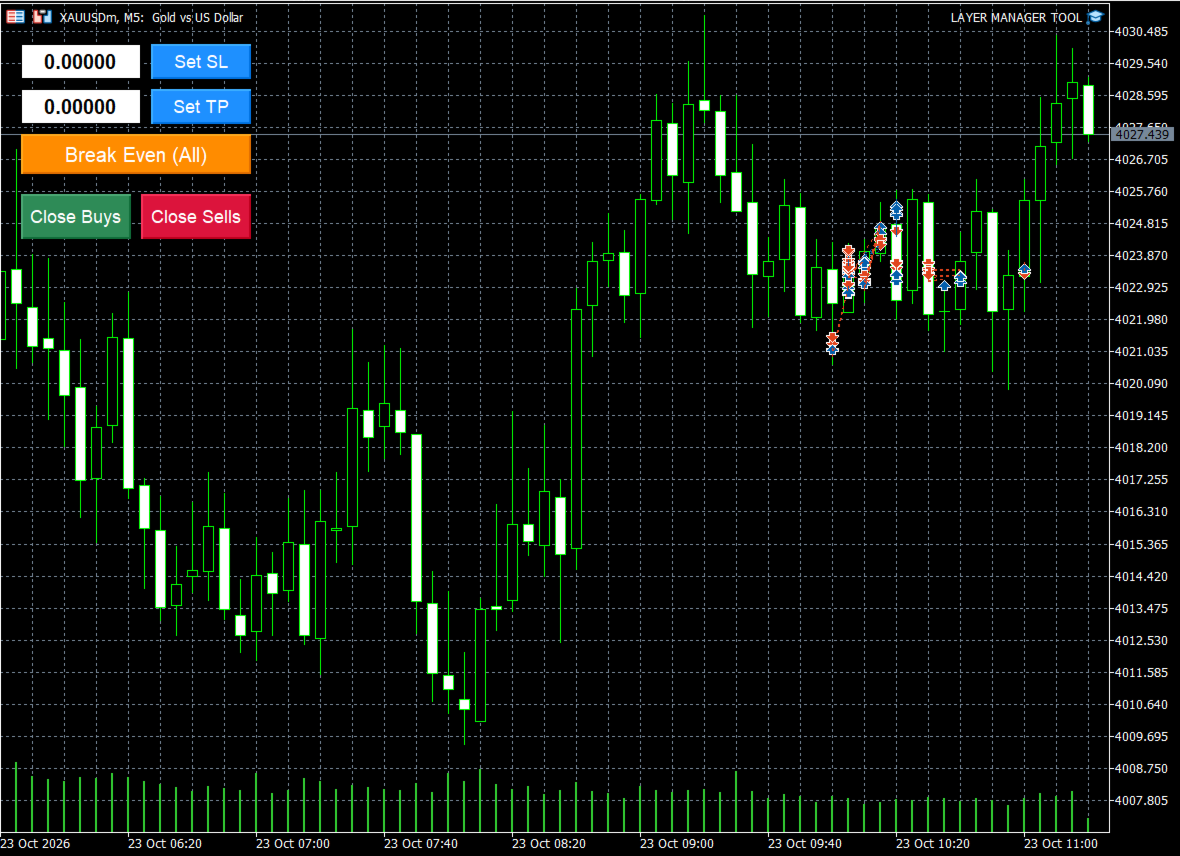
Set SL & TP Instantly: Simply enter your desired Stop Loss or Take Profit price in the input box and click the button to apply it to all open positions of the current symbol simultaneously.
-
One-Click Break-Even: Secure your trades instantly! The "Break Even (All)" button moves the Stop Loss of all open trades to their respective entry prices to protect your capital.
-
Quick Close Buttons: Manage your market exposure quickly. Use the "Close Buys" or "Close Sells" buttons to close all buy or sell trades for the current symbol with a single click—perfect for fast-moving markets.
-
User-Friendly UI: A clean, color-coded, and compact control panel that doesn't interfere with your chart analysis.
How to Use:
-
Attach the utility to any chart.
-
Ensure "Allow Algo Trading" is enabled in your MT5 terminal.
-
Use the panel on the top-left corner of the chart to type prices and click the respective buttons to manage your trades.
Make your manual trading faster, safer, and more efficient!