QPC Oscillator
- 지표
-
Bob Sulaiman
 "Experienced in Financial Trading, Business Development, AI, and Cyber Security | Driving growth in Cryptocurrency & Marketing Solutions" 🌐 Website: www.goldcrusher.net
 - 버전: 2.62
- 활성화: 5
QPC OSCILLATOR | INSTITUTIONAL TARGET AND VOLATILITY ENGINE
Precision Quantitative Trading System with Real-Time Dynamic Target Projections (ENTRY, SL, TP1, TP2, TP3)
OVERVIEW
QPC OSCILLATOR is a professional institutional-grade quantitative indicator engineered for MetaTrader 5. Built for discerning traders who demand mathematical precision over emotional guesswork, QPC Oscillator dynamically identifies structural market turning points, high-probability momentum breakouts, and trend exhaustion waves across all market sessions.
Unlike conventional lagging oscillators that clutter charts with ambiguous lines, QPC OSCILLATOR projects an all-in-one actionable tactical framework directly onto your price chart:
- Instant Non-Repainting Execution Signals (Tactical Directional Arrows)
- Mathematical Stop Loss (SL) calibrated dynamically to prevailing market volatility
- 3-Tiered Profit Projections (TP1, TP2, TP3) engineered around institutional liquidity pockets
- Integrated High-Tech On-Chart HUD showing real-time MACD momentum vectors and ATR volatility metrics
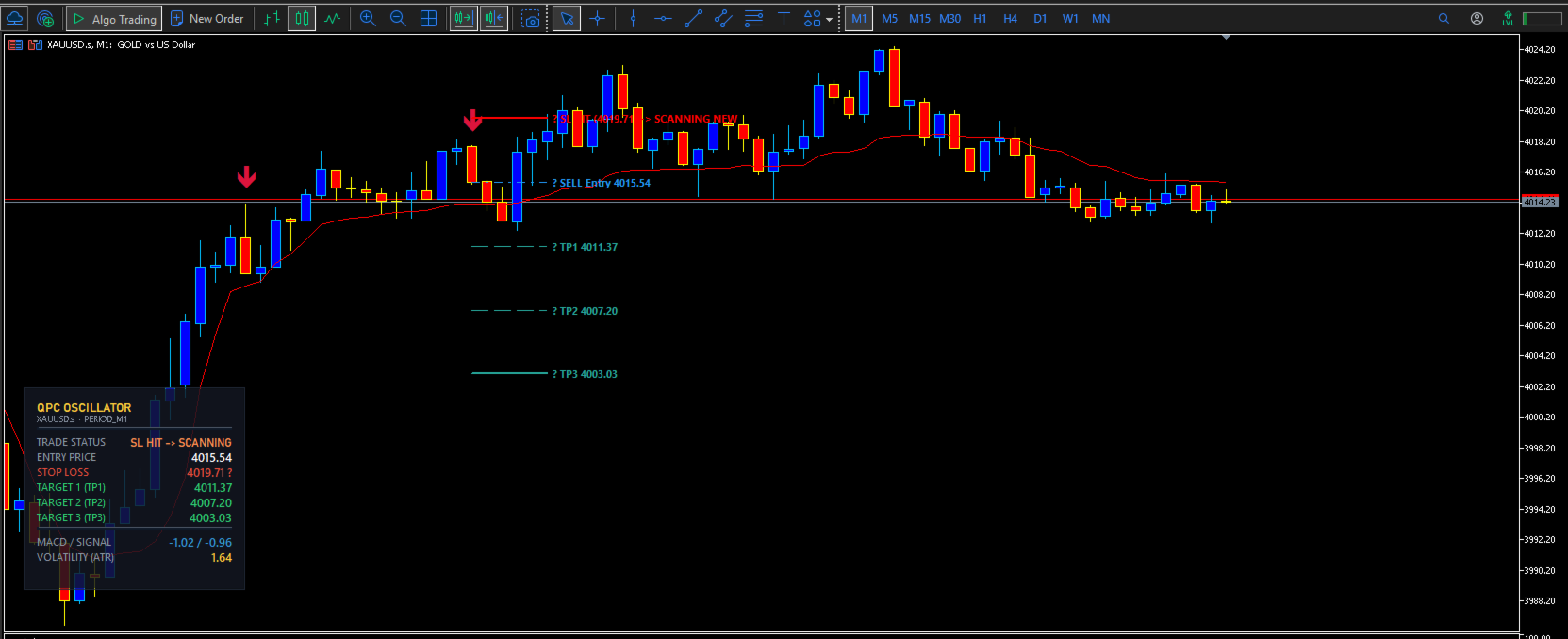
- Automated Setup Reset: If a trade setup hits Stop Loss (SL), the engine immediately resets and actively scans for the next valid high-probability setup without locking or freezing the chart
CORE QUANTITATIVE FEATURES
1. Zero-Repaint Adaptive Execution Signals
Every directional arrow is calculated using closed-candle mathematical filters. Once a candle closes and the signal confirms, the arrow, entry level, and target lines remain locked, giving you complete confidence during live market execution and backtesting.
2. Intelligent Tiered Target Matrix (TP1 / TP2 / TP3)
Never wonder where to take profit again. The integrated target engine projects 3 quantitative profit zones:
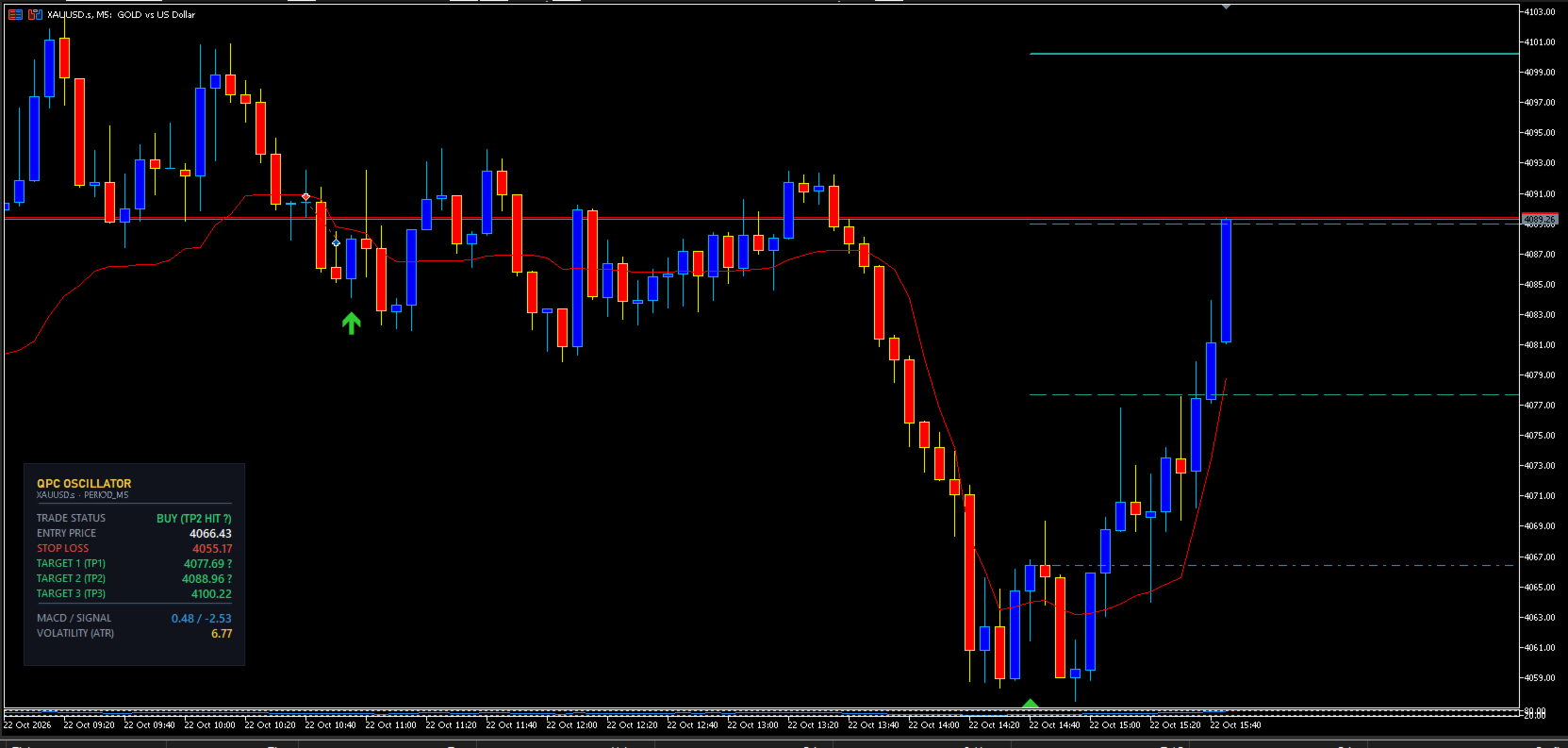
- Target 1 (TP1): Quick momentum scalp target with the highest hit frequency. Ideal for locking partial profits and moving Stop Loss to Breakeven.
- Target 2 (TP2): Structural trend expansion target offering balanced Risk-to-Reward.
- Target 3 (TP3): High-velocity runner target designed to capture full cyclical trend extensions.
3. Volatility-Calibrated Stop Loss and Auto-Scan Next Setup
Dynamic risk containment calculated automatically using Adaptive True Range (ATR) multipliers. If the price touches the Stop Loss level, the trade is marked as closed, the HUD immediately updates status to SL HIT, and the indicator instantly resumes scanning for the next fresh setup at the next structural peak or valley.
4. Tactical On-Chart Telemetry HUD
An ultra-modern, semi-transparent tactical dashboard positioned unobtrusively on your chart displaying:
- Trade Status: Current market scanning mode / active signal status / SL Hit auto-reset state
- Entry Price: Exact institutional entry price
- Stop Loss Level: Exact risk price threshold
- Target Matrix (TP1 / TP2 / TP3): Exact take-profit price levels
- MACD Vector and Signal Line: Real-time momentum convergence/divergence
- Market Volatility (ATR): Real-time tick volatility measurement
5. Multi-Channel Instant Notification Suite
Stay connected to the market anywhere in the world:
- MT5 Terminal Audio and Visual Pop-up Alerts
- Direct Mobile Push Notifications (MetaQuotes ID)
- Automated Email Dispatch
OPTIMAL TRADING ASSETS AND TIMEFRAMES
- Primary Instrument: GOLD (XAUUSD) - Highly responsive to momentum expansion and liquidity sweeps
- Secondary Instruments: Major FX Pairs (EURUSD, GBPUSD, USDJPY), Indices (US30, NAS100), and Crypto (BTCUSD)
- Recommended Timeframes:
Scalping: M1, M5
Intraday Trading: M15, M30, H1
Swing Trading: H4, D1
HOW TO TRADE WITH QPC OSCILLATOR
SELL Setup:
1. Wait for a Red Tactical Down-Arrow to appear on the closed candle.
2. The HUD displays SELL Entry, along with defined Stop Loss and targets TP1, TP2, TP3.
3. Open a SELL position at the marked ENTRY price.
4. Place Stop Loss at the red SL line.
5. Take partial profit at TP1 and trail Stop Loss to Breakeven. Allow remaining volume to run toward TP2 and TP3.
6. If the trade hits Stop Loss, the indicator automatically terminates the setup and continuously scans the market for the next incoming setup.
BUY Setup:
1. Wait for a Green or Cyan Tactical Up-Arrow to appear on the closed candle.
2. The HUD displays BUY Entry, along with defined Stop Loss and targets TP1, TP2, TP3.
3. Open a BUY position at the marked ENTRY price.
4. Place Stop Loss at the SL line.
5. Take partial profit at TP1 and trail Stop Loss to Breakeven. Allow remaining volume to run toward TP2 and TP3.
6. If the trade hits Stop Loss, the indicator automatically terminates the setup and continuously scans the market for the next incoming setup.
RISK DISCLAIMER
Trading foreign exchange, indices, and commodities on margin carries a high level of risk and may not be suitable for all investors. Past performance is no guarantee of future results. Always trade with disciplined risk management.