Three Bar Matrix

Three Bar Matrix

3개 캔들 패턴 분석에 기반한 자동 매매 시스템. 추세 거래를 위해 통제된 로트 배수로 포지션 평균화 메커니즘을 사용합니다. 그리드 전략의 위험을 이해하는 숙련된 트레이더에게 적합합니다.

일반 개념

Three Bar Matrix는 현재 타임프레임에서 마지막으로 완료된 3개 캔들의 조합을 분석합니다. 캔들 몸통과 그림자 사이의 특정 관계가 충족될 때 거래 신호가 생성되어 움직임이 시작될 때 잠재적 진입 지점을 식별합니다.

작동 방식

알고리즘은 다음 조건을 충족하는 3개 캔들 패턴을 검색합니다:

  • 첫 번째 캔들은 명확한 방향성을 가짐 (상승 또는 하락 몸통)

  • 두 번째와 세 번째 캔들은 반대 색상으로 불확실성 생성

  • 첫 번째 캔들의 몸통 크기가 두 번째 캔들의 몸통 크기보다 큼

  • 첫 번째 캔들의 종가가 두 번째 캔들의 고가/저가를 돌파

  • 손절매 수준은 자동으로 세 캔들의 최저점/최고점으로 설정되며 추가로 이전 캔들(10번째 봉까지)에 대해 필터링됨

포지션 관리

가격이 오픈 포지션 반대 방향으로 움직일 때, 전문가 어드바이저는 지정된 단계(Step)로 평균화 그리드를 구축하며 증가된 로트(승수 계수 Multiplier Lot)로 동일한 방향의 추가 거래를 개시할 수 있습니다. 전체 그리드에 대한 이익 실현은 모든 오픈 포지션의 가중 평균 가격을 기준으로 설정됩니다.

입력 매개변수

Lot — 첫 번째 주문의 고정 초기 거래량
Take Profit — 평균 가격으로부터 이익 확정 수준 (포인트 단위)
Step — 평균화 포지션 개시 간격 (포인트 단위)
Multiplier Lot — 그리드 내 각 후속 포지션의 로트 승수 계수
Max Positions — 단일 그리드(단일 방향)에서 허용되는 최대 포지션 수
Magic number — 전문가 어드바이저의 고유 식별자
BalanceEnd flag / BalanceEnd — 목표 잔액 도달 시 전문가 어드바이저 자동 종료 활성화/비활성화

중요!

이 전문가 어드바이저는 평균화 및 로트 승수 전략을 사용합니다. 이는 고위험 거래 방법으로 불리한 시장 움직임 시 예금이 빠르게 손실될 수 있습니다. 개발자는 수익성을 보장하지 않습니다. 실제 계정 거래는 로직을 완전히 이해하고 데모 계정에서 철저히 테스트한 후에만 허용됩니다.
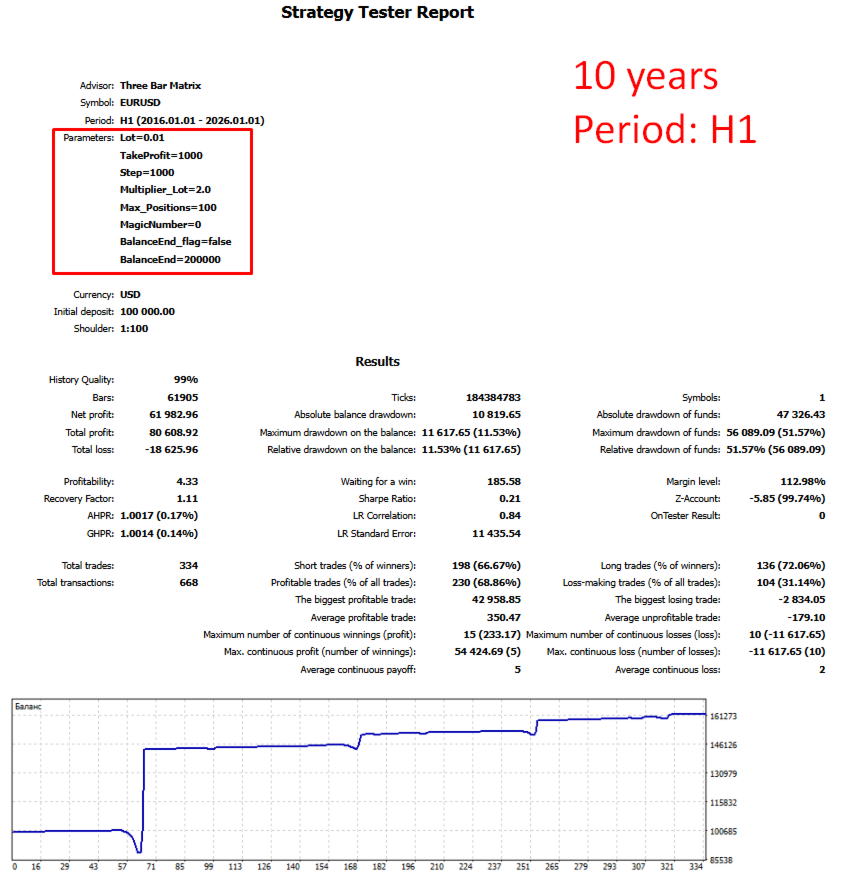
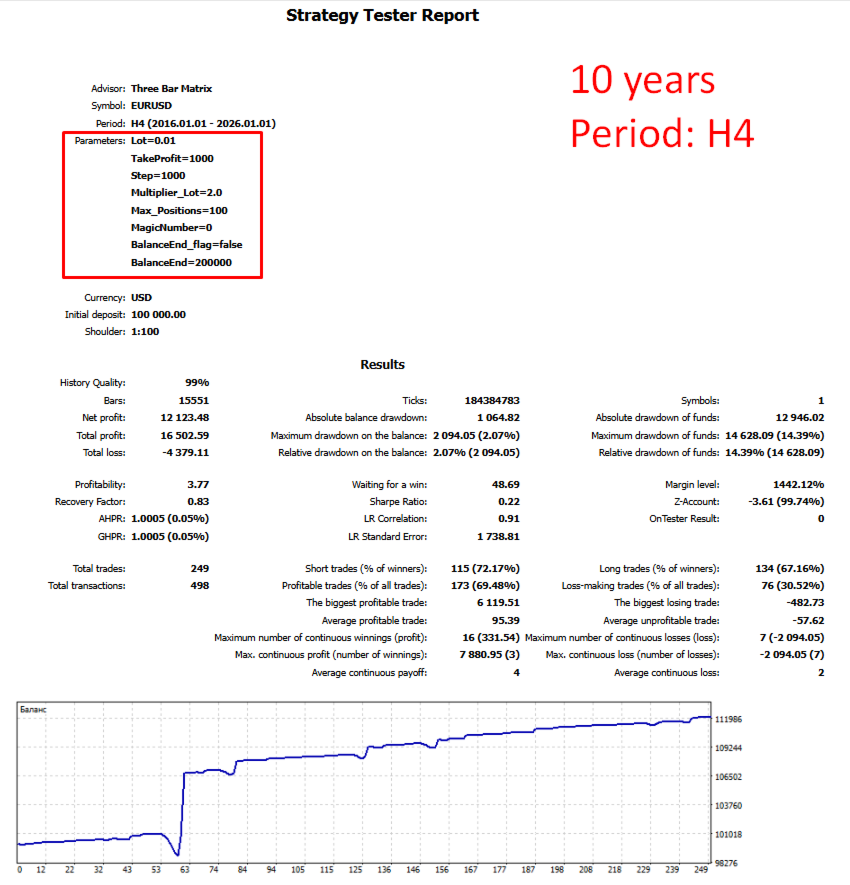
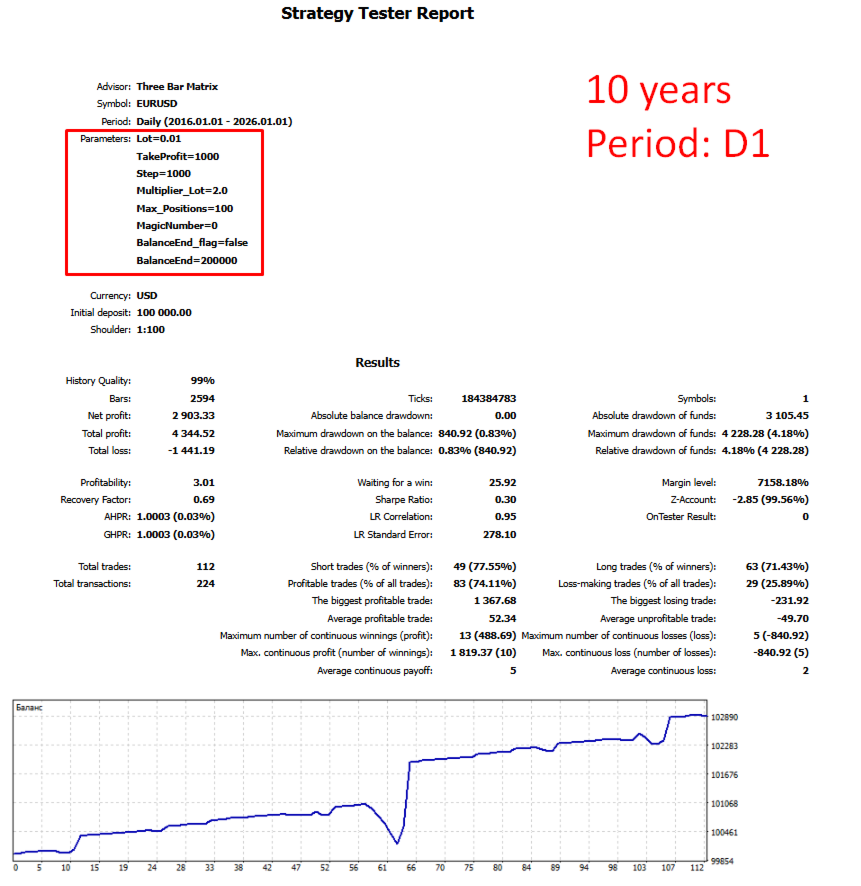
제작자의 제품 더 보기
Trend Pulse Line
Maksim Novikov
Simple and intuitive tool for visual trend filtering based on a moving average. The indicator displays a single line on the chart but changes its color depending on the price's position relative to this line, helping you quickly determine the prevailing market direction. How It Works The indicator calculates a moving average (default EMA 50) on the selected timeframe. It then analyzes the relationship between the candle's closing price and the line's value: If the   close price is above the lin
FREE
HighLow Alarm
Maksim Novikov
The HighLow Alarm indicator automatically displays the High and Low values of the previous trading day on your chart. This tool helps you visually assess key daily levels, from which the price often bounces or which it breaks, and it works on any timeframe. How It Works The indicator accesses the daily timeframe (D1) data and, for each bar on the current chart, calculates the High and Low of the previous daily session. The result is displayed as two horizontal lines: Green line   — The High leve
FREE
Dual Color MA
Maksim Novikov
A clear trend indicator based on two moving averages with dynamic color change for quick visual assessment of market conditions. How it works: The indicator displays two moving averages (fast and slow) with customizable periods on the chart. The line colors change automatically based on the closing price position relative to the fast MA: If   Price > fast MA , both lines turn   green , indicating an uptrend. If   Price < fast MA , both lines turn   red , indicating a downtrend. Key features: In
FREE
Swift Close Utility for closing Buy and Sell positions in MetaTrader 5. Purpose This utility is designed for batch closing of Buy or Sell positions on the current symbol. Operating Modes Close BUY   — Close all open Buy positions on the current symbol. Close SELL   — Close all open Sell positions on the current symbol. Magic Number Filtering The   MagicNumber   parameter allows the utility to target only positions opened by an Expert Advisor with the specified magic number. If   MagicNumber =
FREE
OneClick Close Script for closing positions and removing pending orders in MetaTrader 5. Purpose This script is designed for batch closing of positions and batch removal of pending orders based on specified criteria. Position Closing Modes ALL POSITIONS   — Close all open positions. BUY ONLY   — Close only Buy positions. SELL ONLY   — Close only Sell positions. Pending Order Removal Modes ALL ORDERS   — Remove all pending orders. BUY LIMIT ONLY   — Remove only Buy Limit orders. BUY STOP ONLY  
FREE
OneClick Trader Script for opening market and pending orders in MetaTrader 5. Purpose The script is designed to open orders of two types: Market orders   (Buy, Sell) — executed with a single click. Pending orders   (Buy Limit, Buy Stop, Sell Limit, Sell Stop) — opened by dragging the script onto the desired price level on the chart. Supported Order Types Market: Buy, Sell. Pending: Buy Limit, Buy Stop, Sell Limit, Sell Stop. Parameter Calculation Minimum and maximum lot sizes are verified autom
FREE
Secure Trade Copier Expert Advisor for synchronizing trading positions between MetaTrader 5 terminals. Purpose The Expert Advisor operates in two modes: MASTER and SLAVE. MASTER mode records information about open positions into a file. SLAVE mode reads this file and synchronizes positions in its own terminal. Operating Modes MASTER:   Leading terminal. Writes position data to a shared file. SLAVE:   Following terminal. Reads the file and copies positions. Synchronized Data Opening of new posit
FREE
Here is the product description for   Trade Sketch   translated into English and fully aligned with MQL5 Market rules (Part IV). Trade Sketch Visual pending order builder Core Function Trade Sketch is designed to place Limit and Stop pending orders by dragging graphical blocks. Prices are set visually on the chart rather than entered manually. Risk and potential profit calculations update in real time. Quick Start Enable the panel: click the "Lines ON" button on the left panel. Set the lot size
FREE
Swift Trade Trading panel for MetaTrader 5. Purpose The panel is designed for opening market Buy and Sell orders with preset Stop Loss and Take Profit parameters. Setup Drag the panel onto a chart. Set the position volume (lot). Specify the Stop Loss value in points. Specify the Take Profit value in points. Click the Buy or Sell button to open a trade. Quote Parameters The panel supports three-digit and five-digit quotes. Stop Loss and Take Profit values in points are automatically adjusted ac
FREE
Visual Trailing Stop 그래픽 라인을 통한 시각적 스탑로스 관리 유틸리티 목적 Visual Trailing Stop은 사용자가 차트에 그린 그래픽 라인을 동적 스탑로스로 변환합니다. 보호 수준은 라인 위치를 따라 가격 변동에 따라 자동으로 이동합니다. 기능 추세선, 수평선 및 기타 라인 유형 지원 가격 변동에 따른 스탑로스 자동 조정 매수 및 매도 포지션에 대한 개별 트레일링 설정 각 방향별 트레일링 기능 개별 활성화/비활성화 매수와 매도 포지션에 서로 다른 라인 사용 가능 라인 위치 변경 시 스탑 레벨 즉시 업데이트 작동 절차 차트에 라인을 그립니다. 라인 이름을 "Line BUY"(매수 포지션용) 또는 "Line SELL"(매도 포지션용)로 지정합니다. 유틸리티를 차트에 적용합니다. 설정에서 원하는 트레일링 방향을 활성화합니다. 스탑로스는 그려진 라인의 위치를 자동으로 추적합니다. 설정 파라미터 유틸리티 파라미터를 통해 매수 및 매도 포지션의 트레일링을 개별적으
FREE
Adaptive Grid MA Adaptive Grid MA는 MetaTrader 5 플랫폼용으로 개발된 완전 자동화된 트레이딩 전문가 어드바이저입니다. 트레이딩 전략은 시장 진입을 위해 이동 평선(EMA) 교차 신호를 사용하는 고전적인 포지션 평균화 방법(마틴게일)을 기반으로 합니다. 작동 방식 EA는 조정 가능한 기간(기본값 50 및 100)의 두 지수 이동 평균(EMA) 교차를 분석합니다. 초기 포지션 개설 신호는 해당 방향에 열린 포지션이 없을 때만 생성됩니다: 매수: 단기 EMA가 장기 EMA 위로 교차합니다. 매도: 단기 EMA가 장기 EMA 아래로 교차합니다. 시장이 열린 포지션 반대 방향으로 움직일 경우, EA는 지정된 거리(Step)에 증가된 로트 크기(Multiplier)로 추가 주문을 개설합니다. 이를 통해 전체 포지션 그리드의 개설 가격을 평균화할 수 있습니다. 새로운 평균화 주문 후, EA는 자동으로 재계산하여 가중 평균 가격을 기반으로 전체 그리드에 대한
필터:
리뷰 없음
리뷰 답변