I tested the demo, but the speed goes to fast comparing 32 and 31. I would like to set the time to 1 bar every 5 seconds.
Is that possible?
Regards
Rainer
Hello
I dont think it is possible, the speed depends on your system (processor, RAM, OS) and the indicators you attached on the tested chart. If you find some possible solution please contact me.
I'm looking for a panel trade manager that satisfy my requirement. Your EA is a good start and likely does more than I need. Is it possible to develop a private job? Much simpler than your EA. I manage my trades manually and only trade one instrument: EUR/USD. Just need a panel which will allow me to have an automatic stop loss and 2 TP levels attached when I enter a trade (with the ability to adjust on the chart).
Requirements:
See attached picture. Main features needed
1. Automatic stop loss
2. Automatic Take Profit (2 levels).
3. Ability to place Buy/Sell-Stop pending order
4. Ability to manually adjust stop/tp on the chart
I'm looking for a panel trade manager that satisfy my requirement. Your EA is a good start and likely does more than I need. Is it possible to develop a private job? Much simpler than your EA. I manage my trades manually and only trade one instrument: EUR/USD. Just need a panel which will allow me to have an automatic stop loss and 2 TP levels attached when I enter a trade (with the ability to adjust on the chart).
Requirements:
See attached picture. Main features needed
1. Automatic stop loss
2. Automatic Take Profit (2 levels).
3. Ability to place Buy/Sell-Stop pending order
4. Ability to manually adjust stop/tp on the chart
Hi i have a question why is it that as i load a template before the test has start(ea is loading data) then when it start i cannot Buy or Sell with this Panel.
And if i manual put ALL mi indicators to test it do work???? is there a way that i can test my templates without having to make them each time all over again for testing??
Hi i have a question why is it that as i load a template before the test has start(ea is loading data) then when it start i cannot Buy or Sell with this Panel.
And if i manual put ALL mi indicators to test it do work???? is there a way that i can test my templates without having to make them each time all over again for testing??
regards.
Hi
1. Open any chart with real data.
2. Put all indicators you need.
3. Save a new template as 'tester.tpl'
4. Start Manual BackTester Panel. The panel should appear as usual, tester should load the tester.tpl template
B.T.W great Utility realy great help in testing strategies ........
did work one time now when i load the tester it start normaly but i can't put any buy or sell.... the log stated that the ea loaded and every thing is fine but i cant put any order.
If e remove the tester.tpl it work perfect.... and i need to put all the indicators manualy to test them.
@Nelson Adolf Del Rosario , @kaeboon2007 Please check the following video - https://www.youtube.com/watch?v=iSqjdb6hZQA . This is how I use the panel with indicators. If you have any troubles with using the panel please record a video so I could see the problem you have and find a possible solution.
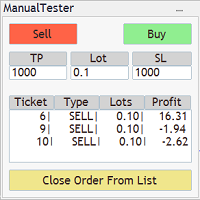

Добрый день, а для МТ5 такой штуки у вас нету?)) полезная вещь, Форекс Тестер стоит дороговато, а здесь самое то.
А еще, можно добавлять любые индикаторы? все будет работать?
Здравствуйте
Для МТ5 такого нет, хотя спрос есть.
Вся проблема в том, что в тестере мт5 нельзя пользоваться объектами (object select), их можно только рисовать.
Нельзя передвигать стоп лосс и вводить данные в поля TP SL и Lot, можно лишь нажимать кнопки.
Таким образом вся функциональность Manual BackTester Panel значительно уменьшается, можно лишь покупать и продавать заданным лотом.
Вообще тестер мт4 имеет куда больше возможностей чем мт5.
Пришлите пожалуйста ссылку на Форекс Тестер, посмотрю как там сделано, я сам работаю на мт5 и мне тоже нужен такой инструмент..
П.С. Да, любые индикаторы можно добавить во время теста. Можете скачать демо Manual BackTester Panel и попробывать сами.
День добрый, времени не было все, вот форекс тестер - там демка есть - https://www.forextester.ru/order,
а по поводу вашего продукта, я что-то не соображу, как его запустить, проверить демо-версию
Как отрезок истории загрузить? Где скорость уменьшать или увеличивать? Я просто ни разу такими программками не пользовался...
Manual BackTester Panel EURUSD,M5: global initialization failed
Anyone have this error, what's the problem?
У кого есть такая ошибка, в чем проблема? -
Hello
I tested the demo, but the speed goes to fast comparing 32 and 31. I would like to set the time to 1 bar every 5 seconds.
Is that possible?
Regards
Rainer
Hello
I tested the demo, but the speed goes to fast comparing 32 and 31. I would like to set the time to 1 bar every 5 seconds.
Is that possible?
Regards
Rainer
Is it possible to have 2 TP levels?
Hey buddy!!
I'm looking for a panel trade manager that satisfy my requirement. Your EA is a good start and likely does more than I need. Is it possible to develop a private job? Much simpler than your EA. I manage my trades manually and only trade one instrument: EUR/USD. Just need a panel which will allow me to have an automatic stop loss and 2 TP levels attached when I enter a trade (with the ability to adjust on the chart).
Requirements:
See attached picture. Main features needed
1. Automatic stop loss
2. Automatic Take Profit (2 levels).
3. Ability to place Buy/Sell-Stop pending order
4. Ability to manually adjust stop/tp on the chart
"закрыть ордер из кнопки список". ГДЕ ЭТА КНОПКА???
Hey buddy!!
I'm looking for a panel trade manager that satisfy my requirement. Your EA is a good start and likely does more than I need. Is it possible to develop a private job? Much simpler than your EA. I manage my trades manually and only trade one instrument: EUR/USD. Just need a panel which will allow me to have an automatic stop loss and 2 TP levels attached when I enter a trade (with the ability to adjust on the chart).
Requirements:
See attached picture. Main features needed
1. Automatic stop loss
2. Automatic Take Profit (2 levels).
3. Ability to place Buy/Sell-Stop pending order
4. Ability to manually adjust stop/tp on the chart
Hi
Please contact me on PM
"закрыть ордер из кнопки список". ГДЕ ЭТА КНОПКА???
"Close order from list", а перед тем выбераем ордер кликом мыши
Hi i have a question why is it that as i load a template before the test has start(ea is loading data) then when it start i cannot Buy or Sell with this Panel.
And if i manual put ALL mi indicators to test it do work???? is there a way that i can test my templates without having to make them each time all over again for testing??
regards.
Hi i have a question why is it that as i load a template before the test has start(ea is loading data) then when it start i cannot Buy or Sell with this Panel.
And if i manual put ALL mi indicators to test it do work???? is there a way that i can test my templates without having to make them each time all over again for testing??
regards.
Hi
1. Open any chart with real data.
2. Put all indicators you need.
3. Save a new template as 'tester.tpl'
4. Start Manual BackTester Panel. The panel should appear as usual, tester should load the tester.tpl template
Info: https://www.metatrader4.com/en/trading-platform/help/overview/strategy_tester/strategy_tester_setup
Regards
Hi
1. Open any chart with real data.
2. Put all indicators you need.
3. Save a new template as 'tester.tpl'
4. Start Manual BackTester Panel. The panel should appear as usual, tester should load the tester.tpl template
Info: https://www.metatrader4.com/en/trading-platform/help/overview/strategy_tester/strategy_tester_setup
Regards
Great thanks .....
B.T.W great Utility realy great help in testing strategies ........
Great thanks .....
B.T.W great Utility realy great help in testing strategies ........
did work one time now when i load the tester it start normaly but i can't put any buy or sell.... the log stated that the ea loaded and every thing is fine but i cant put any order.
If e remove the tester.tpl it work perfect.... and i need to put all the indicators manualy to test them.