StrategyName = Stufic /
name your EA for journal tab and log
CommentShortcut = 11.9 /
shortcut for identifying orders of this EA by comment
SetStartDate = 8.12.2015
/ date of actual set file (its good to know age of settings)
EAPeriod = 3 /
Period of EA. Its useful for testing across all periods (timeframes). 0 =
PERIOD_M1; 1 =
PERIOD_M5; 2 =
PERIOD_M15; 3 =
PERIOD_M30; 4 =
PERIOD_H1; 5 =
PERIOD_H4; 6 =
PERIOD_D1; 7 =
PERIOD_W1;
MagicNumber = 800 / EAs
magic number for trades. Its important to set different Magic Numbers when you
use STUFIC on more charts
M5_Bar_EA = true /
Special EA which is based on opening price of 5M candles. Perfect for high
accuracy testing with Open Price Method (its processor time saving optimizing)
- results are the same like Everytick mode and like real trading!
Orders global settings:
Lots = 0.1 /
fixed basic lot size
MoneyManagement = false /
Lot size will be adapted to each 10000 USD amount. Example: when balance is
increased to 20000 USD, Lot 0.1 will be (20000 / 10000) * 0.1 = 0.20
MaxAllowedLotSize = 10 /
set your maximum accetable lot size
MaxAllowedSpread = 40 / New
trades will be opened only when spread is smaller or equal MaxAllowedSpread.
Five digits brokers use 40 = 4.0 pips. Four digits brokers use 4 = 4.0 pips.
SL and TP global parameters:
SLTP_tr_start_hours = 36
/ give some time to trailing take profit and trailing stop loss. EA wait the
required number of hours before it starts to move trailing SL and TP of opened
order.
SL_tr_speedCandle = 350
/ for unexpected spikes and big movements you can use this parameter. It
activate and tighten trailing stop loss to SL_tr_Offset when there is a big
candle on the market (in the news for example)
SL_tr_Offset = 300 /
depends on SL_tr_speedCandle. Actual SL will be moved to distance of
SL_tr_Offset from Bid price when last candle was bigger than SL_tr_speedCandle.
Orders global rules:
StopStartDistance = 100 / it
will place STOP orders instead of market orders. The main advantage is trailing
STOP which following price.
OrdDistanceOpen = 100 / it
never open new trade when the price is not far than OrdDistanceOpen from orders
OrdHoursDelayOpen = 1 / it
never open new trade if there is no required delay after last open
OrdHoursDelayClose = 2 / it
never open new trade if there is no required delay after last close
Indicators for signals
parameters:
There are four idnicators for your choice. You can use
one, two or three in one time. You can choose which is more important and which
not.
WPR = Williams %R divergence: small amount of trades but very stable for some
markets CCI
= CCI special cross: amounts of trades, good for faster trading, not good for
some markets STO
= Stochastic levels: very stable on 90% of all markets, average amount of
trades ENV
= Envelopes indicator: very nice for jumping markets
SignalMain = ENV /
Main signal. If there is a signal from this indicator, other indicators cannot
open orders
SignalSlave1 = WPR /
Second Slave signal is accepted only if SignalMain has no valid signal
SignalSlave2 = STO /
Third Signal will be used only if SignalMain and SignalSlave1 have no valid
signal
Similar parameters for all indicators:
XXX_MaxOrders = 3 / how
many orders can be opened by this indicator for each direction (3 means 3x SELL
and 3x BUY)
XXX_Hedging = true /
allow hedging or not, if there are BUY orders, SELL must wait for closing and
vice versa
XXX_SL = 600 / Stop Loss
in points (100 = 10 pips with five digits brokers). Stop Loss will be placed
when market order is realized or when STOP order change to market order.
XXX_TP = 1700 / Take Profit. The same principle like
Stop loss.
XXX_TP_trailing = true /
Are you a fan of trailing Take Profit? We are! :-) If the trade is not going to your direction we want to be out as soon as
possible. And what about you? This parameter will scale down Take Profit. Its good for early exit.
XXX_TimeZone = -1 / we
divide day to 231 timezones which cover all important trading timezones. If you
set -1 TimeZone is not active and StartHour and EndHour parameter will be used.
Otherwise StartHour and EndHour will be set by predefined TimeZone. Its very
useful for consistent optimizing of the EA.
XXX_DisableDay = -1 / There are global settings of trading
days for all indicators but this parameter can discard one day specially for selected
indicator. 0 = Sunday, 1 = Monday,... 5 = Friday, -1 = disabled
XXX_Period = 50 / Number of bars for selected indicator.
Bars depends on EAPeriod (if EAPeriod = 1, it means that 1bar = 1M, EAPeriod=2
it means 1bar = M2, etc...
Special Williams %R
divergence parameters:
WPR_LevelPrev = 40 / maximal level of Williams %R of previous bars (defined in MaxBarsPrev); Rec.: 5 - 50
WPR_LevelNow = 3 / maximal level of Williams %R of actual bars (defined in MaxBarsNow); Rec.: 1 - 20
StartBar = 2 / Offset by actual bar
MinDivergencePerc = 8 /
Minimal possible divergence size expressed in percent (in indicator)
MinDivergencePips = 50 /
Minimal possible divergence size expressed in pips (in chart)
MaxBarsNow = 10 /
Maximal number of bars where to search for highest/lowest start point of
divergence
MaxBarsPrev = 100 / Maximal number of bars where to
search for highest/lowest end point of divergence
Special Commodity Channel Index
parameters
CCI_ZeroOffset = 0 / Indicator
boundaries are approximately between -240 to +240, so Zero Offset means offset
from 0 level which will be accepted for signal. Example: CCI_ZeroOffset = 180 will produce valid
signal when CCI will be over 180 level and also for opposite below -180.
Special Stochastic indicator
parameters: (D period is not used)
STO_Slow_K = 21 / Slow
Stochastic K period
STO_Slow_S = 10 / Slow
Stochastic Slowing
STO_Fast_K = 5 / Fast
Stochastic K period
STO_Fast_S = 2 / Fast
Stochastic Slowing
STO_Level = 20 /
Stochastic levels are from 100 to 0. This value is used for both sides. 20
means levels 100-20 = 80 and 0+20 = 20.
Special Envelopes indicator
parameters:
ENV_Divergence = 0.20 / Value for the indicator. For bigger EAPeriod use bigger values.
Starting from 0.05, to 1.00 or 4.50
ENV_Stoch_K = 21 /
Stochastic K period
ENV_Stoch_S = 10 / Stochastic Slowing
ENV_Stoch_Level = 20 /
Stochastic levels are from 100 to 0. This value is used for both sides. 20
means levels 100-20 = 80 and 0+20 = 20.
ENV_Switch_Level = false /
switch signals produced by overbought and oversell zones
Global Time filter parameters:
StartHour = 0 / From
0 to 23 hour. StartHour defining the start of markets monitoring for new
signals. Trailing Stop Losses and Take Profits are controlled whole time and
not depends on StartHour. If XXX_TimeZone is used StartHour will be ignored.
EndHour = 0 / From
0 to 23 hour. If XXX_TimeZone is used EndHour will be ignored.
StartMinute = 5 /
Define your preferred minute for new trades. We dont like opening trades on the
hour, so we are using 5 minute.
EndMinute = 55 / We
would like to finish opening new trades before some news which are often in
whole hour.
Sunday = true /
Disable opening of new orders for selected days. SL and TP is managed whole
time.
Monday = true; / One day can also be
switched off using XXX_DisableDay of selected indicator
Tuesday = true;
Wednesday = true;
Thursday = true;
Friday = true;
Protection parameters:
MaxUsedMargin = 70 / New
orders will not be accepted when this level of margin will be reached
MinimalBalance = 3000 /
Absolute value of minimal balance on your account accepted for opening new
trades
Speacial monitoring
parameters:
If you have your own website with FTP you can setup your
FTP settings in Options. STUFIC will send you CSV file with some parameters.
ValuesCSVFilename =
"" / Its filename. If you leave empty the filename will be „values-MagicNumber-AccountNumber.csv"
SaveValuesToCSV = true / This
parameter prevents the loss of values such as Highest Equity, Lowest Equity,
Maximal Spread, Minimal Spread which can be lost due to MetaTrader restart.
SaveValuesToCSVMinutes = 30 / Save
values every SaveValuesToCSVMinutes minutes
SendValuesCSVtoFTP = false /
CSV file can be send to your FTP
SendValuesCSVtoFTPMinutes = 60 / CSV
file will be send every SendValuesCSVtoFTPMinutes minutes
Optimization parameters:
Stufic using speacial method for testing. It is
appropriate to make the best use of the possibilities MetaTrader and genetic
optimization.
HideInfo = false /
Hide Control Panel (if you dont like it)
HideInfoBG = false /
Hide only background of Control Panel
PanelColor =
clrDarkGoldenrod / Change the color of Control Panel, see color at mql5.com
GA_ScoringMethod = SQN / You
can choose special method for optimization of STUFIC EA. This method produce speacial value for genetic algorithm. You can see this
value in OnTester column.
You can choose one of:
Balance/Equity
Drawdown ratio/ this method is based on ratio between Balance or
Equity and Drawdown Weight
method/ special weighted value which cover drawdown, profit, number of trades,
expected payoff and profit factor STUFIC Score
& OutOfSample profit / this method combine System Quality Number
with OutOfSample profit (OutofSample is based on data after PeriodEndDate
below). If you see this number in your reports 5.31001450 it means SQN = 5.31 and
OutOfSample profit is 1450 USD. SQN/ Pure
System Quality Number based on Van K Tharp formula SQN Score / SQN with
score based on number of trades
MinStopLevelTesting = 20 / Set your StopLevel for testing
(because some brokers have fake StopOut it better to count with some amount of
StopLevel)
MaxDrawdownRatio = 0.2 /
Genetic Algorithm will be affected by this ratio. If you perefer optimization
results with drawdown smaller than 20% from your deposit, set it to 0.2.
MinProfitRatio = 0.5 /
Lets play with Genetic Algorithm. Say them that you want to get results with
profit of 50% from your deposit.
PeriodEndDate = 2015.05.01.
/ YYYY.MM.DD, Hide data from optimization to Our Of Sample period using this
date. Yeah. Its a forward test. How to? Select Use Date and From: To: in Strategy
Tester. PeriodEndDate must be set to few weeks before the end of testing date. Example: From 2012.05.01 To: 2015.12.01 and
PeriodEndDate: 2015.05.01. Genetic algorithm will use only 2012.05.01 to 2015.05.01 date but this
2015.05.01 to 2015.12.01 is your OutOfSample result.
If you have any questions please contact us on info@parbest.com or info@tomashruby.com
Here you can find actual settings. Valid from 8th December 2015.
Attached ZIP files include .set file with htm and gif charts produced by EveryTick mode. Testen with broker GMT +2.
SET files also contain Optimizing steps ;-)
Enjoy ;-)
PS: You cannot use more parameters when optimizing. But there is a way how to test 3 indicators.Try phase testing. First you can test SignalMain with selected Indicator parameters. Than choose the best result and use parameters for next phase. Than select SignalSlave1 and its parameters for next optimizing. You can reach the sky with this method ;-)
Trasher: А что так дорого?Этому советнику цена 10$.
Hi Trahser. its not too much. Simple things are often the result of a long journey. People often spen
People often spend hundreds of dollars for systems like Martingale and while it comes to high-risk products intended for sale. Our system is used in reality. Assessed using on a real account. Stufic is a trading with small risk.
I have a question... why this formula E=mc² is one of themost important? Its only few chars, its simple, but to find it took a whole life of one man!
And we are also providing regular updates... there are no services like this included in one price.
Second is here https://www.mql5.com/en/signals/136986. It was added in the summer after some manual faults (at June) as you can see on the chart (its very low risk).
you must also check Contest dates before you told me that I was on the worst place. Did you check orders and closing times? Trading continued after contest and rankings still changing.
I could be at 10th place next week because I closed account. Othe guys continue in trading. I am going to trade on HotForex contest now (I will publish trading on myfxbook, especially for you). And I am also starting year competition on WorldCup Championship from January... all results will be published ;-)
And I would also trade at Swiss Quote from January. OK. I am going to publish trading with myfxbook if you want it but I am not sure if myfxbook is more reputable. I think its not. I think that mql5.com is more reputable.
Ryan Mann: Would like to test this just fort shits and giggles but it is WAY over priced. $100 1 month option would be reasonable
Hello Ryan Mann,
we are on the long way with this system. It had too many parameters before which were removed due to simplicity. We added new and again removed. Over and over. Its a long journey to get system which is stable across more markets. We know about the price of other systems but there are no too many systems which is actually used by its owners on real accounts. Our product is not designed primarily for sale but its designed for us and own real trading. Thats the fact. But users who buy Stufic are fully suported by our monthly updates. Buying is one time fee for long term service.
We can also provide online monitoring system for your Stufic. We also working on manual control with website interface. Too many services with one time fee but not too many users (its advantage for buyers).
But the monthly fee you are probably right. I will advise with my colleagues.
You are overpriced. Not too many peoples really know what they need when buying EA. Not too many people know what obtain well support. Wake up guy or go to buy system where you never get update. What do you prefer? Searching and buying systems every month with bad support or buy system one time which is developed all the time? Dont talk us that bad word. If its not for you, just leave. Othervise just send us your tips and we will include it in next version. Remember that we are making system for us. For our trading. We are using only parameters and methods which we trade. Did you tryied our SQN testing?


STUFIC PARAMETERS, VERSION 11.9
Basic Parameters:
0 = PERIOD_M1;
1 = PERIOD_M5;
2 = PERIOD_M15;
3 = PERIOD_M30;
4 = PERIOD_H1;
5 = PERIOD_H4;
6 = PERIOD_D1;
7 = PERIOD_W1;
Orders global settings:
SL and TP global parameters:
Orders global rules:
Indicators for signals parameters:
There are four idnicators for your choice. You can use one, two or three in one time. You can choose which is more important and which not.
WPR = Williams %R divergence: small amount of trades but very stable for some markets
CCI = CCI special cross: amounts of trades, good for faster trading, not good for some markets
STO = Stochastic levels: very stable on 90% of all markets, average amount of trades
ENV = Envelopes indicator: very nice for jumping markets
Similar parameters for all indicators:
Special Williams %R divergence parameters:
Special Commodity Channel Index parameters
Special Stochastic indicator parameters: (D period is not used)
Special Envelopes indicator parameters:
Global Time filter parameters:
Protection parameters:
Speacial monitoring parameters:
If you have your own website with FTP you can setup your FTP settings in Options. STUFIC will send you CSV file with some parameters.
Optimization parameters:
Stufic using speacial method for testing. It is appropriate to make the best use of the possibilities MetaTrader and genetic optimization.
You can choose one of:
Weight method / special weighted value which cover drawdown, profit, number of trades, expected payoff and profit factor
STUFIC Score & OutOfSample profit / this method combine System Quality Number with OutOfSample profit (OutofSample is based on data after PeriodEndDate below). If you see this number in your reports 5.31001450 it means SQN = 5.31 and OutOfSample profit is 1450 USD.
SQN / Pure System Quality Number based on Van K Tharp formula
SQN Score / SQN with score based on number of trades
Yeah. Its a forward test. How to? Select Use Date and From: To: in Strategy Tester. PeriodEndDate must be set to few weeks before the end of testing date. Example: From 2012.05.01 To: 2015.12.01 and PeriodEndDate: 2015.05.01. Genetic algorithm will use only 2012.05.01 to 2015.05.01 date but this 2015.05.01 to 2015.12.01 is your OutOfSample result.
If you have any questions please contact us on info@parbest.com or info@tomashruby.com
Here you can find actual settings. Valid from 8th December 2015.
Attached ZIP files include .set file with htm and gif charts produced by EveryTick mode. Testen with broker GMT +2.
SET files also contain Optimizing steps ;-)
Enjoy ;-)

PS: You cannot use more parameters when optimizing. But there is a way how to test 3 indicators.Try phase testing.
First you can test SignalMain with selected Indicator parameters.
Than choose the best result and use parameters for next phase.
Than select SignalSlave1 and its parameters for next optimizing. You can reach the sky with this method ;-)
А что так дорого?Этому советнику цена 10$.
Hi Trahser.
its not too much. Simple things are often the result of a long journey. People often spen
People often spend hundreds of dollars for systems like Martingale and while it comes to high-risk products intended for sale. Our system is used in reality. Assessed using on a real account.
Stufic is a trading with small risk.
I have a question... why this formula E=mc² is one of themost important? Its only few chars, its simple, but to find it took a whole life of one man!
And we are also providing regular updates... there are no services like this included in one price.
Any live account results managed exclusively by this EA and not manual or semi-manual? Please post link of live account.
Sure. One progressive is here (lots 3x increased than I used on second account):
https://www.mql5.com/en/signals/140519
Second is here https://www.mql5.com/en/signals/136986. It was added in the summer after some manual faults (at June) as you can see on the chart (its very low risk).
And contest account is here (its closed and archived after 3rd place at the contest)
https://www.mql5.com/en/signals/143092
And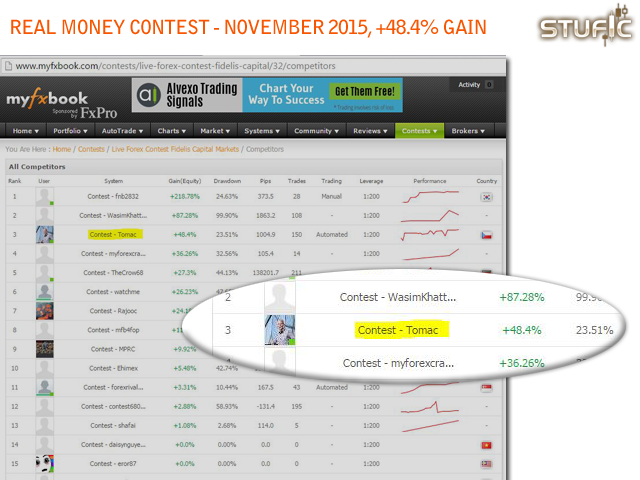
myfxbook account live signal more than 3 month.
I dont using myfxbook. Are there some reasons why mql stats with 2x 60000 USD is not enough? :-)
such as FXCM or ICmarket,active trades , any well known broker you want.
I refer to the contest in myfxbook I found that you are in the 6th place in the contest not in 3rd place.
you start the contest in 27 of oct and stop in 25 in november , so trade for 1 month only.
Hi safetrader,
you must also check Contest dates before you told me that I was on the worst place. Did you check orders and closing times? Trading continued after contest and rankings still changing.
I could be at 10th place next week because I closed account. Othe guys continue in trading. I am going to trade on HotForex contest now (I will publish trading on myfxbook, especially for you). And I am also starting year competition on WorldCup Championship from January... all results will be published ;-)
And I would also trade at Swiss Quote from January.
OK. I am going to publish trading with myfxbook if you want it but I am not sure if myfxbook is more reputable. I think its not. I think that mql5.com is more reputable.
Tom
New optimization passed. Settings for USDCHF and EURUSD:

USDCHF
EURUSD
NEW YEAR SALE 25% OFF.
$2617 instead of $3690
Valid from 1st until 14th January 2016
Would like to test this just fort shits and giggles but it is WAY over priced. $100 1 month option would be reasonable
Hello Ryan Mann,
we are on the long way with this system. It had too many parameters before which were removed due to simplicity. We added new and again removed. Over and over. Its a long journey to get system which is stable across more markets.
We know about the price of other systems but there are no too many systems which is actually used by its owners on real accounts.
Our product is not designed primarily for sale but its designed for us and own real trading. Thats the fact. But users who buy Stufic are fully suported by our monthly updates. Buying is one time fee for long term service.
We can also provide online monitoring system for your Stufic. We also working on manual control with website interface. Too many services with one time fee but not too many users (its advantage for buyers).
But the monthly fee you are probably right. I will advise with my colleagues.
Stochastic as main signal with Envelopes such as Slave signal working nice on AUDUSD.
AUDUSD and Stufic was very stable in real trading 2015. We like this pair too much.
Set file is ready for spread of 4.0 pips (40 points), So if you have broker with smaller spread you will get better gain.
For your requests here are SET files adapted to brokers with GMT +0 (SwissQuote and other GB brokers).
And here you can find Timezones generator and decoder (timezones are used in Stufic for faster optimization).
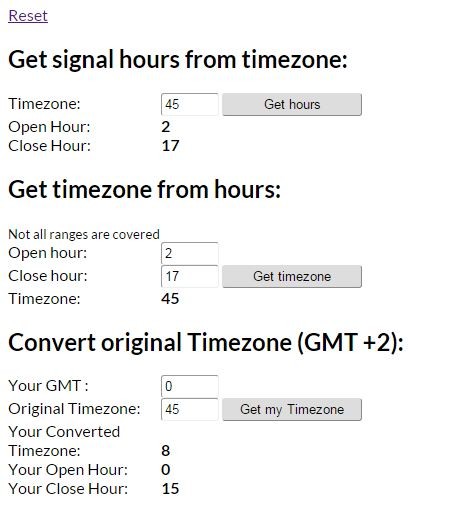
Go to : http://tools.parbest.com/
waaay overpriced EA
Wake up guy or go to buy system where you never get update. What do you prefer? Searching and buying systems every month with bad support or buy system one time which is developed all the time?
Dont talk us that bad word. If its not for you, just leave. Othervise just send us your tips and we will include it in next version. Remember that we are making system for us. For our trading. We are using only parameters and methods which we trade.
Did you tryied our SQN testing?
You are overpriced.