모든 주문
모든 주문
 규칙
규칙
명시
The EA must be coded professionally, optimized for backtesting, and written with clean, organized inputs and modular code.
Core Strategy
The EA should:
-
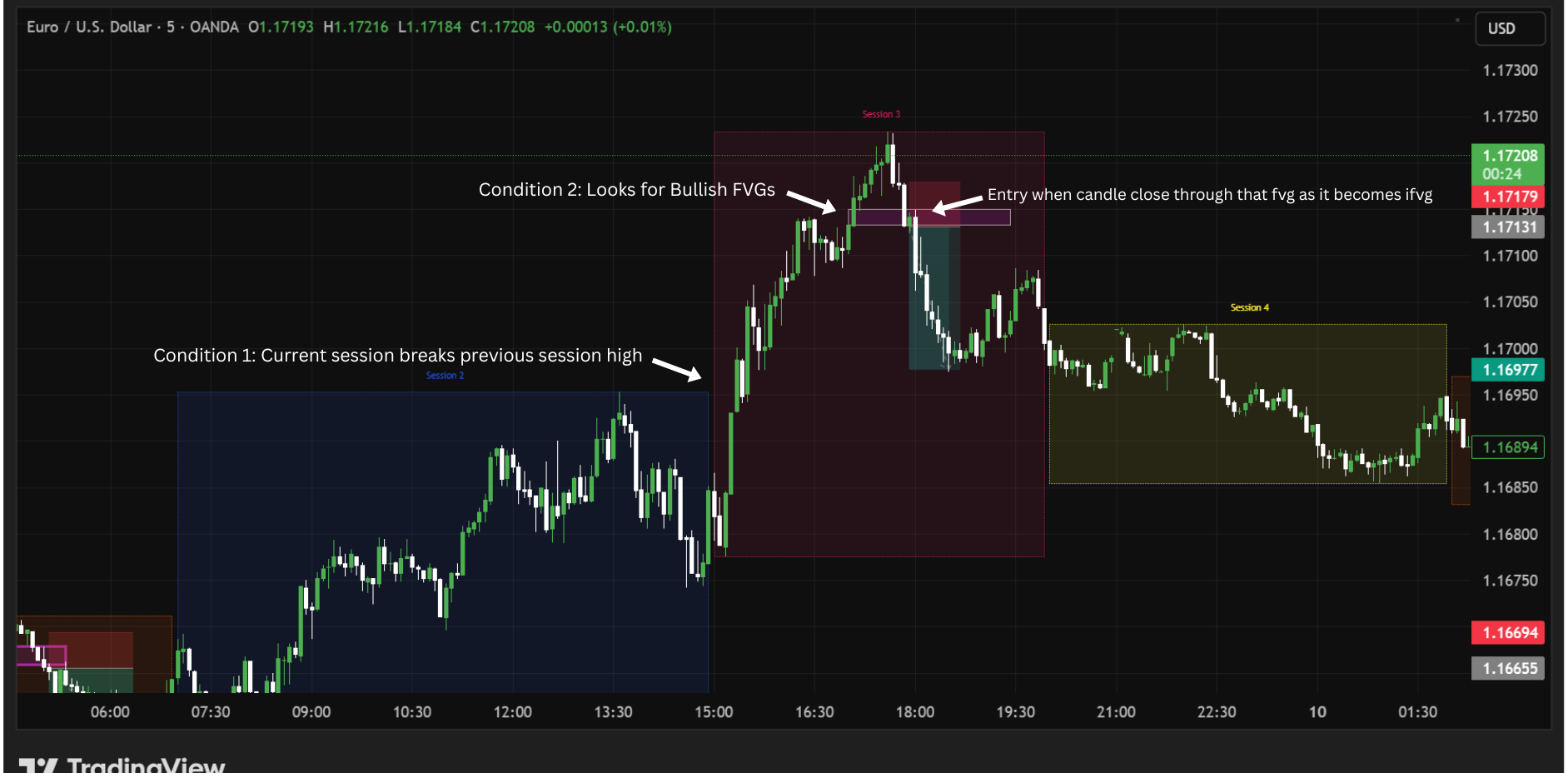
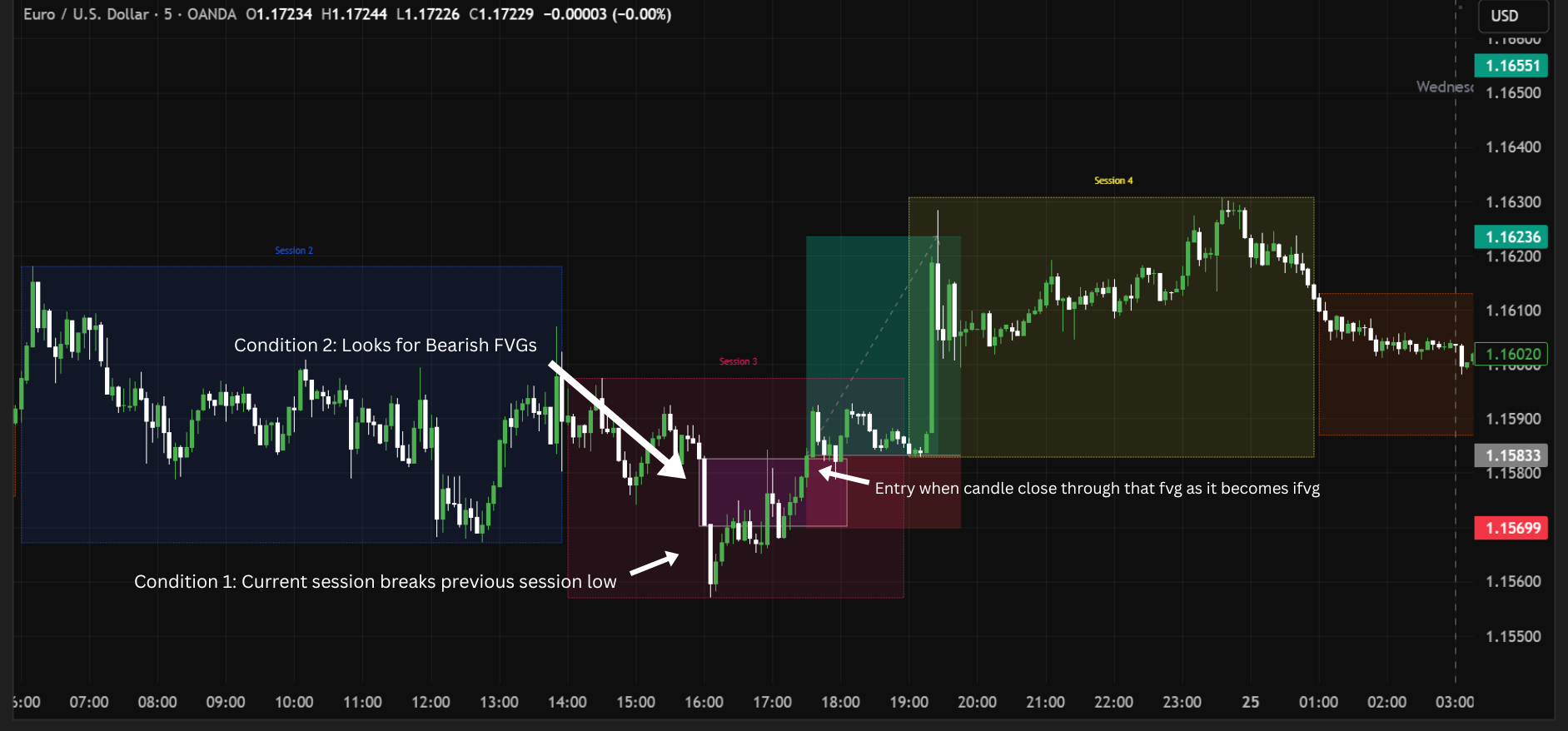
Mark previous session highs and lows
-
Wait for the current session to break the previous session high or low
-
After the break, wait for the correct Fair Value Gap (FVG)
-
Once the FVG is invalidated and becomes an Inverted FVG (iFVG), enter the trade at candle close
-
Manage the trade using stop loss, take profit, optional grid, trailing stop, and filters
The EA must include configurable trade limits:
-
Maximum open trades at one time
-
Maximum trades per session
-
Maximum trades per day
Session Settings
The EA must support 4 sessions and allow all session times to be fully editable.
Default UTC session times:
-
Session 1: 02:00 – 07:00
-
Session 2: 07:00 – 15:00
-
Session 3: 15:00 – 20:00
-
Session 4: 20:00 – 02:00
Required:
-
User can set start hour and minute for each session
-
User can set end hour and minute for each session
-
Session 4 crossing midnight must work correctly
-
Automatic GMT offset detection so session times always remain based on UTC regardless of broker server time
-
Option to choose which sessions are allowed for trading
-
Option to show/hide session drawings
The EA must draw on chart:
-
Session box
-
Session high
-
Session low
-
Session labels
Range type must be wick-to-wick.
Session Break Logic
The EA must compare the current session with the previous session.
Rules:
-
If current session breaks previous session HIGH → only look for SELL setup
-
If current session breaks previous session LOW → only look for BUY setup
A session break should be considered valid if either:
-
Price wicks through the previous session high/low
-
Candle closes through the previous session high/low
After a valid break happens, the EA should only continue to look for the matching FVG setup.
Fair Value Gap (FVG) Logic
The EA must detect both bullish and bearish FVG.
Standard 3-candle FVG definition:
Bullish FVG:
-
Candle 1 high < Candle 3 low
Bearish FVG:
-
Candle 1 low > Candle 3 high
The FVG timeframe must always use the current chart timeframe.
Inputs required:
-
Minimum FVG size in points/pips
-
Maximum FVG age in candles
-
Use only new FVG after session break = true/false
IFVG Entry Logic
SELL Setup:
-
Previous session high is broken
-
Look for a bullish FVG
-
When price closes back down through the bullish FVG, it becomes an IFVG
-
Enter SELL at candle close
BUY Setup:
-
Previous session low is broken
-
Look for a bearish FVG
-
When price closes back up through the bearish FVG, it becomes an IFVG
-
Enter BUY at candle close
The entry must happen at candle close only.
Please include an input for:
-
IFVG confirmation method:
-
Wick through FVG
-
Candle close through FVG
-
Trade Management
The EA must include configurable trade limits.
Inputs:
-
Maximum open trades at one time
-
Maximum trades per session
-
Maximum trades per day
The EA should not open any new trades once any of these limits are reached.
Stop Loss Options
The EA must support 3 stop loss methods.
Option 1 – Current Session High/Low
-
SELL = current session high + extra buffer
-
BUY = current session low - extra buffer
Inputs:
-
Additional SL buffer in pips/points
Option 2 – Fixed Stop Loss
-
Fixed SL in pips
Option 3 – FVG Based Stop Loss
-
SELL = above bullish FVG + extra points
-
BUY = below bearish FVG + extra points
Inputs:
-
FVG SL buffer in pips/points
Take Profit Options
Option 1 – Risk Reward Based
TP must be based on stop loss size.
Examples:
-
1 = 1:1
-
2 = 1:2
-
3 = 1:3
Option 2 – Fixed Take Profit
-
Fixed TP in pips
Grid Recovery System
The EA must include an optional grid system.
Grid levels can be calculated from the ORIGINAL TP distance.
Formula:
Grid Distance = Original TP Distance × Grid Distance Multiplier
Example:
-
Original TP distance = 100 pips
-
Grid Distance Multiplier = 0.5
-
New grid level every 50 pips against trade
Required inputs:
-
Enable Grid
-
Grid Distance Multiplier string
-
Grid Volume Multiplier string
-
Maximum Grid Levels
Volume logic:
-
Each new grid trade volume = previous trade volume × Grid Volume Multiplier
Example:
-
Trade 1 = 0.10
-
Grid 1 = 0.20
-
Grid 2 = 0.40
-
Grid 3 = 0.80
Basket TP Recalculation
When a new grid trade opens, the EA must recalculate a new shared TP for ALL open positions.
Important:
The total combined profit at the new TP must remain equal to the original target profit from the first trade only.
Example:
-
First trade target profit = $100
-
After additional grid positions are opened, move TP closer so total basket profit still equals $100
This shared TP must automatically update every time a new grid level opens.
Trailing Stop
The EA must support a standard trailing stop.
Inputs:
-
Enable trailing stop
-
Trailing trigger in pips
-
Trailing trigger as (%TP)
-
Trailing size (%TP)
-
Trailing step
Logic:
-
When trade reaches trailing trigger, begin trailing SL
-
Only move trailing SL after price moves by the trailing step
Trail at TP Option
The EA must also include a second trailing feature.
Rules:
-
Only if NO grid position was opened
-
If price reaches original TP directly
-
Instead of closing trade, EA can:
-
Remove TP
-
Start trailing stop
-
Required inputs:
-
Enable Trail At TP
-
Trail At TP Distance
-
Trail At TP Step
If a grid trade has been opened, then this feature should not activate.
Money Management
The EA must support two lot size modes.
Option 1 – Risk %
-
Risk based on stop loss size and account balance/equity
Inputs:
-
Risk %
Option 2 – Fixed Lot
Inputs:
-
Fixed Lot Size
Please ensure proper lot calculation according to broker minimum lot and lot step.
Filters
The EA must include the following optional filters.
1. Session Filter
User can choose which sessions are allowed to trade:
-
Session 1
-
Session 2
-
Session 3
-
Session 4
2. Trend Filter
Optional EMA filter.
Inputs:
-
Enable Trend Filter
-
EMA Period
-
EMA Timeframe
Rules:
-
BUY allowed only if price is above EMA
-
SELL allowed only if price is below EMA
3. Spread Filter
Inputs:
-
Maximum allowed spread in points
If current spread is above limit, no trade.
4. Day Filter
User can enable/disable trading for:
-
Monday
-
Tuesday
-
Wednesday
-
Thursday
-
Friday
Optional Saturday/Sunday support also preferred.
5. News Filter
The EA must support high-impact red-folder news filtering.
Required:
-
Detect High impact and Moderate impact news
-
Option to avoid trading only during the affected session
-
Option to avoid trading for the entire day if red-folder news exists that day
The EA should not open any new trades during blocked sessions or blocked days.
6. Maximum Drawdown Filter
The EA must include a maximum drawdown filter.
Inputs:
-
Maximum allowed drawdown %
Logic:
-
Drawdown must be calculated as a percentage of current account balance
-
If current floating drawdown exceeds the maximum allowed value, the EA must close all the trades
7. Broker Authentication
The EA must include a broker authentication / broker lock system.
Required:
-
EA should only work on specified broker names or server names
-
If broker does not match, EA must stop loading and show an error message
-
Clean and organized input panel
-
Input groups/categories
-
Magic number input
-
Comment input
-
Multi-symbol compatible preferred
-
Works on any time frame
-
Must work in Strategy Tester
-
Must work in visual backtest mode
-
EA should avoid duplicate trades
-
Proper error handling
-
No repainting logic
-
Source code (.mq5) required
-
Final compiled .ex5 required
-
Developer should explain where strategy settings can be modified
Deliverables
Please provide:
-
.mq5 source file
-
.ex5 compiled file
-
Instructions for setup and inputs
-
Bug fixes after the release, if any.
Please only apply if you have experience building:
-
IFVG logic
-
Grid systems
-
Advanced MT5 order management