 MetaTrader 5
 Experts
 지표
 스크립트
 라이브러리
 보관함
거래 로봇을 무료로 다운로드 하는 법을 시청해보세요
당사를 Telegram에서 찾아주십시오!
당사 팬 페이지에 가입하십시오
당사 팬 페이지에 가입하십시오
스크립트가 마음에 드시나요? MetaTrader 5 터미널에서 시도해보십시오

정보 패널 - 캔들 카운트다운, 스프레드, ATR 및 일일 변동폭 - MetaTrader 5용 지표

- 조회수:
- 4
- 게시됨:
-
 이 코드를 기반으로 한 로봇이나 지표가 필요하신가요? 프리랜스로 주문하세요
프리랜스로 이동


InfoPanel은 차트에 표시되는 간결한 패널로, 사용자가 항상 확인하는 정보, 즉 현재 캔들이 마감되기까지 남은 시간, 현재 스프레드, 일일 ATR, 그리고 오늘 이미 사용된 일일 평균 변동폭의 비율을 보여줍니다.
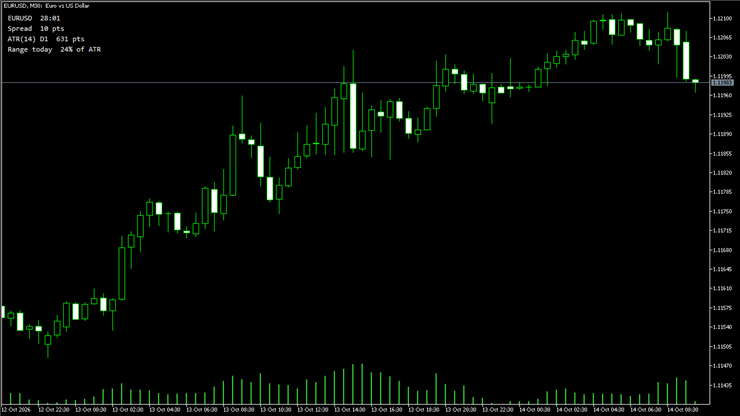
표시 내용:
- 종목명 및 현재 캔들 마감까지 남은 시간
- 포인트 단위의 스프레드 (스프레드가 넓어지면 빨간색으로 표시됨)
- 일봉 시간대의 ATR (포인트 단위)
- 일일 ATR 대비 오늘의 변동폭 비율 (100% 이상일 때 금색으로 변함)
입력값:
- ATR 기간
- 차트 위치, X 및 Y 오프셋, 글꼴 크기 및 텍스트 색상
참고 사항:
- 모든 종목 및 모든 시간대에서 작동
- 리소스 부담이 적음: 초당 1회의 타이머 및 4개의 텍스트 레이블
- 신호 없음: 순수히 정보 제공용
사용 방법:
1. InfoPanel.mq5 파일을 터미널의 MQL5\Indicators 폴더(파일 - 데이터 폴더 열기)에 복사한 후 MetaEditor에서 컴파일합니다.
2. 네비게이터 창에서 InfoPanel을 차트 위로 드래그합니다.
3. 패널 위치를 변경하려면 입력 탭에서 모서리, 오프셋 및 색상을 조정하십시오.
팁:
- 사용된 범위가 이미 100%를 초과하면 해당 날의 변동폭이 평소보다 크다는 뜻이므로, 신규 진입 시 주의하십시오.
- 스프레드가 넓을 때(빨간색)는 시장가 주문을 피하는 것이 좋습니다.
Translated from Italian by MetaQuotes Ltd.
Original code: https://www.mql5.com/it/code/78379
 370 Percent from 2022 to 2026 at 10 Percent MaxDD. The GER40 EA That Waits for the Market to Coil
GER40 Evening Coil은 H1 차트의 독일 40 지수를 대상으로 하는 무료 완전 오픈 소스 EA입니다. 이 EA는 최근 좁은 변동폭의 캔들이 형성된 후, 변동성이 안정적이고 거래량이 정상 수준인 저녁 세션에 매수 포지션을 진입하며, 서버 기준 23:00까지 모든 포지션을 청산합니다. 4가지 조건, 매수 전용, 한 번에 한 건의 거래만 진행, 모든 거래에 손절매 설정.
Session Clock
An animated 24-hour dial of the Sydney, Tokyo, London and New York sessions with automatic daylight saving time, a countdown to the close of the current candle, and live spread and day range. The panel collapses into a bar and can be dragged on the chart.
MTF Order Block Zones Indicator
MTF order blocks from the chart timeframe or a higher one, shaded on the chart and followed bar by bar: fresh until price comes back, tested after that with every return counted, broken once a close goes through. Sizes are measured in average ranges, so the defaults fit any symbol, and a new zone absorbs the ones it overlaps, so zones never stack.
History Export from the Strategy Tester (Bars and Ticks)
Exports bars of any timeframe and, optionally, every tick from the Strategy Tester to CSV, without the chart's 100,000-bar limit. Reports gaps inside trading sessions. Places no orders.