 MetaTrader 5
 Experts
 지표
지표
 스크립트
스크립트
 라이브러리
라이브러리
 보관함
보관함
당사 팬 페이지에 가입하십시오

NeonDesk - Neon Manual Trading Panel with Multi-Timeframe Bias - MetaTrader 5용 expert

- 조회수:
- 162
- 평가:
- 게시됨:
-
 이 코드를 기반으로 한 로봇이나 지표가 필요하신가요? 프리랜스로 주문하세요
프리랜스로 이동
이 코드를 기반으로 한 로봇이나 지표가 필요하신가요? 프리랜스로 주문하세요
프리랜스로 이동

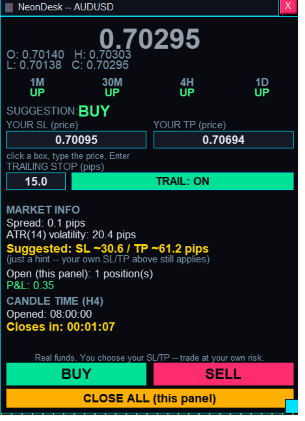
NeonDesk is a manual trading panel for MetaTrader 5. It does not trade automatically -- every position opens only when you press BUY or SELL, and every action is confirmed before it is sent.
What it shows you: a multi-timeframe bias read (M1, M30, H4, D1) so you can see at a glance whether the market is leaning bullish, bearish or mixed; a live candle countdown timer for a timeframe you choose yourself (M1 up to D1), independent of your chart's own period; current Bid/Ask and the candle's Open/High/Low/Close; and an ATR-based Stop-Loss/Take-Profit suggestion for information only -- it never overrides your own settings.
What you control: lot size, Stop-Loss and Take-Profit, entered and edited directly as real price levels matching your chart's own price format; an independent trailing stop set in pips that only ever moves your stop-loss in your favour, never backwards; and one-click BUY, SELL and CLOSE ALL buttons, isolated to this panel's own trades via a dedicated magic number, so it never touches positions opened by any other EA or by you manually.
Built-in safety: a risk disclaimer must be accepted once when the panel is attached, reminding you that BUY/SELL/CLOSE ALL use real funds and that you are responsible for your own Stop-Loss/Take-Profit decisions. Every BUY/SELL asks for confirmation first, showing the exact symbol, lot size, entry, SL and TP before anything is sent, then reports whether the order succeeded. The panel refuses an order outright if your Stop-Loss or Take-Profit is on the wrong side of the entry price, or closer than your broker's minimum stop distance allows. If you already have an open trade on the same symbol, it warns you first, showing your combined exposure and a note on how your account's margin mode (netting/hedging) will treat the new trade.
The panel is fully draggable and resizable, fades to a low opacity when your mouse is elsewhere on the chart, and uses a dark neon colour scheme so it stays legible without cluttering your chart.
Disclaimer: NeonDesk is a manual trading tool, not a trading signal or automated strategy. All trading decisions, including Stop-Loss and Take-Profit levels, remain the user's own responsibility. Trading involves risk of loss.
 Price Action Volumetric Order Blocks MT5
Open-source MT5 indicator for confirmed market structure, volumetric order blocks and estimated buy/sell activity.
ATS Confirmed Swings - non-repainting swing highs and lows
Marks swing highs and lows only after N closed bars have confirmed them, so a drawn swing never moves or disappears.
PropGuard - account risk manager for prop firm accounts
Account level risk guard for prop firm accounts. One copy on any chart watches every position on the account, closes everything when the daily loss or maximum loss limit is hit, caps lot size and can flatten around high impact news. Logs every action to the Experts tab and a CSV.
ImpulseCandle - impulse bar marker with ATR body filter and volume confirmation
Marks impulse candles: body at least ATR x multiplier, body at least a set share of the candle range, close near the extreme, optional tick volume confirmation. Green arrow below a bullish impulse, red above a bearish one. Closed bars only, no repainting. Signals are in the two buffers so an Expert Advisor can read them with iCustom.