
300 USD
Versione demo scaricata:
19 212
Pubblicato:
17 marzo 2014
Versione attuale:
26.222
Non hai trovato un robot adatto?
Ordina il tuo
su Freelance
Vai alla sezione Freelance
Ordina il tuo
su Freelance
Come acquistare un Robot di Trading o un indicatore
Esegui il tuo EA
hosting virtuale
hosting virtuale
Prova un indicatore/robot di trading prima di acquistarlo
Vuoi guadagnare nel Market?
Come presentare un prodotto per venderlo con successo

Ti stai perdendo delle opportunità di trading:
- App di trading gratuite
- Oltre 8.000 segnali per il copy trading
- Notizie economiche per esplorare i mercati finanziari
Registrazione
Accedi
Accetti la politica del sito e le condizioni d’uso
Se non hai un account, registrati
including
CurSpread- Current Spred
AVGSpread -- Average Spred
Distanceopen- How many Ticks in Spred to open
TimeToCheckAverageSpread=8000; // Time of checking average spread in milliseconds
Distance- Average disance from last pos to open new pos
Thank you for your fast answer.
It helps ;)
Anyway, I still have some ... ;)
TimeTo CheckAverageSpread
It that the interval during witch the EA does NOT evaluate if there is an opportunity the average the position ?
If so, why is it interesting to set it so high (8sec is a long time on the market !)
Thank you for your fast answer.
It helps ;)
Anyway, I still have some ... ;)
TimeTo CheckAverageSpread
It that the interval during witch the EA does NOT evaluate if there is an opportunity the average the position ?
If so, why is it interesting to set it so high (8sec is a long time on the market !)
no
8000 = 8 seconds to check spred
spred : for example 5 10 15 5 10
Average Spred = 5+10+15+5+10= 45/5 = 7 pips
for ex : Stoploss = 250 spred = 250*7 = 1750 pips
and floating
no
8000 = 8 seconds to check spred
spred : for example 5 10 15 5 10
Average Spred = 5+10+15+5+10= 45/5 = 7 pips
for ex : Stoploss = 250 spred = 250*7 = 1750 pips
and floating
Thank you
I understand now much better how it works :)
Thank you
I understand now much better how it works :)
Hello,
One more question :
Could you explain the white commentary line that is shown on the chart ?
like :
"k=6 y=12 Tick N°=26037 Price 102.323 Time in mc 20840734
Thank you !
Hello,
Few more points for you Sir !
1 - Could you explain those two settings at the bottom of the list :
- MovingInWLUSE
- Forced Modfication of SL/TP in Market Trade
2 - Also, I noticed that even if I use a "Max orders for averaging 0 -infinity" = 5, sometimes the position is closed after only 1 or 2 averagings...
Is that a normal behavior of the EA ?
If yes, could you explain ?
3- Finaly, I also noticed that sometime the SL is executed before the averaging, even if the number of spreads for averaging is LOWER than the nuber of spread for fixing the SL.
Same question, is that normal behavior ?
How to avoid that (if possible)
4 - Sometimes, the system "forgets" to setup the SL after averaging !
THIS IS VERY DANGEROUS, moreover if this occurs after the last averaging !
Maybe something have to be fixed about that, cause this is not acceptable for "automatic trading" I think...
Look here, the SL in the settings is set at 7 (and number of averaging at 5) , but no SL at all after the fiftht averaging :
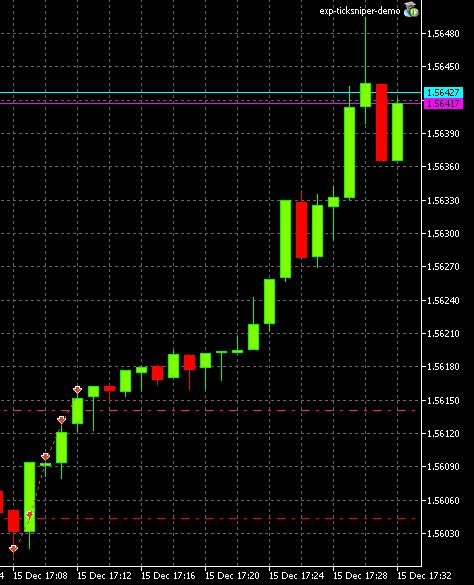
You help on this would be appreciated, as I need to understand well the "rules" to find the settings that are good for me before to buy the EA.
hello
1. Moving Stop Loss to break even
MovingInWLUSE (true - false) LevelWLoss (in points) LevelProfit (in points).
These parameters adjust the possibility to modify deals moving the Stop Loss to break even at the earliest opportunity.
For example:
MovingInWLUSE = true, LevelWLoss=0, LevelProfit=10.
MovingInWLUSE = true, LevelWLoss=5, LevelProfit=20.
Therefore the difference between LevelProfit-LevelWLoss must always be greater or equal to the minimum stop on the server.
Forced Modfication of SL/TP in Market Trade - after open position - EA use forsed modification of SL & TP
On some accounts - the adviser does not have time to modify the stoploss. Therefore, after the opening of positions - he again tries to modify the position of the force.
2 - Max order = 5. EA install max 5 orders to One owner position
3. Please atach your screen from graph and LOGFIle of EA
4. After averaging EA use TrallingStop and TakeProfit
please Atach full screen from your terminal and All log file from server and Ea
hello
1. Moving Stop Loss to break even
MovingInWLUSE (true - false) LevelWLoss (in points) LevelProfit (in points).
These parameters adjust the possibility to modify deals moving the Stop Loss to break even at the earliest opportunity.
For example:
MovingInWLUSE = true, LevelWLoss=0, LevelProfit=10.
MovingInWLUSE = true, LevelWLoss=5, LevelProfit=20.
Therefore the difference between LevelProfit-LevelWLoss must always be greater or equal to the minimum stop on the server.
Forced Modfication of SL/TP in Market Trade - after open position - EA use forsed modification of SL & TP
On some accounts - the adviser does not have time to modify the stoploss. Therefore, after the opening of positions - he again tries to modify the position of the force.
2 - Max order = 5. EA install max 5 orders to One owner position
3. Please atach your screen from graph and LOGFIle of EA
4. After averaging EA use TrallingStop and TakeProfit
please Atach full screen from your terminal and All log file from server and Ea
Hello,
Thank you for your answer.
1 - Those parameters are not in the demo version
By the way, is that possible to have de very same version as PRO-FULL for demo ?
2-3-4 - About the three other points, they are linked to each other.
I think I understood the reason why...
I use to small values for the parameters. (SL=7, Nb_Spreads_for_AVG=4)
This causes two kinds of troubles :
- When the market moves fast, the EA have not the time to set all the AVG for this fast move and validates the SL (that causes premature closing of the position, after for example 2 AVG, even if the parameter is set to 5 AVG MAX)
- Sometimes the market moves fast enough to prevent the EA to set a new SL (after a correct AVG for example). The "force SL/TP option" is sometimes efficient to set it up few second after. BUT it is of no help, if the current market value passed already the value that is supposed to be set as SL... (in the logs, the "set SL" is present, but the broker can't set a SL at an unappropriate value that is under the current market price for a BUY position, or over the current market price for a SELL position)
Those "reactivity" issues seem difficult to handle. It not about network I think, I use a VPS, with low latency -4ms- with the broker, the CPU use is about 20%, and same for RAM
I faced those issues on the two brokers tested (Alpari and Activtrades)
What do you think ?
Здравствуйте,
Спасибо за ваш ответ.
1 - Эти параметры не в демо-версии
Кстати, то, что можно было отменить ту же самую версию, как PRO-ПОЛНАЯ демо?
2-3-4 - О трех других точках, они связаны друг с другом.
Я думаю, что я понял причину, почему ...
Я использую малых значений параметров. (SL = 7, Nb_Spreads_for_AVG = 4)
Это приводит к два вида проблем:
- Когда рынок движется быстро, EA не имеют времени, чтобы установить все AVG для этого быстрого движения и подтверждает SL (что вызывает преждевременный закрытие позиции, после, к примеру 2 AVG, даже если параметр установлен в 5 AVG MAX)
- Иногда рынок движется достаточно быстро, чтобы предотвратить EA, чтобы установить новый SL (после правильного AVG, например). "Сила SL / TP вариант" иногда эффективнее настроить его несколько секунд после. НО это не поможет, если текущая рыночная стоимость прошло уже значение, как предполагалось должен быть установлен как SL ... (в журналах, "установленных SL" присутствует, но брокер не может установить SL на тона, являются значение, находится под текущей рыночной цене на должность купить, или по текущей рыночной цене за позицию на продажу)
Эти "реактивность" проблемы, как представляется трудно справиться. Это не о сети Я думаю, что я использую VPS, с низкой латентностью -4ms- с брокером, использование CPU составляет около 20%, а то же самое для памяти
Я столкнулся с этим вопросы на двух брокеров проверенных (Alpari и ActivTrades)
Что ты думаешь?
без логов я не могу разобраться.
oh sorry in this EA use only this parametrs
input string MovingInWLUSE_="========= WithoutLOSS options =========";
input bool MovingInWLUSE=true;
Hello,
An idea :
Recalculate frequently the SL and re-set it on current positions.
Because it is indexed on the spread, and that the spread can change with the time.
As the distance to average is constantly adapted with the spread variation, so should the SL.
Unless, I saw some cases where the SL executed BEFORE the avg distance is reached.
Example :
Settings :
SL : 10 spreads
AVG : 5 spreads
When the spread is 10 pts both are calculated :
SL distance : 100 pts
AVG distance : 50 pts
imagine the market goes in the wrong direction for 40 pts AND in the same time, the spread TRIPLE at 30 pts
now the AVG distance is not 10 pts from us, but at 260 pts from us ((5*30)-40)
bt the SL is still at its original value, only 60 pts from us.
So the SL will be executed WAY BEFORE the AVG.
Frequent re-calculation of the SL and position modification to update the SL would prevent that issue.
What do you think about it ?
Thanks i think about it
Thank you :)
In the same time, please think about adding a parameter in the settings to setup the value of the SL (in points) for the LAST PHASE (after the last AVG).
Because after the last AVG, the lot size is supposed to be big, the user may be willing to set the SL not so far from last AVG, maybe less than the AVG distance... and that is not possible at the moment, cause the only parameter that deals with SL have to be higher than the AVG distance...
Hey, can you pls tell me how to activate it on MT4. I am logged into the market but nothing shows in Purchased Tab.
Hi Vlad,
Until when is valid the Christmas season discount?
Have a great 2015!
hello
Happy New Year!
Christmas season discount - until January 15,
Thank you
Hello, i am using your EA on Activtrades. I am curious with acc 10k USD how much to set the lot size and what leverage is good?
Hello, i am using your EA on Activtrades. I am curious with acc 10k USD how much to set the lot size and what leverage is good?
hello
Laverage 1 : 500
Lot for this recommended = 0.1
more than enough .