Pair Trading Station MT5
280 USD
Versione demo scaricata:
488
Pubblicato:
3 agosto 2015
Versione attuale:
7.2
Non hai trovato un robot adatto?
Ordina il tuo
su Freelance
Vai alla sezione Freelance
Ordina il tuo
su Freelance
Come acquistare un Robot di Trading o un indicatore
Esegui il tuo EA
hosting virtuale
hosting virtuale
Prova un indicatore/robot di trading prima di acquistarlo
Vuoi guadagnare nel Market?
Come presentare un prodotto per venderlo con successo

Ti stai perdendo delle opportunità di trading:
- App di trading gratuite
- Oltre 8.000 segnali per il copy trading
- Notizie economiche per esplorare i mercati finanziari
Registrazione
Accedi
Accetti la politica del sito e le condizioni d’uso
Se non hai un account, registrati
Hi , I like this indicator , could an addition be made so it can be run on different timeframes , especially the daily .
I think you have used this indicator.
You know this uses Brute Force methods, which requires a lot of Memory and CPU power for calculating all the possible pairs.
Doing this for all timeframe could crash your MetaTrader if you add too many symbols in your market watch.
The recommendation is to attach this Pairs Trading Analyzer to Daily timeframe instead of H1 timeframe.
Then it will do the calculation for Daily timeframe.
That is the recommended usage for you.
I think you have used this indicator.
You know this uses Brute Force methods, which requires a lot of Memory and CPU power for calculating all the possible pairs.
Doing this for all timeframe could crash your MetaTrader if you add too many symbols in your market watch.
The recommendation is to attach this Pairs Trading Analyzer to Daily timeframe instead of H1 timeframe.
Then it will do the calculation for Daily timeframe.
That is the recommended usage for you.
Yes , I now see that the indicator will work on whatever time frame the chart you attach the indicator has been selected. I have found that if I change any of the settings within the indicator then the indicator will run but the panel will not populate with any potential trades. I ticked the " allow modification of signal settings " box.
When you click Analyze pair button, indicator will create statistical data base to calculate spread for each pairs.
When you restart your chart or MetaTrader, you can bring this stistical data base using Ctrl + j short cut key while your chart is focused.
https://algotrading-investment.com/2015/11/14/introduction-to-pair-trading-station_ati/
Periodically, it is recommended create this statistical data base, around once in every two weeks if your holding period is less than 2 weeks.
Kind regards.
am using MT5 Roboforex terminal build 3228 and getting the following message - please advise
Hi
am using MT5 Roboforex terminal build 3228 and getting the following message - please advise
We tried on two differnent MetaTrader 5 platform. It was all working fine.
The screenshot was taken in just five minutes ago for proof.
For some advice, do not include any inactive symbols in your market watch, the inactive symbols are useless and they can cause the problem for calculation.
In addition, make sure to have some right amount of symbols in your market watch, otherwise, your memory and cpu capacity will be limited causing the problem for calculation.
As I mentioned before, start with 10 symbols first and then gradually add more active symbols to test your CPU and Memory limit with calculation.
Kind regards.
We tried on two differnent MetaTrader 5 platform. It was all working fine.
The screenshot was taken in just five minutes ago for proof.
For some advice, do not include any inactive symbols in your market watch, the inactive symbols are useless and they can cause the problem for calculation.
In addition, make sure to have some right amount of symbols in your market watch, otherwise, your memory and cpu capacity will be limited causing the problem for calculation.
As I mentioned before, start with 10 symbols first and then gradually add more active symbols to test your CPU and Memory limit with calculation.
Kind regards.
Hi - am still getting the same message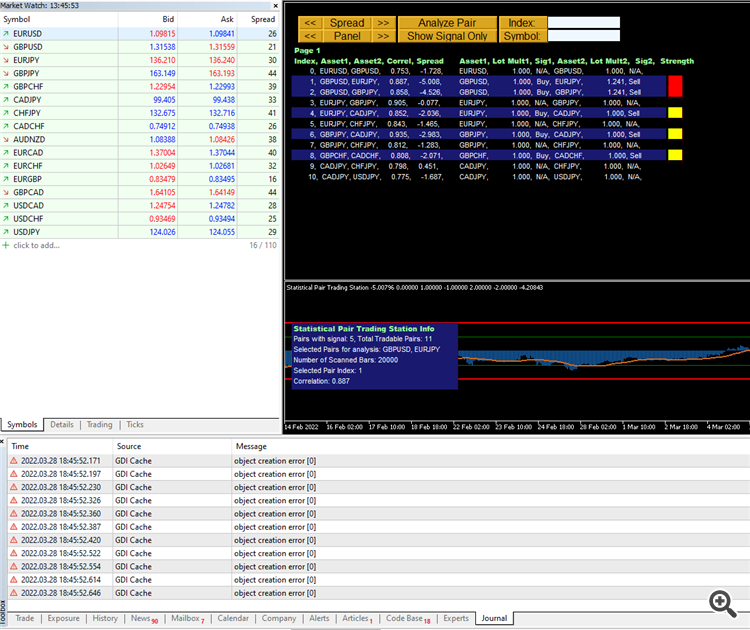
Hi - am still getting the same message
Please try with another MetaTrader 5 platform and see how it work first.
Kind regards.
Please try with another MetaTrader 5 platform and see how it work first.
Kind regards.
Hi - thanks for the quick reply.
The problem only seems to be on the MT% dowload from Roboforex. If i use a downloaded MT5 termainal from another broker the message does not appear.
Thank you :)
Hello Young Ho Seo , I am enjoying your Pair Trading Station . I have had to delete the indicator and reinstall due to mt5 freezing . I just noticed a maximum 5 installations allowed . Since I only have 1 activation left i am concerned due to the ease of mt5 freezing using the indicator . PZ Chart Overlay which I also use has 100 installations allowed , could you increase the number of installations of pair trade station allowed . On your instruction video you use the mt4 platform which has a history centre , but MT5 does not have this . How do i download missing data on mt5 . With the index number , where does that number come from and what does it represent .
Hello Young Ho Seo , I am enjoying your Pair Trading Station . I have had to delete the indicator and reinstall due to mt5 freezing . I just noticed a maximum 5 installations allowed . Since I only have 1 activation left i am concerned due to the ease of mt5 freezing using the indicator . PZ Chart Overlay which I also use has 100 installations allowed , could you increase the number of installations of pair trade station allowed . On your instruction video you use the mt4 platform which has a history centre , but MT5 does not have this . How do i download missing data on mt5 . With the index number , where does that number come from and what does it represent .
If you believe that the actication should be not taken or the activation was taken mistakenly, then you can contact mql5.com. Any thing related to license or purchase should be talked to the mql5.com staff. Unfortunately, seller in mql5.com does not have any power or authority to control your license, activation or purchase.
We are just like you on this website.
Data loading in MT5 is automatic, it is done when you open chart. Sometimes, I try to scoll the the left until I see the historical data I want to see.
So far, I found this manual way of loading historical data in MT5. Once again, let us hope that MT5 platform will have some ways to control historicla data too like MT4 platform.
Kind regards.
If you believe that the actication should be not taken or the activation was taken mistakenly, then you can contact mql5.com. Any thing related to license or purchase should be talked to the mql5.com staff. Unfortunately, seller in mql5.com does not have any power or authority to control your license, activation or purchase.
We are just like you on this website.
Data loading in MT5 is automatic, it is done when you open chart. Sometimes, I try to scoll the the left until I see the historical data I want to see.
So far, I found this manual way of loading historical data in MT5. Once again, let us hope that MT5 platform will have some ways to control historicla data too like MT4 platform.
Kind regards.
Thankyou for the explanation about activations . Would you increase the max activations to 10 for all who have and will purchase this indicator .
Thankyou for the explanation about activations . Would you increase the max activations to 10 for all who have and will purchase this indicator .
I am really sorry. It was determined by mql5.com guideline + our internal auditor + many other factors.
When it comes to license or purchase, I do not have any authority or power to change it.
Kind regards.