Expert Smart Trend MT4
70 USD
Versione demo scaricata:
818
Pubblicato:
20 giugno 2018
Versione attuale:
4.55
Non hai trovato un robot adatto?
Ordina il tuo
su Freelance
Vai alla sezione Freelance
Ordina il tuo
su Freelance
Come acquistare un Robot di Trading o un indicatore
Esegui il tuo EA
hosting virtuale
hosting virtuale
Prova un indicatore/robot di trading prima di acquistarlo
Vuoi guadagnare nel Market?
Come presentare un prodotto per venderlo con successo

Ti stai perdendo delle opportunità di trading:
- App di trading gratuite
- Oltre 8.000 segnali per il copy trading
- Notizie economiche per esplorare i mercati finanziari
Registrazione
Accedi
Accetti la politica del sito e le condizioni d’uso
Se non hai un account, registrati
I bought your program today.
There is one question.
I have this problem.How should I solve it?
hello
I bought your program today.
There is one question.
I have this problem.How should I solve it?
Hi,
1) For the EA operation, open "Tools" > "Options" > "Expert Advisors". Check the option "Allow WebRequests for listed URL:". Add https://ec.forexprostools.com, https://time.is/UTC and click OK.
2) It is recommended to install the EA on one any chart and any timeframe. (one any chart)
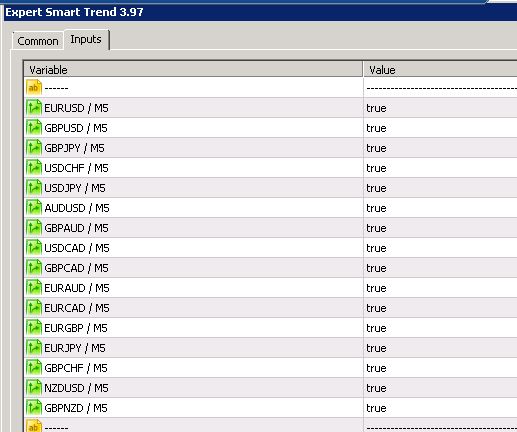
You can enable and disable currencies in the settings EA:
3) Upload the history of quotes as shown in the video: https://youtu.be/LpZxoboOd8Q
4) Default settings, change only one parameter (Risk MM ):
Risk_Stop_Loss = true;
Percentage_Risk = 5;
--------------------------------------------------------------------------------------------------------------------------
Link to the EA - https://www.mql5.com/en/users/profi_mql/seller
Link to the EA - https://www.mql5.com/en/users/profi_mql/seller
Just installed on ICMarket with all pairs, may I know when will be the first order?
Thanks
Just installed on ICMarket with all pairs, may I know when will be the first order?
Thanks
Hi,
may I know when will be the first order?
in coming days.
Recommendations to EXPERT_SMART_TREND_МТ4:
1) For the EA operation, open "Tools" > "Options" > "Expert Advisors". Check the option "Allow WebRequests for listed URL:". Add https://ec.forexprostools.com, https://time.is/UTC and click OK.
2) It is recommended to install the EA on one chart, you can enable and disable currencies in the settings.
3) Independently download the history of the quotes as shown in the video: https://youtu.be/LpZxoboOd8Q
4) Minimum balance 1000 or more. (using all 16 pairs)
5) default Settings. ( our signal uses the default settings: https://www.mql5.com/en/signals/412728 ).
Recommendations to EXPERT_SMART_TREND_МТ5:
EA installation video: https://youtu.be/PQTGZ7w4lTc
1) Open an account with hedging support.
2) For the EA operation, open "Tools" > "Options" > "Expert Advisors". Check the option "Allow WebRequests for listed URL:". Add https://ec.forexprostools.com, https://time.is/UTC and click OK.
3) It is recommended to install the EA on one chart, you can enable and disable currencies in the settings.
4) Minimum balance 1000 or more. (using all 16 pairs)
5) default Settings. ( our signal uses the default settings: https://www.mql5.com/en/signals/412728 ).
--------------------------
The EA requires up to 1.5 GB of RAM.
Hello. Ruslan.
I use Forex brokers whose servers are based off GMT+2 (or +3) server time.
Could you tell me the correct settings for these parameters?
Time trading within a day:
Hello. Ruslan.
I use Forex brokers whose servers are based off GMT+2 (or +3) server time.
Could you tell me the correct settings for these parameters?
Time trading within a day:
Hi,
use by default.
Hi,
use by default.
When I use by default, I see GMT + 0 in the information panel.
In addition, when I manually change to the following setting, the display becomes GMT+2.
But, I am worried about the need to change Start Hour/Minute and End Hour/Minute.
Which is the setting that EA shows its true performance?
GMT setting : GMT Mode
GMT mode : 2
Start Hour : 23
Start Minute: 30
End Hour : 21
End Minute : 30
Thanks.
When I use by default, I see GMT + 0 in the information panel.
In addition, when I manually change to the following setting, the display becomes GMT+2.
But, I am worried about the need to change Start Hour/Minute and End Hour/Minute.
Which is the setting that EA shows its true performance?
GMT setting : GMT Mode
GMT mode : 2
Start Hour : 23
Start Minute: 30
End Hour : 21
End Minute : 30
Thanks.
The GMT is configured autonomously for each broker.
Data is taken from site https://time.is/UTC, also economic news is set by GMT.
It is recommended to use the GMT Auto.
GMTは各ブローカーに対して自律的に構成されます。
データはhttps://time.is/UTCのサイトから取得されます。また、経済ニュースはGMTによって設定されます。
GMT Autoの使用をお勧めします。
OK. I will use GMT Auto.
Thank you so much.
Руслан, добрый день!
Какой сет на новом сигнале?
Руслан, добрый день!
Какой сет на новом сигнале?
Здравствуйте,
сет файл.
A new update is available
A new update is available
When will you update MT5 version?
When will you update MT5 version?
will be available in a few days ( 1 - 5 ).
Any news for the EA?
no.
no.
so you will not update this ea anymore?