TradeVector Gold Pullback

TRADES GOLD PULLBACKS WITH THE DAILY TREND. MAX 3 POSITIONS. HARD BASKET STOP ON EVERY BASKET.

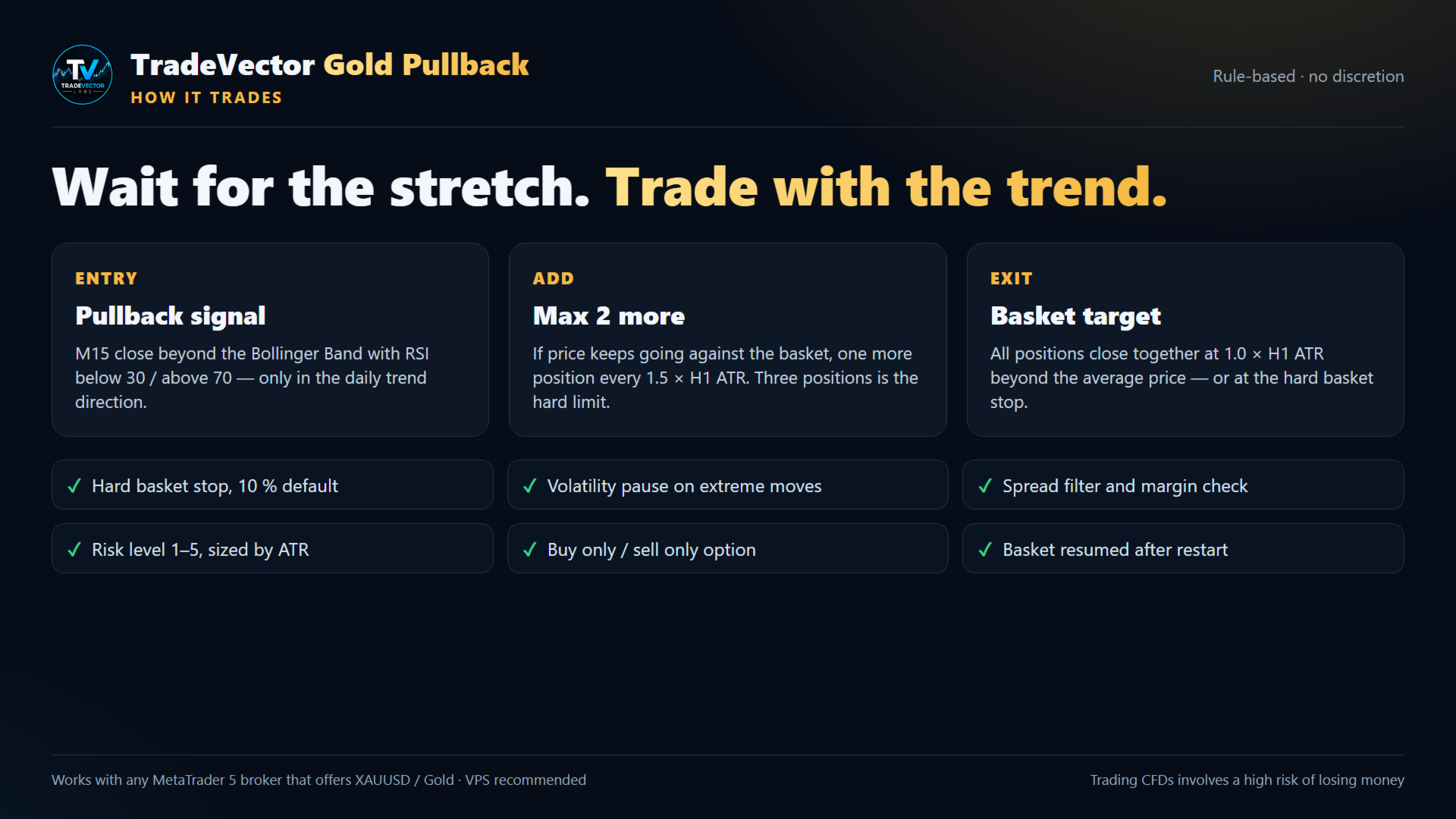
TradeVector Gold Pullback buys pullbacks in gold uptrends and sells rallies in gold downtrends. When a pullback goes further, it adds at most two more positions at fixed ATR steps and closes the whole basket together – at a profit target or at a hard basket stop (10% of the balance by default).

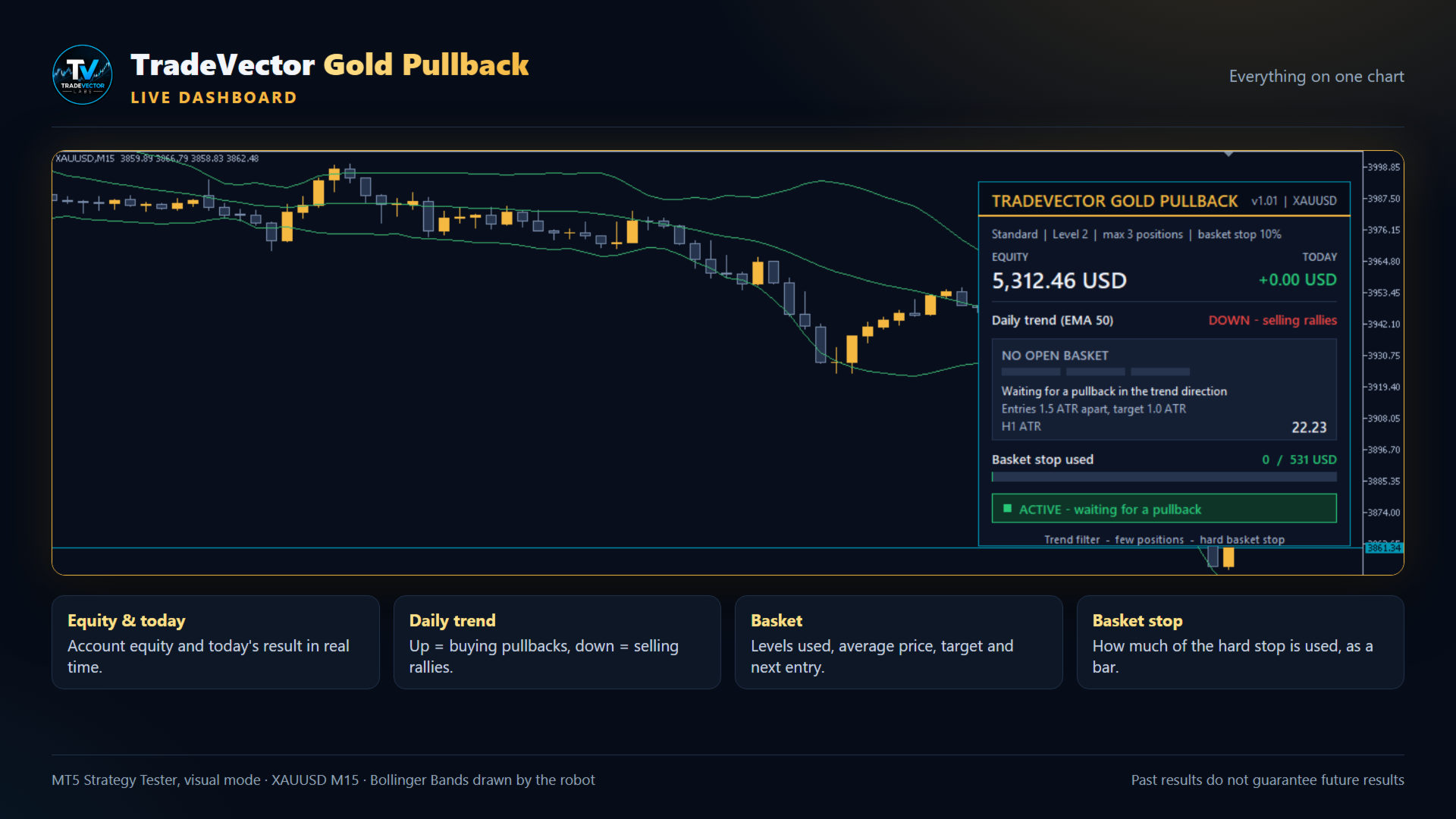
Attach it to one XAUUSD chart. A live dashboard shows equity, today's result, the daily trend, the open basket and how much of the basket stop is used.

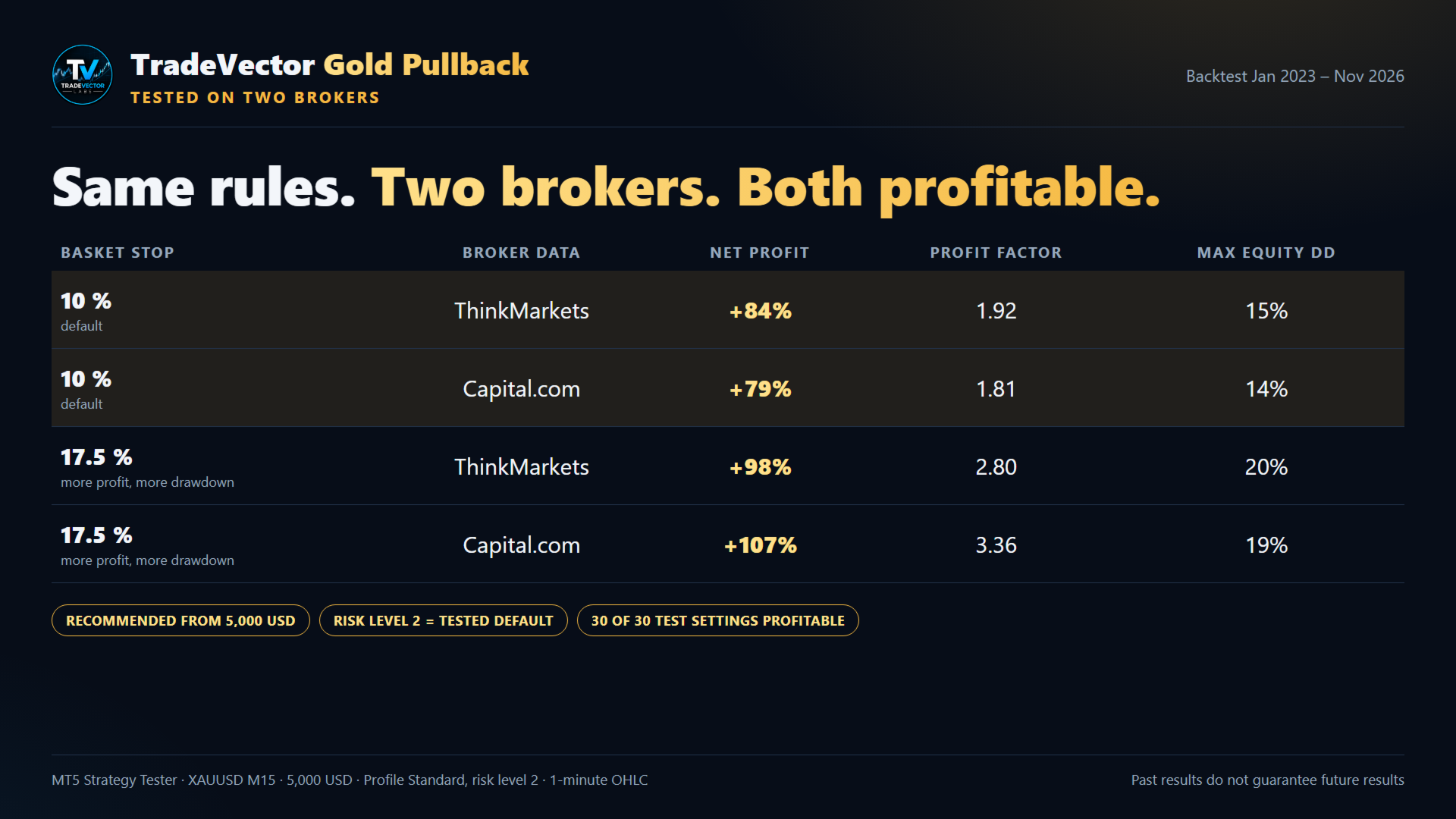
Backtest Jan 2023 – Nov 2026 (XAUUSD M15, 5,000 USD, Profile Standard, risk level 2, basket stop 10%, 1-minute OHLC)
ThinkMarkets data: +84%, profit factor 1.92, max equity DD 15%
Capital.com data: +79%, profit factor 1.81, max equity DD 14%
All 30 tested combinations of risk level and basket stop were profitable on both brokers.

How it trades

  • Daily trend: buys only when gold is above its daily EMA 50, sells only below it.
  • Entry: M15 close beyond the Bollinger Band (20, 2) with RSI(14) below 30 / above 70 – a stretched move against the trend.
  • Adding: one more position every 1.5 × H1 ATR if price keeps going against the basket. Three positions is the hard limit.
  • Exit: all positions close together at 1.0 × H1 ATR beyond the average price.
  • Basket stop: the whole basket closes if its loss reaches 10% of the balance (adjustable).

Choose your basket stop

Basket stopBroker dataNet profitProfit factorMax equity DD
10% (default)ThinkMarkets+84%1.9215%
10% (default)Capital.com+79%1.8114%
17.5%ThinkMarkets+98%2.8020%
17.5%Capital.com+107%3.3619%

Profiles: Standard (entries 1.5 ATR apart, tested default), Active (1.0 ATR apart, more trades) or Custom. Risk level 1–5 sizes the first position by ATR (0.05–0.30% of equity per H1-ATR move).

Live dashboard

Equity and today's result, the daily trend (buying pullbacks / selling rallies), the open basket with level bars, average price, target and next entry, a bar for the basket stop used, and the status in plain words.

Built-in protection

  • Hard basket stop on every basket – the most a basket can lose is fixed in advance.
  • Max 3 positions – no endless grid.
  • Volatility pause when H1 ATR is above 2× its average.
  • Spread filter, free-margin check and broker volume limits before every order.
  • Restart safe: an open basket is found again and managed after a restart or VPS migration.

Quick start

  1. Open an XAUUSD chart (any timeframe) and attach TradeVector Gold Pullback.
  2. Keep Profile = Standard, Risk level = 2 and Basket stop = 10% (tested defaults).
  3. Enable Algo Trading. A VPS is recommended.

Inputs

  • Profile – Standard / Active / Custom
  • Risk level – 1–5
  • Hard basket stop – % of balance, default 10
  • Trade direction – buy and sell / buy only / sell only
  • Custom: distance between entries, max positions (1–5), basket target, lot multiplier
  • Trend filter, Spread filter, Volatility pause
  • Show dashboard, Magic number, Order comment

How it was tested

MT5 strategy tester, XAUUSD M15, January 2023 – November 2026, 5,000 USD, 1-minute OHLC, on ThinkMarkets and Capital.com data. Risk levels 1–3 and basket stops 10–20% were tested on both brokers. An earlier real-tick test (June 2025 – November 2026) confirmed the results.

Requirements

  • MetaTrader 5, hedging account recommended
  • A broker that offers XAUUSD / Gold
  • Recommended from 5,000 USD – with smaller accounts the gold minimum lot makes the risk too high (the dashboard warns below 5,000)

Important: the robot averages up to 3 positions against the move. Losses can be large when a trend reverses; the basket stop limits each basket. Backtest results do not guarantee future results. Trading CFDs on margin carries a high risk of loss.

Altri dall’autore
TradeVector Gold Signals
Bjorn Iain Krister Dickson
TradeVector Gold Signals is a free MetaTrader 5 indicator from TradeVector Labs. It finds trend pullback setups on gold (XAUUSD) and shows a complete trade plan on the chart: entry, stop loss and two targets . What you get Buy and sell arrows - printed only after the bar has closed. Arrows on closed bars do not repaint. Trade plan zones - entry line, stop loss zone (red) and target zone (green) with Target 1 and Target 2, similar to a position tool. Trend dashboard - trend direction on M15, H1 a
FREE
TradeVector Atlas Index
Bjorn Iain Krister Dickson
TradeVector Atlas Index is a free trend-following Expert Advisor for MetaTrader 5, made for the major stock indices DE40, US500 and US30 . It uses the same trend-breakout engine as TradeVector Atlas 2.0, with fixed, tested settings on one chart: an H1 signal and an M30 signal, at most one position each. How it trades Daily trend: buys only in daily uptrends, sells only in daily downtrends. Real breakout: a closed H1 or M30 candle must close beyond its 48-bar channel. Stop from the start: stop lo
FREE
TradeVector US100 Signals
Bjorn Iain Krister Dickson
TradeVector US100 Signals finds trend pullback setups on the Nasdaq 100 and shows a complete trade plan on your chart: entry, stop loss and two targets. What you get Buy and sell arrows, printed only after the bar has closed Trade plan zones: entry line, stop loss zone and target zone with Target 1 and Target 2 Trend dashboard: trend on M15, H1 and H4, last signal, entry, stop loss, targets, ATR and market session Alerts: popup, sound and push notifications to your phone Optional TradeVector dar
FREE
Tradevectorlabs Pro
Bjorn Iain Krister Dickson
Tradevectorlabs Pro Tradevectorlabs Pro is a trend-following Expert Advisor for trading US100 in MetaTrader 5. Choose M5, M15 or H1 and run the EA on the chart you prefer. If you trade several timeframes, you can give each one its own risk settings, entry hours and exit rules. For example, you can run M15 on its own, allow only long entries and set risk to 0.5% per position. To trade H1 as well, attach the EA to a second US100 chart and choose the settings for that timeframe. Each instance manag
TradeVector Gold Pro
Bjorn Iain Krister Dickson
LAUNCH PRICE: 349 USD – next price 449 USD after the first 10 copies – final price 599 USD. Rent from 59 USD per month. NO GRID. NO MARTINGALE. NO AVERAGING. EVERY TRADE STARTS WITH A STOP LOSS. TradeVector Gold Pro trades one market only: gold (XAUUSD). It waits for gold to make a real move, joins the trend with a clear breakout, protects every position with a fixed stop loss and lets winning trades run with a trailing stop. It buys strong uptrends, sells real downtrends – and stays out when go
TradeVector Atlas
Bjorn Iain Krister Dickson
Launch price 199 USD – only for the first 10 copies. After that the price goes up. TradeVector Atlas is a multi-market trend-following Expert Advisor for MetaTrader 5. It trades gold, US500, US30, DE40 and Brent oil with the same breakout rules – all from a single chart . One rule set – five markets Atlas waits for price to close outside its recent trading channel in the direction of the daily trend. Every trade has a stop loss from the first second . Winners are followed with an ATR trailing s
TradeVector Prop
Bjorn Iain Krister Dickson
TradeVector Prop is a prop firm challenge Expert Advisor for MetaTrader 5. It combines a tested multi-market trend engine with a complete prop rule engine that watches your daily loss, max loss and profit target on equity – the way the firms measure it – before and during every trade. One goal: pass the challenge without ever breaking a firm rule . 116 full challenges simulated in MT5 – one started every month from January 2024 to May 2026 for each of the four paces, good and bad markets include
TradeVector Crypto
Bjorn Iain Krister Dickson
NO GRID. NO MARTINGALE. NO AVERAGING. EVERY TRADE STARTS WITH A STOP LOSS. TradeVector Crypto trades Bitcoin and Ethereum around the clock with the discipline of a rule-based trend system – and shows everything on a live dashboard : equity, open risk, the daily limit and every position. Attach it to one chart . It finds BTC and ETH at your broker by itself (BTCUSD, ETHUSD, BTCUSDT and similar names) and trades up to four timeframes at the same time. You choose how often it trades and how much it
TradeVector Prop Guardian
Bjorn Iain Krister Dickson
FREE UTILITY. PROTECTS YOUR PROP-FIRM CHALLENGE FROM RULE BREAKS – FOR MANUAL TRADES AND ANY ROBOT. TradeVector Prop Guardian watches your daily loss , max loss and profit target on equity, every second. It warns you early and – if a safety level is reached – closes all positions and locks the account before the firm's own limit is hit. Attach it to one chart . It watches the whole account: your manual trades and every other Expert Advisor. A live dashboard shows how much of each limit is used,
FREE
Filtro:
Nessuna recensione
Rispondi alla recensione