Hermit Lamp Position Size Box

Plan a trade the way you would on a long / short position tool: drag a box, read the lot.

WHAT YOU GET
- Click Long or Short: a red stop box and a green target box appear at the current price
- Drag the edges to set entry, stop and target, or drag a box to move the whole plan. The other box follows
- Lot for your risk: % of balance, % of equity, or a fixed amount, with commission per lot included
- The loss per lot is computed from the symbol's contract settings, the same way MetaTrader books profit (currency conversion included), not from the broker tick value alone. If the broker tick value disagrees, the panel tells you
- Lot is rounded down to the symbol's lot step. Warnings when the minimum lot already risks more than you set, or the lot is above the maximum
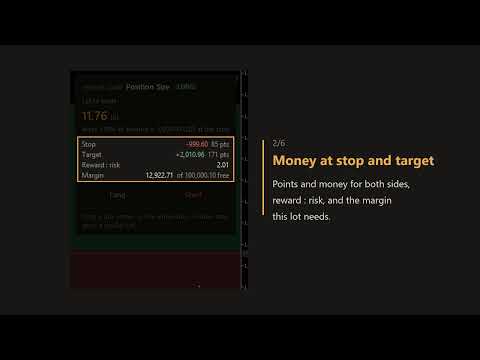
- Target to stop ratio, stop and target in points, money at the stop and at the target, margin needed and free margin
- Never sends orders. No DLL, no web requests

LIMITS
- If the contract calculation is not possible (an unknown contract type, or no conversion price yet), the lot is estimated from the broker tick value and the panel says so.
- Currencies converted through a pair with a wide spread can differ from the broker by up to that spread.
- Commission must be entered by you; brokers do not publish it to the terminal.
- One box per chart.

Works in the Strategy Tester in Visual mode with the tester account.

QUESTIONS AND BUGS
Write in the Comments tab or send me a message on MQL5. I read every comment and fix reported bugs.
If the tool is useful to you, a short review helps other traders find it.
Altri dall’autore
Broker time, UTC and market sessions - correct after daylight saving (DST) changes and inside the Strategy Tester. No setup needed. WHY - Many session tools are one hour off after a DST change. - In the Strategy Tester, real UTC is normally unknown. - Gold, indices and others pause every day. It is easy to forget when. WHAT YOU GET - Broker time zone found automatically (live chart and tester) - Correct UTC on every date, using the official time zone database - Next daily break of the chart sy
FREE
See where your trades really entered and exited, right on the chart, without clutter. WHAT YOU GET - Entry arrow and a line from entry to exit for every closed trade of the chart symbol - Result at the exit in points, money, or both. Money is net: profit + commission + swap - Green line = net win, red = net loss - Hover a line for details: times, prices, lot, profit, commission, swap, magic number - Smart labels: one per bar and never on top of each other (or every trade, or none) - Correct mat
FREE
A small close panel that does one job well: close groups of trades by hand, and tell you the truth about the result. WHAT YOU GET - Buttons: Close all, Close profit, Close loss, Close buys, Close sells, Delete pending - Each button shows how many trades are in its group and their floating result (profit + swap), updated every second - Second click to confirm, so a slip of the mouse does not close your trades (can be turned off) - After each action: "Closed 5 of 6", and the reason for any trade
FREE
One quiet panel with the numbers you check most, so you do not have to open three tabs. WHAT YOU GET - Equity in large type, with balance and floating result under it - Open trades: count, lots and floating result, for the whole account and for the chart symbol - Today and This week: closed net (profit + commission + swap + fee) plus floating, in money and % - Margin level and free margin, with a warning colour below 200% - Filter by magic number (all, manual only, one EA) - Day start: server m
FREE
Your EA can stop without telling you: AutoTrading gets switched off, the terminal loses the broker, a chart is closed, or the EA simply stops placing orders. This tool watches for that and sends a push notification to your phone (the MetaTrader app), so you do not find out days later. WHAT IT WATCHES - AutoTrading switched off (alert after 2 minutes) - The account cannot trade (investor password, or the broker does not allow EAs) - Connection to the broker lost for 5 minutes or more (the alert
FREE
Your EA or manual trades made money. Was it the timing, or luck? This tool replays the same trades at random times and shows where your real result falls among them. HOW IT WORKS - Reads your closed trades from the account history (filter by magic number, symbol and dates), or from a CSV file. - Builds 1,000 random-entry versions: each trade keeps its direction, lot size and holding time, but enters at a random time of the same weekday and New York hour, in the following weeks. - Every version
A guard that acts, not just warns. Built for prop firm style daily rules and for anyone who wants a hard stop for the day. RULES (each one can be turned off) - Daily loss limit: % of the day base and / or a fixed amount - Daily profit lock: stop for the day after a gain - Max drawdown: static (below the starting balance) or trailing (below the highest equity) - Day base: higher of balance / equity at the day start (as many prop firms do), balance, or equity WHEN A RULE IS HIT - Closes every op
Running several EAs on one account? See what each one really did, in one table. WHAT YOU GET - One row per magic number (manual trades as "Manual"): trades, win %, net, profit factor, max drawdown, costs, open trades and floating result - Net = profit + commission + fee + swap. Costs = commission + fee + swap, shown on their own - A trade = a closed position. Partial closes count when the position is fully closed. A trade closed by hand still belongs to the EA that opened it - Click a row to se
A backtest is only as good as the price history behind it. Broker history has gaps, shifted clocks, day bars stored as 1-minute bars and fake spreads, and the Strategy Tester uses it without warning. Backtest Data Check checks it month by month before you test. WHAT IT CHECKS (M1 bars and ticks, no internet, no DLL) - Missing data vs closed market: minutes the broker's session table says are open but have no bars. Holidays and short sessions are told apart from real gaps. - Week clock shifted b
Filtro:
Nessuna recensione
Rispondi alla recensione