Hurricane Clock Pro Sessions Spread

Follow my MQL5 channel ‘Hurricane Tools for MT5’ for new tools and updates: https://www.mql5.com/en/channels/hurricane_tools

DESCRIPTION

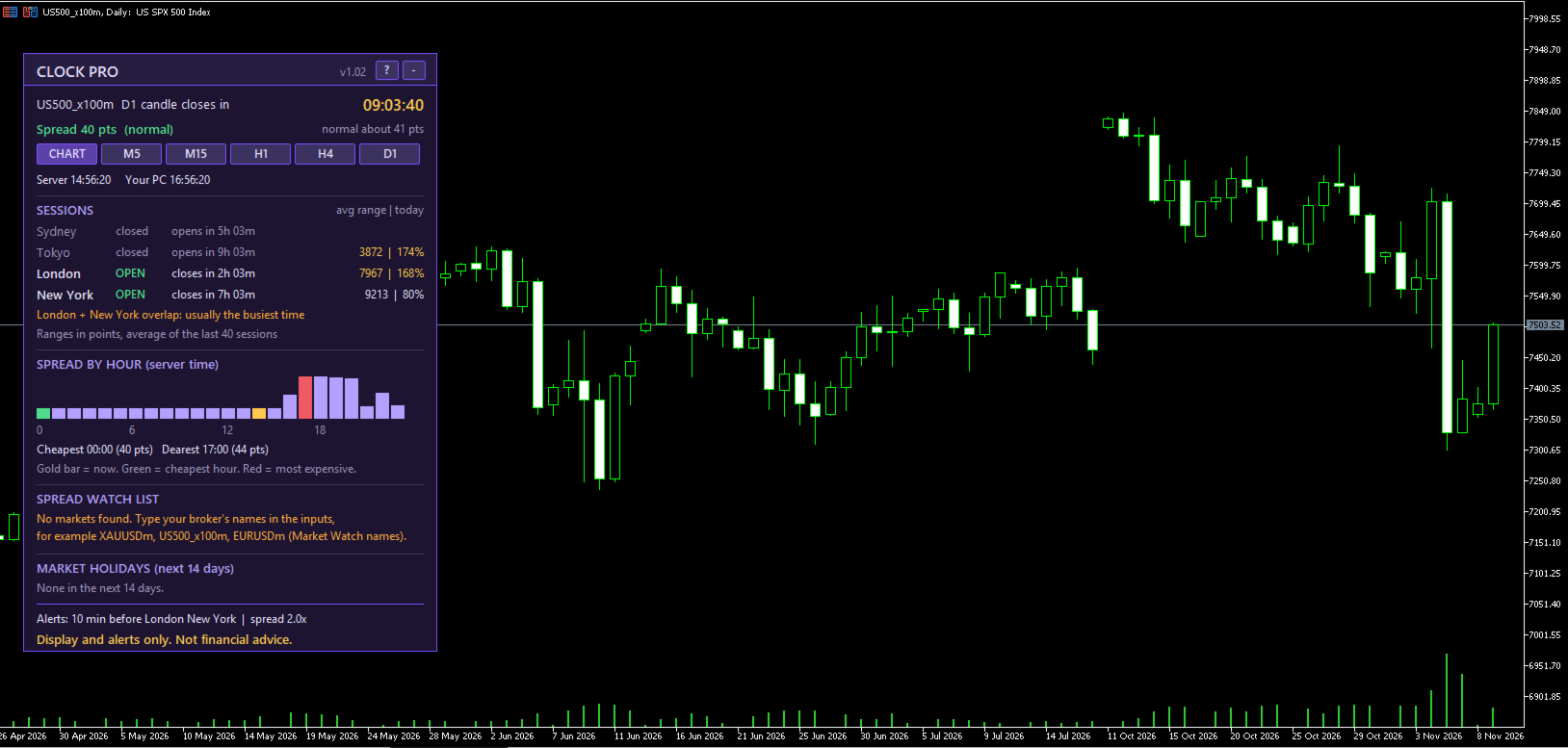
Hurricane Clock Pro is the full version of the free Hurricane Clock. It tells you not only what time it is in the markets, but how big each session usually is, when spreads are cheap or expensive, and what is coming up.

Clock and sessions

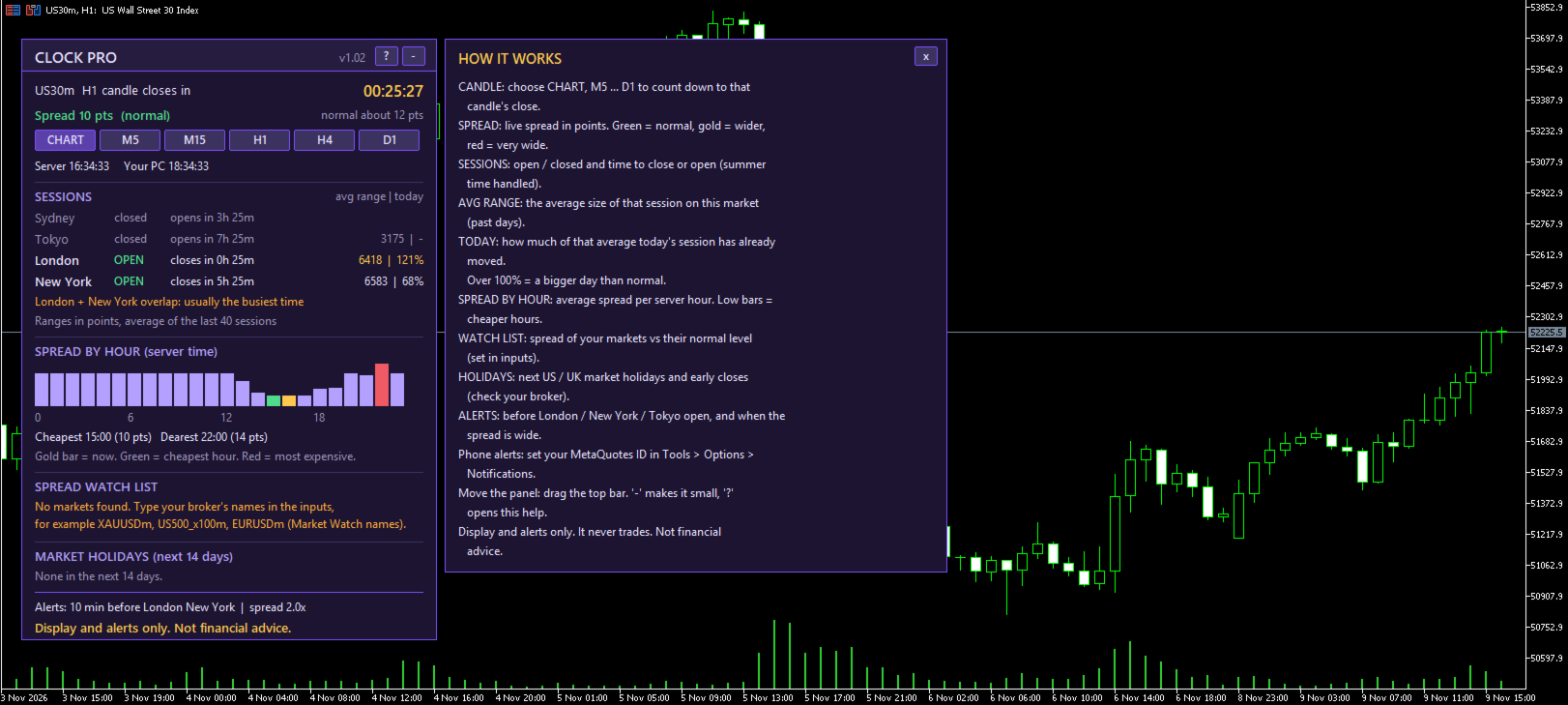
  • Countdown to the candle close: chart timeframe, M5, M15, H1, H4 or D1
  • Server time and your own PC time
  • Sydney, Tokyo, London and New York: open or closed, with time to close or open (summer and winter time handled automatically)
  • London + New York overlap marked

Session statistics

  • The AVERAGE range of the Tokyo, London and New York sessions on your market (past 40 sessions, you choose)
  • How much of that average TODAY’s session has already moved, for example “London 78%”. Over 100% = a bigger day than normal

Spread

  • Live spread with a green / gold / red warning compared with this market’s normal spread
  • Spread by hour: a small chart of the average spread for every hour of the day, with the cheapest and most expensive hour marked
  • Spread watch list: the live spread of up to 10 markets against their normal level (type ALL to use your Market Watch; broker suffixes are found automatically)

Market holidays

  • The next US and UK market holidays and early closes in the coming 14 days

Alerts (pop-up or phone push)

  • A chosen number of minutes before London, New York or Tokyo opens
  • When the spread is much wider than normal

Easy to use

  • “?” button: a short “How it works” guide right on the chart
  • Draggable panel, minimise button, large easy-to-read text
  • Works on any symbol

Important

  • Display and alerts only. It never opens, changes or closes trades.
  • Spread history comes from your broker’s price data; values differ between brokers and account types.
  • Holiday dates come from public exchange and bank-holiday calendars. Always check your broker’s own holiday schedule.
  • The watch list needs live charts; in the Strategy Tester it shows a note.

Disclaimer
Not financial advice. Trading carries a high risk of loss.


Altri dall’autore
Hurricane Patterns scans your chart and draws the classic chart patterns for you, so you can study how they behaved on your market. Reversals - Head and shoulders and inverse head and shoulders (strict rules: clear head, balanced shoulders, prior trend) - Double and triple tops and bottoms, with the level line, numbered touches and the neckline Triangles and wedges - Ascending, descending and symmetrical triangles - Rising and falling wedges - Every touch on each line is numbered 1, 2, 3... Str
DESCRIPTION Renamed to Liquidity Boxes and Sweeps. New logo. No changes to how the indicator works. Hurricane Liquidity Boxes and Sweeps finds and draws three price-action structures on your chart automatically:   - Boxes: sideways ranges where price was trapped, with the top and bottom marked - Liquidity pools: equal highs and equal lows, marked "$$$" while untouched and "taken" once price runs through them - Liquidity sweeps: candles that pierce a level and close back inside   Features - Scan
FREE
A clean, free panel that answers three questions at a glance: when does this candle close, is the spread normal right now, and which session is open? Features - Candle countdown: choose CHART, M5, M15, H1, H4 or D1 with one click - Live spread in points and price, coloured green / amber / red against its own 10-minute average - Server time and your PC time - Sydney, Tokyo, London and New York: open or closed, with the time until they open or close - Summer and winter time handled automatically -
FREE
SHORT DESCRIPTION Free push alerts to your phone for every trade open and close: result in $ and R, why it closed (stop, target, by hand, stop-out) and a daily summary. DESCRIPTION Know what happens on your account while you are away from the computer. Hurricane Phone Trade Alerts sends a push notification to the MetaTrader app on your phone for every trade.   No Telegram, no Discord, no bots, no extra accounts. It uses MetaTrader's own push notifications: you only need your MetaQuotes ID.   W
FREE
Hurricane News Panel shows the upcoming economic news right on your chart, so you never get surprised by NFP, CPI or a central bank decision again. The events come directly from the built-in MetaTrader 5 economic calendar. No websites, no DLLs and no extra downloads are needed. What the panel shows - The next high-impact events for the currencies you choose (default USD, EUR, GBP, JPY) - A live countdown to each event, updated every second - The date and server time of each event - A clear "NEW
FREE
Description: Hurricane Tools is a trade-planning panel for traders who want to protect their account, especially on prop firm challenges. Plan the trade Drag the ENTRY and STOP lines on the chart: the panel shows the exact lot size for your risk % Or type the lot size you use and see the risk in money and % Up to 4 targets in R (1R, 2R, 3R, 4R), each one on or off Prop firm room Type your challenge size (for example 100,000) and your firm’s limits (for example 5% daily, 10% max) The panel shows
Short description Liquidity pools, sweeps and boxes with higher-timeframe pools, nearest liquidity above and below, alerts and a market scanner. Description Hurricane Liquidity Pro is the full version of the free Liquidity Boxes and Sweeps indicator. It finds where liquidity is resting, shows how far away it is, and alerts you when something happens. On the chart Liquidity pools: equal highs and equal lows, marked "$$$" while untouched and "taken" once price runs through them Liquidity sweeps:
Description See your trading month at a glance. Hurricane Profit Calendar draws a calendar on your chart and colours each day by its result, straight from your account history. What you see Every day with trades in green (profit) or red (loss); a stronger colour for days of 1% or more The day’s result in money, or in percent of the balance at the start of that day The number of trades closed that day Month total in $ and %, number of green and red days, best and worst day Previous / next buttons
Filtro:
Nessuna recensione
Rispondi alla recensione