Opening Liquidity Sweep Pro
- Experts
- Versione: 1.0
- Attivazioni: 5

Opening Liquidity Sweep PRO (by TP Trading) is a fully automated, institutional price-action Expert Advisor engineered for major global indices on the M5 timeframe (DJ30 / US30, NAS100 / USTEC, GER40 / DE40, SPX500, and more).
BONUS — OFFICIAL .SET PRESETS INCLUDED: After downloading or purchasing, send me a private message here on MQL5 and I will gladly send you the optimized .set configuration files for all 3 flagship indices ( DJ30 , NAS100 , and GER40 ).
Strategy Logic Every trading day, institutional liquidity accumulates above the Overnight High (ONH) and below the Overnight Low (ONL), as well as the Previous Session High/Low (PSH/PSL). Following the cash market open (such as 09:30 AM EST in New York or the European open in Frankfurt), institutional order flow frequently sweeps one side of this liquidity pool before reversing at the key opening inflection window (10:00 AM EST / 17:00 Broker Time for US indices, or 10:00 CET / 11:00 Broker Time for GER40).
-
Liquidity Sweep Detection: Monitors whether Overnight or Previous Session extremes have been swept prior to or after the session inflection window, with an optional single-side sweep filter to block choppy double-sweep days.
-
Rejection Confirmation: Enters only upon a confirmed M5 rejection candle closing back across the inflection opening price with customizable body-to-range and rejection-wick proportions.
-
Flexible Take Profit Architecture: Choose between Opposing Liquidity Pool Targeting (ONL/PSL or ONH/PSH with a minimum R:R threshold) or Fixed Risk/Reward targets.
-
Strict Intraday Discipline: Configurable max trades per day (default: 1 sniper trade), mandatory intraday close before session end (zero overnight swap/gap exposure), and strictly no Grid, Martingale, or averaging down.
PRO Customization, Visuals & Risk Architecture
-
Plug & Play Default + Multi-Index Flexibility: Pre-calibrated out of the box for DJ30 (M5), with full access to session hours, candle anatomy filters, and R:R parameters to trade NAS100, GER40, and other indices.
-
Dynamic Risk & Margin Protection: Calculates lot size automatically from account balance (% risk or fixed lot) and ATR-buffered structural stop loss, including a small-account protection cap and free-margin verification (compatible with accounts starting from 300 EUR/USD).
-
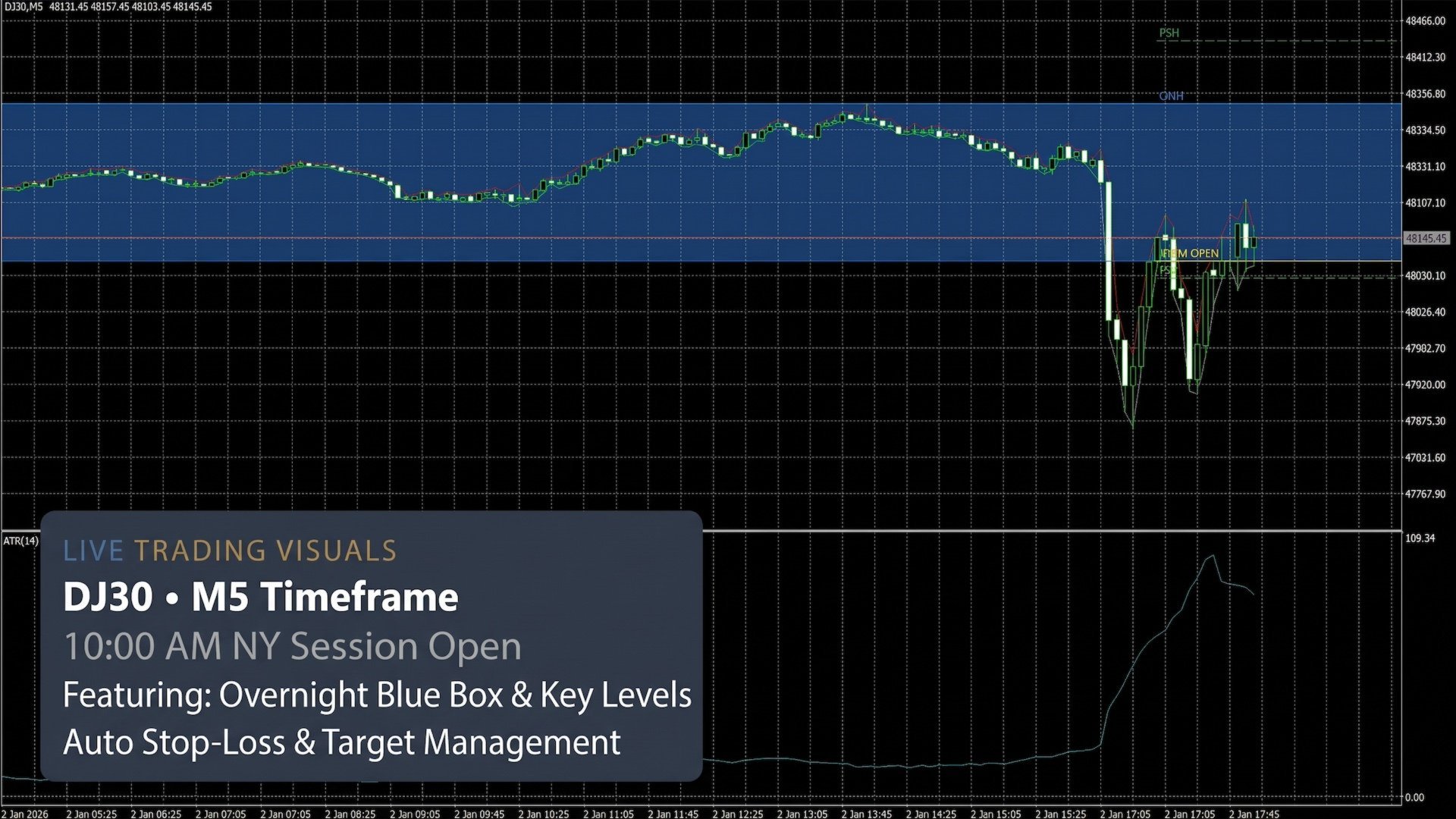
Clean Chart Overlay: Automatically draws the filled Overnight Blue Range Box alongside labeled ONH, ONL, 10AM OPEN, PSH, and PSL levels directly on your chart.
-
Multi-EA Ready: Customizable Magic Number and Order Comment for seamless portfolio management alongside other robots.
Input Parameters Guide
1. NY SESSION SCHEDULE (SERVER TIME GMT+2/+3)
-
NY Regular Session Open Hour (16:30): Hour when the regular cash session opens in broker server time (e.g., 16 for NY 09:30 EST, or 10 for Frankfurt/GER40). Marks the end of the Overnight range.
-
NY Regular Session Open Minute: Minute when the regular cash session opens (30 for NY, 0 for GER40).
-
NY Regular Session Close Hour (23:00): Hour when the regular cash session closes in broker server time (23 for US indices, 18 for GER40). Marks the start of the Overnight range.
-
NY Regular Session Close Minute: Minute when the regular cash session closes (0 for US indices, 30 for GER40).
-
10:00 AM EST Hour (17:00 Server): Hour of the key institutional inflection window (17 for NY 10:00 AM EST, 11 for GER40) where the reference opening price is captured.
-
10:00 AM EST Minute: Minute of the institutional inflection window (0 by default).
-
Entry Window After 10:00 AM (Mins, e.g. 180 = until 20:00): Duration in minutes after the inflection time during which new trade entries are allowed.
-
Mandatory Intraday Close Hour: Server hour at which any open position is automatically closed to prevent overnight exposure.
-
Mandatory Intraday Close Minute: Server minute for the mandatory intraday close.
2. LIQUIDITY & REJECTION RULES
-
Include Previous Session High/Low (PSH/PSL): Enables tracking of the prior day's regular session extremes (PSH/PSL ) alongside Overnight levels (ONH/ONL ) for sweeps and take-profit targets.
-
Require Single-Side Sweep Only (Block Double Sweep): Blocks entries for the rest of the day if liquidity has already been swept on both sides (high and low), filtering out choppy days.
-
Trigger Candle Min Body Ratio (% of Total Range): Minimum candle body size relative to its total high-to-low range (e.g., 0.465 = 46.5%) required to confirm rejection momentum.
-
Trigger Candle Min Rejection Wick (% of Total Range): Minimum rejection wick size relative to the candle's total range (e.g., 0.15 = 15%) opposing the entry direction.
-
Max Trades Per Day (Sniper): Maximum number of trades permitted per trading day (default: 1 ).
3. STOP LOSS, TAKE PROFIT & RISK MANAGEMENT
-
ATR Period: Lookback period for the Average True Range (ATR) indicator used for volatility scaling.
-
ATR Buffer Beyond Sweep Extreme: Extra safety cushion (in ATR multiples) placed beyond the sweep high/low for the Stop Loss.
-
Max Allowed Stop Loss (x ATR - Filters Extreme Days): Maximum permitted Stop Loss distance in ATR multiples; skips trades on abnormally volatile spike days.
-
Take Profit Mode: Selects between Opposing Liquidity Pool (targets opposite ONL/PSL or ONH/PSH) and Fixed Risk/Reward Target .
-
Risk/Reward Ratio (Fixed or Minimum for Pool Target): Target R:R multiplier (e.g., 3.0 = 3R). Acts as the exact target in Fixed mode or the minimum required R:R in Pool mode.
-
Position Sizing Mode: Selects between dynamic balance-based risk (Risk % of Account Balance ) and static lot sizing (Fixed Lot Size ).
-
Risk Per Trade (% of Balance): Percentage of account balance risked per trade when dynamic sizing is active.
-
Block Trade if Min Lot Risks > X% of Balance: Small-account safeguard that skips a trade if even the minimum lot (0.01 ) would risk more than this percentage of your balance.
-
Fixed Lot Size: Static lot volume used when Position Sizing Mode is set to Fixed Lot Size.
4. EXECUTION, VISUALS & IDENTIFICATION
-
Order Comment (For History Filtering): Custom text comment attached to every order for easy filtering in account history.
-
Draw Overnight Blue Box & Session Levels on Chart: Toggles the visual Overnight range box and labeled ONH , ONL , 10AM OPEN , PSH , and PSL lines on the chart.
-
Overnight Range Box Fill Color: Fill color for the shaded Overnight range rectangle.
-
Minimum Trades Threshold in OnTester(): Minimum number of trades required in Strategy Tester custom optimization (Custom max ) to ensure statistical validity.
-
Unique Magic Number: Unique ID number ensuring the EA only manages its own trades without conflicting with other EAs.
-
Max Slippage (Points): Maximum allowed price slippage in points during order execution.
Setup & Broker Requirements
-
Supported Symbols: DJ30 / US30, NAS100 / USTEC, GER40 / DE40, SPX500 / US500
-
Timeframe: M5 (5 Minutes)
-
Broker Server Time: GMT+2 (Winter) / GMT+3 (Summer) — standard New York close brokers (session hours are fully adjustable for any timezone)
-
Minimum Deposit: 300 EUR / USD (0.01 minimum lot size)
-
Recommended Environment: Low-spread ECN/Raw index account on a 24/5 VPS
Disclaimer: Past performance in backtesting or live trading does not guarantee future results. Always test on a demo account first to verify your broker's symbol specifications, contract sizes, and server timezone.