NY Opening Range Breakout Retest
- Indicatori
-
Cristian Bodisteanu
 Sviluppatore MQL5 – Expert Advisor, indicatori e gestione del rischio per MetaTrader 5
Sviluppo e testo Expert Advisor, indicatori e script in MQL5 per MetaTrader 5.
Cosa ho realizzato per la mia ricerca di trading: - Versione: 1.0
- Attivazioni: 5
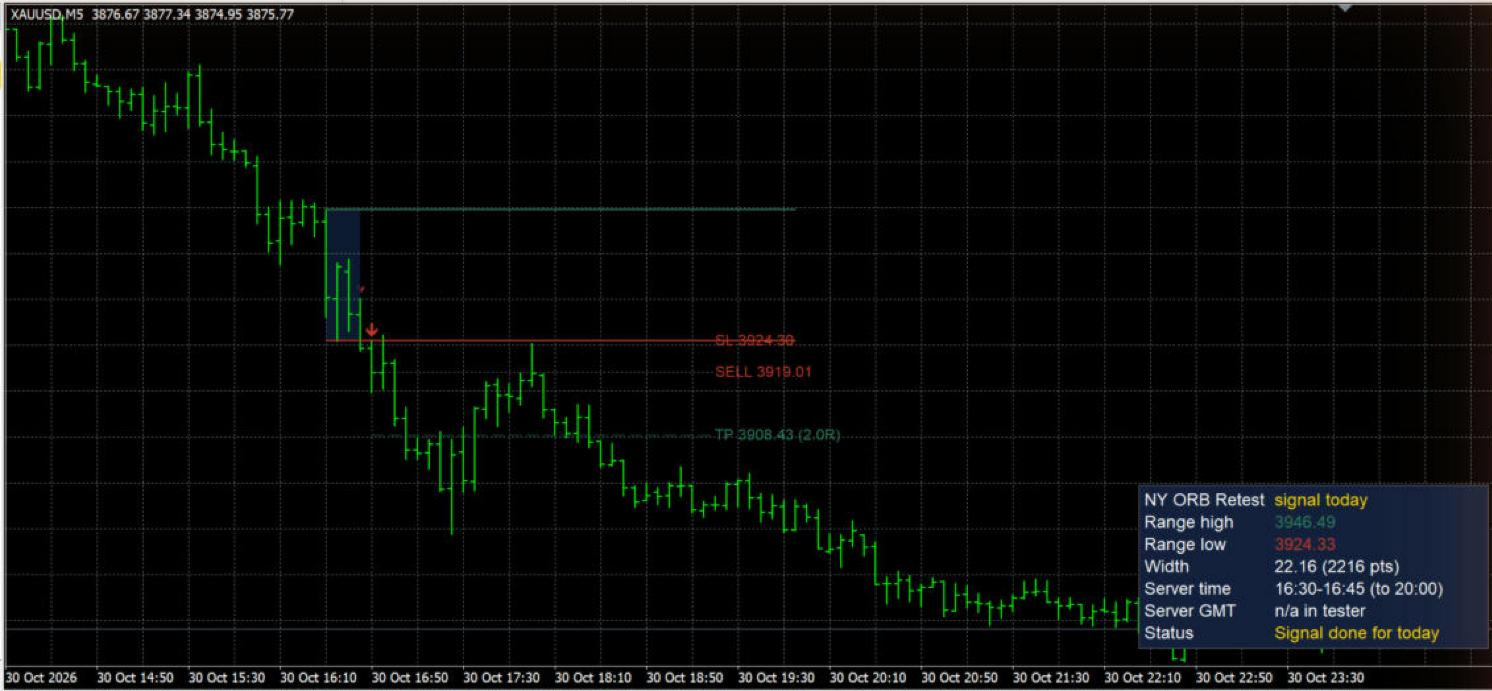
The first minutes after the New York open often define the range that the rest of the session reacts to. NY Opening Range Breakout Retest draws that range automatically and waits for a clean sequence: a candle closes outside the range, then price comes back to retest the broken edge and a strong candle closes in the breakout direction. Only then is a signal printed.
How a signal is formed
1. Opening range: the high and low of all bars that open between Range start and Range end (default 09:30-09:45 New York time).
2. Breakout: inside the signal window (from Range end to Signal end, default 13:00 New York), a close above the range high is a breakout up and a close below the range low is a breakout down. A close back inside the range cancels the setup.
3. Retest BUY: after a breakout up, a later bar whose low touches the range high (plus a tolerance), closes above the range high and has a real body of at least Min. candle body % of its high-low range. SELL is the mirror image.
4. Optional EMA trend filter and an option to allow only one signal per day.
5. For every signal the indicator draws entry (signal bar close), stop loss (signal bar low for BUY, high for SELL) and take profit at a chosen R multiple.
Main features
- Non-repainting: signals are evaluated only on closed bars. The forming bar never creates or removes a signal.
- Automatic New York time: you enter the session in New York time. The indicator converts it to your broker's server time every day and applies US daylight saving time itself (second Sunday of March to first Sunday of November).
- Works on any symbol (indices, gold, forex, crypto, stocks) and any timeframe from M1 to M30. On higher timeframes it shows a short message and draws nothing.
- Range box and lines: shaded range box (the fill is blended with your chart background, so it stays readable on dark and light charts) and range high / low lines extended through the signal window.
- Breakout markers and BUY / SELL arrows stored in indicator buffers, so they appear in the Data Window.
- Entry / SL / TP lines with price labels for every signal.
- Info panel in a corner of your choice: range high, range low, width (price and points), today's session in server time, server GMT offset check, and current status (waiting for range, waiting for breakout, above / below range waiting for retest, signal done, window closed).
- Alerts on new signals only (never on history): pop-up alert, push notification to your phone and e-mail. Each message contains the symbol, timeframe, direction, entry, stop loss and take profit. Optional alerts on breakouts.
- EA-friendly buffers for iCustom: 0 BUY, 1 SELL, 2 breakout up, 3 breakout down, 4 EMA, 5 signal entry, 6 signal SL, 7 signal TP, 8 range high, 9 range low (EMPTY_VALUE = no value).
- Light on resources: history is limited by Days of history to process, and new bars are processed incrementally.
Inputs
Session and time zone
- Time mode: New York time (automatic DST conversion) (default) or Broker server time (manual), where the three times below are used exactly as server time.
- Broker server GMT offset in winter (hours): default 2.
- Broker server shifts +1h with US DST: default true (the most common setup: server GMT+2 in winter and GMT+3 in summer, so 09:30 New York is always 16:30 server time).
- Opening range start / end and Signal window end: in HH:MM format, default 09:30, 09:45 and 13:00.
Signals
- Retest tolerance (% of range width): how close to the broken edge the retest must come (default 10%).
- Min. candle body (% of candle range): strength of the signal candle (default 40%).
- Max one signal per day: default true.
- Trend filter: use EMA and EMA period: when enabled, BUY signals need the close above the EMA and SELL signals below it.
Risk visuals
- Take profit (R multiple), Draw entry / SL / TP lines, Line length (bars), Show breakout markers.
History
- Days of history to process: default 60. Larger values show more history but take longer to load on M1.
Alerts
- Pop-up, push notification, e-mail, and Also alert on range breakouts.
Style and info panel
- Range box on/off, color and opacity, BUY / SELL colors, entry line color, range line width.
- Panel on/off, corner, offsets, font size, background and text colors.
How to set the broker GMT offset
1. Attach the indicator with the default inputs and look at the Server GMT row of the panel. It shows the offset measured from your terminal right now and the offset that your inputs give. If both numbers are the same, the row is white and you are done. If the row is orange, change Broker server GMT offset in winter until they match. Always enter the winter offset: in summer the "inputs" value already adds the extra hour when Broker server shifts +1h with US DST is true.
2. Check the Server time row. With the default session it should show the server time of 09:30-09:45 New York (for example 16:30-16:45 on a GMT+2/+3 server).
3. Broker with a fixed offset all year (no daylight saving): enter the offset and set Broker server shifts +1h with US DST to false.
4. Broker that changes time on the European dates (last Sunday of March / October): the session is correct for most of the year, but it is one hour off for about three weeks in spring and one week in autumn, when US and European DST differ. During those weeks you can use Time mode = Broker server time (manual) and enter the server times yourself.
5. You can always use Broker server time (manual) and type the session directly in server time (for example 16:30, 16:45, 20:00).
Notes
- Signals appear when the signal bar has closed, so an alert arrives at the open of the next bar.
- The entry, stop loss and take profit lines are visual levels calculated from the signal bar. They are not orders, and the indicator does not trade.
- In the Strategy Tester push notifications and e-mails are not sent (MetaTrader limitation), and the panel shows "n/a in tester" for the GMT check.
Risk notice
This indicator is a charting and analysis tool. It does not guarantee any result. Past signals do not predict future performance. Test it on a demo account and use your own risk management.