Fusion Gold Trading Indicator
- Indicatori
- Versione: 1.10

Fusion Gold Trading Indicator is a MetaTrader 5 chart-analysis tool designed primarily for Gold and XAUUSD.
It combines trend, momentum, volatility, volume-proxy and multi-timeframe information in one structured indicator. It provides visual Buy and Sell signals, market-bias information and reference risk levels without opening, modifying or closing trades.
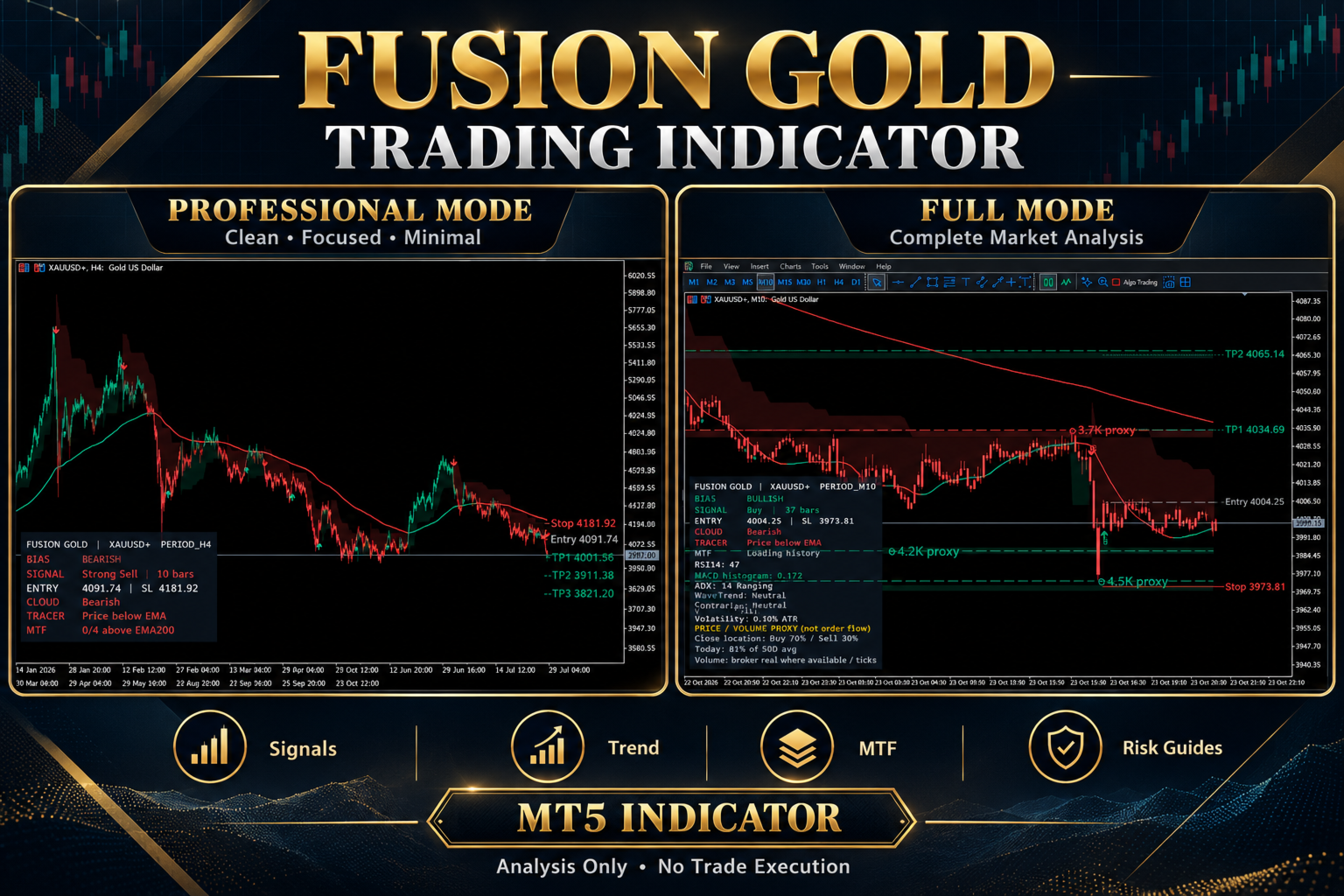
The indicator includes two display modes, allowing traders to choose between a clean working chart and a complete analytical view.
Two Display Modes
Professional Mode
Professional Mode is designed for traders who prefer a clean chart with minimal visual clutter.
It displays:
-
Compact professional dashboard
-
Current market bias
-
Latest Buy or Sell signal
-
Entry and Stop Loss reference levels
-
Cloud direction
-
Trend Tracer position
-
Multi-timeframe EMA200 confirmation
-
Latest signal label
-
Configured risk-reference lines
Historical liquidity details, pullback markers, Hull MA and extended dashboard information are hidden in this mode.
Full Mode
Full Mode provides the complete indicator display.
It includes:
-
Full analytical dashboard
-
Historical signal labels
-
Buy and Sell signal markers
-
Pullback markers
-
Trend cloud
-
Trend Tracer
-
Hull moving average
-
Candle heatmap
-
Entry, Stop Loss and TP1, TP2 and TP3 reference levels
-
Multi-timeframe EMA200 analysis
-
RSI, MACD and ADX information
-
WaveTrend and contrarian conditions
-
Volatility information
-
Volume-pressure proxy
-
Liquidity proxy map
Main Features
-
Buy and Sell signal generation
-
Standard and strong signal classification
-
Optional confirmed-candle signal processing
-
Adjustable signal sensitivity
-
Multiple signal presets
-
Trend, volume, cloud and contrarian filters
-
Pullback signal detection
-
Configurable trend cloud
-
EMA trend tracer
-
Hull moving average
-
Configurable candle heatmap
-
Multi-timeframe EMA200 confirmation
-
M15, H1, H4 and D1 trend context
-
RSI momentum information
-
MACD histogram information
-
ADX trend-strength information
-
WaveTrend conditions
-
ATR-based volatility information
-
Reference Entry and Stop Loss levels
-
Three configurable profit-target guides
-
Optional trailing-stop guide
-
Percentage-based or ATR-based stop calculation
-
Configurable dashboard position and size
-
Popup and push-notification options
-
No external DLL required
Signal Filters
The indicator includes optional filters that can be enabled individually:
-
Trend signals only
-
Strong signals only
-
High-volume signals only
-
Cloud-aligned signals only
-
Contrarian-condition signals only
Using additional filters normally reduces the number of signals. Traders should test each configuration before relying on it.
Risk Guides
When a signal is generated, the indicator can display:
-
Entry reference
-
Stop Loss reference
-
TP1
-
TP2
-
TP3
-
Optional trailing-stop guide
Target levels are calculated using configurable reward-to-risk multiples.
These are analytical chart guides only. They are not broker orders and the indicator does not execute or manage trades.
Liquidity and Volume Information
Full Mode includes a liquidity proxy map based on confirmed price pivots and broker-provided volume information.
The liquidity and pressure displays are analytical proxies. They do not represent centralized exchange order flow, Level II data or guaranteed institutional liquidity.
Where real broker volume is unavailable, MetaTrader tick volume may be used.
Alerts
Individual alerts can be enabled for:
-
Buy signals
-
Strong Buy signals
-
Sell signals
-
Strong Sell signals
-
Stop guide crossings
-
TP1, TP2 and TP3 guide crossings
-
Bullish cloud crossings
-
Bearish cloud crossings
Optional MetaTrader push notifications are also supported when notifications are correctly configured in the terminal.
Basic Installation
-
Install the indicator through the MQL5 Market.
-
Open the required chart in MetaTrader 5.
-
Attach Fusion Gold Trading Indicator to the chart.
-
Select Professional or Full display mode.
-
Review the signal, filter and risk-guide settings.
-
Allow sufficient chart history to load.
-
Configure alerts if required.
Recommended Use
The indicator is designed primarily for Gold and XAUUSD, including broker-specific Gold symbol names when attached directly to the correct chart.
It may also be tested on Forex pairs, indices and cryptocurrency instruments. Results and visual behaviour can differ because every symbol has different volatility, session structure, price precision and broker data.
Always test the indicator on the intended symbol, timeframe and broker before using its analysis for trading decisions.
Important Information
-
This product is an indicator, not an Expert Advisor.
-
It does not open, modify or close trades.
-
It does not provide account-level risk management.
-
Entry, Stop Loss and target levels are analytical references only.
-
Signal frequency depends on the selected settings and market conditions.
-
Enabling additional filters may significantly reduce signal frequency.
-
Broker price history and volume data can affect indicator output.
-
Historical signals do not guarantee future results.
-
No indicator can guarantee profitable trading.
Fusion Gold Trading Indicator is designed to organize technical information and support manual market analysis. Every trading decision remains the responsibility of the user.