RiskShield Terminal

RISKSHIELD TERMINAL

The Ultimate Professional Risk Management & Prop Firm Protection EA

🔥 Overview

RiskShield Terminal is a high-performance, professional-grade Expert Advisor built specifically for serious traders and Prop Firm challenges (FTMO, FundedNext, MyForexFunds, etc.). It combines an intuitive on-chart interactive dashboard with robust, automated account protection to ensure you never violate drawdown limits. Say goodbye to manual lot calculations and emotional trading mistakes.

📌 Important Note for Testing: RiskShield Terminal is a fully interactive on-chart dashboard EA designed for manual execution and visual management (using draggable chart lines and control buttons). Because it relies on active user interaction, it cannot be backtested automatically in the Strategy Tester. Please attach it to a live or demo chart to experience its full features.

⭐ Key Features

  • Interactive Drag-and-Drop Lines: Easily adjust Entry, Stop Loss, and Take Profit directly on the chart with visual real-time feedback.
  • Advanced Prop Firm Guard: Protects your account equity with persistent daily loss limits and profit targets shared across all charts and sessions.
  • Smart Lot Sizing: Automatically calculates safe lot sizes based on your exact risk percentage (%) or fixed money amount ($) relative to your Stop Loss distance.
  • Automated Breakeven (BE): Automatically moves your Stop Loss to entry plus a custom offset once target pips are reached.
  • Dynamic Trailing Stop: Locks in profits safely using customizable step sizes and distances.
  • Auto Partial Take Profit: Secure profits automatically by closing a specified percentage of your lot size at milestone pips.
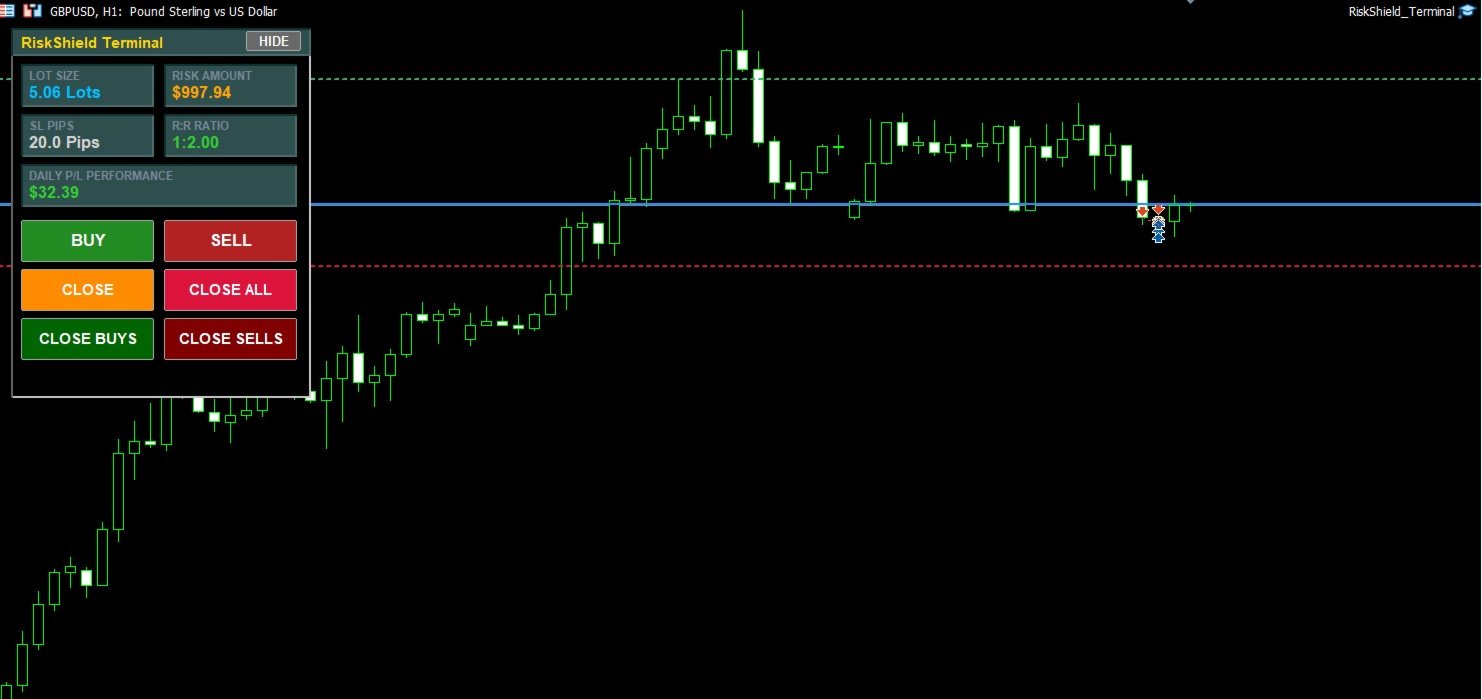
  • Quick Execution Panel: Execute Market Buy/Sell orders instantly, or close current/all/buy/sells with a single click right from the UI.

📊 Interactive Chart Lines & Real-time Calculation Guide

When RiskShield Terminal is attached to your chart, it automatically draws 3 horizontal lines to give you full visual control over your trades. Here is what each line represents and what happens when you drag it:

Chart Line Behavior & What Happens When You Drag It
Entry Line
■ Dodger Blue (Solid)
Represents the planned entry/reference price.
When dragged: The dashboard instantly recalculates the distance, lot size, and Risk-to-Reward (R:R) ratio in real-time based on the new price level.
Stop Loss (SL) Line
■ Crimson (Dashed)
Defines your risk protection boundary.
When dragged closer/further: The EA instantly recalculates your Lot Size to strictly match your configured Risk % or Risk $ amount. It also updates the SL Pips and R:R Ratio cards on the dashboard instantly.
Take Profit (TP) Line
■ Medium Sea Green (Dashed)
Defines your target profit level.
When dragged: Dynamically recalculates and updates the Risk-to-Reward (R:R) Ratio card on the dashboard in real-time (highlighted with color codes: Green for >= 1.5, Gold for >= 1.0, Red for < 1.0).

🕹️ Dashboard Buttons & Controls Guide

RiskShield Terminal features a modern, clean interactive control panel. Here is what each button does:

Button Name Function & Description
HIDE / SHOW
(Top Right of Panel)
Collapses or expands the dashboard and chart lines instantly to keep your workspace clean.
BUY Executes an instant market BUY order using the automatically calculated safe lot size, with your current chart Stop Loss and Take Profit lines attached.
SELL Executes an instant market SELL order using the automatically calculated safe lot size, with your current chart Stop Loss and Take Profit lines attached.
CLOSE Closes all open positions belonging to this EA on the current chart symbol only.
CLOSE ALL Emergency button to close all open positions across all symbols managed by the EA.
CLOSE BUYS Closes all active BUY positions on the current symbol instantly.
CLOSE SELLS Closes all active SELL positions on the current symbol instantly.

⚙️ Input Parameters Guide

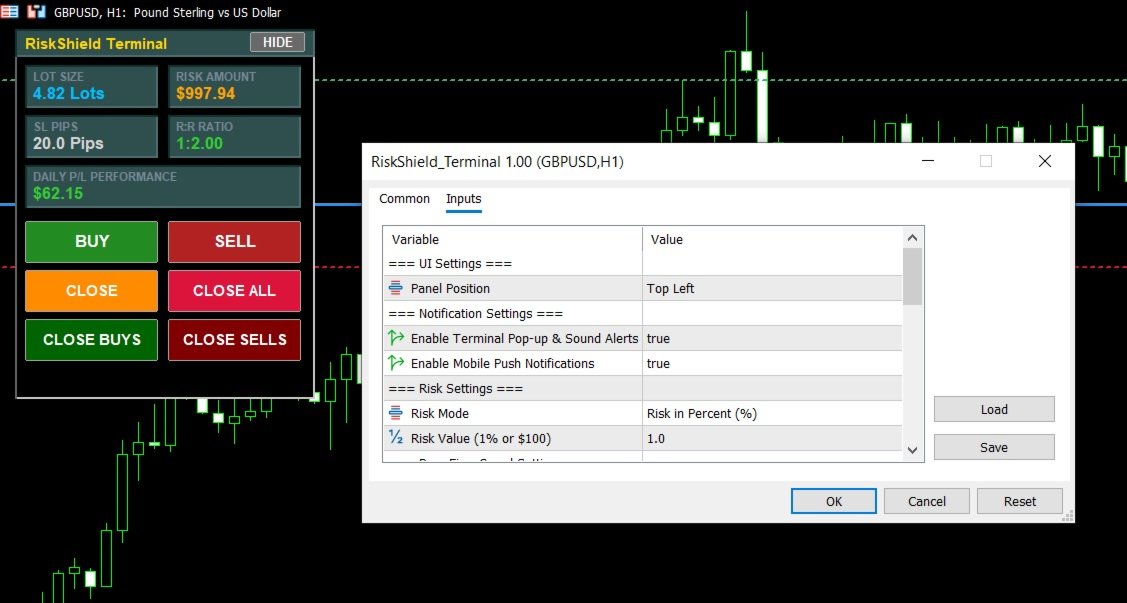
Here is a complete breakdown of all configurable parameters in RiskShield Terminal:

Group / Parameter Description & Options
🎨 UI Settings
Panel Position
InpPanelCorner
Choose dashboard location on the chart.
Options: Top-Left or Top-Right.
🔔 Notification Settings
Terminal Pop-up Alerts
InpUsePopupAlerts
Enable or disable terminal audio and pop-up alerts for trades and guard triggers.
Options: true / false.
Mobile Push Notifications
InpUsePushAlerts
Send instant push notifications to your mobile MetaTrader app.
Options: true / false.
💰 Risk Settings
Risk Mode
InpRiskType
Select how lot size is calculated.
Options: Risk in Percent (%) or Risk in Fixed Money ($).
Risk Value
InpRiskValue
The numeric value for risk (e.g., 1.0 for 1% risk or 100.0 for $100).
🛡️ Prop Firm Guard Settings
Enable Prop Guard
InpUsePropGuard
Master switch for daily drawdown and profit target protection.
Options: true / false.
Max Daily Loss ($)
InpMaxDailyLoss
Hard daily loss limit in dollars. Blocks new trades once reached.
Daily Profit Target ($)
InpDailyTarget
Daily profit target lock to secure winnings and stop trading for the day.
Close All Exposure
InpGuardCloseAllAccountExposure
If true, triggers full account position and pending order closure when guard limit is hit.
Options: true / false.
⚖️ Auto Breakeven Settings
Enable Breakeven
InpUseBreakEven
Automatically move SL to entry when in profit.
Options: true / false.
BE Trigger (Pips)
InpBreakEvenTrigger
Profit distance in pips required to trigger Breakeven (e.g., 15.0 pips).
BE Offset (Pips)
InpBreakEvenOffset
Extra profit pips locked above entry price to cover spread/commission (e.g., 2.0 pips).
📈 Trailing Stop Settings
Enable Trailing Stop
InpUseTrailing
Activate dynamic trailing stop.
Options: true / false.
Trailing Start (Pips)
InpTrailingStart
Profit distance required to start trailing (e.g., 20.0 pips).
Trailing Distance (Pips)
InpTrailingDistance
Distance maintained behind current price (e.g., 15.0 pips).
Trailing Step (Pips)
InpTrailingStep
Minimum price movement required to update SL order (e.g., 3.0 pips).
✂️ Partial Take Profit Settings
Enable Partial TP
InpUsePartialTP
Enable automated partial lot closures (Hedging accounts required).
Options: true / false.
Partial TP Trigger (Pips)
InpProfessionalTP1Pips
Profit distance in pips to trigger partial close (e.g., 20.0 pips).
Partial Close Pct (%)
InpPartialClosePct
Percentage of the position lot size to close (e.g., 50.0 for 50%).
Manage Only Current Symbol
InpManageOnlyCurrentSymbol
If true, manages trades on the current chart symbol only.
Options: true / false.

RiskShield Terminal — Secure your capital, conquer prop firm challenges, and trade with confidence.
Altri dall’autore
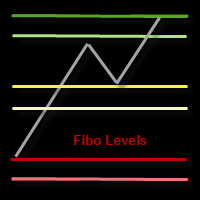
This indicator draws the Fibonacci -38.2, -17, 38.2, 61.8, 117, 138 levels for the last closed H1, H4, Daily, Weekly and Monthly candle. Features Automatic display of the most important Fibonacci levels. Parameters TimeFrame: Choose which timeframe you want Fibonacci levels to be based on. SetLabels: Visible/invisible Fibonacci level labels. Labels Position : Position of Fibonacci level labels (Right - Left - Middle). FontSize: Font size of Fibonacci level labels. c38: Color of level 38.2%.
It is a demo version of Advanced Arrow indicator It works only on GBPJPY but the full version works on all currency pairs. Features Simply it gives you entry point ,SL line and 4 TP lines or less. Once SL-TP lines are shown with the arrow, they remains as they are until signal change. It is historical indicator. No Repaint. Indicator parameters Indicator Version : choose V5 or V6. TP 1 Line color : TP1 color. TP 2 Line color : TP2 color. TP 3 Line color : TP3 color. TP 4 Line color : TP4 colo
FREE
FiboRecDemo
Alfred Kamal
4 (1)
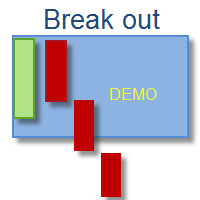
This indicator is Demo version of FiboRec and works only on EURUSD This indicator depends on Fibonacci lines but there are secret lines I used. By using FiboRec indicator you will be able to know a lot of important information in the market such as: Features You can avoid entry during market turbulence. You can enter orders in general trend only. You will know if the trend is strong or weak. Signal Types and Frame used You can use this indicator just on H1 frame. Enter buy order in case Candle
FREE
This is Demo Version of PipsFactoryMonthly This indicator depends on High and Low price of Currency in last Month and then i made some secret equations to draw 10 lines. Features You will know what exactly price you should enter the market. You will know when to be out of market. You will know you what should you do in market: Buy Sell Take profit and there are 3 levels to take your profit Support Resistance Risk to buy Risk to Sell Signal Types and Timeframe Used You can use this indicator ju
FREE
This is Demo version of PipsFactoryWeekly This indicator depends on High and Low price of Currency in last Week and then i made some secret equations to draw 10 lines. Features: You will know what exactly price you should enter the market . You will know when to be out of market. You will know you what should you do in market: Buy Sell Take profit and there are 3 levels to take your profit Support Resistance Risk to buy Risk to Sell Signal Types and Frame used: You can use this indicator just
FREE
This is a Demo version of PipsFactoryInd it is works only NZD/USD but full version is works on all currency pair. This indicator is a collection of three indicators, it is 3 in 1: PipsFactoryDaily Click Here PipsFactoryWeekly Click Here PipsFactoryMonthly Click Here This indicator depends on High and Low price of currency in the (Last day / Last week / Last Month) depends on user input, and then I made some secret equations to draw 10 lines. Features: You will know what exactly price you shoul
FREE
PipsFactoryDailyDemo
Alfred Kamal
4.5 (2)
This is Demo Version of PipsFactoryDaily This indicator depends on High and Low price of currency in the last day, and then I made some secret equations to draw 10 lines. Features You will know what exactly price you should enter the market. You will know when to be out of market. You will know what you should do in market: Buy Sell Take profit, and there are three levels to take your profit Support Resistance Risk to buy Risk to sell Signal Types and Timeframes Used You can use this indicator
FREE
Features It is a demo version of All inOne indicator It works only on EURUSD, but the full version works on all currency pairs. All in One indicator is a simple indicator, it makes you know about 8 indicators in all timeframes simultaneously at a single glance. Stochastic RSI Moving Average (MA) Parabolic SAR ADX MACD CCI Last Candle (Candle) In all timeframes (M1, M5, M15, M30, H1, H4, D1, MN) at the same time. Parameters Stochastic: PercentK : Period of the %K line. PercentD : Period of the %
FREE
FiboRec
Alfred Kamal
This indicator depends on Fibonacci lines but there is a secret lines i used them, by using FiboRec indicator you will be able to know a lot of important information in the market such as: Features You can avoid entry during market turbulence. You can enter orders in general trend only. You will know if the trend is strong or weak. Signal Types and Frame used You can use this indicator just on H1 frame. Enter buy order in case Candle break out the square area and closed over it, at least 20 pi
This indicator depends on High and Low price of Currency in last Week and then i made some secret equations to draw 10 lines. Features: You will know what exactly price you should enter the market . You will know when to be out of market. You will know you what should you do in market: Buy Sell Take profit and there are 3 levels to take your profit Support Resistance Risk to buy Risk to Sell Signal Types and Frame used: You can use this indicator just on H4 frame and you have to download the h
This indicator depends on High and Low price of Currency in last Month and then i made some secret equations to draw 10 lines. Features You will know what exactly price you should enter the market . You will know when to be out of market. You will know you what should you do in market: Buy Sell Take profit and there are 3 levels to take your profit Support Resistance Risk to buy Risk to Sell Signal Types and Timeframe Used You can use this indicator just on H4 timeframe and you have to downloa
PipsFactoryDaily
Alfred Kamal
5 (1)
This indicator depends on High and Low price of currency in the last day, and then I made some secret equations to draw 10 lines. Features You will know what exactly price you should enter the market. You will know when to be out of market. You will know what you should do in market: Buy Sell Take profit, and there are three levels to take your profit Support Resistance Risk to buy Risk to sell Signal Types and Timeframes Used You can use this indicator just on (M1, M5, M15, M30, H1) timeframe
Description: This indicator is a collection of three indicators , it is 3 in 1: PipsFactoryDaily Click Here PipsFactoryWeekly Click Here PipsFactoryMonthly Click Here If you are interesting in all of them, you can save money - this collection indicator is cheaper. This indicator depends on High and Low price of currency in the (Last day / Last week / Last Month) depends on user input, and then I made some secret equations to draw 10 lines. Features: You will know what exactly price you should
Advanced Arrow
Alfred Kamal
3.9 (39)
This indicator depends on some secrets equations to draw Signals with Stop loss and maximum 4 Take profits. There is a free EA depends on this indicator as a gift when you purchase/rent it. Features Simply it gives you entry point as Ready sign (Buy / Sell) and arrow (Buy / Sell) after candle closed, also SL line and 4 TP lines or less. Once SL-TP lines are shown with the arrow, they remains as they are until signal change. It is historical indicator. No Repaint. user manual for V5 please click
All inOne
Alfred Kamal
Features All in One indicator is a simple indicator. It makes you know about eight indicators in all timeframes at just one view in the same time. Stochastic RSI Moving Average (MA) Parabolic SAR ADX MACD CCI Last Candle (Candle) in all timeframes (M1, M5, M15, M30, H1, H4, D1, MN) in the same time. Parameters Stochastic PercentK : period of the %K line. PercentD : period of the %D line. Slowing : slowing value. RSI RSIP1 : period 1 RSIP2 : period 2 Fast Moving Average MA averaging period: aver
All Pivot Points
Alfred Kamal
5 (1)
Pivot Points is used by traders to objectively determine potential support and resistance levels. Pivots can be extremely useful in Forex since many currency pairs usually fluctuate between these levels. Most of the time, price ranges between R1 and S1. Pivot points can be used by range, breakout, and trend traders. Range-bound Forex traders will enter a buy order near identified levels of support and a sell order when the pair nears resistance. But there is more one method to determine Pivot po
It is the same of Advanced Arrow indicator but shows the signal of 8 currencies pairs at the same time on 5 Timeframes without any TPs line or SL. Features You will know when exactly you should enter the market. This indicator does not repaint it's signals. Signal Types and Timeframes Used You can use this indicator on any timeframes but i recommend you to use it on H1, H4 frames. The indicator gives you four signals (Ready to Buy "RBuy", Ready to Sell "RSell", Buy, Sell). When RBuy appear you
This indicator show you the begin of the Trend by drawing (Up/Down) arrow. It works using compatibility of current fame and the next 3 frames to make it more professional and more profitable. Features:- Simply it gives you entry point as arrow (Buy / Sell) after candle closed. You can use it on time frames ( M1 , M5 , M15 , M30 ) are more profitable. You can use it on any currencies pair. It is historical indicator. No Repaint. No additional indicator needed. Easy to use. Indicator parameters:-
Filtro:
Nessuna recensione
Rispondi alla recensione