LayerPro Trade Manager Plus
- Utilità
- Versione: 4.40
- Attivazioni: 5

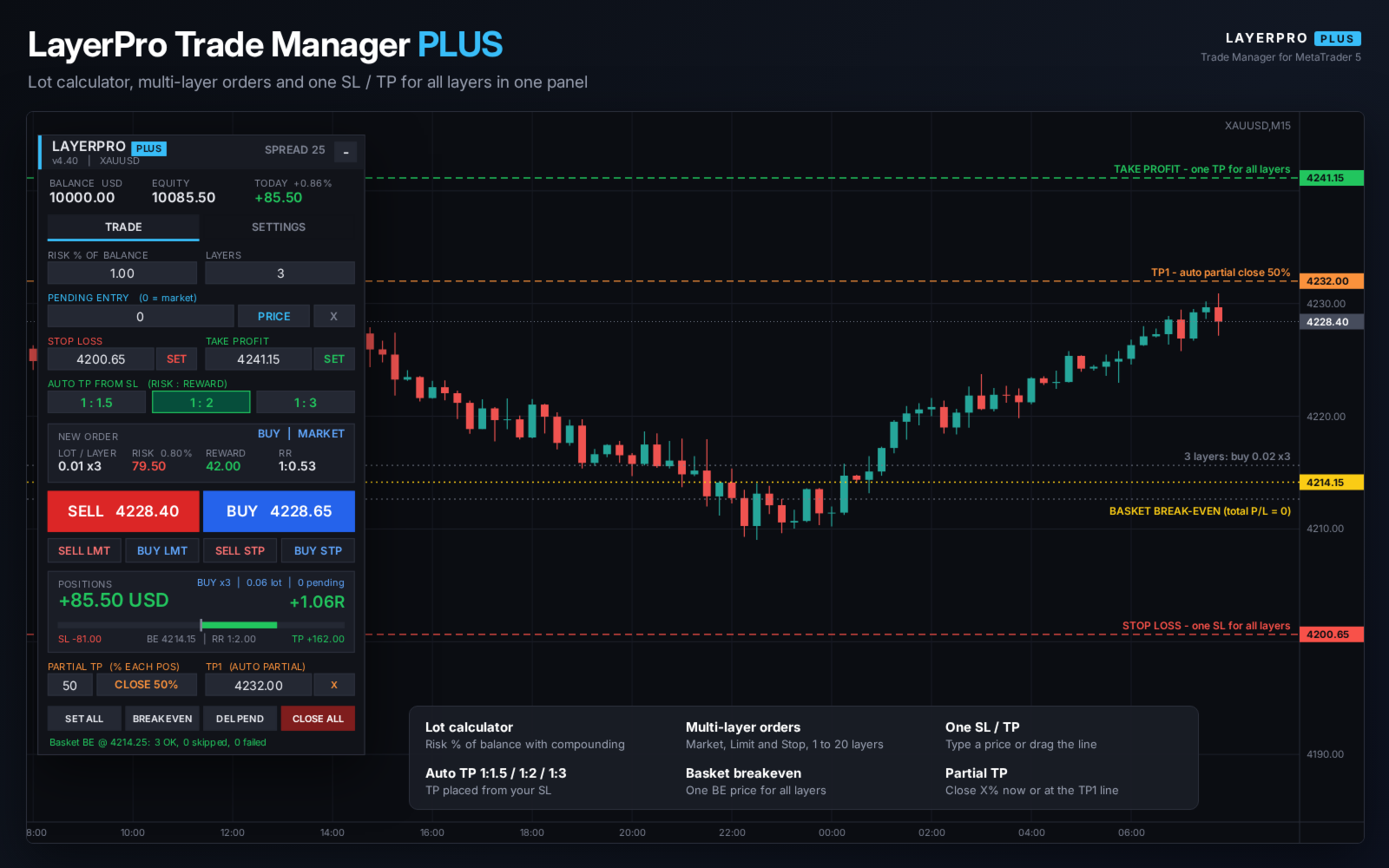
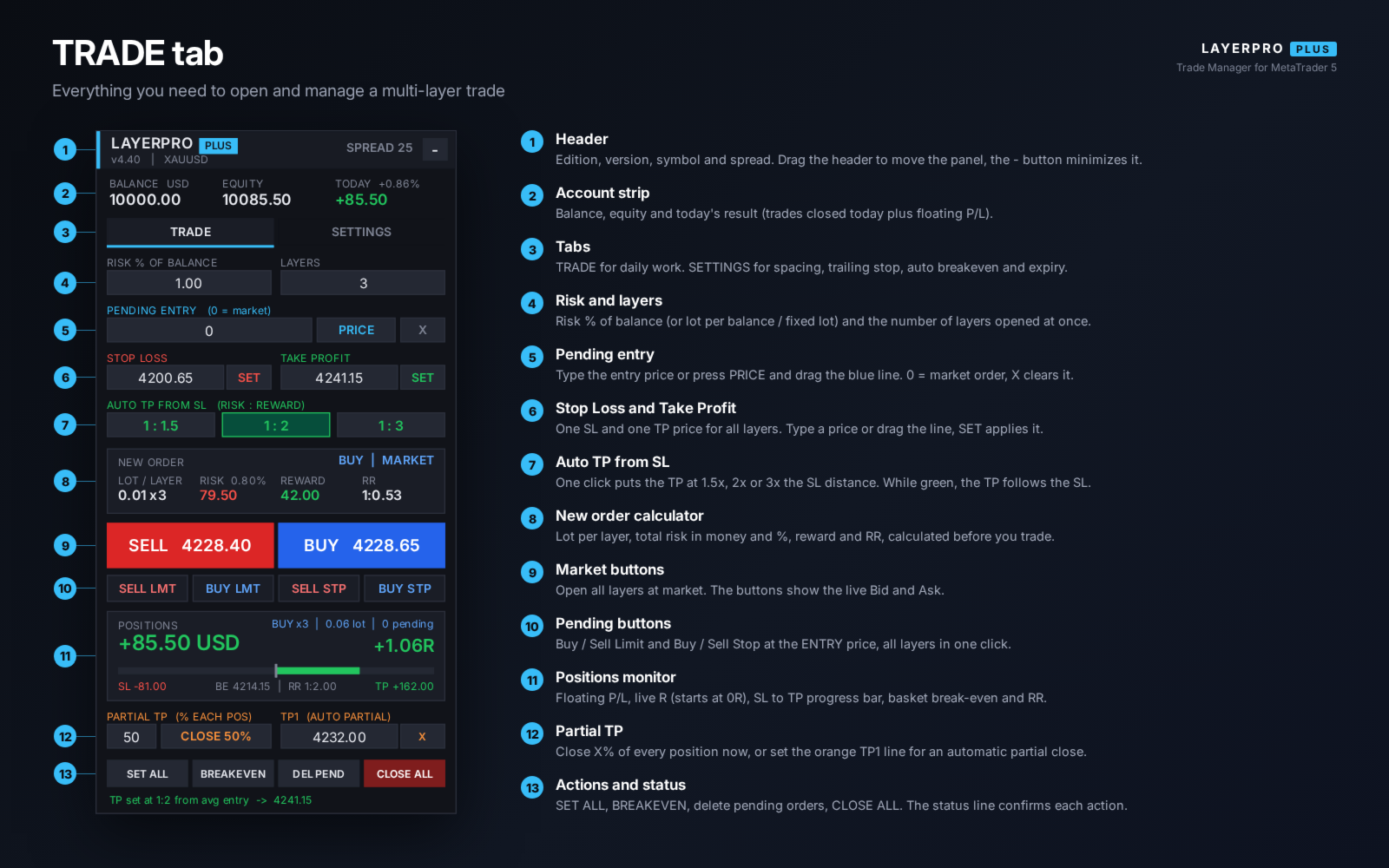
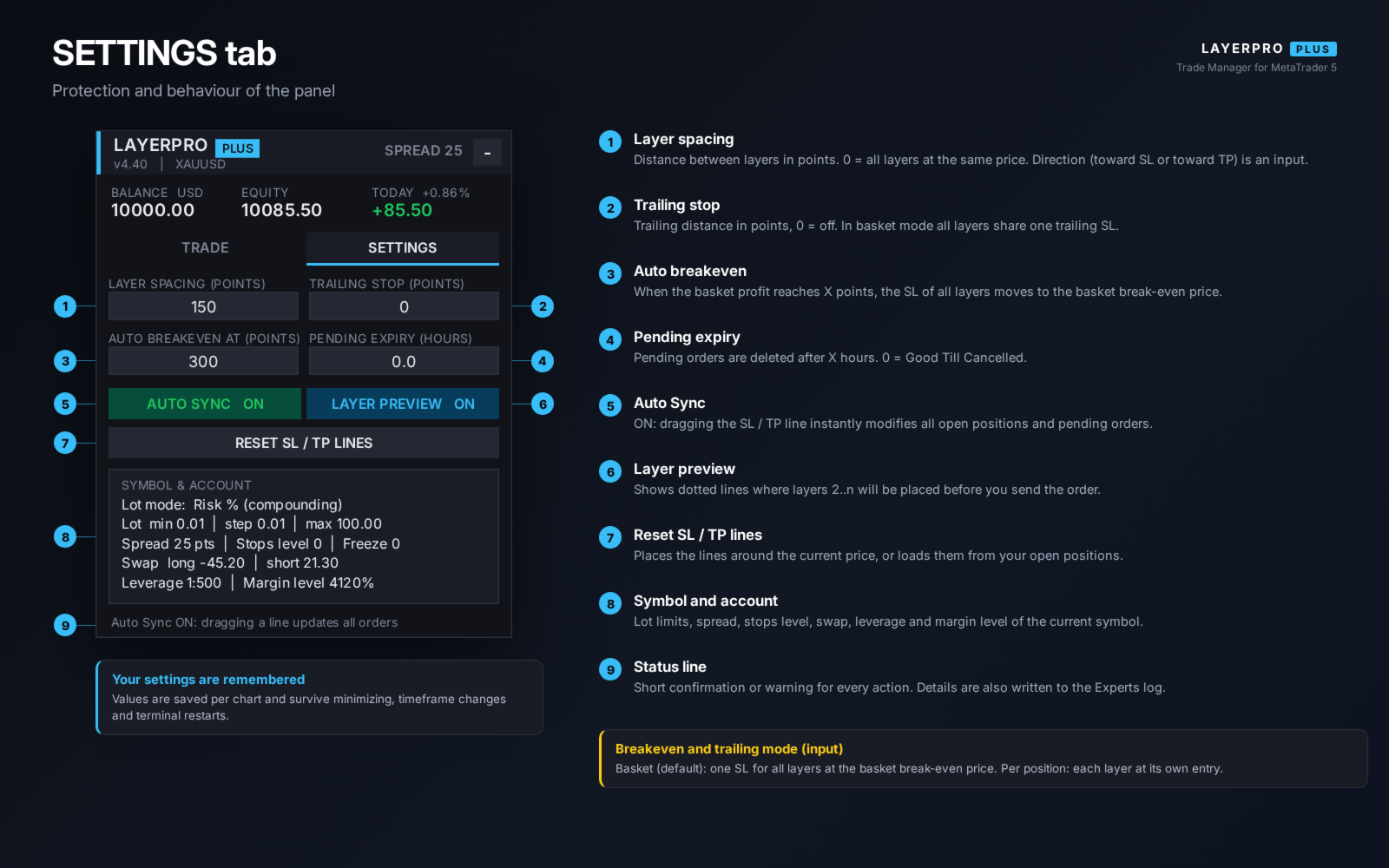
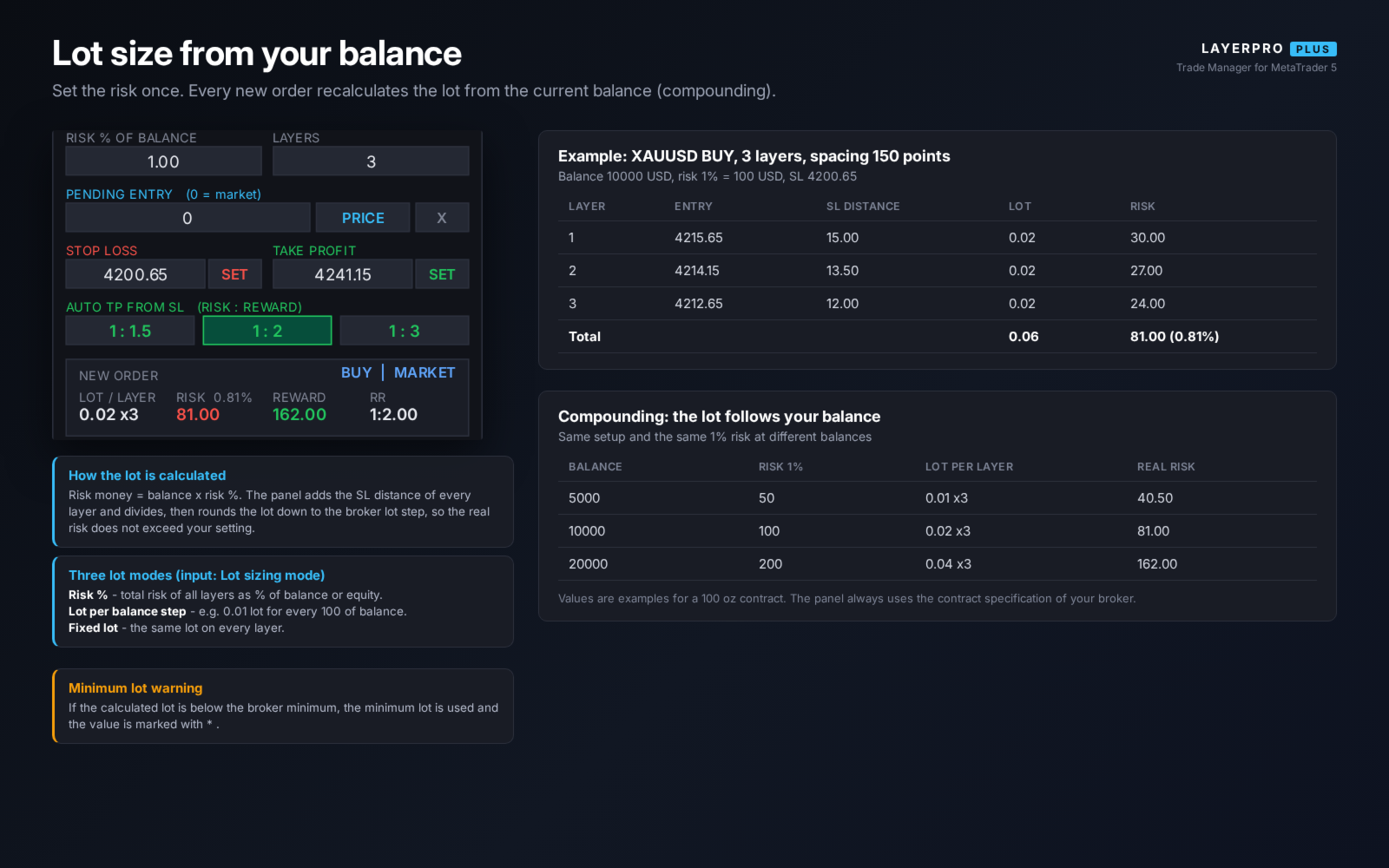
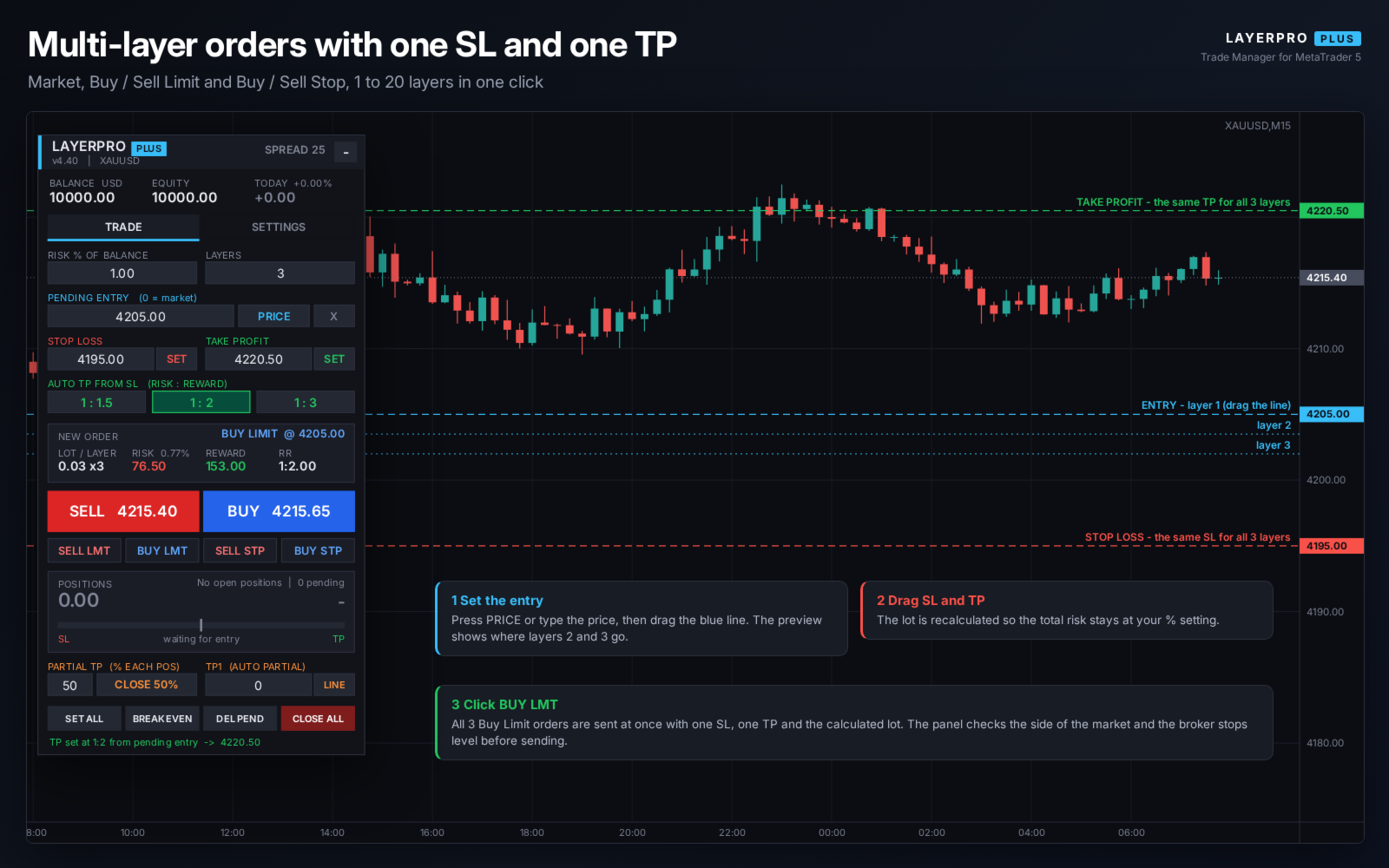
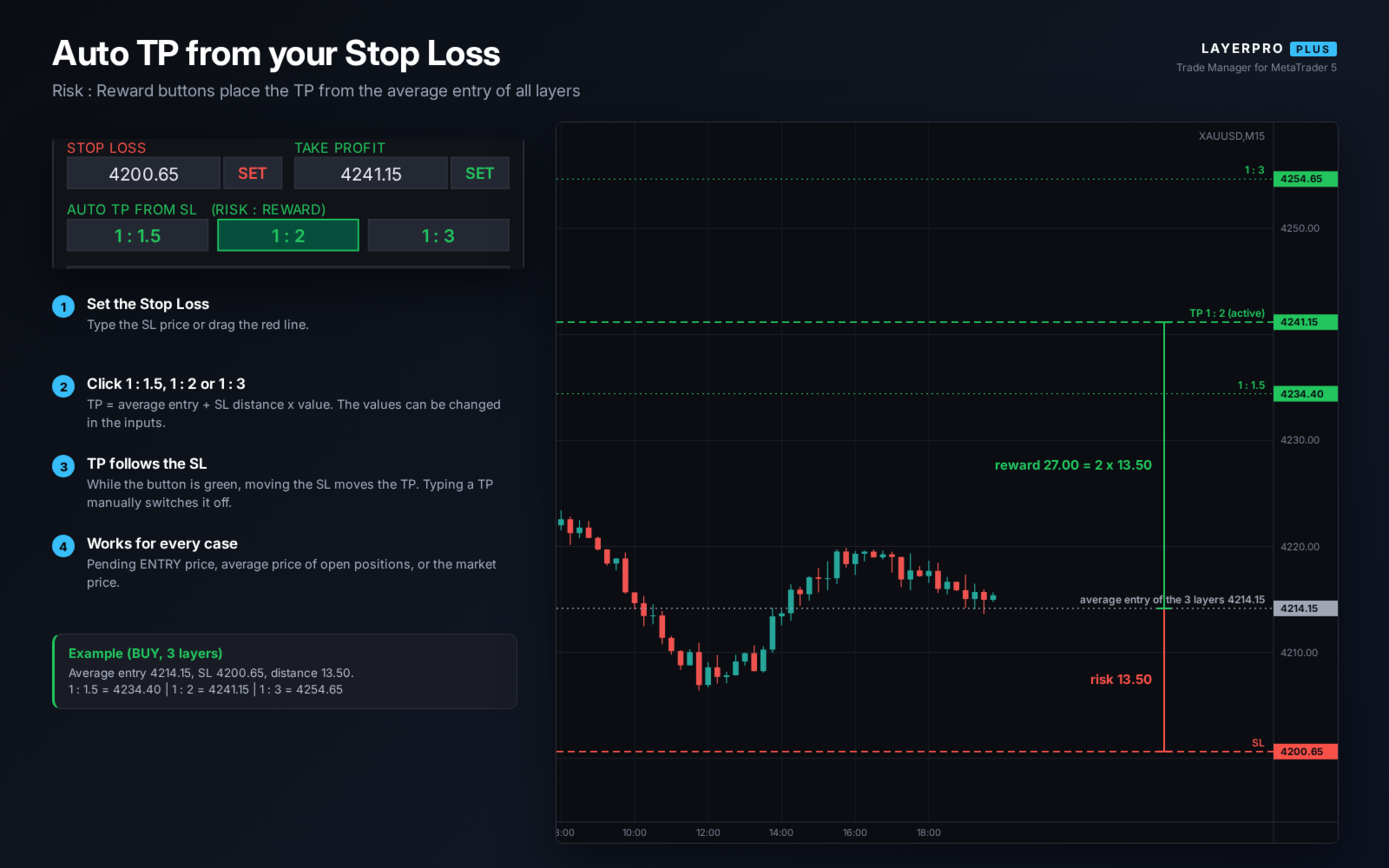
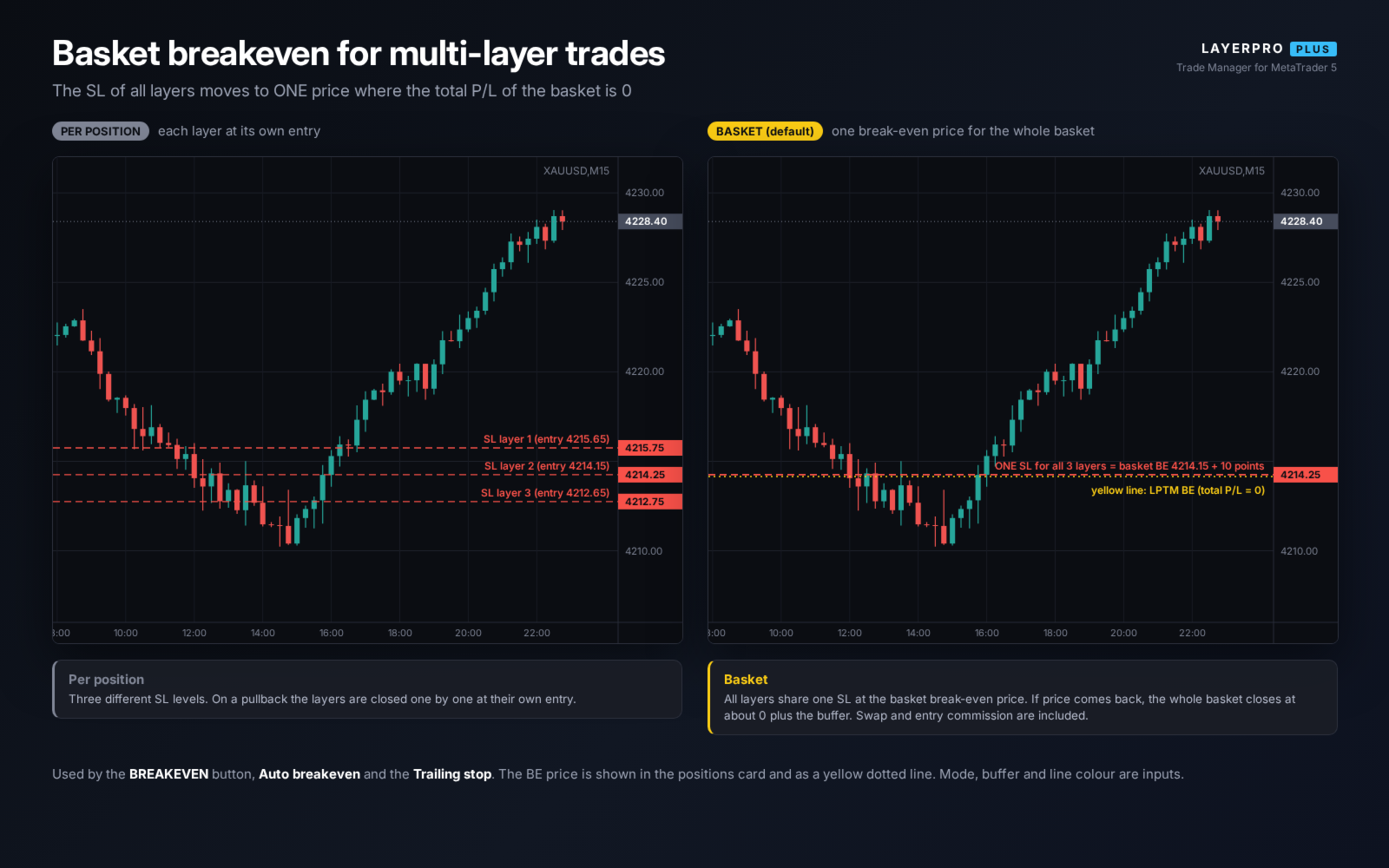
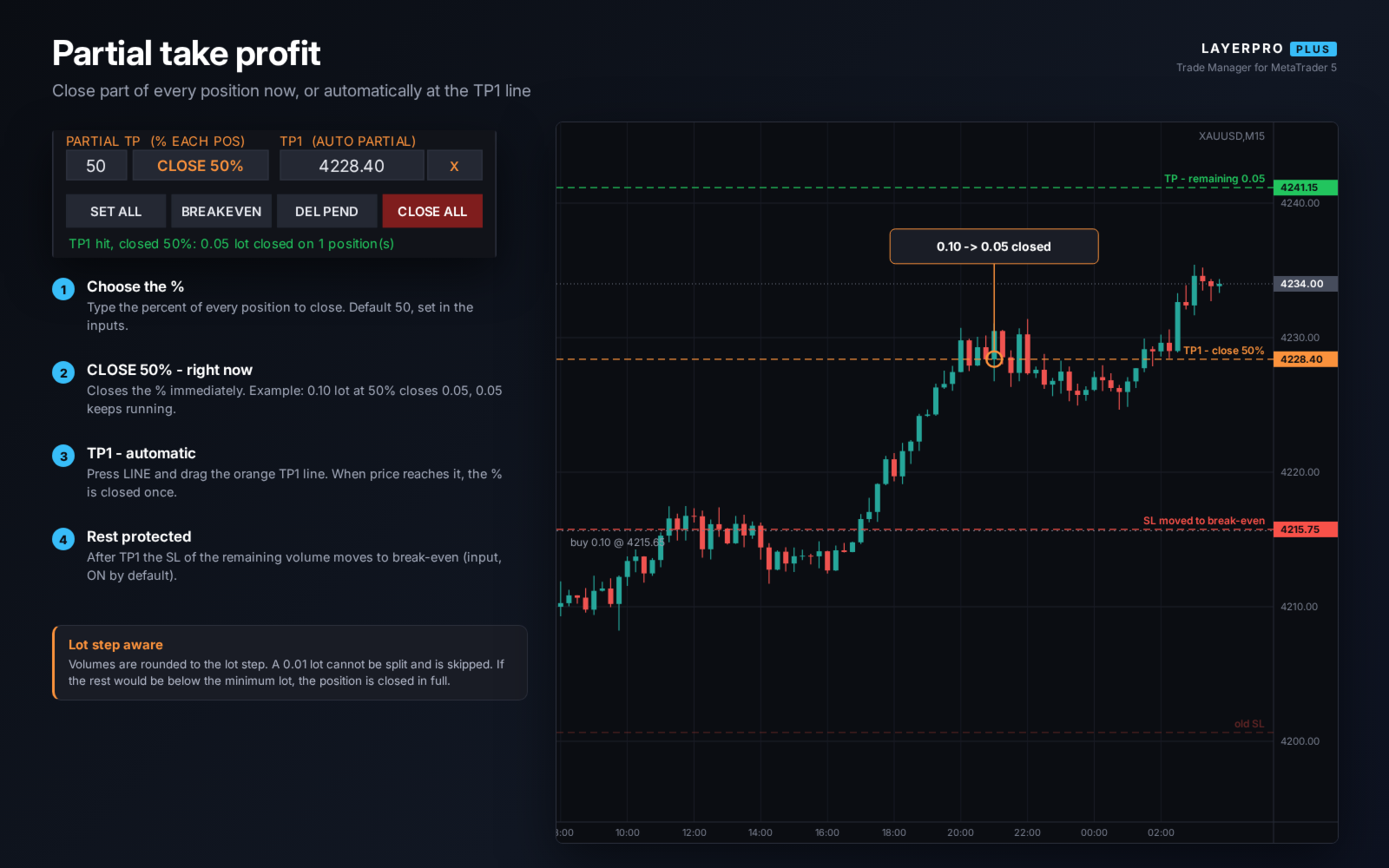
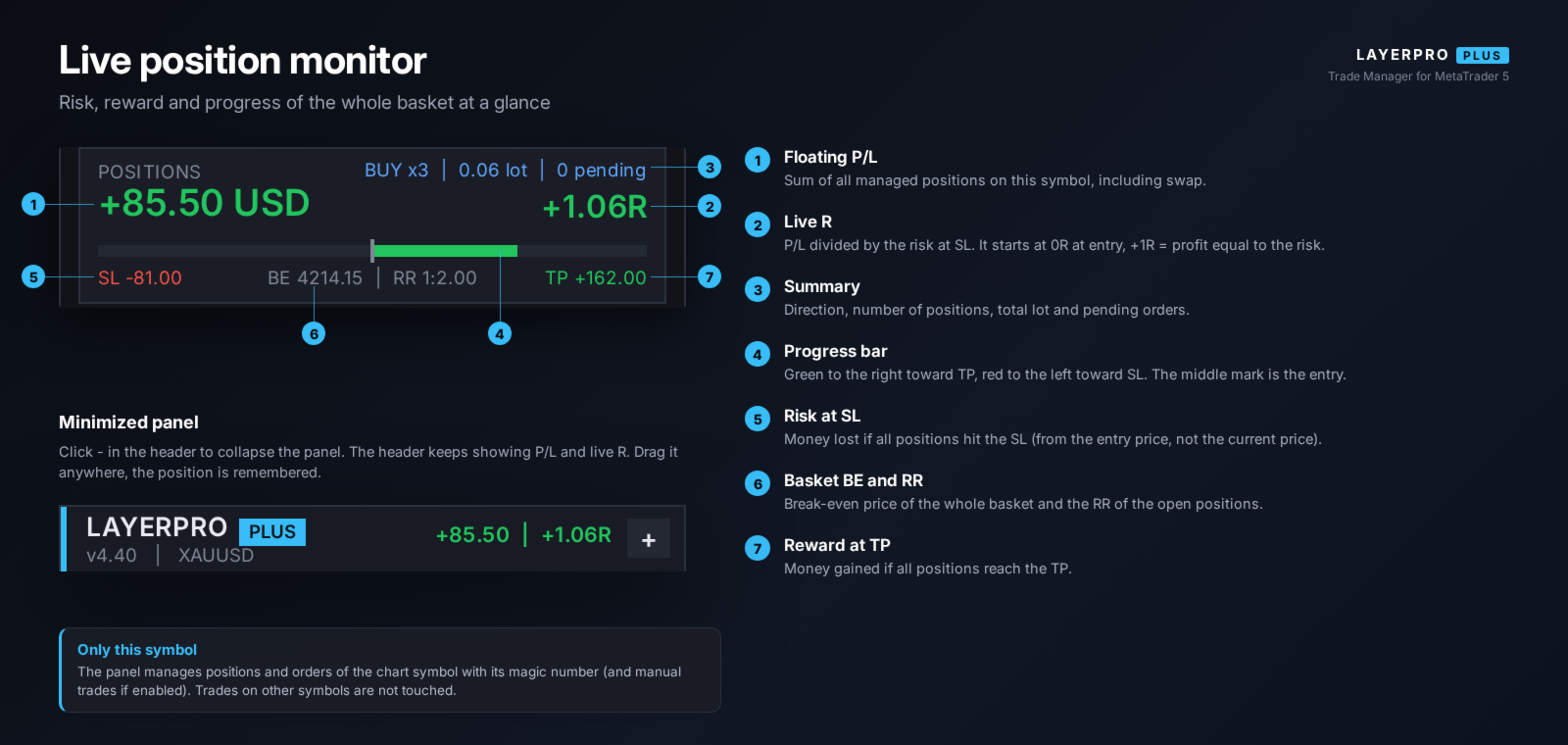
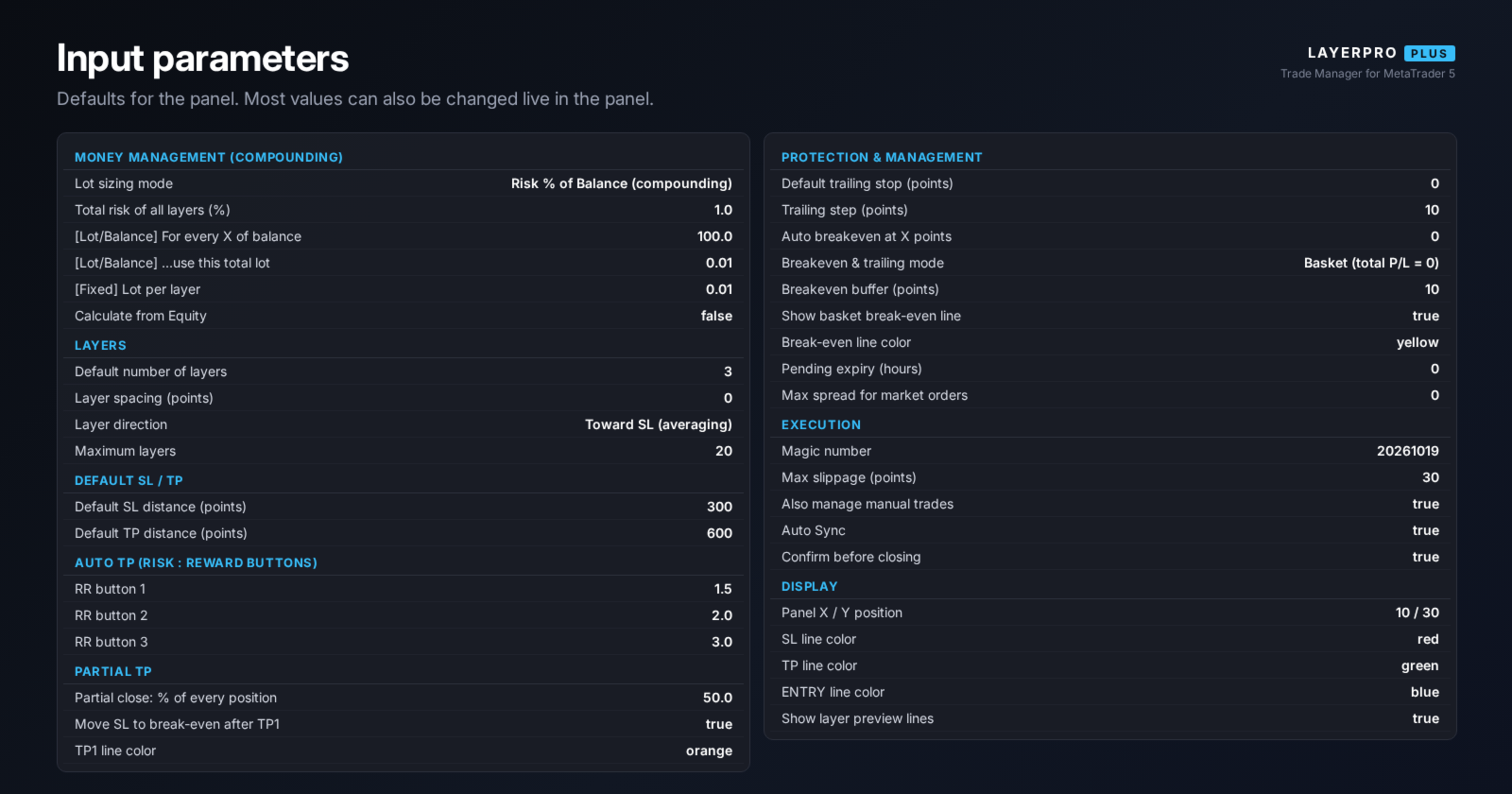
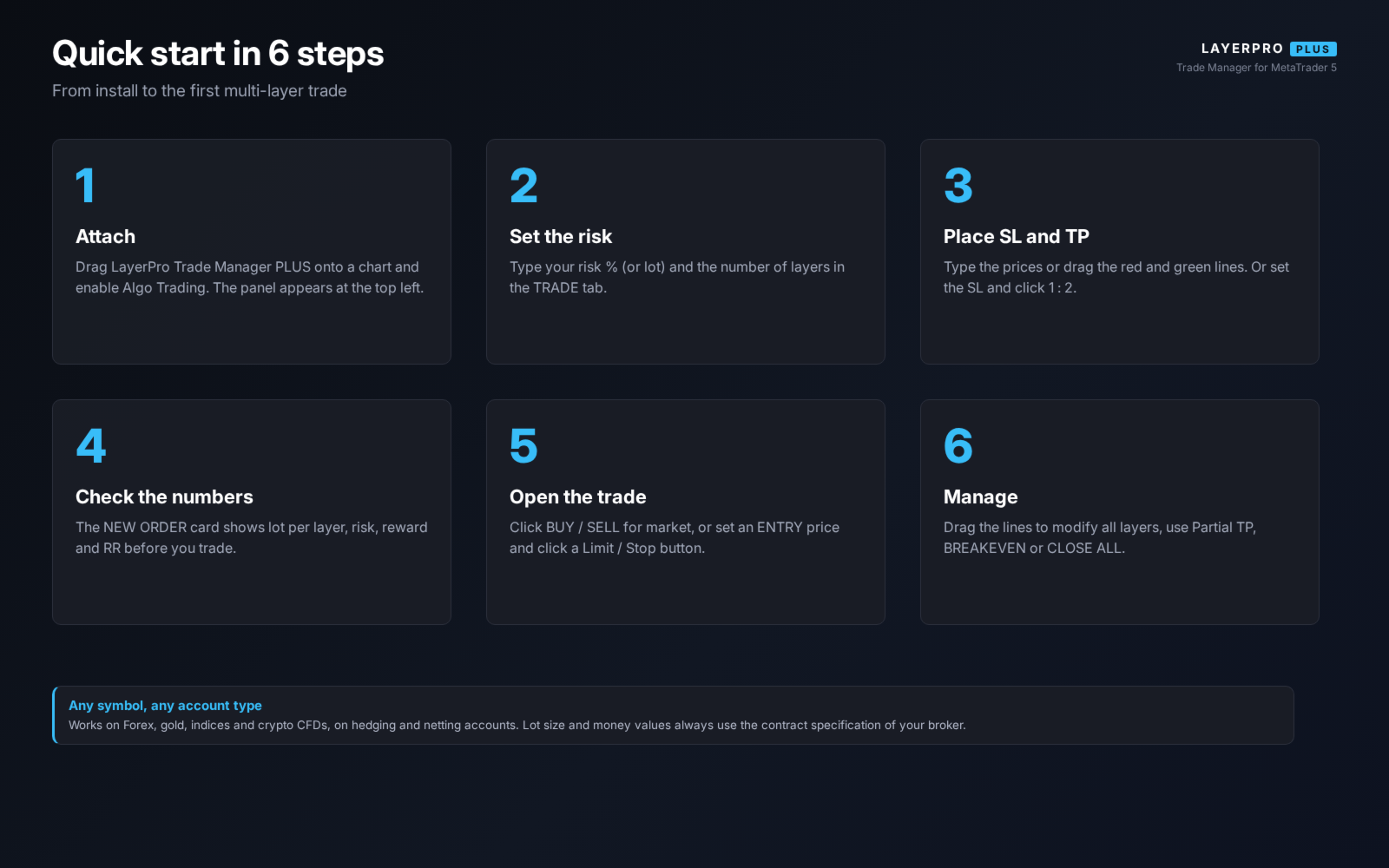
LayerPro Trade Manager Plus is a trading panel for traders who enter with several orders (layers) and want to control the risk of the whole position from one place. You set the risk once, place one Stop Loss and one Take Profit by typing a price or dragging a line, and open all layers with one click. The panel calculates the lot from your current balance, so the lot grows and shrinks with your account (compounding). After the entry, the same panel shows the floating P/L, the live R, the basket break-even price and lets you take partial profit or move the stop of all layers at once. MAIN FEATURES Lot calculator - Risk % of balance or equity: the total risk of all layers equals your setting. - Lot per balance step (for example 0.01 lot for every 100 of balance) or fixed lot. - Lots are rounded down to the broker lot step, so the real risk does not exceed your setting. - The NEW ORDER card shows lot per layer, risk in money and %, reward and RR before you trade. Multi-layer orders - 1 to 20 layers in one click: Market BUY / SELL, Buy Limit, Sell Limit, Buy Stop, Sell Stop. - Layer spacing in points, toward the SL (averaging) or toward the TP (pyramiding). - Dotted preview lines show where every layer will be placed. - Pending orders are checked against the market side and the broker stops level; optional expiry. One Stop Loss and one Take Profit for all layers - Type a price or drag the red / green line on the chart. - Auto Sync: moving a line modifies all open positions and pending orders instantly. - SET buttons for manual control when Auto Sync is off. Auto TP from SL (Risk : Reward buttons) - One click places the TP at 1.5x, 2x or 3x the SL distance (values are inputs). - The TP is calculated from the average entry of all layers: pending entry, open positions or market. - While the button is active, moving the SL also moves the TP. Basket breakeven and basket trailing stop - The SL of all layers moves to one price where the total P/L of the basket is 0 (swap and entry commission included), plus a buffer. - Used by the BREAKEVEN button, Auto breakeven and the Trailing stop. - The break-even price is shown in the panel and as a yellow dotted line on the chart. - Per position mode is also available (each layer at its own entry). Partial take profit - CLOSE X% closes the chosen percent of every position now (for example 0.10 lot at 50% closes 0.05). - TP1 line: drag the orange line; when price reaches it, the percent is closed once and the SL of the rest can move to break-even. - Volumes follow the lot step; a position that cannot be split is skipped and reported. Position monitor - Floating P/L, live R (starts at 0R at entry), progress bar from SL to TP. - Risk at SL and reward at TP calculated from the entry price. - Balance, equity and today's result in the account strip. Panel - Dark, compact design with TRADE and SETTINGS tabs. - Collapsible to a single header line that still shows P/L and live R. - Drag the header to move the panel; position, tab and values are remembered per chart. - Lines are drawn behind the panel, so the panel always stays readable. QUICK START 1. Attach LayerPro Trade Manager Plus to a chart and enable Algo Trading. 2. Enter your risk % (or lot) and the number of layers. 3. Type the SL and TP prices or drag the lines. Or set the SL and click 1 : 2. 4. Check lot, risk, reward and RR in the NEW ORDER card. 5. Click BUY / SELL, or set an ENTRY price and click a Limit / Stop button. 6. Manage the trade: drag the lines, CLOSE 50%, TP1 line, BREAKEVEN or CLOSE ALL. TRADE TAB 1. Header: edition, version, symbol, spread, minimize button. 2. Account strip: balance, equity, today's result. 3. Tabs: TRADE and SETTINGS. 4. Risk % (or lot) and number of layers. 5. Pending entry price, PRICE button (places the blue line), X (clear). 6. Stop Loss and Take Profit prices with SET buttons. 7. Auto TP from SL: 1 : 1.5, 1 : 2, 1 : 3. 8. NEW ORDER card: lot per layer, risk, reward, RR. 9. SELL and BUY at market. 10. SELL LMT, BUY LMT, SELL STP, BUY STP. 11. POSITIONS card: P/L, live R, progress bar, basket BE and RR. 12. Partial TP: percent, CLOSE X%, TP1 price and LINE button. 13. SET ALL, BREAKEVEN, DEL PEND, CLOSE ALL and the status line. SETTINGS TAB 1. Layer spacing (points). 2. Trailing stop (points). 3. Auto breakeven trigger (points). 4. Pending expiry (hours). 5. Auto Sync on / off. 6. Layer preview on / off. 7. Reset SL / TP lines. 8. Symbol and account information (lot limits, spread, stops level, swap, leverage, margin level). INPUT PARAMETERS - Money management: lot sizing mode, risk %, balance step, lot per step, fixed lot, use equity. - Layers: default layers, spacing, direction, maximum layers. - Default SL / TP distance for the RESET button. - Auto TP: values of the three Risk : Reward buttons. - Partial TP: default percent, move SL to break-even after TP1, TP1 line colour. - Protection: trailing stop, trailing step, auto breakeven, breakeven mode (basket / per position), breakeven buffer, break-even line, pending expiry, maximum spread for market orders. - Execution: magic number, slippage, manage manual trades, Auto Sync, confirmation before closing. - Display: panel position, line colours, layer preview. IMPORTANT NOTES - The panel works on the symbol of its chart. It manages positions and orders with its magic number and, if enabled, manual trades (magic 0) of that symbol. Trades on other symbols are not touched. - Works on hedging and netting accounts, on Forex, metals, indices and other CFDs. Money values use the contract specification of your broker. - Automatic functions (trailing stop, auto breakeven, TP1 partial close) work while the terminal is running with the panel attached. - This is a trade management tool. It does not open trades by itself and does not predict the market. - In the Strategy Tester (Free Demo) MetaTrader does not send chart click events to Expert Advisors, so the demo shows the panel and its calculations, but buttons and line dragging respond only on a live or demo account.