Nexum Oraculum Telegram Signal Reader
- Experts
- Versione: 1.19
- Attivazioni: 5

Nexum Oraculum: forward a Telegram signal to your own bot and see it on your MT5 chart.
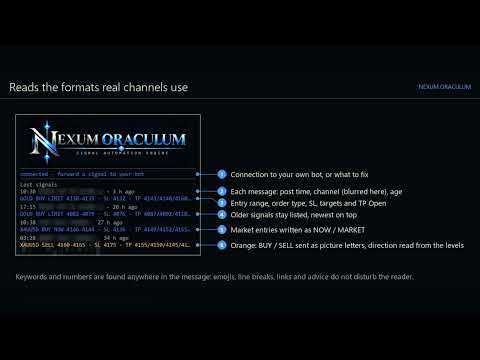
Signal channels post trades as text. Nexum Oraculum reads the signals you forward (or type) to your own Telegram bot, shows each one on its panel, draws its entry, stop and targets on the chart, and alerts you. It reads the formats real channels use, without you retyping a single price.
WHAT IT READS
- Symbol: GOLD, XAUUSD, XAU/USD, silver, BTC, ETH, currency pairs and indices (US30, NAS100, GER40 / DAX, US500, UK100, JP225), matched to your broker's symbol names
- Direction and type: BUY / SELL, LIMIT / STOP, NOW / MARKET
- Entry or entry range (4190-4195, 4176/4178, @4194-4184), a second entry (MORE BUY 4183)
- Stop loss and up to ten targets in the usual spellings (TP1:, TP 1:, TP., TP Open)
- Keywords and numbers anywhere in the message: emojis, line breaks, greetings, links and advice do not disturb it
- When a channel writes BUY / SELL as picture letters, the direction is read from the levels and clearly flagged
ON THE CHART
- Panel with the connection state and the last four messages with channel, age and how each was read
- The newest signal's entry, stop and targets as lines with labels at the right edge; the price scale shows them all
- Alert window and optional push notification to your phone for every signal
- Click the logo to fold the panel
WITH NEXUM PRAEMIUM
Nexum Praemium (trade manager, separate product) turns each signal into a planned trade on the chart of that symbol: sized from your risk, split over up to three targets, market or pending chosen by price, old and already-passed signals refused. Nothing is sent until you confirm with two clicks.
SETUP (ONCE)
- Create a bot with @BotFather in Telegram and copy its token
- Tools - Options - Expert Advisors: allow WebRequest for https://api.telegram.org
- Attach Nexum Oraculum to a chart of its own and paste the token
- Open your bot and press Start: it pairs with your chat only
PRIVACY
- Reads only your own bot, only messages from your own chat
- The token stays in MT5 on your computer; only a fingerprint of it is stored
- Places no orders
A bot can only read chats it is in, so Oraculum reads what you forward to it; it does not read channels by itself. Designed on dark charts; light chart schemes are supported too.
FREE DEMO
Telegram cannot be reached from the Strategy Tester, so there Oraculum plays a demo: with Visualization on, a sample message written the way signal channels write them arrives every 8 bars (ranges, NOW, limits with TP Open, a second entry, picture-letter direction, an update that is not a signal). Each one is read by the same reader, built around the replayed price of any symbol, and shown on the panel and as lines.
NEXUM · MARKET INTELLIGENCE SYSTEMS
Tools for discretionary traders on MetaTrader 5. Nexum Veritas (market structure and setups), Nexum Praemium (trade planning and management) and Nexum Oraculum (Telegram signal reading) work alone or together. None of them trades on its own.
Corrections and improvements are delivered as free updates to every buyer. Send any signal format that is not read yet in the product comments and it will be added in an update.