AlphaSynth Step Specialist MT5
- Indicatori
-
Bashirah Rogers
 AlphaSynth Tech specializes in creating high-performance algorithmic tools, custom indicators, and risk-management software for the MetaTrader 5 platform.
 - Versione: 1.0
- Attivazioni: 10
The step-by-step price grid architecture of the Step Index contract creates a highly unique, algorithmic trading environment. Standard technical analysis indicators built for traditional currencies heavily fail on this instrument because they are crushed by rapid whipsaws and false breakout traps during quiet, sideways market phases.
The AlphaSynth Step Specialist MT5 provides a professional, mechanical alternative. Built exclusively for MetaTrader 5, this manual charting framework isolates real institutional momentum shifts on the price grid by executing a multi-layered mathematical confirmation matrix on every closed candle bar.
THE ENGINE PROFILE: 100% ZERO-REPAINT ASSURANCE
This framework runs on complete data transparency. Every algorithmic calculation loop executes strictly on the absolute close of the candlestick. When an execution arrow prints at the opening tick of a brand-new bar, it locks into the chart database permanently. The software will never shift positions, disappear, or alter its historical performance. The backtest data you observe inside your native MT5 Strategy Tester matches live brokerage environment execution perfectly.
THE 19-POINT GRID EVALUATION MATRIX
Instead of using lagging retail indicators, the Step Specialist audits 19 independent price mechanics simultaneously before a directional setup is drawn on your terminal screen:
- GRID TREND FILTERING (5 Factors): Evaluates structural price containment over custom exponential moving average stacks, slow EMA directional vector slope, live price interaction against the fast EMA baseline, channel deviation relative to the Bollinger Bands median, and structural ADX trend intensity thresholds with +/-DI corridor confirmation.
- MOMENTUM INSULATION (5 Factors): Evaluates Relative Strength Index boundary containment, MACD histogram directional expansion velocity, Stochastic K/D overbought/oversold momentum crossovers, Commodity Channel Index velocity, and strict Awesome Oscillator balance tracking alongside a specialized 5-candle micro-momentum index.
- PRICE VELOCITY EXTRACTION (5 Factors): Scans 3-candle structural bias, last-candle micro closure paths, progressive higher-low/lower-high vector mechanics, and strict candlestick body close percentage placement.
- CONSOLIDATION WHIPSAW SHIELDS (4 Factors): Measures systemic data efficiency via the Kaufman Ratio, maps structural trend durability using Linear Regression R-Squared calculations, isolates flat sideways ranges via a specialized Choppiness Index value, and tracks price distance expansion parameters away from the slow EMA line.
AUTOMATED RISK GATES AND HORIZON DISCIPLINE
To protect retail accounts from emotional overtrading and market noise, the software features strict structural gates hardcoded directly into the calculation loops:
1. MULTI-TIMEFRAME CONSOLIDATION FILTER
The system eliminates minor market whipsaws by ensuring that lower-timeframe scalp setups strictly align with the broader structural trend. When loaded on M1, an internal bypass loop cross-checks a higher-timeframe trend gate (M5 by default) to completely suppress conflicting arrows, protecting your capital from sideways market noise.
2. HARDCODED ENTRY QUOTAS
The software enforces automatic risk discipline by limiting entry markers to a maximum of 2 confirmed signals per server clock hour. Once this quota is hit, system alerts freeze until the next clock hour begins, forcing capital preservation hands-free.
COMPLETE PARAMETER CUSTOMIZATION: HOW TO INCREASE TRADE FREQUENCY
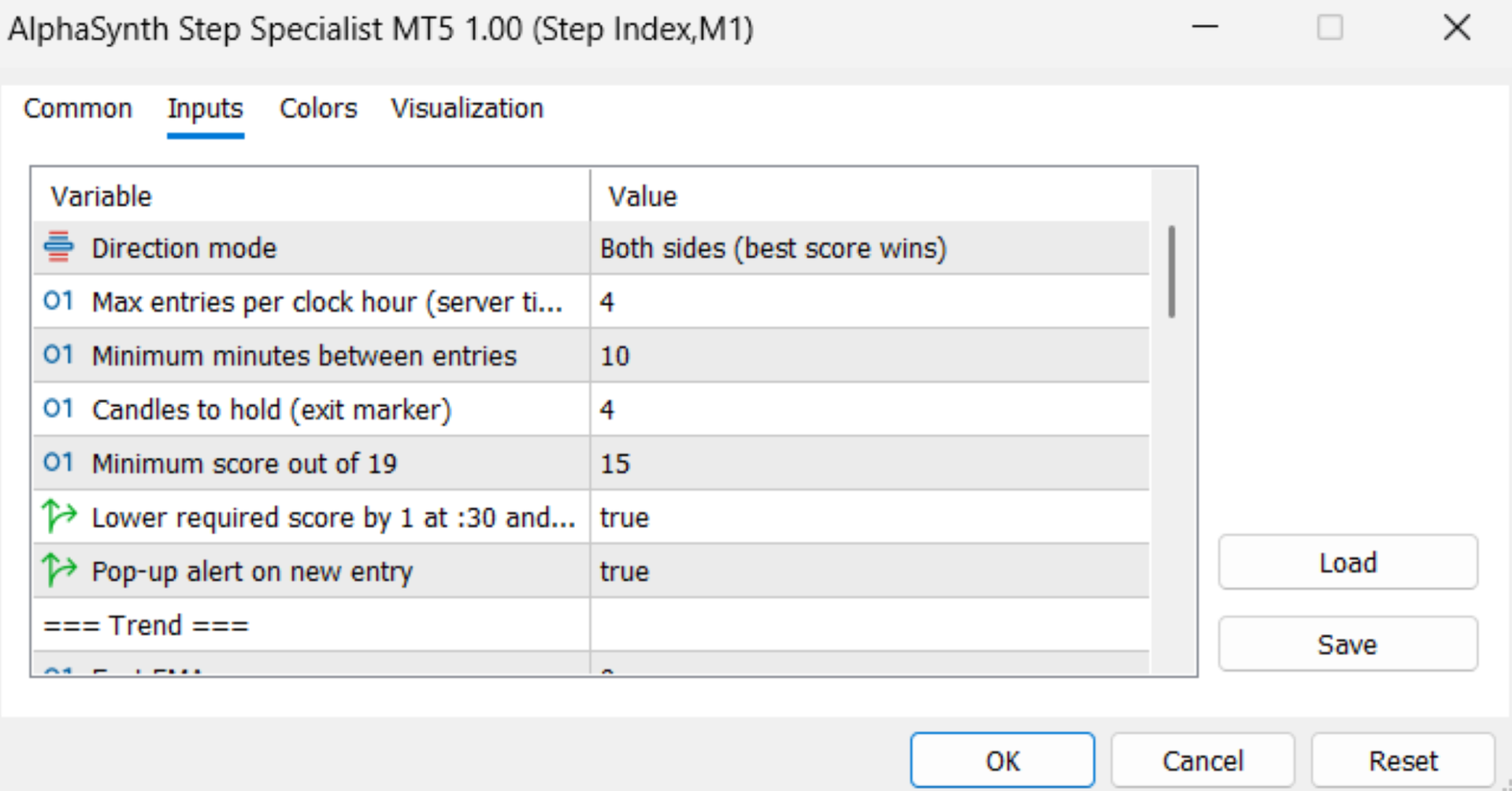
While the software features optimal default parameters for strict risk control, the system is fully customizable to fit your personal trading style. If you want to bypass the default 2 trades per hour restriction and get significantly more trade setups, you can change the parameters inside your MetaTrader 5 Inputs window:
- To Increase Hourly Trades: Double-click the input variable labeled InpMaxPerHour (Default: 2) and change it to a higher threshold (such as 4, 5, or more). This instantly unlocks the automated lock function to print more signals per hour.
- To Decrease Minutes Gaps Between Entry Signals: Double-click the input variable labeled InpMinMinsBetweenTrades (Default: 20) and change it to a smaller value (such as 5 or 10) to allow consecutive trades to execute closer together.
- To Adjust Strategy Strictness: Lower the minimum confirmation score (Default: 15 out of 19 points) to 13 or 14 to allow faster, early-stage trend runs, or raise it to 16 or 17 for highly selective setups.
- To Customize Profit Targets: Adjust the InpHoldCandles duration variable to lock in your gains earlier or let your run positions ride across longer market cycles.
Note: We highly recommend verifying your custom configurations inside the Free Strategy Tester Demo first to view your updated win-rate metrics before modifying live parameters.
REAL-TIME HISTORICAL METRICS PANEL
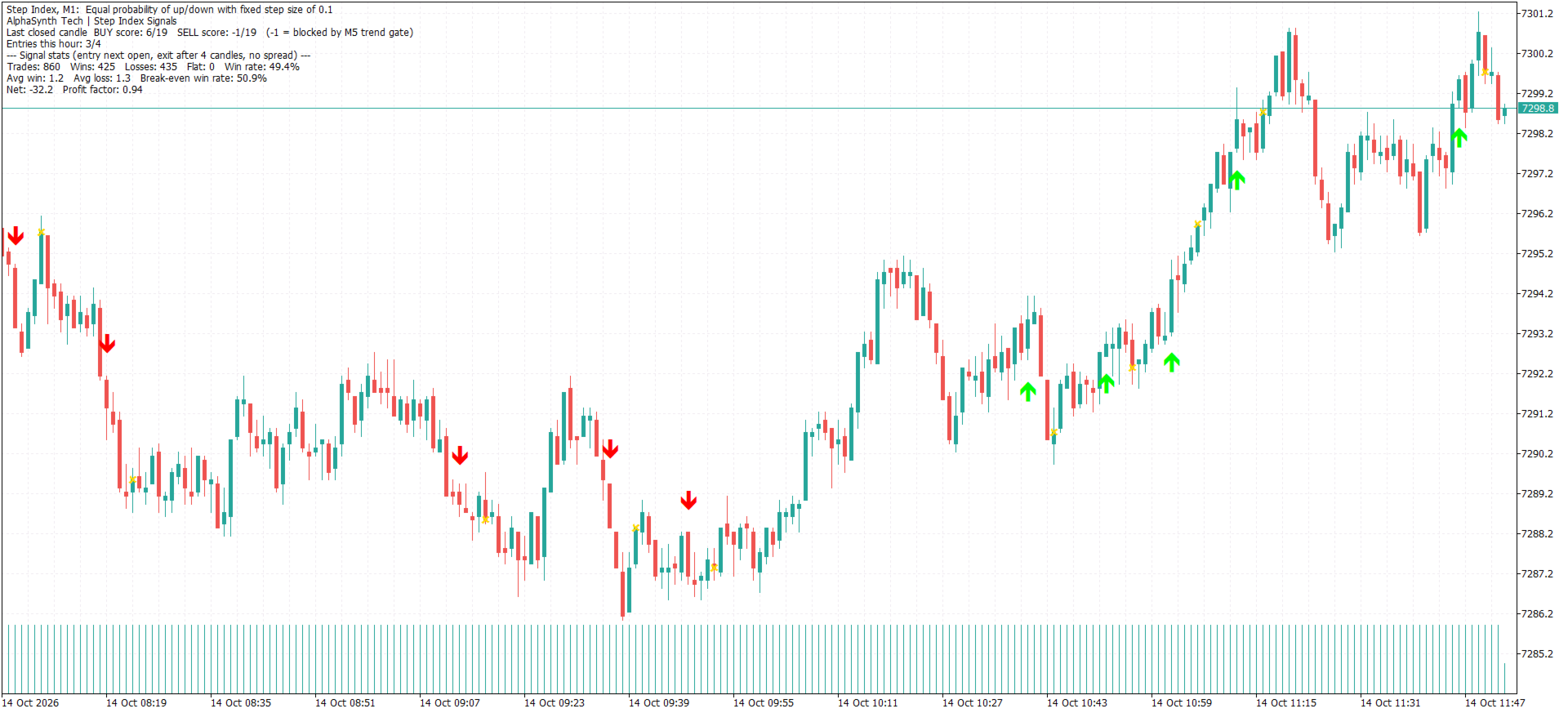
We provide transparent mathematical proof of concept. Our built-in, real-time analytics dashboard calculates performance data dynamically from your loaded server chart history to display your true edge right on your screen:
- Total System Trades Tracked
- Overall Strategy Win Rate Percentage
- Net Profit Factor
- Total Wins, Losses, and Flat Trades
- Average Win and Average Loss Values
- Break-Even Win Rate Threshold Requirement
- Cumulative Strategy Net Result P&L
TECHNICAL SPECIFICATIONS AND LICENSING
- System Type: Multi-Timeframe Manual Charting and Structural Analysis Framework.
- Asset Optimization: Configured and optimized exclusively for the Step Index contract. While pre-optimized for M1 extraction, the indicator fully scales across alternative charts (such as M5) with dynamic automated variable adaptation.
- Memory Footprint: Completely lightweight execution engine operating fully within standard terminal thresholds to ensure zero charting lag.
- Licensing Protection: Each lifetime acquisition grants a secure permanent activation license tied directly to your secure profile. This grants a standard maximum threshold of 5 distinct device environments (PCs or VPS systems) with unlimited trading accounts running on those authorized machines.
OPERATIONAL INSTRUCTIONS
1. Open your target Step Index chart on your chosen timeframe (M1 default).
2. Attach the AlphaSynth Step Specialist and enable your terminal alerts.
3. Wait for a confirmed signal arrow to print at the open of a candle.
4. Open your trade manually the exact split-second the arrow locks in.
5. Close your position manually exactly at the end of the holding period shown by the gold exit marker.
DOWNLOAD THE FREE STRATEGY TESTER DEMO NOW
We encourage all traders to download the Free Demo version. Run the software inside your native MT5 Strategy Tester against historical data grids, watch the 19-point scorecard compile live on your screen, track the real-time performance metrics of our built-in statistics dashboard, and let objective statistics guide your licensing decisions before acquiring a permanent lifetime license.
Disclaimer: The Step Index exhibits structural characteristics modeled closely on random-walk mathematical distributions. System signals describe past localized price behavior patterns and do not serve as a predictive guarantee of future market directions. The built-in statistics panel calculates purely historical mathematical values based on a zero-spread, zero-slippage execution model using the opening tick of the next immediate candle; actual live brokerage execution metrics will vary depending on your network latency and environment commissions. No win rate, profit factor, or capital safety is guaranteed. Algorithmic software deployment carries a substantial risk of financial loss; always run extensive evaluations within a demo terminal setup first and never trade with capital you cannot afford to lose. This framework is an analytical technical tracking tool and does not constitute financial advice. Support is handled strictly through the official product comments or via secure community profile messaging.