KNN Pattern Hunter
- Experts
- Versione: 2.0
- Attivazioni: 10

KNN Pattern Hunter 2.0
An automated trading advisor that learns from market history and adapts to volatility changes
Short Description
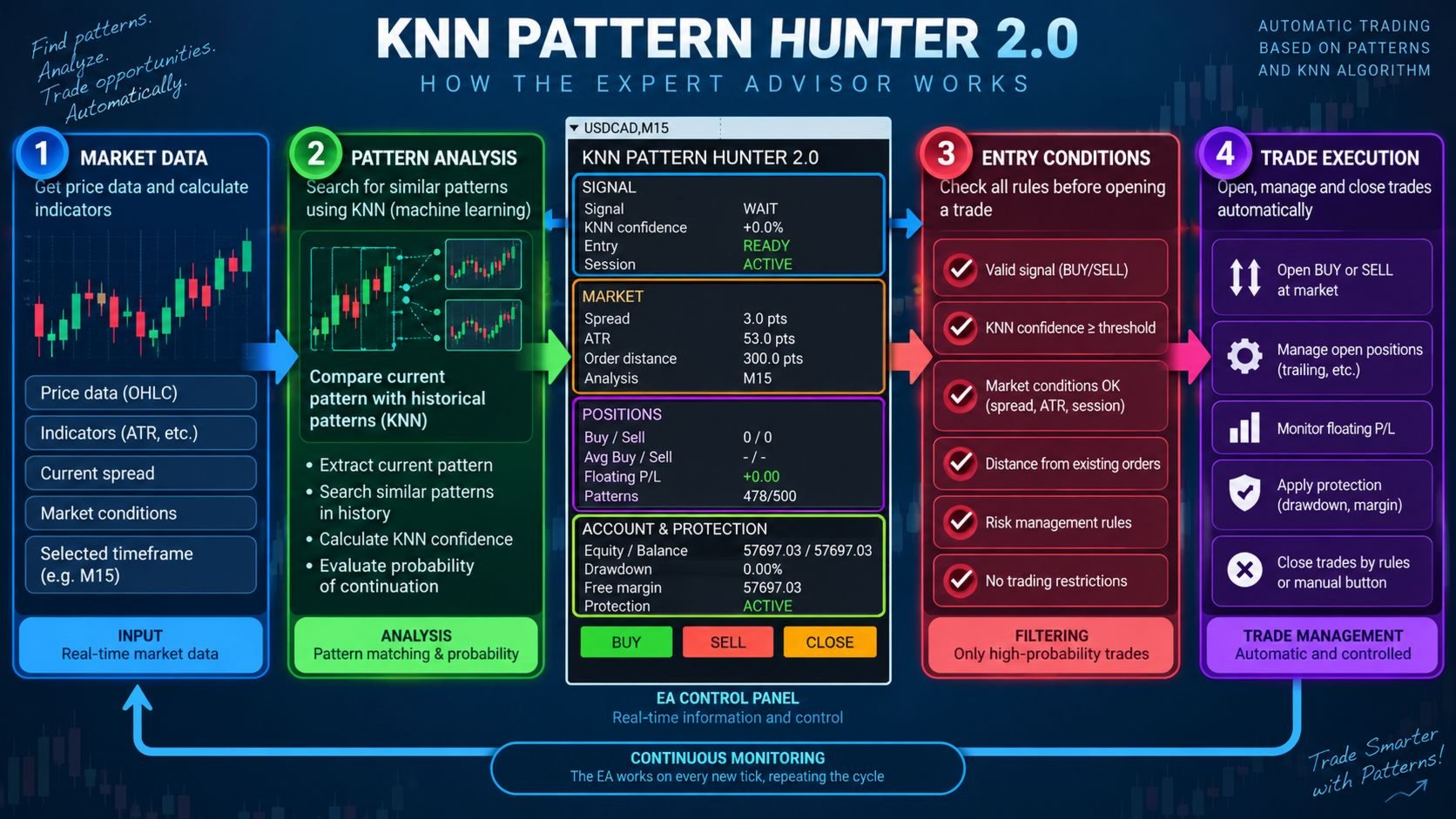
KNN Pattern Hunter 2.0 is a fully automated trading robot for MetaTrader 4 built on the K-Nearest Neighbors (KNN) machine learning algorithm. The advisor analyzes historical market patterns and finds the most similar past situations to predict future price movement.
The key innovation in version 2.0 is adaptive rolling Z-normalization: the robot continuously recalculates statistical characteristics of the market in a rolling window and automatically renormalizes its pattern database. This allows the system to remain effective when volatility and market regimes change.
How It Works
The advisor operates as follows:
-
Pattern collection. On each closed bar, the robot creates a vector of 11 features: relative price changes over 1, 2, and 3 bars, candle body size, RSI, ATR, price position relative to the fast moving average, fast-slow MA difference, MACD signal, relative volume change, and price–volume correlation.
-
Target variable. For each pattern, the future percentage price change is calculated over a specified horizon ( TargetBars ). Values below MinTargetReturn are considered neutral.
-
Rolling Z-normalization. Each feature is normalized using statistics (mean and standard deviation) calculated over a rolling window. When volatility changes, the statistics are updated, and all patterns in the database are automatically renormalized — the model remains in a unified coordinate system.
-
Neighbor search and prediction. For the current market situation, the robot finds the K nearest patterns in the normalized space and computes a prediction using one of three methods: mean, distance-weighted, or median.
-
Trading decision. Based on the KNN prediction, trend signal, and moving average crossover, a final signal is generated. A trade is opened only when all filters are satisfied: trading time, maximum spread, position count limit, drawdown protection, and distance to the previous order.
Advantages
-
Market adaptability. Rolling Z-normalization automatically adjusts statistics to current volatility. There is no need to manually retrain the model when the market regime changes.
-
Model persistence. The pattern database and normalizer state are saved to a file. When the terminal restarts, the robot instantly restores the trained model and does not lose accumulated experience.
-
Three prediction methods. Mean, distance-weighted, and median averaging are available — you can choose the optimal option for a specific instrument and timeframe.
-
Multi-layered capital protection. Real and virtual Stop Loss / Take Profit, trailing stop, limit on simultaneous positions, drawdown protection with automatic lot reduction, and maximum spread filter.
-
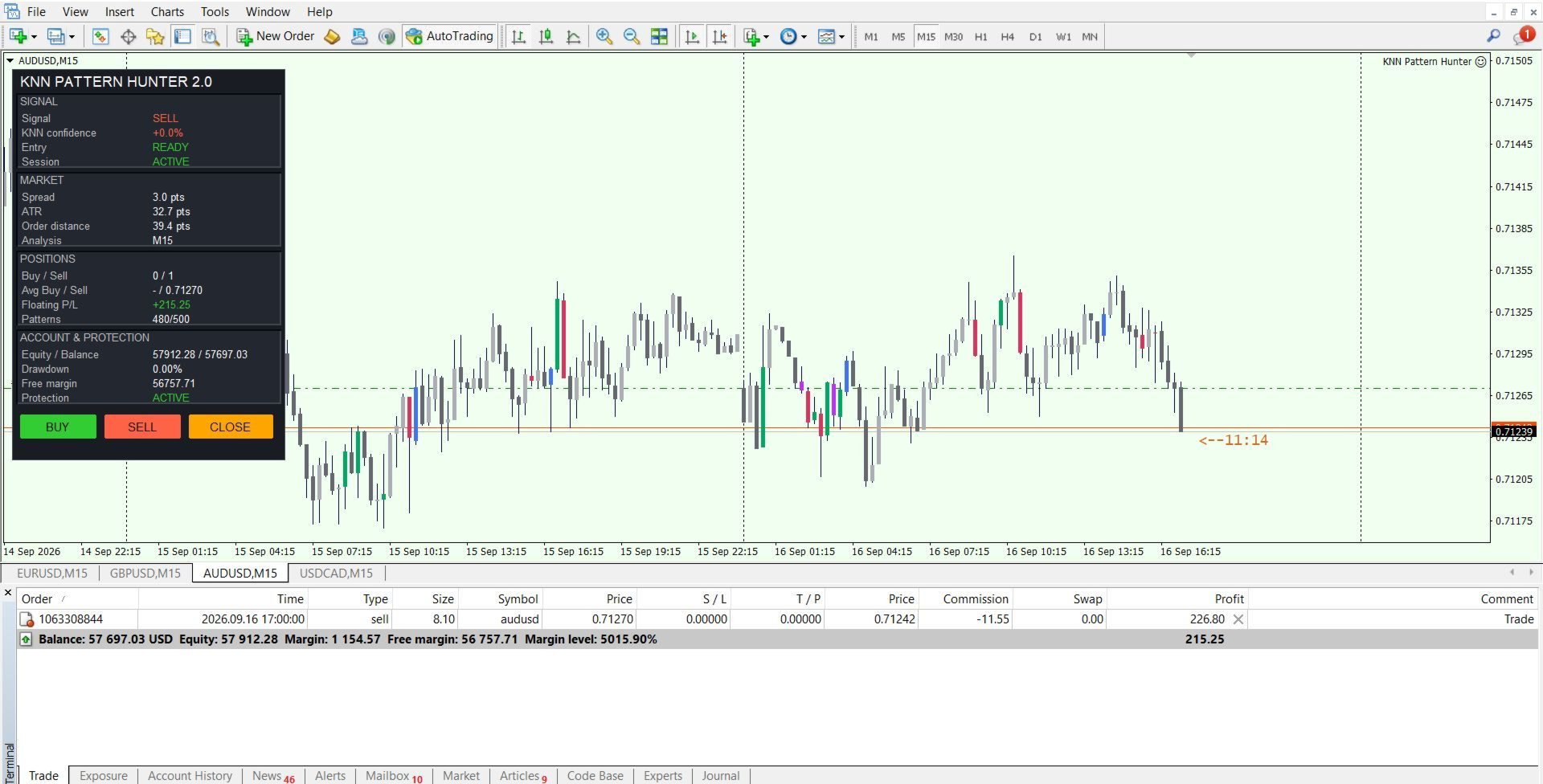
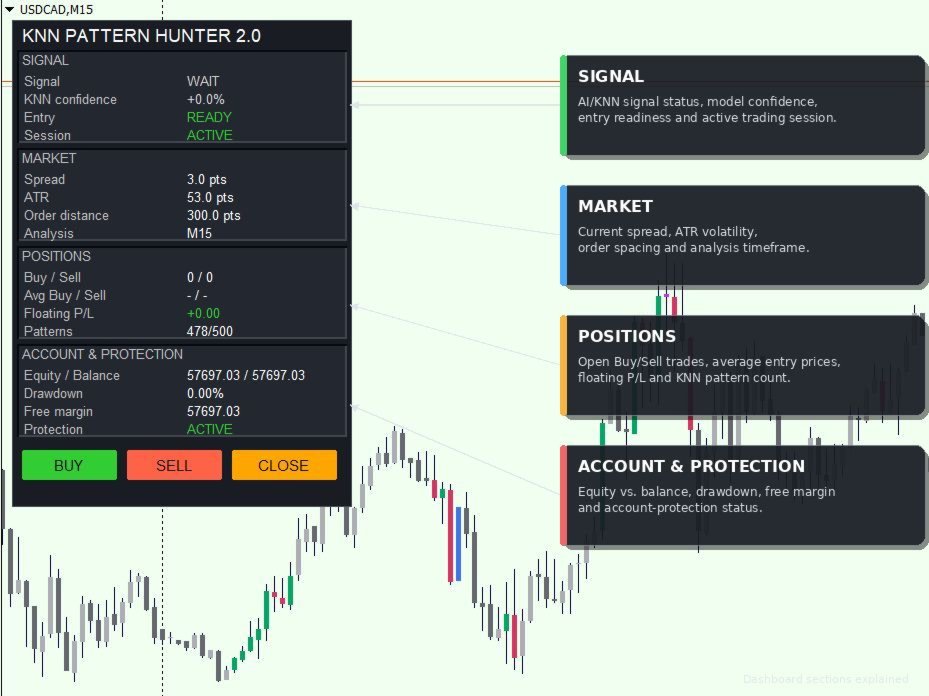
Information panel. The chart displays the current signal, KNN confidence, session status, spread, ATR, number of patterns, average position prices, floating profit, drawdown, and protection status. The panel allows manual opening and closing of positions.
-
Position averaging. When multiple simultaneous trades are enabled, the robot can average positions with an adaptive step based on ATR.
Input Parameters
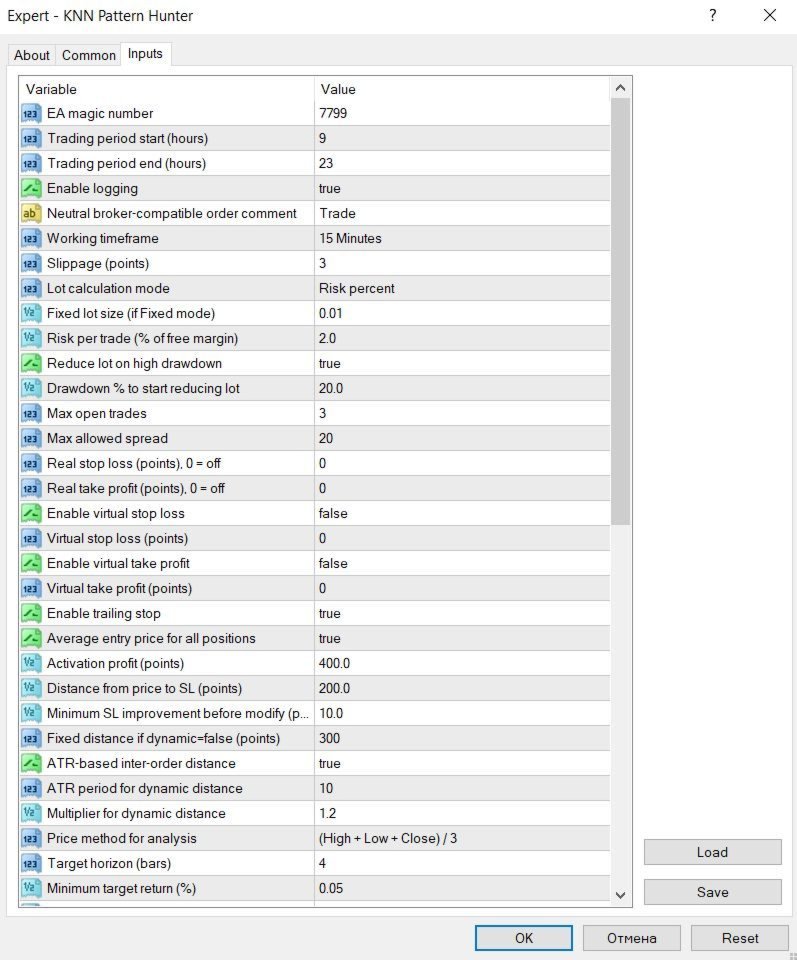
Main Settings
-
MagicNumber — unique identifier for the advisor's orders.
-
SessionStart — trading session start hour (0–23).
-
SessionEnd — trading session end hour (0–23).
-
EnableDebugLogging — enable detailed logging.
-
InpOrderComment — order comment.
-
AnalysisPeriod — working timeframe for analysis.
-
Slippage — allowed slippage in points.
Risk Management
-
LotCalculationMode — lot calculation mode: fixed or percentage of free margin.
-
FixedLotSize — fixed lot size.
-
RiskPercent — percentage of free margin for lot calculation.
-
UseEquityProtection — reduce lot on high drawdown.
-
MaxDrawdownPercent — drawdown threshold (%) for lot reduction.
-
MaxConcurrentTrades — maximum number of simultaneous positions.
-
MaxSpreadPoints — maximum allowed spread in points.
Real Stop Loss / Take Profit
-
StopLoss — real stop loss in points (0 = disabled).
-
TakeProfit — real take profit in points (0 = disabled).
Virtual Stop Loss / Take Profit
-
UseVirtualSL — enable virtual stop loss.
-
VirtualStopLoss — virtual stop loss size in points.
-
UseVirtualTP — enable virtual take profit.
-
VirtualTakeProfit — virtual take profit size in points.
Trailing Stop
-
UseTralling_Stop — enable trailing stop.
-
UseAveragePrice — use average position price for trailing activation.
-
TrallingStart — profit in points to activate trailing.
-
TrailingDistance — distance from price to stop loss in points.
-
TrailingStep — minimum stop loss improvement for modification.
Order Distance
-
FixedDistancePoints — fixed distance in points.
-
UseDynamicDistance — use adaptive distance based on ATR.
-
DynamicDistanceAtrPeriod — ATR period for distance calculation.
-
DynamicDistanceMultiplier — multiplier for ATR-based distance.
KNN Settings
-
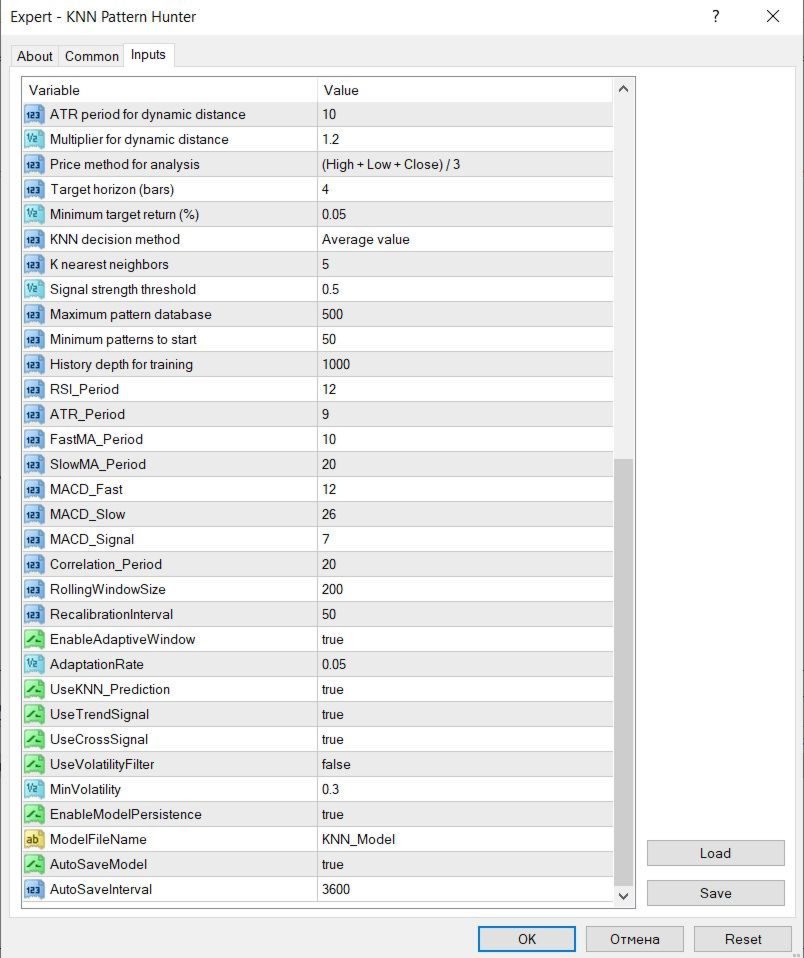
PriceMethod — price calculation method for analysis: Close, HL2, Typical.
-
TargetBars — forecast horizon in bars.
-
MinTargetReturn — minimum target price change (%).
-
KNN_Method — KNN prediction method: mean, weighted, median.
-
KNN_Neighbors — number of nearest neighbors.
-
KNN_Threshold — signal strength threshold.
-
KNN_MaxPatterns — maximum number of patterns in the database.
-
KNN_MinPatterns — minimum number of patterns to start.
-
KNN_HistoryBars — history depth for training.
Indicator Settings
-
RSI_Period — RSI period.
-
ATR_Period — ATR period.
-
FastMA_Period — fast moving average period.
-
SlowMA_Period — slow moving average period.
-
MACD_Fast — MACD fast period.
-
MACD_Slow — MACD slow period.
-
MACD_Signal — MACD signal period.
-
Correlation_Period — period for price–volume correlation calculation.
Adaptive Normalization
-
RollingWindowSize — rolling window size for statistics.
-
RecalibrationInterval — recalibration interval in patterns.
-
EnableAdaptiveWindow — adapt window size when volatility changes.
-
AdaptationRate — adaptation rate (0.001–0.5).
Signal Filters
-
UseKNN_Prediction — use KNN prediction.
-
UseTrendSignal — use trend signal.
-
UseCrossSignal — use MA crossover signal.
-
UseVolatilityFilter — price–volume correlation filter.
-
MinVolatility — minimum correlation threshold.
System Settings
-
EnableModelPersistence — save model between sessions.
-
ModelFileName — base model file name.
-
AutoSaveModel — auto-save model.
-
AutoSaveInterval — auto-save interval in seconds.
Usage Recommendations
-
Recommended timeframe — M15 or higher.
-
Before live trading, test the advisor in the Strategy Tester.
-
Adjust KNN_MaxPatterns and KNN_HistoryBars depending on your computer's performance and the chosen timeframe.
-
For ECN brokers, use virtual SL/TP or disable real stops.