Trading and Management Panel
- Utilità
-
Hariel Dumont
 Ayo
Ayo - Versione: 4.30
- Attivazioni: 20
Before we start...
Honestly, I just made this EA for fun. I felt like MT5's platform wasn't super optimized and I still find it pretty hard to understand for beginners like me. Cause yes, I'm still a noobie. The panel is super efficient.. really efficient. I use it in pretty much all of my trades. I hope you'll like it as much as I do.
Feel free to leave a comment and ask me any questions. I'll respond to pretty much anyone.
RONIN TRADING & MANAGEMENT PANEL
RONIN is a manual trading and position-management panel for MetaTrader 5.
It combines direct BUY and SELL execution, visual Risk-to-Reward planning, position sizing, global and individual trade management, risk monitoring, session information, and interface customization in one chart-based panel.
RONIN does not make trading decisions automatically. The trader remains in control of entries, risk, targets, and position management.
FAST BUY & SELL EXECUTION
Open BUY or SELL positions directly from the panel.
RONIN supports:
• Market BUY and SELL
• Risk-based position sizing
• Fixed lot sizing
• Max allowed slippage
• Broker aware volume normalization
• Trading validation before order submission
When the R:R tool is active, the order can also be built from the Entry, Stop Loss, and Take Profit levels available directly on the chart.
VISUAL RISK-TO-REWARD TOOL
RONIN includes an interactive Risk-to-Reward tool designed for visual trade planning directly on the chart.
The tool provides three draggable levels:
• ENTRY
• STOP LOSS
• TARGET
You can move the levels directly with your mouse by dragging it on the graph.
The panel calculates and displays :
• Risk to Reward ratio
• Potential losses
• Potential gains
• Position size (based on configured risk)
• Entry price
• Stop Loss price
• Take Profit price
The R:R ratio can be adjusted using the R:R − and R:R + controls.
The R:R step is configurable, and the initial Stop Loss distance is based on a configurable ATR 14 multiplier.
The visual risk and reward zones can also be adjusted in width.
MARKET, LIMIT & STOP EXECUTION
When the R:R tool is active, the position of the Entry line determines how the order is sent.
Depending on the Entry location relative to the current market price, RONIN can use:
• Market execution
• Buy Limit / Sell Limit
• Buy Stop / Sell Stop
For pending orders, RONIN validates the Entry, Stop Loss, Take Profit, and minimum trading distances before submitting the request.
For market execution, the current Bid or Ask is used as the effective execution price while preserving the distances defined by the R:R tool (when possible).
RISK-BASED POSITION SIZING
RONIN can calculate position size according to % of account balance.
The calculation uses the Entry and Stop Loss distance defined by the trade setup.
The position’s size calculation takes the symbol's trading specifications into account, including:
• Tick value
• Tick size
• Volume step
• Minimum volume
• Maximum volume
When Risk Per Trade is set to 0, RONIN uses the configured fixed lot size by default.
MANUAL LOT CONTROL
The trading volume can also be adjusted manually directly on the panel.
The lot controls includes:
• LOT −
• LOT +
• AUTO
AUTO returns the panel to its automatically calculated position size.
The selected volume is normalized according to the broker's allowed minimum, maximum, and volume step.
GLOBAL POSITION MANAGEMENT
RONIN provides global position management controls on the main panel.
The main controls are:
• CLOSE
• BREAK-EVEN
• PARTIAL
The main CLOSE function closes all RONIN positions on the current chart symbol and also removes RONIN pending orders for that symbol.
The global Break-Even function applies Break-Even management to qualifying RONIN positions.
The global Partial function reduces qualifying RONIN positions according to the configured partial percentage.
INDIVIDUAL TRADE MANAGEMENT
Opened RONIN positions can also display their own management controls (individually)
Individual controls also include:
• CLOSE
• BREAK-EVEN
• PARTIAL
This allows individual positions to be managed independently instead of always applying an action globally.
The controls are associated with the individual position ticket and are created or removed automatically as positions appear or disappear.
The colors of the individual CLOSE, BREAK-EVEN, and PARTIAL buttons can be customized independently.
BREAK-EVEN MANAGEMENT
RONIN includes configurable Break-Even management.
The Break-Even buffer can be specified in points.
When the buffer is set to zero, RONIN automatically derives the buffer from the current spread.
The Break-Even calculation can also include an estimated round-trip commission.
This allows you, the user, to account for additional trading costs when moving a position toward Break-Even.
PARTIAL CLOSE
The Partial function allows the trader to reduce an active position without closing the entire position.
The percentage closed is also configurable.
RONIN checks the broker's volume requirements before attempting the operation, including minimum volume and volume step.
The panel shows the volume actually closed after the operation.
ACCOUNT INFORMATION
The ACCOUNT section displays key account information in the panel.
Available information includes:
• Balance
• Equity
• Free Margin
The current Spread can also be displayed directly in the interface.
SESSION PERFORMANCE
RONIN provides a performance overview for the current trading session.
The panel can display:
• Session Profit
• Closed Trades
• Open Trades
• Pending Orders
The displayed monetary values can be converted to the selected display currency.
RISK EXPOSURE MONITORING
RONIN can display estimated open and pending risk as a percentage of account balance.
The Risk Scope can be configured in two ways:
• Entire Account — evaluates account-wide exposure
• RONIN Panel — evaluates orders belonging to RONIN on the current symbol
Positions without a Stop Loss are identified separately rather than being incorrectly treated as zero risk.
RONIN also distinguishes positions for which the risk calculation cannot be reliably determined.
DAILY LOSS PROTECTION
RONIN includes an optional Daily Loss Limit.
The limit is configured as a percentage.
When enabled, the system monitors the realized trading result for the current trading day.
If the configured daily loss threshold is reached:
• New RONIN entries are blocked
• RONIN pending orders are cancelled
If the daily loss cannot be reliably evaluated, new entries are also blocked while the protection remains enabled.
A value of zero disables the Daily Loss Limit.
SPREAD MONITORING
The current spread can be displayed in the panel.
RONIN also provides a Spread Warning system.
The warning threshold can either be:
• Manually defined in points
• Automatically calculated from recent spread behavior
When the current spread exceeds the configured or automatically determined threshold, the spread display is visually highlighted.
MARKET SESSION BADGE
RONIN can display a session badge in the panel header.
The system calculates the active trading session using broker server time together with the configured server UTC offset and European daylight-saving setting.
Supported session labels include:
• SYD — Sydney
• TYO — Tokyo
• LDN — London
• NYC — New York
The badge can also reflect overlapping active sessions.
DISPLAY CURRENCY
RONIN can display monetary values using the account's native currency or a selected display currency.
Available currencies include:
• Account Currency
• USD
• CAD
• EUR
• GBP
• JPY
• CHF
• AUD
• NZD
This conversion affects the values displayed by the panel only. It does not change the trading account's actual currency.
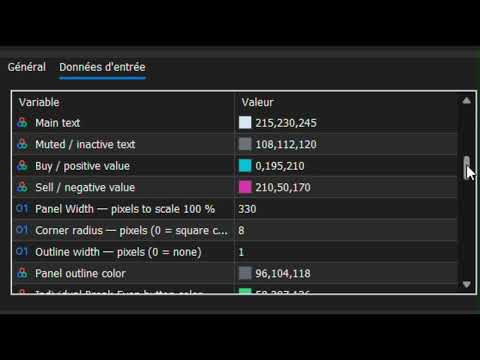
FULL INTERFACE CUSTOMIZATION
RONIN includes several visual themes:
• Custom Colors
• Dark Theme
• Light Theme
• Cyber Punk
With Custom Colors selected, the trader can customize the main visual elements of the interface, including:
• Background
• Header
• Border
• Accent
• Main Text
• Muted Text
• Bullish / Buy Color
• Bearish / Sell Color
• Individual Break-Even Color
• Individual Partial Color
• Individual Close Color
Additional layout settings include:
• Panel Width
• Corner Radius
• Outline Width
• Outline Color
ENGLISH & FRENCH
The interface supports:
• English
• French
English is the default language.
PANEL SCALE
RONIN supports four interface scaling levels:
• 80%
• 100%
• 125%
• 150%
This allows the panel size to be adapted to different screen resolutions and chart layouts.
MOVABLE PANEL
The panel can be positioned directly on the chart.
The initial X and Y coordinates can be configured in pixels.
When panel dragging is enabled, the interface can be repositioned directly by dragging its header.
RONIN can also remember the panel position and state between sessions.
CONFIGURABLE DISPLAY ELEMENTS
The trader can choose which major information blocks and controls are visible.
Configurable display elements include:
• Session Badge
• Account Section
• Spread
• Performance
• Risk Exposure
• Open Positions
• R:R Controls
• Lot Controls
• Break-Even / Partial Controls
This allows the interface to be adapted to the trader's preferred workflow.
BROKER-AWARE VALIDATION
RONIN performs validation before sending or modifying trading operations.
The implementation accounts for broker and symbol requirements such as:
• Stop Loss / Take Profit minimum distances
• Pending Entry distance requirements
• Tick size
• Volume step
• Minimum volume
• Maximum volume
• Maximum allowed deviation
• Trading server return codes
This helps ensure that trading requests respect the conditions imposed by the current broker and symbol.
RONIN TRADE IDENTIFICATION
RONIN uses a configurable Magic Number to identify its own trading operations.
This identifier is used when the panel needs to distinguish RONIN-managed positions and pending orders from other trades.
MANUAL TRADING — NOT AN AUTOMATED STRATEGY
RONIN is designed as a manual trading and position-management tool.
It does not automatically analyze the market and decide when to enter or exit trades.
The trader determines:
• Direction
• Entry
• Stop Loss
• Take Profit
• Risk
• Position size
• Trade management
RONIN provides the interface and calculations needed to execute and manage those decisions directly from the MT5 chart.
IMPORTANT NOTICE
RONIN is a trading software tool for MetaTrader 5.
It does not constitute financial or investment advice.
Trading financial markets involves significant risk, and no trading result or level of profitability is guaranteed.
Always evaluate the product in an appropriate testing environment and use risk management suitable for your own circumstances.