Super OB HCS Indicator
- Indicatori
-
Muxlisa Gofurova
 🇮🇹 Italian (Italiyan tili)
🚀 Specialista in Trading Algoritmico MQL4 & MQL5 | Sviluppatore di Expert Advisor - Versione: 1.0
- Attivazioni: 20
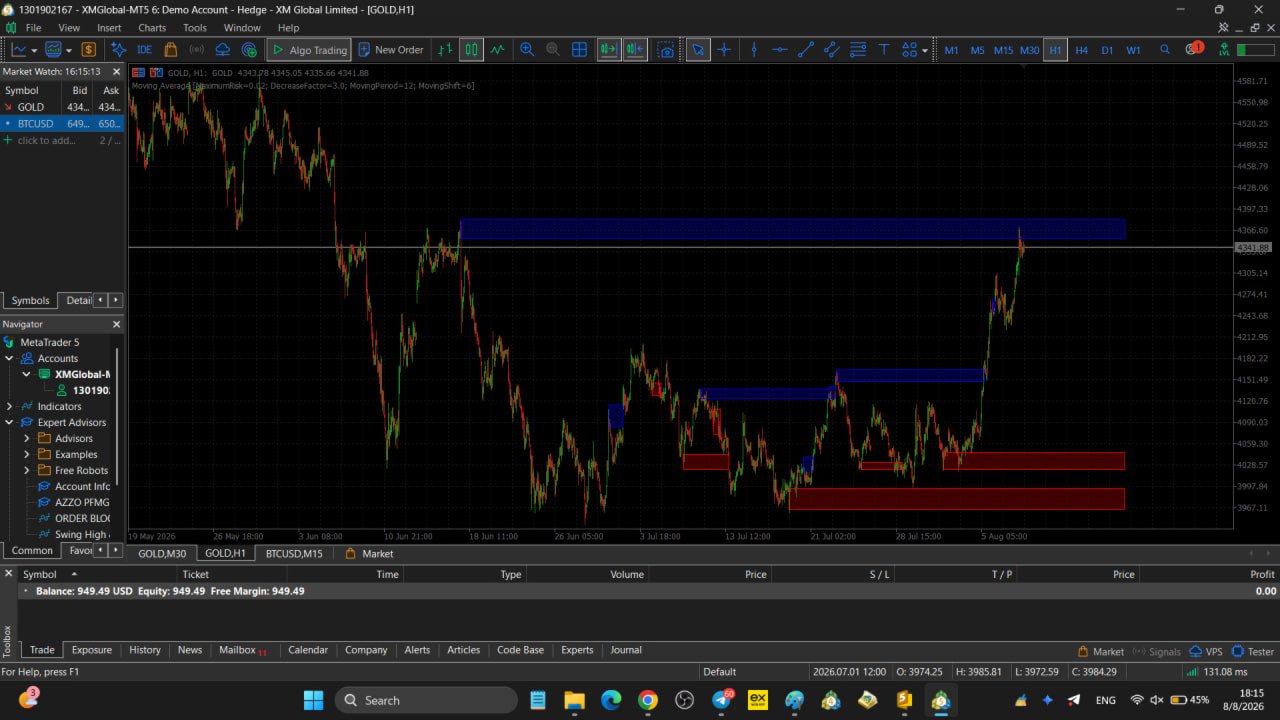
Auto Order Blocks is a high-performance, professional MetaTrader 5 indicator designed for traders utilizing Smart Money Concepts (SMC) and institutional price action strategies. It automatically detects and plots high-probability Bullish and Bearish Order Blocks on your chart in real time with an ultra-clean, modern visual layout.
🌟 KEY FEATURES
-
Institutional Order Block Detection: Scans market structure, local swing extremes, and impulsive price moves to accurately plot active Buy and Sell Order Blocks.
-
Smart Break/Mitigation Logic: When price invalidates an Order Block with a Candle Body Close, the indicator automatically stops extending the zone right at the point of the break. No more cluttered or outdated zones on your chart.
-
Smart Color Blending (Soft Transparency): Equipped with a native algorithm ( BlendColor ) that automatically blends block colors with your chart background (Light or Dark Mode). Provides a clean, modern visual overlay without blocking price candles.
-
Dynamic Forward Extension: Active, unmitigated Order Block zones automatically project into the future ( InpRightBars ) from the current price bar for easy visualization.
-
Lightweight & High Speed: Engineered with low-overhead memory loops. It scans full history on load and efficiently updates only on new bar opens, ensuring zero chart lag or terminal freeze.
⚙️ INPUT PARAMETERS
1. OB Detection Settings
-
InpLookbackBars (Default: 1000) — Number of historical bars to scan for Order Blocks.
-
InpLeftBars (Default: 30) — Left swing bars required to confirm a local high/low extreme.
-
InpRightBars (Default: 150) — Number of bars to project active Order Blocks forward into the future.
-
InpMinImpulseBody (Default: 300) — Minimum body size of the impulse candle in pips ($0 = \text{Disabled}$).
-
InpUseBodyClose (Default: true) — Uses candle Body Close to validate impulse breakouts and zone invalidations.
2. Management & Clean-up
-
InpMaxOBCount (Default: 7) — Maximum active Order Blocks retained per side (Bullish / Bearish). Older blocks are automatically purged.
3. Visual & Style Settings
-
InpBullColor — Fill color for Bullish Order Blocks (Default: Red).
-
InpBearColor — Fill color for Bearish Order Blocks (Default: Blue).
-
InpTransparency (Default: 75) — Transparency level ($0\% = \text{Solid}$, $100\% = \text{Nearly Invisible}$).
-
InpShowBorder (Default: true) — Enables a solid, thin outer border around Order Block zones.
📈 TRADING APPLICATIONS (SMC & Price Action)
-
Bullish Order Blocks: Act as high-confluence demand zones. Look for long entries (XAUUSD, Forex, Crypto) when price retraces back into the block with confirmation.
-
Bearish Order Blocks: Act as supply zones. Ideal for short setups upon price retests.
-
Zone Invalidation: A broken Order Block signals a potential Market Structure Shift (MSS/CHoCH) or liquidity sweep.
📦 INSTALLATION
-
Download the .mq5 file.
-
Open MT5 and go to File -> Open Data Folder.
-
Navigate to MQL5 -> Indicators and paste the file.
-
Restart MetaTrader 5 or right-click Indicators in the Navigator panel and hit Refresh.
-
Attach AutoOrderBlocks to any chart or timeframe!