Pattern Wizard
FREE
Pubblicato:
4 febbraio 2024
Versione attuale:
1.50
Non hai trovato un robot adatto?
Ordina il tuo
su Freelance
Vai alla sezione Freelance
Ordina il tuo
su Freelance
Come acquistare un Robot di Trading o un indicatore
Esegui il tuo EA
hosting virtuale
hosting virtuale
Prova un indicatore/robot di trading prima di acquistarlo
Vuoi guadagnare nel Market?
Come presentare un prodotto per venderlo con successo

Ti stai perdendo delle opportunità di trading:
- App di trading gratuite
- Oltre 8.000 segnali per il copy trading
- Notizie economiche per esplorare i mercati finanziari
Registrazione
Accedi
Accetti la politica del sito e le condizioni d’uso
Se non hai un account, registrati
I keep seeing this error in the Expert tab:
Rule Plotter (ETHUSD,H1) custom indicator '\indicators\market\patternwizard.ex5' cannot load [4802]
Hello Krazi, thank you very much for your reports
are you sure the indicator is in the correct folder/name?
for example, this indicator must be in the folder
\Indicators\Market\Patter Wizard.ex5
notice that there is a space between the words Patter Wizard
it is essential that Rule Plotter finds the indicator in the correct folder/name
you can fix this in 2 ways
Thanks for the quick response! What's weird about the error is that I haven't changed anything! e.g., I haven't renamed the indicator or moved it from the default directory where it was originally installed ( \Indicators\Market\ ).
I am using MT5 in portable mode but that shouldn't cause an issue.
Are you using the latest version of Rule Plotter 1.13 ? here in my metatrader is working ok
Rule Plotter (ETHUSD,H1) custom indicator '\indicators\market\patternwizard.ex5' cannot load [4802]
This bug was found when while we were improving the speed of the rule plotter, the error appeared when the indicators were between parentheses ( )
All Rule Plotter programs were updated to version v1.14
Thank you again for your reports!
Excellent work! Great job! Thank you!
I have some development ideas for the future:
Free version
Check Rule: 1.) Every Tick, 2.) Every Close, 3. Every OpenInstance name: „Name of signal“ variable behind „Pattern Wizard“ text in indikator list of the chart (example: Pattern Wizard – pos Candles)
If rule is applicable, change candle-color
Non-Free 100$ version:
Possibility of user defined sounds
If rule is applicable, place a buy or sell order with pre-defined SL, TP or more of them.
Excellent work! Great job! Thank you!
I have some development ideas for the future:
Hello, thanks for your ideas and feedbacks
IndicatorExperience #:
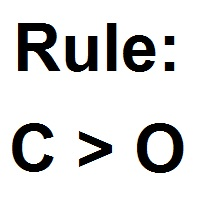
Check Rule: 1.) Every Tick, 2.) Every Close, 3. Every Open
these parameters are working already, developers use the "Every Open" to know if is the candle closes "Every Close"
Instance name: „Name of signal“ variable behind „Pattern Wizard“ text in indikator list of the chart (example: Pattern Wizard – pos Candles)
this is not possible in Metatrader 5 ;(
Non-Free 100$ version:
Possibility of user defined sounds
If rule is applicable, place a buy or sell order with pre-defined SL, TP or more of them.
Currently Rule Plotter can make it, but I love your idea *.*
Hello, i have new ideas:
1.) CSV export function: Export candle-data (list) as CSV-file for every candle where the expression is true (for further calculations in a spreadsheet)
2.) Storage for single values from expression (example: C - C[1] = VAR1)
3.) user-defined external variable (example: C - C[1] > USERVAR2 | C[1] - C > USERVAR2) So it is easy to change equal values in multiple expressions with one modification
4.) When expression is true, draw a horizontal line for the next x-number of candels at: O or C or H or L
Topic: Check rule
Dropdown menu:
This whould be nice, because sometimes there are gaps between close and open.
Thank you for this powerful tool and for the hint to "Rule Plotter"!
Topic: Check rule
Dropdown menu:
This whould be nice, because sometimes there are gaps between close and open.
it is like to see, but it is the same option because when the candle closes other open, it is way that we know the candle closes
Thank you for this powerful tool and for the hint to "Rule Plotter"!
you can join both and create your automatic tradesystens :)
ou que a vela mude de cor como no outro indicador.
H - L > 200 * Point
look as I make it
hello again MajidJavan1
yes we can, but my candle is hardcore because we must write the code directly in indicator's input, Try the tool Rule Plotter, because Rule Plotter does the same than my candle but using a interface instead code directly ons inputs, and if you want you can copy the code of Rule Plotter and put on input of my candle latter :)
hello again MajidJavan1
yes we can, but my candle is hardcore because we must write the code directly in indicator's input, Try the tool Rule Plotter, because Rule Plotter does the same than my candle but using a interface instead code directly ons inputs, and if you want you can copy the code of Rule Plotter and put on input of my candle latter :)
Hello MajidJavan1 to put more than two rules you can press the "Back" until the "Home" page of rule plotter and afterward editing the rules of buy/sell again, now you will see more spaces to put more rules, thanks for try it :)