 MetaTrader 5
 Sistemi Esperti
 Indicatori
 Script
 Librerie
 Archiviazione
Unisciti alla nostra fan page

BlueMoon - sistema esperto per MetaTrader 5

- Visualizzazioni:
- 49
- Valutazioni:
- Pubblicato:
- Aggiornato:
-
 Ti stai perdendo delle opportunità di trading:
- App di trading gratuite
- Oltre 8.000 segnali per il copy trading
- Notizie economiche per esplorare i mercati finanziari
Registrazione AccediAccetti la politica del sito e le condizioni d’uso
Se non hai un account, registrati -
 Hai bisogno di un robot o indicatore basato su questo codice? Ordinalo su Freelance
Vai a Freelance
Hai bisogno di un robot o indicatore basato su questo codice? Ordinalo su Freelance
Vai a Freelance
BlueMoon EA è un Expert Advisor per MetaTrader 5 che utilizza i segnali dell'EMA Envelope per individuare potenziali inversioni di tendenza del mercato e gestisce automaticamente le operazioni utilizzando tecniche adattive di recupero del paniere.
Il sistema è stato progettato per i trader che preferiscono un approccio strutturato alla gestione del paniere, pur mantenendo controlli di rischio configurabili.
A differenza di molti semplici sistemi a griglia, BlueMoon combina la generazione di segnali tecnici con una gestione controllata del paniere e una protezione integrata del conto
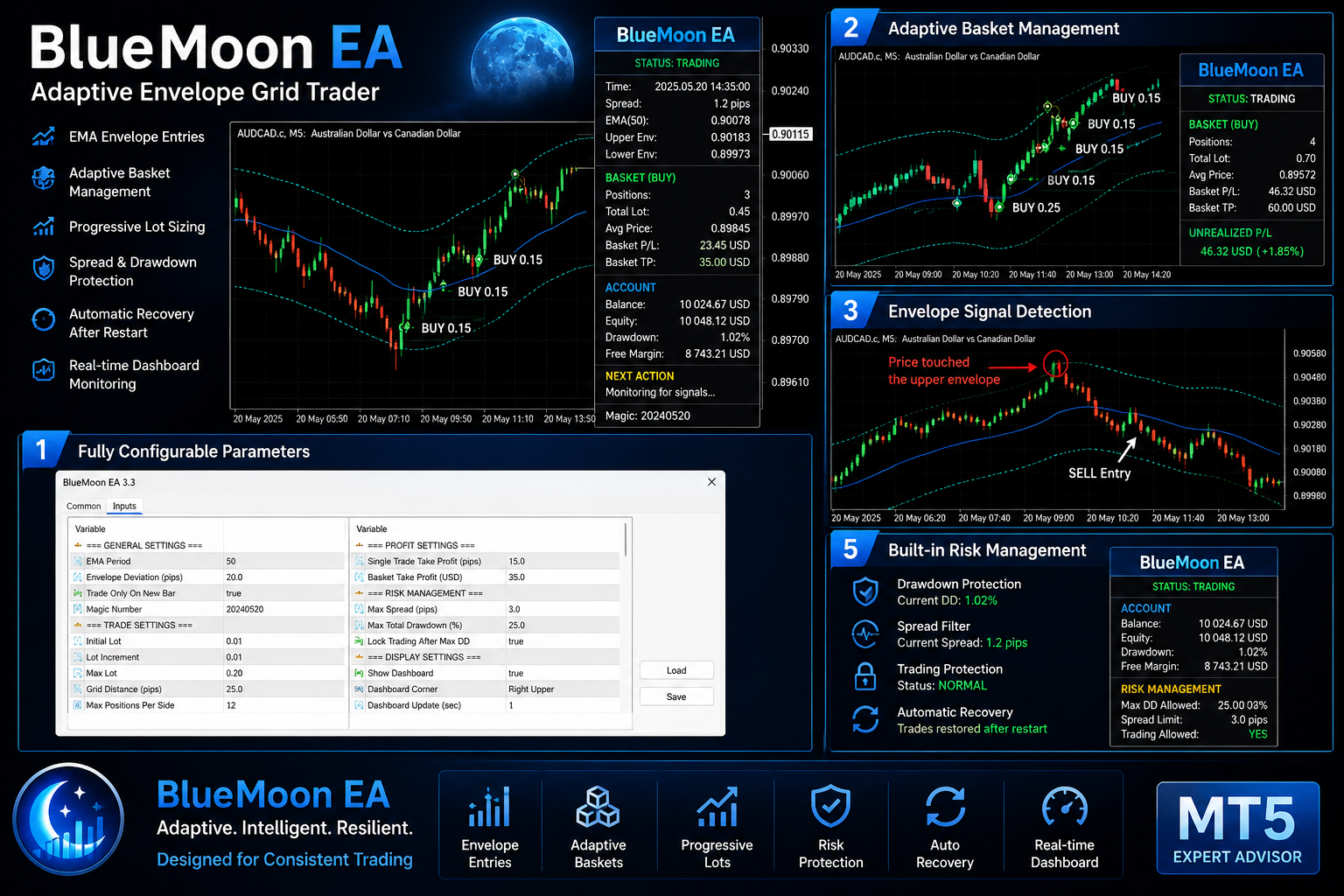
Caratteristiche principali
✔ Rilevamento dei segnali EMA Envelope
✔ Entrate automatiche di ACQUISTO e VENDITA
✔ Gestione adattiva del paniere
✔ Determinazione progressiva delle dimensioni dei lotti
✔ Distanza della griglia configurabile
✔ Take-profit per singola operazione
✔ Obiettivo di profitto del paniere
✔ Protezione dallo spread
✔ Protezione dal drawdown
✔ Ripristino automatico dopo il riavvio del terminale
✔ Pannello di controllo in tempo reale
✔ Supporta i suffissi dei simboli dei broker (esempio: AUDCAD.c)
✔ Progettato per i conti di hedging su MT5
Logica di trading
BlueMoon monitora il mercato utilizzando un inviluppo basato sulla media mobile esponenziale (EMA).
Quando il prezzo raggiunge i limiti dell'inviluppo configurati, l'EA può aprire una posizione in base alle impostazioni selezionate.
Se il mercato continua a muoversi in direzione opposta alla posizione iniziale, è possibile aprire ulteriori operazioni utilizzando una spaziatura della griglia configurabile e un dimensionamento progressivo dei lotti.
Una volta che il paniere raggiunge l’obiettivo di profitto configurato, l’EA chiude automaticamente il paniere.
Gestione del rischioL’EA include diversi meccanismi di protezione configurabili:
• Filtro dello spread massimo
• Dimensione massima del paniere
• Dimensione massima del lotto
• Protezione dal drawdown totale
• Blocco opzionale delle operazioni dopo un drawdown di emergenza
• Ricostruzione automatica del paniere dopo il riavvio della piattaforma
Dashboard
BlueMoon include una dashboard informativa che mostra:
• Stato attuale dell'EA
• Spread
• Valori EMA
• Livelli dell'envelope
• Statistiche del paniere
• Drawdown attuale
• Prossima azione prevista
• Ultima attività di trading
• Informazioni sul conto
Dati inseriti
L'EA consente di configurare:
- Periodo EMA
- Deviazione dell'inviluppo
- Lotto iniziale
- Incremento del lotto
- Lotto massimo
- Distanza della griglia
- Obiettivo di profitto del paniere
- Take-profit per singola operazione
- Spread massimo
- Posizioni massime
- Protezione dal drawdown
- Opzioni del pannello di controllo
- MetaTrader 5
- Conto di copertura
- Broker con spread ridotti
- VPS consigliato per un funzionamento senza interruzioni
- Provare le impostazioni su un conto demo prima di utilizzarle su un conto reale
Importante
Il trading comporta dei rischi.
Questo Expert Advisor non garantisce profitti e i rendimenti passati non sono indicativi di risultati futuri.
Si invitano gli utenti a comprendere la strategia e a effettuare i propri test prima di operare con denaro reale.
Tradotto dall’inglese da MetaQuotes Ltd.
Codice originale https://www.mql5.com/en/code/75264
 Breakout Distance - Donchian channel with distance-to-trigger panel in ATR units
La maggior parte degli indicatori di canale indica dove si trova il livello di breakout. Questo invece ti dice quanto sei lontano da esso, in questo preciso momento, in un formato che ti permette di agire di conseguenza. Il pannello mostra, sia per il bordo superiore che per quello inferiore del canale: il livello stesso la distanza dal prezzo attuale, nelle unità di prezzo del titolo stesso la stessa distanza espressa in unità ATR una barra di prossimità che si riempie man mano che il prezzo si avvicina al trigger Perché la colonna ATR è importante. Una distanza di 8 dollari da un breakout ha un significato completamente diverso in una sessione asiatica tranquilla rispetto a quanto avviene durante la pubblicazione di notizie. Dividere la distanza per l’ATR attuale rende il numero comparabile tra le diverse sessioni, tra i diversi regimi di volatilità e tra i diversi simboli. Un valore di 0,30 ATR significa la stessa cosa sia sull’oro che sull’EURUSD. Codifica a colori: testo normale: a più di InpNearATR di distanza (impostazione predefinita 1,0 ATR) oro : entro InpNearATR arancione-rosso: entro InpVeryNearATR (impostazione predefinita 0,5 ATR)
PRO SCREENER
Prendi il controllo delle tue prestazioni di trading con Pro Dashboard Screener. Progettata per i trader più esigenti, questa utility offre una panoramica chiara, professionale e in tempo reale dello stato del tuo conto direttamente sul grafico.
Draw On Liquidity + Kill Zone
L'indicatore Draw On Liquidity (DOL) traccia automaticamente questi livelli fondamentali sul grafico ed evidenzia le finestre di trading ad alta probabilità attraverso le “kill zone” delle sessioni. Grazie alle opzioni di personalizzazione complete, offre una visualizzazione chiara, professionale e altamente informativa per migliorare le tue decisioni di trading.
Nikkei 225 Gap Continuation EA
L'EA Nikkei 225 Gap Continuation è un Expert Advisor per MetaTrader 5 che opera sui movimenti di continuazione rialzisti e ribassisti dopo il gap di apertura della sessione in contanti. Combina un breakout del range di apertura con la conferma VWAP, il dimensionamento automatico delle posizioni basato sul rischio, la presa di profitto parziale, la gestione del break-even e l'uscita forzata dalla sessione. L'EA supporta sia i conti di netting che quelli di hedging.