LENS Smart Trade Manager
- Utilitaires
-
Ba Tinh Ho
 LENS QUANT LAB
Quantitative Trading Research | Algorithmic Systems | AI-Powered Development - Version: 2.500
- Activations: 5
Manual Trading Panel | Risk Management | Trailing Stop | Account Protection
Trade with Control. Manage Risk with Confidence.
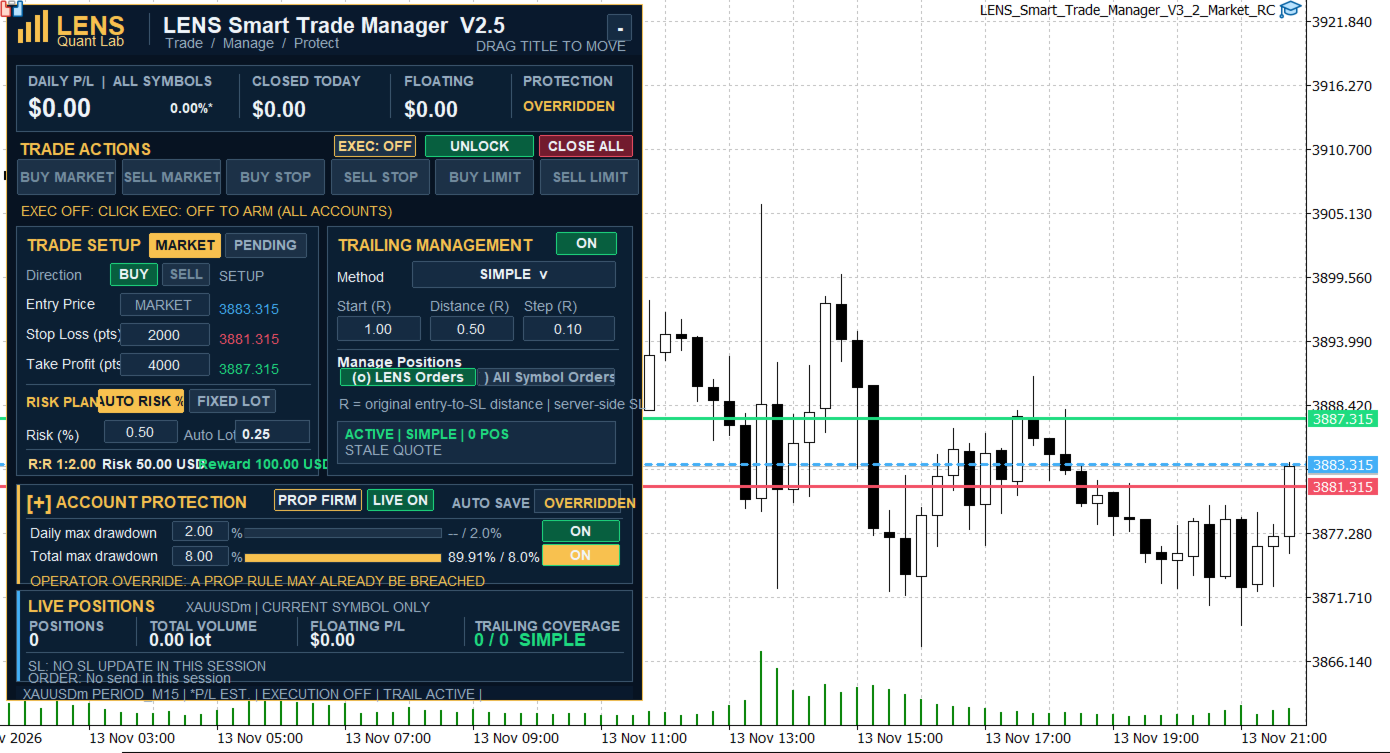
LENS Smart Trade Manager is a MetaTrader 5 trading utility designed to simplify manual order execution, position management, and account risk monitoring.
The utility combines a visual trading panel, position sizing calculator, multiple trailing stop methods, and account protection tools in one chart-based interface.
Whether you trade Forex, Gold, Indices, or other instruments supported by your broker, LENS Smart Trade Manager helps you organize your trading workflow while keeping trading decisions under your control.
The utility does not generate trading signals or open trades automatically based on market predictions.
1. Visual Trading Panel
Manage your trading operations directly from the chart using an interactive dashboard.
Main features:
-
Six order types: Buy Market, Sell Market, Buy Stop, Sell Stop, Buy Limit, and Sell Limit.
-
Visual Entry, Stop Loss, and Take Profit levels.
-
Adjustable trading levels using draggable chart lines.
-
Automatic calculation of price distances and risk parameters.
-
Movable dashboard with adjustable display size.
-
Live position information for the current trading symbol.
The panel is designed to reduce repetitive manual calculations and provide a clear overview before submitting an order.
2. Position Sizing and Risk Calculator
Control your trade exposure before entering the market.
Two position sizing methods are available:
Auto Risk: Calculate trading volume based on the selected risk percentage and Stop Loss distance.
Fixed Lot: Enter the desired trading volume manually.
The calculation considers the symbol's trading specifications and estimates potential loss in the account currency.
Additional settings allow users to account for estimated trading commissions and slippage.
Actual trading results may differ because of execution prices, commissions, swaps, and market conditions.
3. Four Trailing Stop Methods
LENS Smart Trade Manager provides four methods for managing Stop Loss levels as the market moves.
Simple Trailing
Uses predefined risk multiples (R) to determine when trailing begins, how far the Stop Loss follows the price, and the minimum adjustment step.
Conservative Trailing
Combines a Break Even trigger with a trailing mechanism designed for more gradual Stop Loss adjustments.
ATR Trailing
Uses Average True Range to adjust the trailing distance according to recent market volatility.
Structure Trailing
Uses recent price structure and an ATR-based buffer to determine potential Stop Loss levels.
Users can select the preferred method and adjust its parameters to suit their trading approach.
Trailing management can be restricted to positions identified as LENS orders. Managing other positions on the same symbol requires an explicit user setting.
4. Account Risk Protection
The utility includes two account protection modes.
Personal Safe
Designed for traders managing their own trading accounts.
Personal Safe provides daily loss monitoring, configurable protection actions, and manual controls for managing trading permissions.
Prop Firm Safe
Designed to help traders monitor accounts with daily and total drawdown limits.
Daily Drawdown Protection
The default daily reference is calculated using the higher of Balance and Equity recorded near the configured daily reset time.
Daily protection can be enabled or disabled directly from the dashboard.
Total Drawdown Protection
Total drawdown is calculated using an initial capital amount confirmed by the user.
The initial setup is completed once and the confirmed value is saved for subsequent sessions.
After setup, total drawdown monitoring can be controlled directly using ON/OFF.
Daily and total drawdown controls operate independently.
Important: Proprietary trading firms may use different drawdown formulas, reset times, and account rules. Users must verify that the selected settings match their trading conditions.
5. Multi-Chart Trading Support
LENS Smart Trade Manager supports operation on multiple charts within the same MetaTrader 5 terminal.
The utility automatically identifies the trading symbol and generates a consistent Magic Number based on the account, server, and symbol.
This allows users to operate the trading panel on different instruments without manually assigning a Magic Number to every chart.
Multi-chart features include:
-
Independent EXEC ON/OFF control for each chart.
-
Symbol-specific trading and trailing management.
-
Automatic Magic Number assignment.
-
Shared account protection information within the same terminal.
-
Manual Magic Number configuration when required.
When multiple instances manage the same symbol, users should ensure their trading and trailing settings do not conflict.
6. Manual Trading and Safety Controls
The dashboard includes several controls for managing trading permissions and account-level actions.
EXEC ON/OFF
Enables or disables new order execution from the selected chart.
LOCK/UNLOCK
Provides manual control over trading restrictions, subject to the active protection state.
Operator Override
Allows the user to review and explicitly acknowledge certain protection states before changing trading restrictions.
Close All
Provides an account-wide closing function with confirmation controls.
Depending on the selected settings and permissions, account protection may restrict new trading operations or initiate protective closing actions.
7. Interactive Dashboard
The interface is designed for chart-based trading and daily position management.
Features include:
-
Dark-themed dashboard.
-
Movable and collapsible interface.
-
Adjustable UI scaling.
-
Live account and position information.
-
Visual Entry, SL, and TP levels.
-
Trading permission indicators.
-
Account protection status indicators.
The objective is to keep frequently used trading functions accessible without relying on several separate tools.
8. Getting Started
-
Install LENS Smart Trade Manager in MetaTrader 5.
-
Attach the utility to the desired trading chart.
-
Enable algorithmic trading permissions in MetaTrader 5.
-
Review the input parameters and trading permissions.
-
Select Auto Risk or Fixed Lot.
-
Configure Entry, Stop Loss, and Take Profit.
-
Enable EXEC on the dashboard.
-
Use the trading buttons to submit orders.
-
Configure trailing management and account protection if required.
For multi-chart trading, attach the utility separately to each desired chart.
9. Important Information
LENS Smart Trade Manager is a trade execution and management utility, not an automated signal-generation system.
Trading and protective operations depend on the MetaTrader 5 terminal, broker connectivity, order execution conditions, and available account permissions.
The utility cannot guarantee that losses will remain within a configured drawdown limit, particularly during price gaps, slippage, connection interruptions, or terminal shutdowns.
For continuous monitoring and management, MetaTrader 5 must remain operational and connected.
Users should test their preferred settings on a demo account before using the utility with real funds.
Product Information
Product: LENS Smart Trade Manager
Developer: LENS Quant Lab
Platform: MetaTrader 5
Category: Utilities
Trading Style: Manual Trading and Position Management
Supported Instruments: Broker-supported MT5 trading instruments
Interface Language: English
Support and Updates
Product questions and technical support are available through the MQL5 product comments and messaging system.
Future updates may introduce additional trade management tools, usability improvements, and compatibility enhancements.