The State Trading Panel
- Utilitaires
- Version: 4.33
- Activations: 10

The State Trading Panel is a risk management, trade execution and discipline utility for MetaTrader 5.
You know your trading rules. The difficult part is following them when a trade goes against you.
Moving a stop loss to avoid taking a loss. Entering another trade to recover the last one. Taking a setup that doesn't meet your plan.
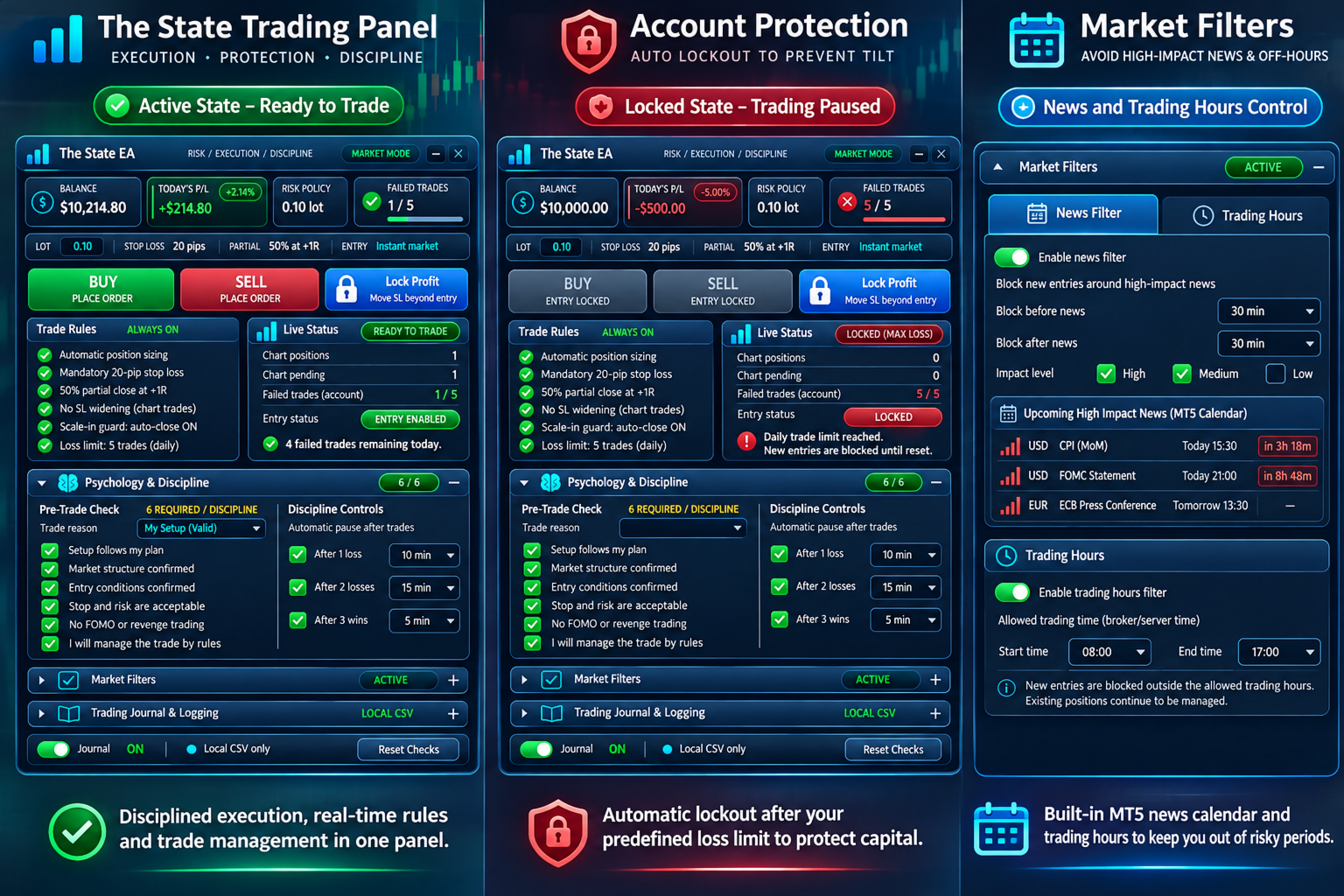
The State helps you control these decisions with a mandatory pre-trade checklist, automated stop-loss protection, entry restrictions, trading cooldowns and market filters.
You decide what to trade. The State helps you stick to your rules.
1. Pre-Trade Psychology Checklist
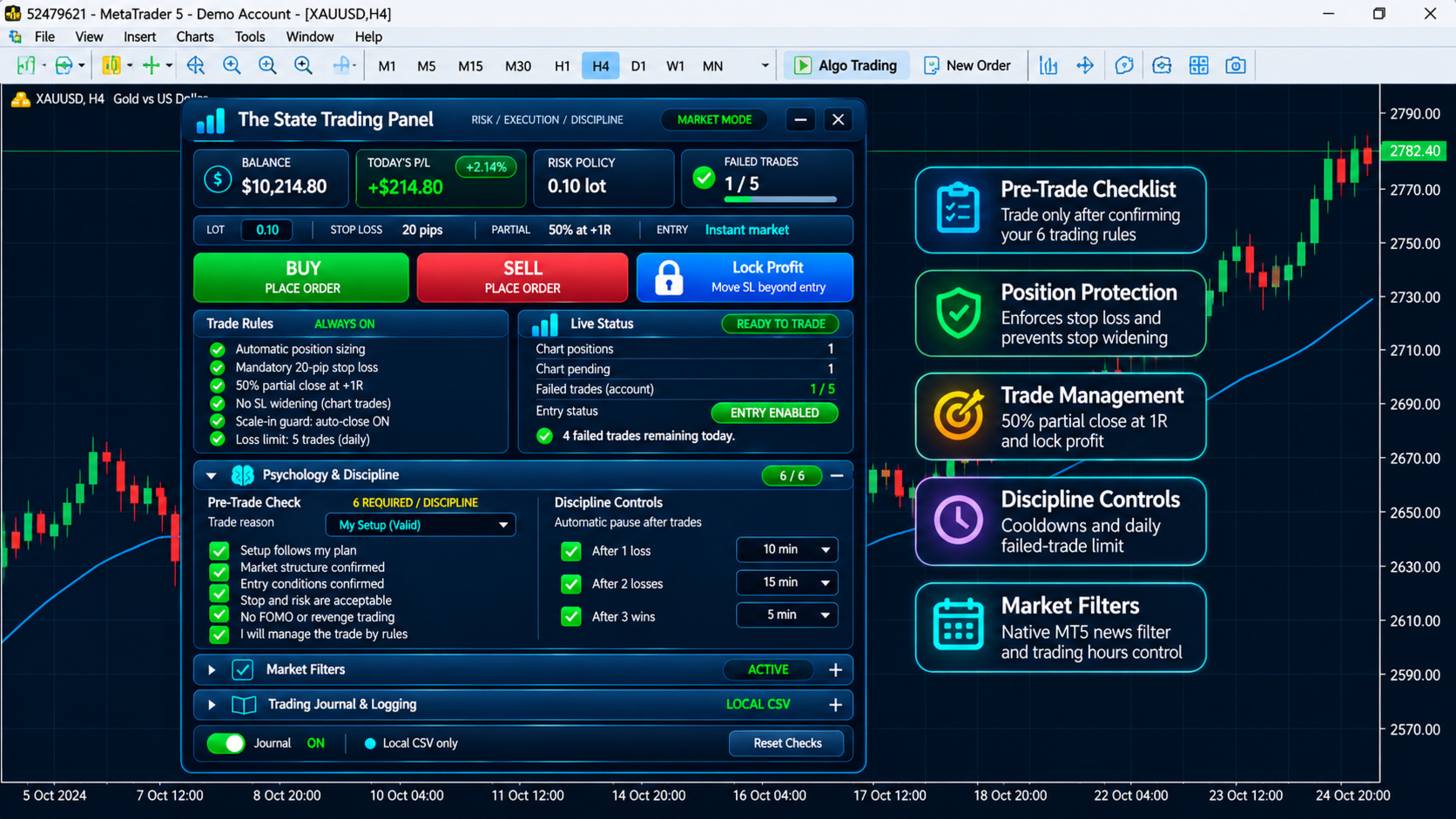
Every order submitted through the panel requires six checklist confirmations. You cannot place a new panel order until all six are completed.
Choose from three modes:
- Trading Discipline: Confirm your setup, market structure, entry conditions and accepted risk.
- The State Mindset: Focus on emotional awareness, avoiding desperation and accepting trade outcomes.
- Custom Checklist: Write your own six trading rules in the EA settings.
The checklist resets after each confirmed panel order, requiring a fresh review before the next entry.
2. Trade Execution and Risk Management
Automatic Position Sizing
Calculate lot sizes using configurable fixed-lot and percentage-risk settings.
Mandatory Stop Loss
Panel orders are submitted with a predefined stop loss based on your configured distance.
Stop-Loss Protection
The EA monitors positions on the attached chart symbol and attempts to restore stop losses that have been widened or deleted. If the protected stop price has already been crossed, or protection cannot be restored, the EA can attempt to close the position.
Automatic Partial Close at 1R
When an eligible trade reaches the configured 1R target, the EA attempts to close 50% of the position. Partial closing is subject to broker minimum lot sizes and volume requirements.
Lock Profit
Use the Lock Profit button to move the stop loss of an eligible profitable position beyond its entry price.
Market and Pending Orders
Place market orders, Buy Limit, Sell Limit, Buy Stop and Sell Stop orders. Pending Limit orders are the default execution mode.
3. Trading Discipline and Entry Protection
Daily Failed-Trade Limit
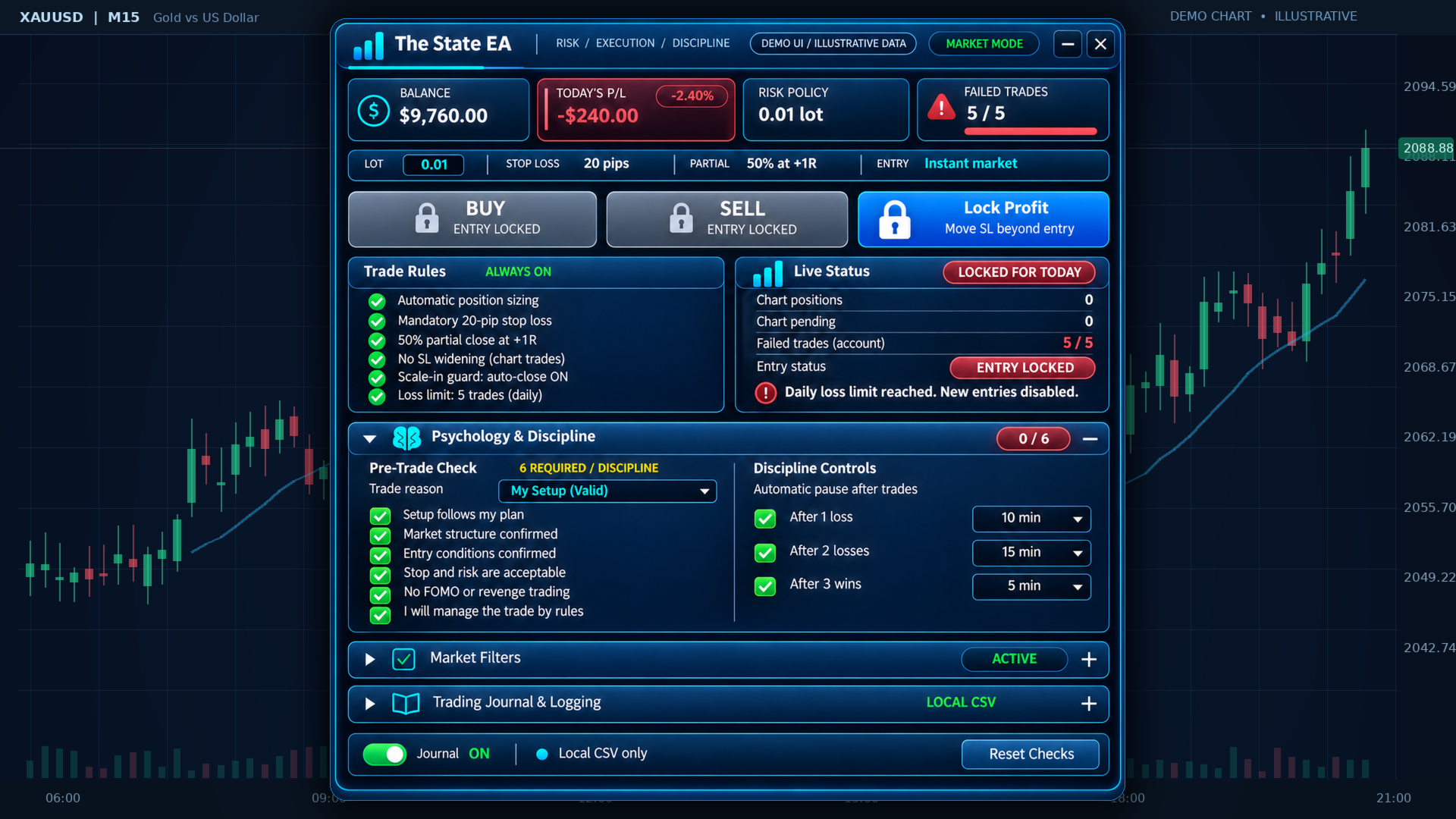
Set the maximum number of failed trades allowed per day. When the limit is reached, new panel entries are disabled until the configured reset.
Automatic Cooldowns
Set waiting periods after a loss, two consecutive losses or three consecutive wins. The cooldowns help prevent immediate re-entry after emotionally significant results.
Scale-In Protection
The EA restricts additional entries when existing positions on the chart symbol are losing or their stop losses have not been secured beyond entry.
Mobile and External Trade Guard
The State also monitors positions opened manually, from mobile MT5 or by other Expert Advisors on the same account.
When enabled, the external-entry guard attempts to close newly added exposure that violates the active entry restrictions. This works while the hosting MT5 terminal is running and connected.
4. News and Trading Hours Filters
Economic News Filter
Uses MetaTrader 5's built-in Economic Calendar to restrict new entries around relevant high-impact news events.
Configure how many minutes before and after a scheduled release new entries should be blocked. No third-party news API or WebRequest setup is required.
Trading Hours Filter
Set a custom no-trade time window based on your preferred trading schedule. Broker-server time is used by default, with an optional fixed UTC offset.
Existing positions continue to receive trade-management protection when new entries are restricted.
5. Live Dashboard and Trading Journal
The panel gives you an overview of your account and current trading restrictions, including:
- Account balance and daily profit/loss
- Calculated lot size and risk settings
- Open positions and pending orders
- Daily failed-trade count
- Entry eligibility and lockout reasons
- Psychology checklist and cooldown settings
Local Trading Journal
The EA records panel order submissions and checklist confirmations to a local CSV file for later review.
No external account, webhook or subscription is required.
6. Installation and Compatibility
Platform: MetaTrader 5
Account type: Designed for hedging accounts
Trading style: Manual and discretionary trading
Position management: All active positions on the attached chart symbol, regardless of origin
News source: Native MT5 Economic Calendar
Journal: Local CSV storage
Getting started:
- Install The State Trading Panel and attach it to your trading chart.
- Enable Algo Trading.
- Configure your lot sizing, stop loss, trading limits and market filters.
- Choose your psychology checklist mode.
- Complete the six checks before placing a panel order.
Important Information
The State Trading Panel does not generate trading signals, predict market direction or guarantee profitable trading.
Trade execution, stop-loss corrections, partial closes and corrective position closures depend on market conditions, broker restrictions and terminal connectivity. External trades cannot be blocked before reaching the broker.
The economic news filter depends on the availability of MT5 calendar data. The utility does not guarantee compliance with proprietary trading firm rules.
Test all settings on a demo account before using the product with real funds.
The State Trading Panel helps you follow your trading plan, manage risk and maintain consistent execution.