Multi-symbol Expert Advisor that fades extreme daily Fibonacci pivot levels, with 3-day confluence, a GMT filter, smoothed Heikin Ashi confirmation, fixed SL/TP and one trade at a time.
Trade the reversal where the market is stretched
At R4 to R6 and S4 to S6 the daily range has already been extended a long way. The EA waits for price to reach one of these levels and then looks for a move back toward the pivot. It acts only when several separate checks agree, and it never has more than one position open.
- Extreme level touchDaily Fibonacci pivots (P, R1-R6, S1-S6) are calculated for three days: today's set, yesterday's set and the set from two days ago. The EA looks for price touching R4+ to sell or S4+ to buy on any of the three sets.
- 3-day confluence scoreEach touch is scored from 1 to 5 using the other two days. Only setups at or above your minimum score are traded.
- GMT time filterEntries are allowed only inside your GMT hours, with optional protection against early Monday and late Friday.
- Smoothed Heikin Ashi confirmationThe EA waits for a colour flip in the reversal direction on the entry timeframe, so it does not fight a strong move.
- Defined risk on every tradeThe stop-loss goes just beyond the next outward level. The take-profit is a fixed multiple of the stop distance. The lot is sized as a percentage of balance.
How the confluence score works
The score is built only from pivot data of the last three days, which keeps the filter objective and easy to tune with one input.
+1Price touches the extreme level (R4+ or S4+) of one of the three pivot sets.
+1 / +1Another day's pivot set has a level on the same side within the cluster distance of the touched level. Up to two days can add a point.
+1 / +1Yesterday and/or the day before already reached the extreme level of its own pivots. Up to two points.
The maximum is 5. With the default minimum of 3, a single touch is never enough: at least two of the confirming conditions must also be present. Distances are measured in daily ATR, so one setting works on forex pairs, metals and other instruments.
Features
Multi-symbolOne chart scans and trades the whole symbol list. A suffix input covers brokers that add one to symbol names. Symbols the broker does not have are skipped without errors.
One position at a timeWhen several symbols qualify together, the EA takes the one with the highest score, then the one closest to its level.
SL and TP on every orderNo grid and no averaging down. Stop-loss sits beyond the next level, and take-profit follows your reward/risk ratio.
Risk-based lot sizeLot is calculated from the stop distance so each trade risks the same percentage of balance. A fixed lot is available too.
Optional risk step-up after lossesRaises risk by a multiplier after consecutive losses, with a step limit and a hard cap. It can be switched off completely.
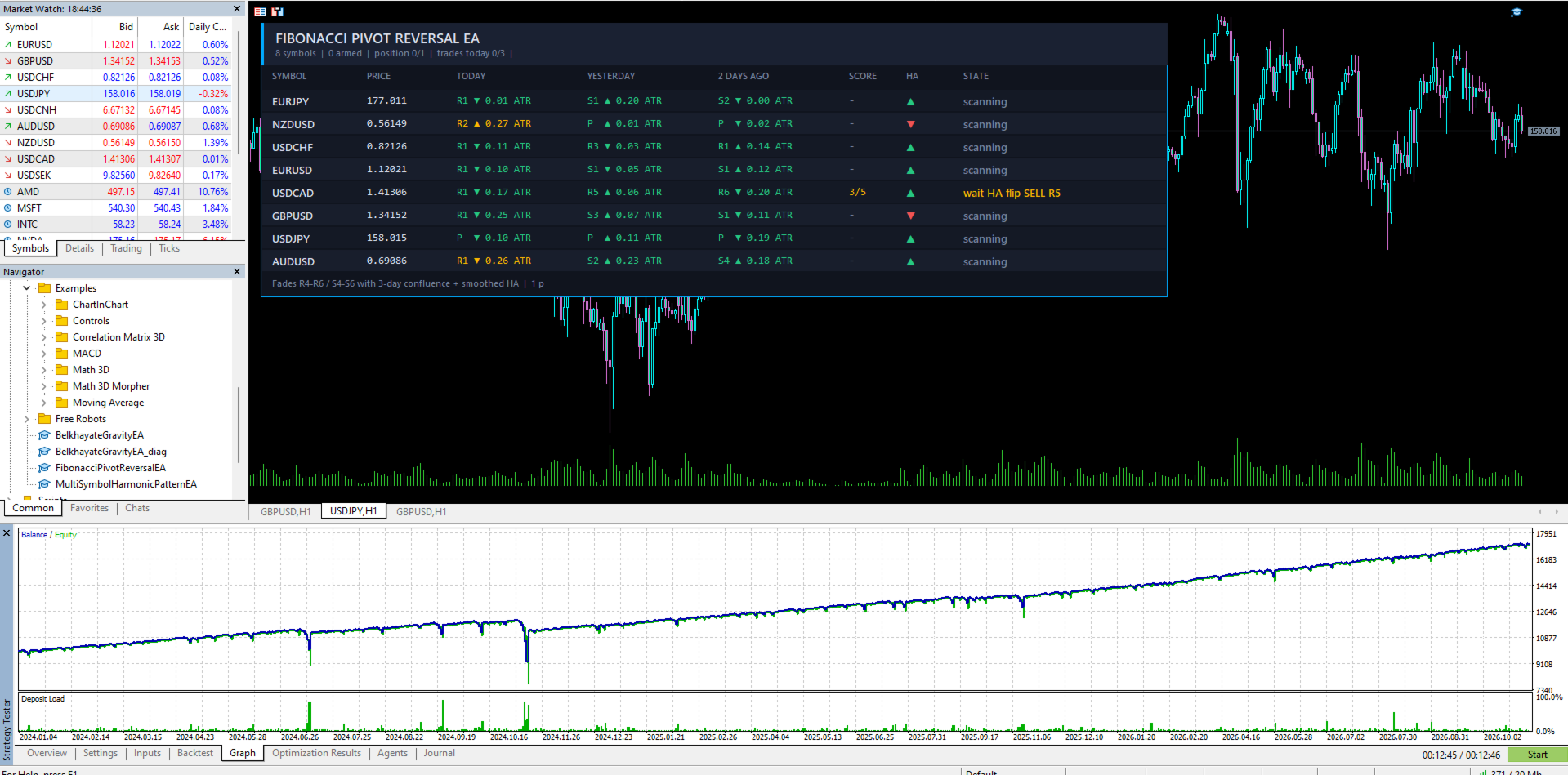
DashboardOne row per symbol with price, nearest pivot level today, yesterday and two days ago (in ATR), confluence score, Heikin Ashi direction and live state such as scanning, armed, in trade or outside GMT window.
Fast backtestsAn input turns the dashboard off in the Strategy Tester, which makes tests run faster.
Correct Monday levelsBrokers that add a Sunday daily bar for weekend-closed symbols are handled: the Sunday bar is merged into Monday, so Monday's pivots come from Friday. This can be switched off.
Self-containedNo external indicator is needed. All pivot, ATR and Heikin Ashi calculations are built in.
Input reference
Every setting is grouped as it appears in the EA's inputs window. Defaults are a starting point, not an optimised set.
Symbols
| Input | Default | What it does |
| Symbols | 8 forex pairs | Comma-separated list of symbols to scan and trade. Default: EURUSD, GBPUSD, USDJPY, AUDUSD, USDCAD, USDCHF, NZDUSD, EURJPY. |
| Suffix | empty | Text added to every symbol, for brokers that name symbols like EURUSD.m or EURUSDpro. |
| Entry timeframe | M15 | Timeframe used to detect the touch and to calculate the Heikin Ashi filter. Pivots always come from daily data. |
Setup (levels and confluence)
| Input | Default | What it does |
| Minimum level | 4 | Lowest level to fade. 4 means R4/S4, R5/S5 and R6/S6. Lower values give more trades at weaker levels. |
| Minimum score | 3 | Required confluence score out of 5. Higher is stricter and gives fewer trades. |
| Touch tolerance | 0.10 | How close price must come to a level to count as a touch, in daily ATR. |
| Touch bars | 6 | How many recent bars of the entry timeframe are checked for the touch, so a quick spike is not missed. |
| Overshoot limit | 0.30 | Skip the setup if price has already run this far beyond the level (in ATR). It avoids entering a breakout. |
| Cluster distance | 0.20 | Levels from two different days within this distance (in ATR) count as a cluster and add a point to the score. |
| Require prior extreme | true | Requires that yesterday or the day before already reached the extreme level of its own pivots. |
| ATR period | 14 | Number of completed daily bars in the average true range used to measure every distance. |
| Merge Sunday into Monday | true | Combines a broker's Sunday daily bar with Monday so Monday's pivots come from Friday. |
Time filter (GMT)
| Input | Default | What it does |
| Use GMT window | true | Allow new trades only inside the hours below. It uses GMT, so it behaves the same on any broker server time. |
| Start hour (GMT) | 6 | First GMT hour when entries are allowed. |
| End hour (GMT) | 20 | Entries stop at this hour (exclusive). A start later than the end gives an overnight window. |
| No early Monday | true | No entries on Monday before 07:00 GMT, when weekend gaps and thin liquidity are common. |
| Friday stop hour | 18 | No new entries on Friday from this GMT hour. Set 24 to turn it off. |
Smoothed Heikin Ashi filter
| Input | Default | What it does |
| Use Heikin Ashi | true | Require a smoothed Heikin Ashi confirmation before entering. |
| Smoothing 1 | 10 | EMA period applied to the raw open, high, low and close before Heikin Ashi is built. |
| Smoothing 2 | 10 | EMA period applied again to the Heikin Ashi open and close. |
| Flip window | 5 | The last closed bar must point the trade direction, and an opposite-colour bar must have appeared within this many bars. In other words, the colour must have flipped recently. |
Trade management
| Input | Default | What it does |
| SL buffer | 0.05 | Distance added beyond the next outward level for the stop-loss, in daily ATR. A sell at R3 gets its stop a little above R4. |
| Max SL size | 1.50 | Skip the trade if the stop would be farther than this many daily ATR. |
| Reward / risk | 1.5 | Take-profit distance as a multiple of the stop distance. |
| Risk % | 0.5 | Base risk per trade as a percentage of balance. 0 switches to the fixed lot. |
| Fixed lot | 0.01 | Lot size used when Risk % is 0. |
| Max lot | 5.0 | Hard cap on the lot size of any order. |
| Martingale | true | Increase risk after a losing trade. A win resets it. Still one position at a time. |
| Risk multiplier | 1.5 | Risk is multiplied by this value for each consecutive loss. |
| Max steps | 3 | After this many increases, the next loss returns risk to the base level. |
| Max risk % | 3.0 | Hard cap on risk per trade after all multiplications. |
| Max trades per day | 3 | Maximum number of trades per day across all symbols. Each level is also traded at most once per day. |
| Max spread | 40 | No entry when the spread is above this many points. 0 turns the check off. |
| Magic number | 20261109 | Identifies this EA's trades. Use a different number for each copy running on the same account. |
| Slippage | 20 | Maximum price deviation in points allowed on entry. |
Dashboard
| Input | Default | What it does |
| Draw in tester | false | Shows the dashboard during backtests. Leave it off for faster tests. On a live chart the dashboard always shows. |
| Scan interval | 1 | Seconds between scans of the symbol list. |
| X offset / Y offset | 12 / 24 | Position of the dashboard on the chart in pixels. |
Setup
- Attach the EA to one chart of any symbol. It trades every symbol in the list from that chart.
- Add the symbols to Market Watch and make sure daily history is available.
- If your broker adds a suffix to symbol names, set the Suffix input.
- Run it on a VPS so it can scan and trade around the clock.
- Test on a demo account with the default settings first, and check the results on your own broker and symbols.
Spreads, symbol names and the timing of daily bars differ between brokers, so results will differ too.
Risk notes
- Trading involves risk. Past results do not guarantee future results.
- Increasing risk after losses can lead to larger drawdowns in a losing run. The option can be turned off, and the multiplier, step limit and risk cap keep it bounded.
- Reversal strategies can lose in strong trends that keep going through extreme levels. Every trade has a stop-loss, and the Heikin Ashi and score filters are there to reduce such entries, not remove them.
- Use low risk per trade, and do not risk money you cannot afford to lose.