Risk Limit Board

Risk Limit Board keeps an eye on the limits of your account, for example the rules of a prop-firm challenge. It shows how much of each limit is already used and warns you in time.


What you see

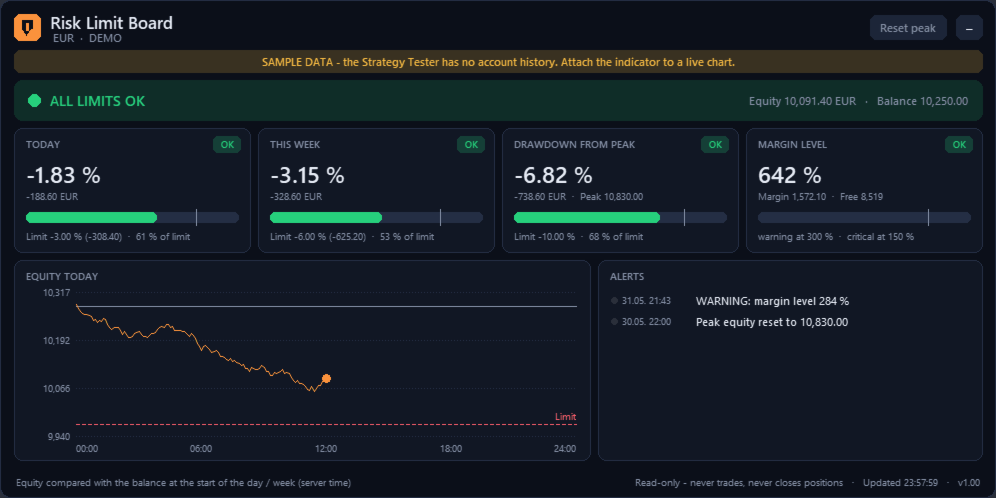
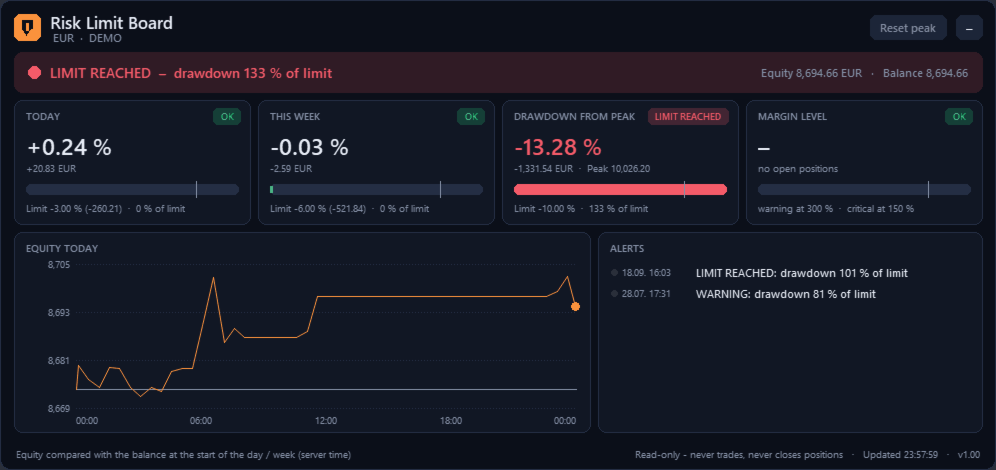
- A status strip: all limits OK, warning or limit reached.

- Four gauges: today, this week, drawdown from the equity peak, margin level. Each gauge shows the value, the amount in account currency and how much of the limit is used, with a marker at the warning level.

- The equity curve of the current day with the start balance and the daily limit line.

- An alert log with time and message.

- A button to reset the equity peak, for example after a new challenge has started.


How it calculates

- Daily and weekly result = equity compared with the balance at the start of the day or week. Open positions count.

- Deposits and withdrawals are not counted as profit or loss. They also move the equity peak, so a withdrawal is not shown as a drawdown.

- Credit or bonus money is not counted as profit.

- The trading day can start at any server hour, for example to match the reset time of your prop firm.

- Optional start value for the equity peak, for example the start balance of a challenge.

- The equity peak is stored per account and shared between charts.


Alerts

- Warning when a set part of a limit is used (default 80 %), and an alert when the limit is reached.

- Margin level warning and critical level.

- Pop-up, sound, push notification and e-mail, each on or off.

- Each alert is sent once per day or week and level, also after a restart of the indicator.


Notes

- Read-only: the indicator never opens, changes or closes orders. It does not close positions when a limit is reached.

- No DLL, no internet connection, no files are written.

- The Strategy Tester has no account history. In the tester and in the demo version the panel shows clearly labelled sample data.

- Rules of prop firms differ. Check that the settings match the rules of your firm.
Plus de l'auteur
EA Performance Board shows the results of every Expert Advisor on your account in one clear panel on the chart. Each EA is identified by its magic number. Manual trades get their own row. What you see - Six summary tiles: net result, win rate, profit factor, number of closed trades, maximum drawdown of closed trades, open profit/loss. - A table with one row per EA: trades, win rate, profit factor, net result with bar, average win, average loss, maximum drawdown, longest loss streak, open profit
PnL Calendar Board shows your closed trading results as a calendar on the chart. Green days made money, red days lost money. The stronger the colour, the bigger the result. What you see - A month grid with the net result and number of trades for every day. - Week totals on the right side of each row. - Six summary tiles: month net result, trading days, best day, worst day, win rate of the days, average per trading day. - A bar chart of all 12 months of the year. Click a bar to open that month.
Trading Hours Board sorts your closed trades by weekday and hour and shows the result as a heat map. You see at once which hours bring profit and which hours cost money. What you see - A heat map weekday x hour. Choose what it shows: net result, win rate, number of trades or average trade. - Bars by hour and by weekday. - Six tiles: best hour, worst hour, best weekday, worst weekday, trades analysed, time basis. - Click a cell for details: trades, win rate, net result, profit factor, average tr
Exposure Board
Hussein Mohammad
Exposure Board shows what is open on your account right now and how much is at risk. It is made for traders who run several EAs or many positions at the same time. What you see - Six tiles: open positions, floating profit/loss, result if all stop losses are hit, positions without stop loss, margin used with margin level, largest currency exposure. - A table by symbol or by EA: positions, long and short lots, net lots, floating result, result at stop loss, positions without stop loss (marked), m
Filtrer:
Aucun avis
Répondre à l'avis