Japanese Candle Scalper
- Experts
- Version: 3.45
- Activations: 15

Japanese Candle Scalper - (EA en version ingles)
Japanese candlestick scalping for XAUUSD on MetaTrader 5.
Bring a defined gold trading strategy to your chart, with automated execution and visible controls. Japanese Candle Scalper evaluates candle-based entry opportunities according to its trading rules. Its Japanese-style panel displays the strategy status, position information and trading controls in one place.
The EA comes with a predefined configuration. Start your evaluation on XAUUSD, M5, then explore its operating modes, lot sizing and position-management settings using your broker’s historical data.
Control the settings that matter
- Two operating modes with independent stop-loss and management settings.
- Fixed lots or automatic sizing based on account balance, with configurable increments.
- Candle-range stop loss, break-even and trailing stop.
- Trading sessions based on the broker’s server time and a configurable daily target.
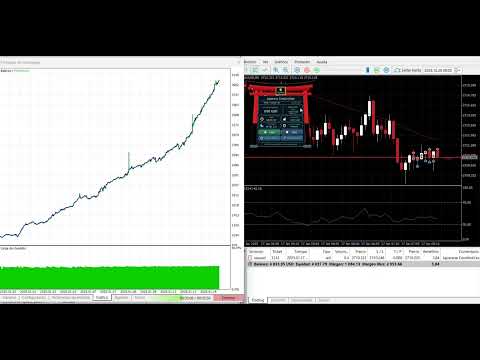
- Adjustable panel with START, STOP, AUTO BE, TRAILING and a candle countdown.
The strategy does not use martingale progression, build an order grid or average into an existing position on the same symbol. It manages one strategy position at a time per symbol, keeping entry and position management straightforward.
Two approaches to managing candle-based entries
Mode 1: The previous candle’s range determines the stop-loss distance. Break-even and trailing settings control subsequent stop adjustments.
Mode 2: Provides an independent stop-loss percentage, break-even or position-holding behavior at the start of a candle, and optional trailing. An open position is not automatically closed simply because a candle ends.
Mode 1 is enabled by default and takes priority if both modes are enabled. Only one entry opportunity is evaluated per candle. If a candle opens outside the enabled sessions, evaluation may wait until the first tick of an allowed session. Entry filters and broker conditions must still be satisfied.
Configurable lot sizing
Automatic lot sizing is enabled by default. With the supplied balance and lot increments, a USD 1,000 balance produces an initial volume calculation of 0.10 lots, before broker volume limits and step adjustments are applied.
You can change the balance and lot increments or select fixed lots. The daily target is configured separately.
The following are manual configuration examples for evaluation, not expected returns or predefined risk profiles.
They do not represent the default automatic-lot formula:
- USD 1,000 balance: 0.10 fixed lots; daily target setting of USD 150–300.
- USD 2,000 balance: 0.15 fixed lots; daily target setting of USD 300–400.
- USD 5,000 balance: 0.25 fixed lots; daily target setting of USD 400–700.
- USD 10,000 balance: 0.50 fixed lots; daily target setting of USD 600–1,000.
- USD 20,000 balance: 1.00 fixed lot; daily target setting of USD 1,000–2,000.
These examples assume a USD account. A daily target is a configurable threshold; it may not be reached, and losses remain possible.
Balance-based sizing does not maintain a fixed percentage of capital at risk. Actual exposure depends on volume, stop-loss distance and the instrument’s specifications. For accounts denominated in other currencies, an appropriate conversion quote must be available through the broker. If it is unavailable, the EA waits. Automatic volume respects the broker’s per-order and aggregate directional limits.
Understand why the EA is waiting
The panel distinguishes between ACTIVE, WAITING, MANAGING and INACTIVE. Status messages can identify disabled sessions, RSI conditions, a daily-target pause, missing data or unavailable trading permissions.
ACTIVE means the EA is ready to evaluate opportunities. It does not mean an order must open immediately.
Initial configuration
- Platform: MetaTrader 5 desktop.
- Initial evaluation: XAUUSD, M5.
- Mode 1 enabled; Mode 2 disabled.
- Asian session disabled.
- London: 08:00–17:00; New York: 13:00–22:00, using broker server time.
- Automatic lot sizing enabled.
- Daily target: 10,000 in the account currency, configurable.
- Panel scale: 125%, adapting to the available chart space.
Review the lot-sizing parameters and daily target before use. The default target is an input value, not a recommended return for every account balance.
How the daily target works
The daily target combines this strategy’s closed and floating results. It is a configurable threshold, not an expected return.
While the target-pause condition applies, normal entries and break-even/trailing adjustments are paused until the relevant session condition changes. Reaching the target does not automatically close an open position. Stops already placed with the broker remain active.
Test it. Understand it. Choose your settings.
Download the Market demo and evaluate XAUUSD in the MetaTrader 5 Strategy Tester. Use visual mode to inspect the panel and position management. Compare complete reports, drawdown, trade counts and trading costs across different historical periods.
When the EA’s behavior and configuration meet your requirements, purchase the full version through MQL5 Market. The Market manages licensing and activations, with no additional seller activation code.
Technical support is available through the product comments and private messages on MQL5 for setup questions and assistance.
Trading can result in loss of capital. Historical backtests do not guarantee future results. Performance depends on data quality, broker conditions, spreads, commissions, slippage and the selected settings.