SX HTF Candles
- Indicateurs
-
Nikolett Gorjanacz Toth
 SizerX – risk and trade management tools for MetaTrader 5.
Built by a trader, for traders: position sizing, trade management, pyramiding and prop firm protection in one clean panel. Every feature is tested on live and Strategy Tester charts before release. - Version: 1.0
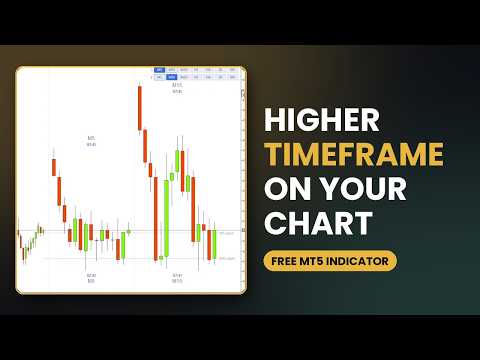
SX HTF Candles shows the candles of a higher timeframe in a block on the right side of your chart, next to the price. You see the bigger picture without changing the chart timeframe. For example, on an M1 chart you see the last 15 M5 candles and the time left until the current M5 candle closes.
What you get:
- Higher-timeframe candles in the free space on the right side of the chart, so the price candles are not covered
- Automatic timeframe (one step above the chart), or any timeframe you choose
- One or two timeframes side by side, each with its own row of buttons to switch with one click
- The candles use the colours of your own chart, so they look like the chart candles
- Timeframe name and time left above and below the block; the time left turns amber near the close
- Levels: the open of the current higher-timeframe candle (also for the second timeframe), and optional previous high and low, 50% of the previous candle, daily open and weekly open
- Adjustable number of candles (3 to 40): the block keeps its width and the candles get narrower
- Works on dark and light charts and on high-resolution screens
The space on the right side: the indicator makes room on the right side of the chart when the block needs more space. It gives the space back when the block needs less (for example when you switch off the second timeframe) and when you remove the indicator. If you change the right side space by hand, the indicator keeps your setting and does not change it again. In that case you can set it back by hand.
How to use it:
- Attach the indicator to a chart.
- The block appears on the right side with the next higher timeframe.
- Use the buttons at the top of the block to switch the timeframe.
- To see a second timeframe, switch on "Show a second timeframe" in the inputs.
Inputs: timeframes, number of candles, candle style and width, block width and gap, timeframe labels and time left, levels and their names, line thickness, buttons and colours.
Please note: the price scale of the chart follows the chart candles only. If the higher-timeframe candles are larger than the visible price range, their ends are cut off. In that case show fewer candles or zoom out the chart.
SX HTF Candles only draws on the chart. It does not open, modify or close trades.