Bullrun EA MT5
- Experts
-
Stephen Gathumbi Ndiba
 Hi, I'm Steve and I make Expert Advisors as well as Trading Tools.
Feel free to contact me via messages here. - Version: 1.0
- Activations: 20
!!ATTENTION!!CURRENT PRICE OF $105 IS ONLY AVAILABLE FOR THE NEXT 10 COPIES, AFTER WHICH THE PRICE GOES TO $149.99. |
|---|
BullRun is built on a straightforward principle: trend following. Rather than relying on obscure trading logic or strategies that look impressive in a backtest but are difficult to understand, BullRun uses moving average crossovers as its core trading mechanism. Its approach is transparent, making it easier to evaluate the markets it is suited to, understand its trading behaviour, and identify the market conditions that may affect its performance.
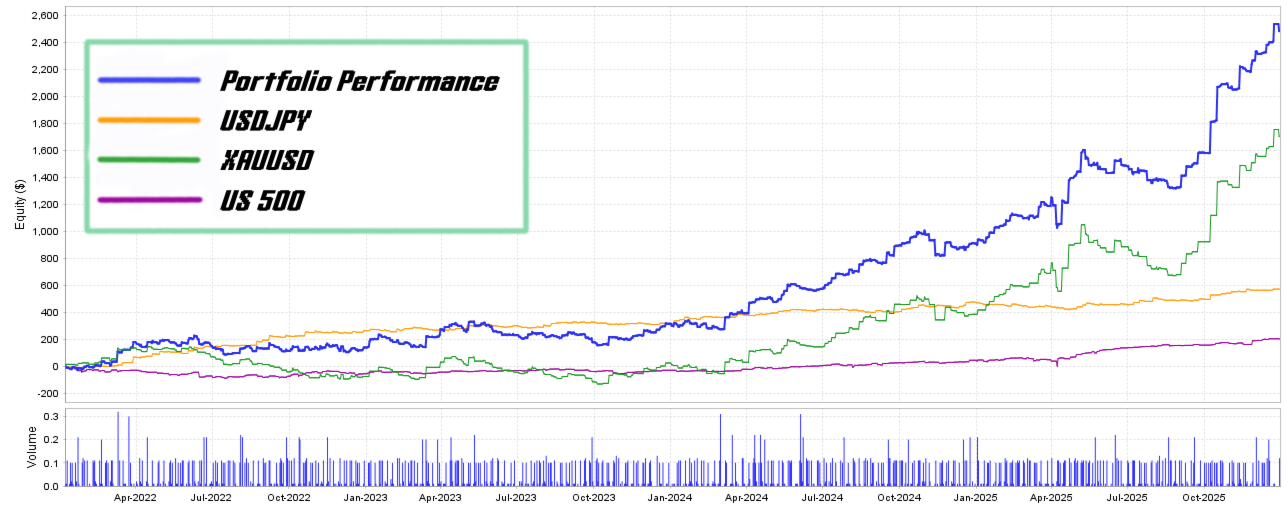
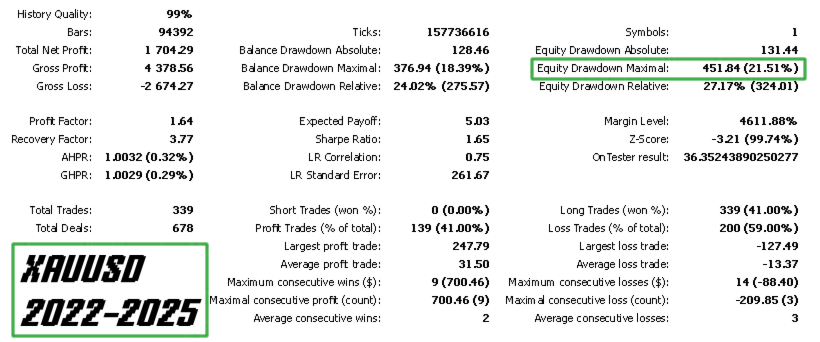
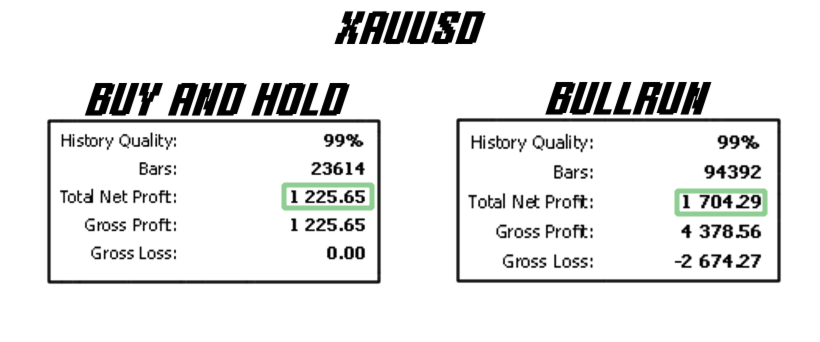
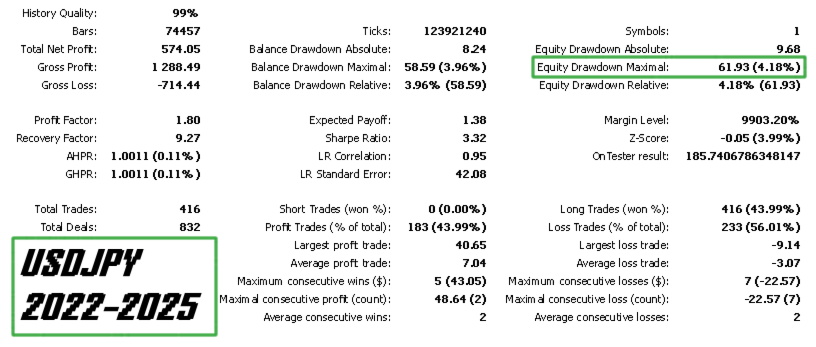
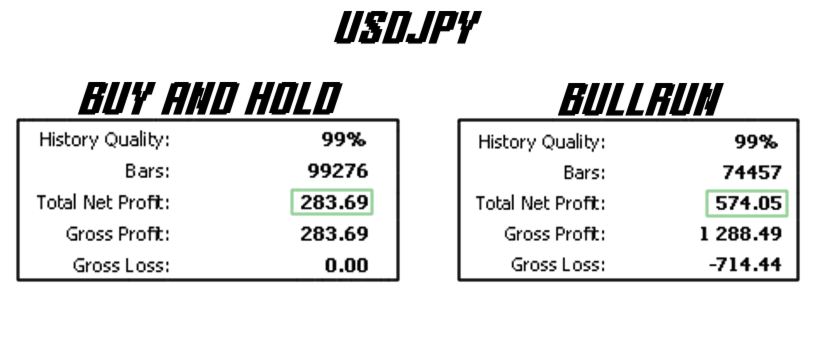
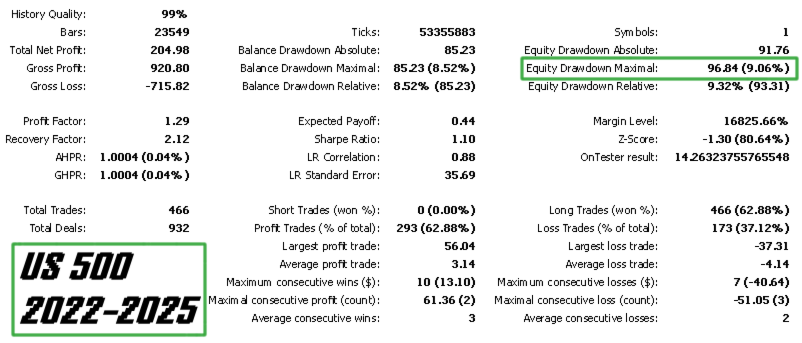
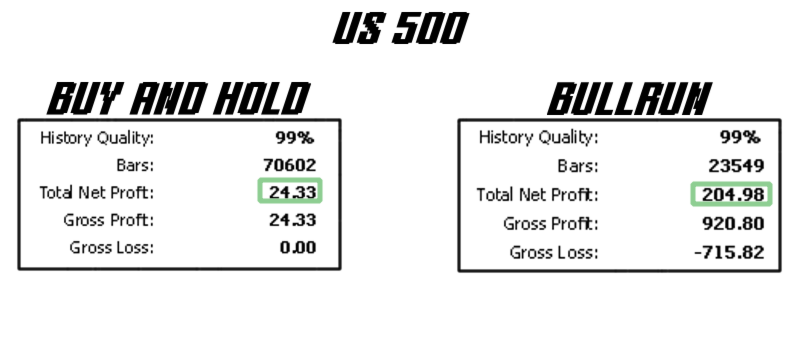
Across the markets I have tested, BullRun has repeatedly outperformed a buy-and-hold approach while recording lower drawdowns. These results suggest that its trend-following approach can offer an alternative to simply holding an asset through its market cycles.
BullRun is designed for traders who value a systematic, understandable trading strategy and want to evaluate its performance against their own risk requirements, whether for personal trading or as part of a broader trading plan.
Key Features
- No use of grid or martingale.
- Opens only one trade at a time.
- Max Drawdown protection feature that uses an intraday rolling max drawdown.
- Configurable testing restraints which restricts certain parameter combinations and leads to faster testing.
- Magic numbers for independent management.
- Trailing Stop option for extra drawdown protection.
- Trading hours specification.
Strategy Outline
As mentioned, Bullrun’s core strategy is based on moving average crossovers, where a fast moving average crosses the slow moving average and that generates a trading signal, Buy when it crosses from below to above the slow moving average and vice versa. Buys are automatically closed when a sell signal is generated and sells are automatically closed when a buy signal is generated.
The user has the option to enable long trades only (buys), short trades only (sells) or both long and short trades by toggling the ‘Direction of Trading?’ option. They also can invert the logic by toggling the ‘Lock MA Order?’ option which enables the ‘Fast Moving Average Period’ to be set higher than the ‘Slow Moving Average Period’, essentially making it the slower of the two moving averages. This has proved to be profitable in some markets according to my testing. If you would like access to these, send me a private message after purchase.
The ADX indicator is used as a filter for more accurate trades and the details of how it is used I won’t disclose as it is part of what makes the edge of the overall strategy work. I will however mention that it is simple but very effective and if you figure it out, well, congratulations.
The trailing stop feature is essential for capturing big swings without waiting for the market to generate an inverse signal. Its also quite useful for controlling drawdown as it establishes a stop-loss for every trade, essentially creating a controllable max loss per trade.
The user can specify the hours they would like Bullrun to trade by using the ‘Start Trading Hour’ and ‘End Trading Hour’ settings in the ‘Trading Time Management’ section. This can enable the user to rake in profits which consolidate on a given instrument at given hours of the day.
Parameters
Magic Number – Used to make an instance of the EA identify its own trade. Change this number for every instance you run simultaneously. For example, if you are running Bullrun on XAUUSD and US500 at the same time, ensure that this entry is, lets say, 1011 and 1012 respectively to avoid the instance running on XAUUSD controlling the trades running on US500.
Lot Size – also known as volume, it refers to the size of trades you would like to place using the EA.
Activate Trailing Stop Loss – Used to activate or deactivate the trailing stop loss feature.
Initial Stop Loss Points – Used to setup the initial stop loss for the trailing stop feature. It is denoted in points for compatibility with multiple instruments.
Trailing Stop Loss Points – sets up the points that the stop loss should trail price once in profit.
Activate Max Drawdown Protection – used to activate or deactivate max equity drawdown feature. This is quite useful for anyone using this EA for prop firm trading since it enables faster testing by discarding runs that hit the drawdown limit early on.
Max Equity Drawdown (%) - the value inserted in this parameter is used to deactivate the EA once the max drawdown gets to this level. As mentioned earlier, it is a rolling intraday max drawdown, so it is calculated from the highest equity level achieved at any given point.
Activate Trading Time Management – Activates or deactivates trading time management, where the user can specify the hours they would like Bullrun to trade.
Start Trading Hour – Used to set the hour that Bullrun will start looking for trade signals as well as placing the said trades.
End Trading Hour – Used to set the hour that Bullrun will stop looking for trade signals as well as close any open trades.
Lock Timeframes? – Used to declare if you would like the two Moving Average timeframes to be the same or not. This parameter is very handy during testing as it discards runs with different timeframes early on if your goal is to use one timeframe for both Mas.
Lock MA Order? – Used to declare if you would like the ‘Fast Moving Average’ to always have a lower period than the ‘Slow Moving Average’. This is a handy setting for a user who would like to test a wide range of values while retaining the core strategy logic.
Fast MA Timeframe – Used to set the timeframe for the data the ‘Fast Moving Average’ will use.
Fast MA Period – Used to set the period of the ‘Fast Moving Average’ indicator.
Fast MA Type – Used to set the type of moving average the ‘Fast Moving Average’ will be. This includes simple, exponential, smoothed and linear weighted.
Slow MA Timeframe - Used to set the timeframe for the data the ‘Slow Moving Average’ will use.
Slow MA Period - Used to set the period of the ‘Slow Moving Average’ indicator.
Slow MA Type - Used to set the type of moving average the ‘Slow Moving Average’ will be. This includes simple, exponential, smoothed and linear weighted.
Direction of Trading? – Used to setup the types of trades the EA will take. These include ‘longOnly’ which only trades buys, ‘shortOnly’ which only trades sells and ‘longShort’ which trades both buys and sells. This is a great feature for directionally biased instruments.
Activate ADX Filter? – Used to activate or deactivate the ADX filter.
ADX Period – Used to set the period for the ADX indicator.
ADX Timeframe – Used to declare the timeframe that the ADX indicator will use to calculate its data.
As much as I have made Bullrun transparent strategy-wise and low drawdown by using features such as a trailing stop loss as well as an ADX filter, like every other EA, it doesn’t mean that losses and drawdowns that are larger than expected are inevitable and always keep in mind that historical performance does not guarantee future results.