Quantus
- Experts
- Version: 1.51
- Activations: 10

Quantus — Automated Gold Trading and Position Management
Trade with a plan. Manage every position with purpose.
Quantus is an algorithmic trading system designed for XAUUSD (Gold).
Unlike a simple entry-only Expert Advisor, Quantus manages the entire trade lifecycle through a structured position framework. Initial entries, profit-taking, trailing logic, grid expansion, margin-aware position sizing, and basket-level exit management work together within one automated system.
Built for traders who value structured execution, configurable risk parameters, and transparent trade management.
No profit guarantees. No reliance on a single indicator. A systematic approach to trading decisions and position management.
Trading Logic and Components
Quantus combines several analytical components to evaluate potential trading opportunities.
Market Profiles
Quantus includes two market profiles:
-
Gold Profile — XAUUSD: uses Gold-oriented settings for the absolute ATR filter and dashboard display.
-
Forex Major Profile: provides a pip-based absolute ATR threshold for major currency pairs.
The appropriate profile and parameters depend on the symbol specifications, broker conditions, spread, and execution environment.
Timeframe
The strategy is intended for the M15 timeframe.
For consistent evaluation, attach Quantus to an M15 chart and use the same timeframe in your backtests.
Volatility Modes
Select the filtering approach that fits your testing methodology:
-
Relative volatility filtering for a threshold that adapts to recent ATR conditions.
-
Absolute volatility filtering for a user-defined minimum volatility requirement.
All parameter choices should be validated against the intended instrument and broker.
Structured Position Management
Quantus organizes each trading signal into a basket with separately managed position roles.
R1 — Initial Profit Target
The first position uses an ATR-based take-profit. Its purpose is to realize a portion of the trade's potential before the remaining position continues under its own management rules.
R2 — Break-Even and Trailing Management
After R1 reaches its take-profit, Quantus activates trailing management for R2 and attempts to move its stop-loss to the entry price before applying the ATR-based trailing logic.
Break-even at entry does not necessarily mean break-even after commission, swaps, or other trading costs.
G1 and G2 — Configurable Grid Expansion
The number of permitted grid levels is configurable. Grid expansion is optional through the grid-level setting.
It increases exposure when additional positions are opened and can increase losses during sustained adverse price movements.
Risk and Exposure Controls
Equity-Based Position Sizing
The base trading volume is calculated using account equity and a configurable lot allocation. The volume is divided between R1 and R2 according to the configured percentage.
Margin-Aware Entry Sizing
Quantus evaluates the estimated margin requirements for the base basket and configured grid levels. Depending on the settings, the initial position size can be reduced to fit the configured margin budget, or the entry can be skipped.
Structural Soft Stop-Loss
The EA monitors swing structure and applies a momentum-confirmation condition to its soft-stop exit logic. If the defined structural level is breached with the required confirmation, the basket is closed.
This is software-managed exit logic, not a guaranteed broker-side stop-loss.
Optional Broker-Side Safety Stop
An additional emergency stop-loss can be enabled. With grid management active, this stop is applied to the basket when the final configured grid level is reached. If the grid is disabled, the safety stop can be attached at entry.
Before that final grid level is reached, positions may not have this additional broker-side safety stop. Traders must understand this exposure when selecting their settings.
Basket Trailing
When the basket reaches its configured profit trigger above break-even, basket-level trailing logic can manage the exit of remaining positions.
Friday and Weekend Management
Quantus includes a hard-close routine that closes its managed baskets during the configured Friday server-time window and on Saturday and Sunday.
The configured closing hour is based on broker server time, not necessarily the trader's local time.
Broker Stop-Level Validation
The EA checks broker stop and freeze restrictions when adjusting stop-loss and take-profit levels. This is intended to improve compatibility with symbol-specific trading constraints, although execution can still fail because of broker or market conditions.
Quick-Start
Get Started in Five Steps
Step 1 — Install Quantus
Install the Expert Advisor through MetaTrader 5 and open the Navigator panel.
Step 2 — Select Your Trading Environment
Open the chart for your intended instrument. For the default Gold setup, select XAUUSD and use the M15 timeframe.
Confirm that your broker's symbol specifications and trading conditions are suitable for the strategy.
Step 3 — Configure the Market Profile
Select Gold (Standard) or Forex Major profile as appropriate. Choose the volatility-filter mode and review its parameters before trading.
Step 4 — Review Risk Parameters
Before enabling automated trading, review:
-
Minimum equity required for new entries.
-
Base lot allocation and R1/R2 volume split.
-
Maximum margin-usage setting.
-
Whether the EA may reduce the initial lot size to fit the margin budget.
-
Number of permitted grid levels.
-
ATR-based take-profit, grid spacing, and trailing settings.
-
Emergency stop-loss settings.
-
Friday hard-close hour in broker server time.
Do not assume the default parameters are optimal for your account or broker.
Step 5 — Test Before Live Deployment
Run a backtest using high-quality historical tick data where available. Include realistic spreads, commissions, swaps, and execution assumptions.
Proceed to demo testing before considering live deployment.
Recommended practice: Change one parameter group at a time and compare results across multiple market periods. Avoid selecting settings solely because they produce the highest historical profit.
Monitoring
Understand What Your EA Is Doing
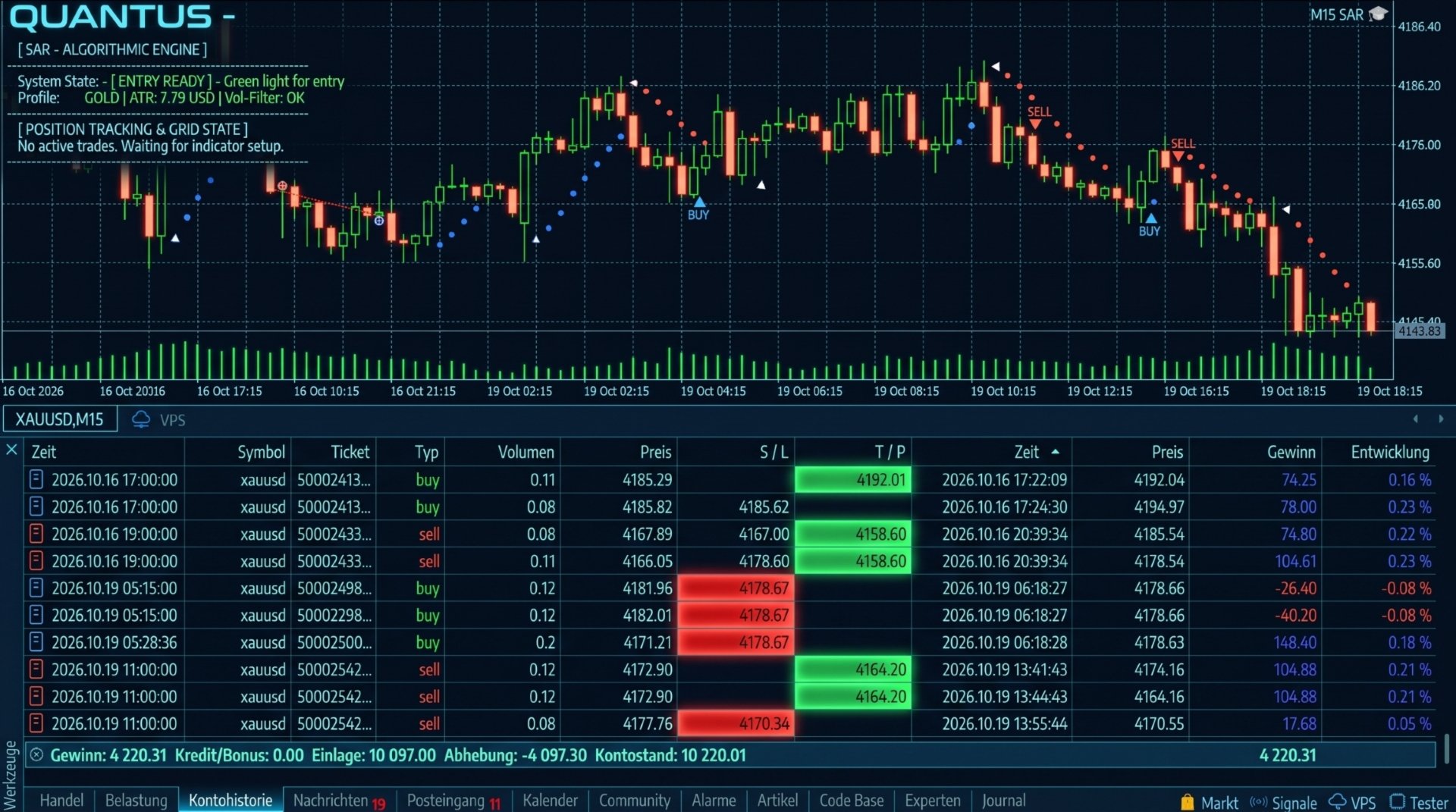
Quantus includes an on-chart dashboard designed to make its operational state and active basket management easier to inspect.
Depending on the current state, the dashboard displays:
-
System State: entry-ready, active position management, or hard-close pause.
-
Market Profile: Gold or Forex Major.
-
ATR Reading: current ATR value in the selected profile's units.
-
Volatility Filter: whether the configured volatility condition is satisfied.
-
Active Baskets: basket identifiers and buy/sell direction.
-
Current Exit Reference: initial R1 target or active trailing reference.
-
Next Grid Level: the next configured grid price and grid progression.
-
Grid Status: whether the maximum configured grid level has been reached.
The EA also writes operational messages to the Experts log, including basket entries, grid events, exit decisions, and certain trade failures.
Designed for Ongoing Supervision
Quantus stores basket identifiers and uses position comments and terminal Global Variables to help reconstruct its internal basket state after a terminal or EA restart.
This supports state recovery, but it does not eliminate the need to monitor the terminal, connection, account exposure, and open positions.
Automated trading should not be treated as a substitute for ongoing risk supervision.
Backtests
Evaluate the Strategy With Evidence
A systematic trading approach should be assessed using historical data before it is deployed with real capital.
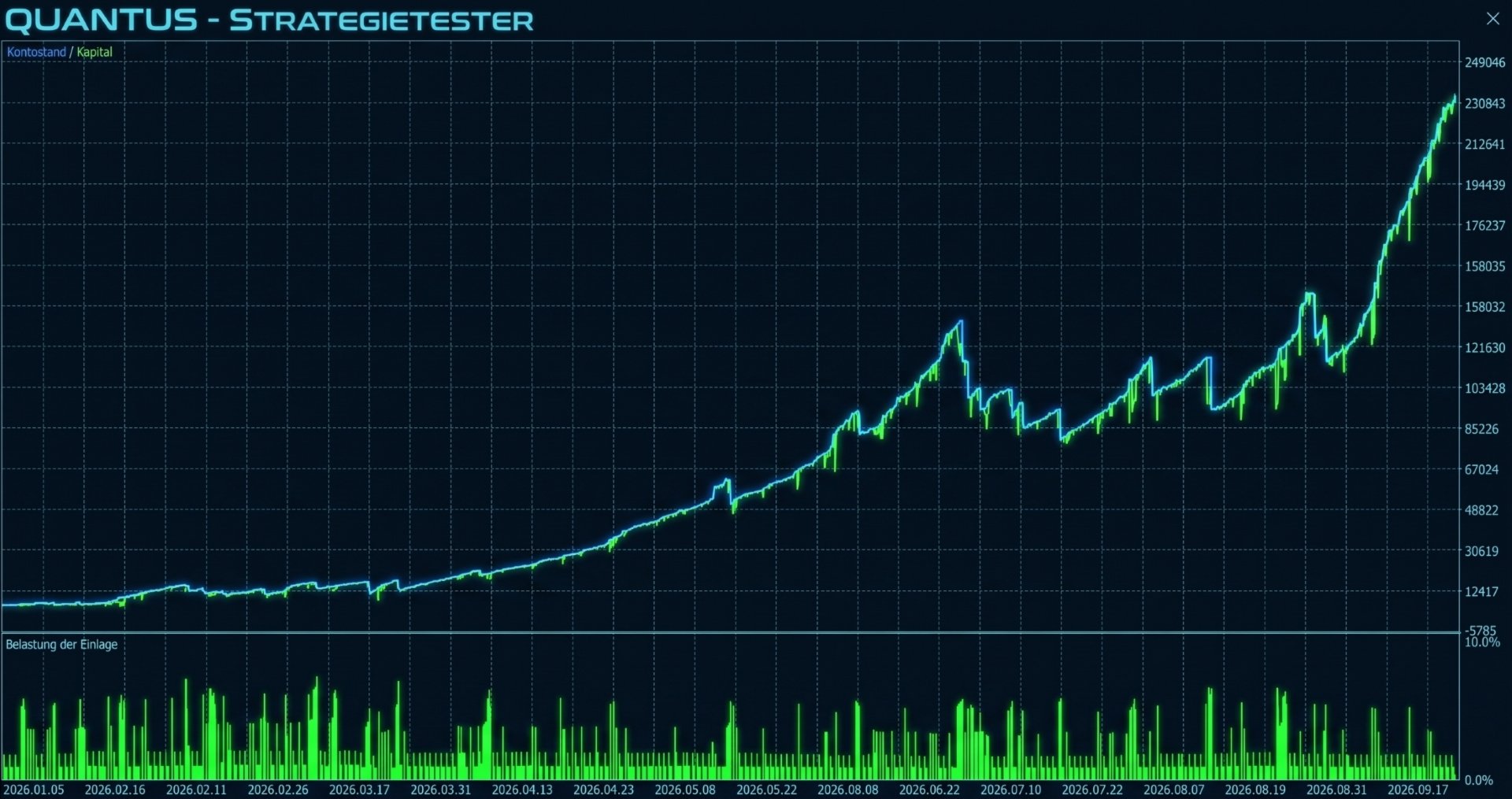
Quantus can be evaluated in the MetaTrader 5 Strategy Tester. Backtest results depend on the instrument, timeframe, historical data quality, spread, commission, swaps, execution assumptions, and parameter selection.
Verified test configuration
-
Symbol: XAUUSD
-
Timeframe: M15
-
Test period: 01.01.2026 - 30.09.2026
-
Broker / server: Roboforex
-
Initial deposit: 6 000.00 $
-
Leverage: 1:500
-
Parameter set: Default
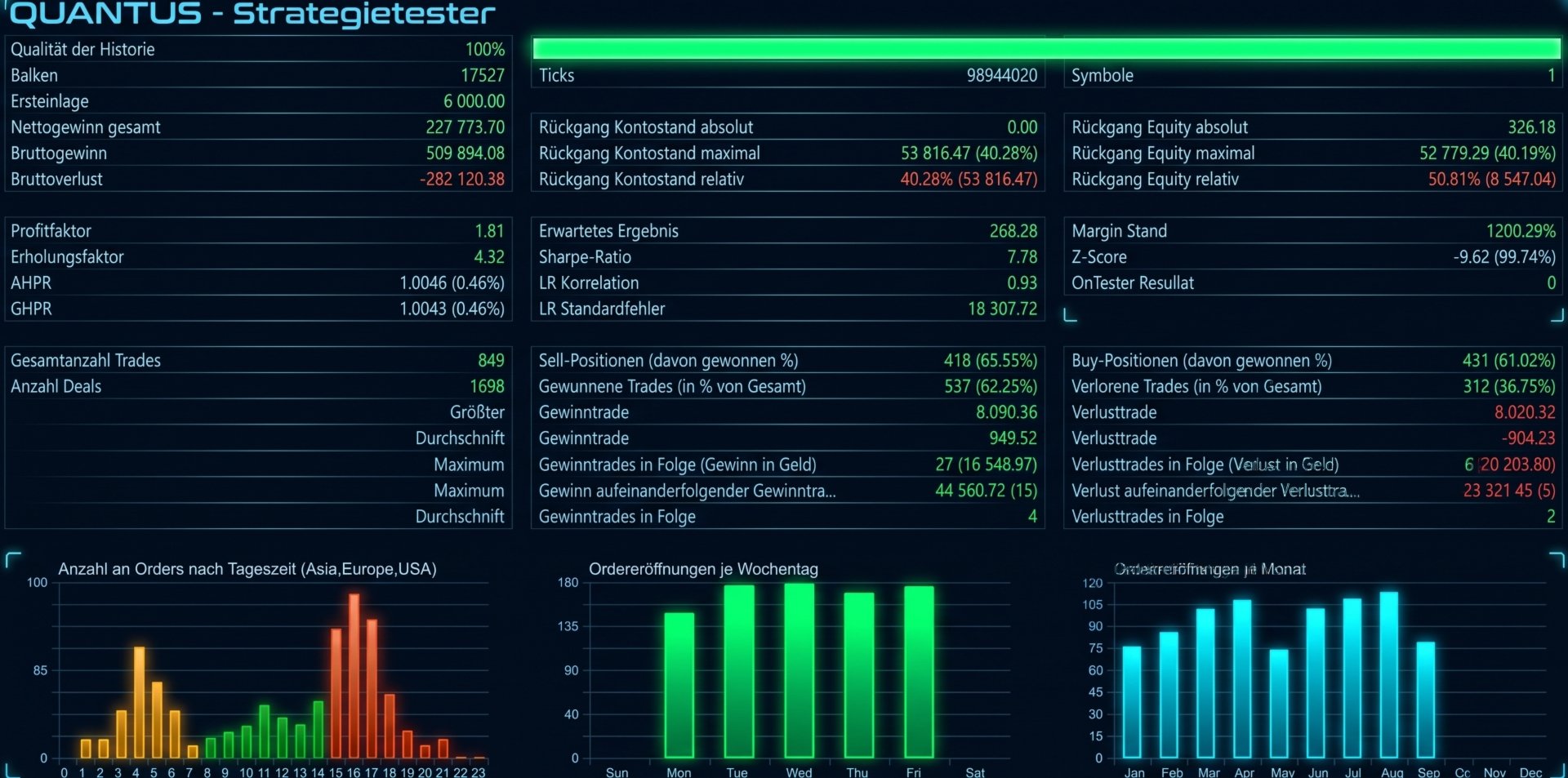
Performance statistics
-
Net profit: 227 773.70 $
-
Profit factor: 1.81
-
Maximum equity drawdown: - 40.19 %
-
Relative drawdown: - 40.28 %
-
Total trades: 849
-
Expected payoff: 268.28
-
Recovery factor: 4.32
What to Look for in the Results
Do not evaluate an EA by net profit alone. Review drawdown, trade frequency, the duration of adverse periods, margin usage, the number of simultaneous positions, and the behavior of grid baskets during strong directional moves.
Where possible, compare in-sample and out-of-sample periods and test the selected settings under different spread and execution assumptions.
Historical results do not guarantee future performance. Backtests can differ materially from live trading, particularly when spreads widen, slippage increases, or market conditions change.
Product Features
Trade Management
Quantus is built around a complete trade-management workflow rather than a single entry condition.
-
Multi-layer signal filtering: combines SAR pullback detection, EMA50 alignment, volatility analysis, and optional tick-volume confirmation.
-
Volatility-adaptive management: uses ATR-based distances for several key trade-management decisions.
-
Separate position roles: R1 and R2 follow different exit-management rules, with optional grid positions managed within the basket framework.
-
Configurable exposure: allows the trader to adjust base position sizing, margin usage, and the number of grid levels.
-
Visible operational state: an on-chart dashboard provides insight into active baskets and grid progression.
-
Restart-oriented state recovery: basket tracking is designed to reconstruct managed positions after an EA or terminal restart.
-
Broker-aware stop handling: validates stop and freeze constraints when modifying protective levels.
-
No performance promises: the system can be assessed through transparent, reproducible testing instead of unsupported claims.
System Monitoring and Configuration
Quantus is intended for traders who prefer configurable rules, structured position management, and a clear view of how the EA handles an open trade.
It is not a guarantee of profit, and its grid functionality can increase exposure and drawdown. The value of the system should be judged by its documented logic, tested behavior, and suitability for the trader's risk tolerance.
Important Risk Disclosure
Trading Gold and Forex involves substantial risk. Losses can exceed expectations, and adverse price movements can result in significant drawdown or margin pressure.
Grid strategies add exposure as price moves against an existing basket. Structural exit logic and broker-side emergency stops have different protection characteristics; neither guarantees a specific maximum loss under all market conditions.
Use conservative settings, verify behavior on a demo account, and ensure that you understand every input parameter before enabling live trading.
Quantus is a trading tool, not a promise of financial returns.
Product Information
-
Expert Advisor: Quantus
-
Platform: MetaTrader 5
-
Primary instrument: XAUUSD (Gold)
-
Additional profile: Forex Majors
-
Intended timeframe: M15
-
Strategy type: SAR pullback and trend-resumption system with ATR-based position management
-
Recommended testing environment: MetaTrader 5 Strategy Tester
-
Version: 1.51