DashXpert
FREE
Publié:
9 octobre 2025
Version actuelle:
2.0
Vous ne trouvez aucun robot qui vous convient ?
Commandez le vôtre
dans la section Freelance
Aller à la section Freelance
Commandez le vôtre
dans la section Freelance
Comment acheter un robot de trading ou un indicateur
Exécutez votre EA sur
hébergement virtuel
hébergement virtuel
Test un indicateur/robot de trading avant d'acheter
Vous voulez gagner de l'argent sur Market ?
Comment présenter un produit pour qu'il se vende bien

Vous manquez des opportunités de trading :
- Applications de trading gratuites
- Plus de 8 000 signaux à copier
- Actualités économiques pour explorer les marchés financiers
Inscription
Se connecter
Vous acceptez la politique du site Web et les conditions d'utilisation
Si vous n'avez pas de compte, veuillez vous inscrire
English
Welcome to XpertHub, I’m Steve Rosenstock, a professional trader with over 15 years of experience in the Forex, Gold, Indices and Crypto markets. My goal is to show you how to trade successfully with discipline and a solid system – no hype, just real results. My global YouTube channel for all XpertHub content is called XpertHubMT5:
https://www.youtube.com/@XpertHubMT5
日本語
XpertHub へようこそ。私はスティーブ・ローゼンストックです。FX、ゴールド、株価指数、暗号通貨などのマーケットで15年以上のプロトレーダーとしての経験があります。私の目標は、誇大広告ではなく、本当の結果で示せるように、規律と堅実なシステムによって成功するトレード方法をお伝えすることです。 日本語向けの公式 XpertHub チャンネルは XpertHubJP です:
https://www.youtube.com/@XpertHubJP
Deutsch
Willkommen bei XpertHub, ich bin Steve Rosenstock, ein professioneller Trader mit über 15 Jahren Erfahrung in den Märkten Forex, Gold, Indizes und Krypto. Mein Ziel ist es, dir zu zeigen, wie du mit Disziplin und einem soliden System erfolgreich tradest – ohne Hype, nur echte Ergebnisse. Mein deutschsprachiger XpertHub-YouTube-Kanal heißt XpertHubDE:
https://www.youtube.com/@XpertHubDE
Find more free Xpert tools and strategies in my MQL5 store:
https://www.mql5.com/en/users/steverosenstock/seller
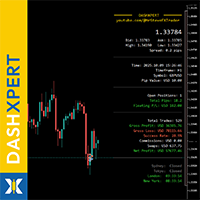
If you look at the dashboard above, you'll find information. There have been 4 transactions on the board, and profits and losses are recorded. Please explain what the basis was presented, how the dashboard shows the selling and buying, and how it is displayed on the board. Thank you.
If you look at the dashboard above, you'll find information. There have been 4 transactions on the board, and profits and losses are recorded. Please explain what the basis was presented, how the dashboard shows the selling and buying, and how it is displayed on the board. Thank you.
Simply put, there is a setting in Settings called “Stats for all symbols” which is set to true by default. This means that all trades in your account are evaluated. If you set this to false, only trades on the asset will be evaluated.