Récupération d'indicateurs et Ea d'un PC vers un autre PC
It is not possible to transfer market products from one computer to another. License protection is specific to each computer configuration and cannot be transferred.
You will need to download and install the product again on the other computer, which will result in the loss of a number of activations. There is no other solution.
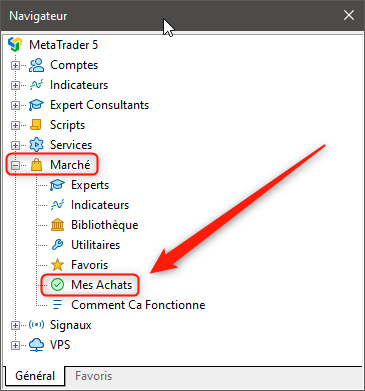
Vous trouverez tous les produits que vous avez achetés précédemment dans la section « Mes Achats » du « Navigateur ».
(Translated from English)
It is not possible to transfer Market products from one computer to another. The license protection is unique to each computer setup and cannot be transferred.
You will have to download and install the product again on the other computer, which will result in the loss of an activation count. There is no other way.
You will find all your previously purchased products in the "My Purchases" section of the "Navigator".
It is not possible to transfer market products from one computer to another. License protection is specific to each computer configuration and cannot be transferred.
You will need to download and install the product again on the other computer, which will result in the loss of a number of activations. There is no other solution.
Vous trouverez tous les produits que vous avez achetés précédemment dans la section « Mes Achats » du « Navigateur ».
(Translated from English)
It is not possible to transfer Market products from one computer to another. The license protection is unique to each computer setup and cannot be transferred.
You will have to download and install the product again on the other computer, which will result in the loss of an activation count. There is no other way.
You will find all your previously purchased products in the "My Purchases" section of the "Navigator".
Bonjour, merci et d'accord mais pour des EA plus à la vente ni au téléchargement sur MQL5 Market à l'exception de consulter sur mon ancien PC je n'ai plus la possibilité d'utiliser sur le nouveau ?
N'y a t'il pas une manipulation de registre Windows qu'il est possible de faire pour récupérer le dossier entier ? d'autant plus qu'il porte le même nom sur la nouvelle installation mq5 ; MetaQuotes\Terminal\7FFCE38F0E5448455FD4A193320A30E8
a+
========================================================
Translation to english ;
Hello, thank you and ok but for EAs no longer for sale or download on MQL5 Market with the exception of consulting on my old PC I no longer have the possibility of using on the new one? Isn't there a Windows registry manipulation that can be done to recover the entire folder? especially since it has the same name on the new mq5 installation; MetaQuotes\Terminal\7FFCE38F0E5448455FD4A193320A30E8
bye
Bonjour, merci et d'accord mais pour des EA plus à la vente ni au téléchargement sur MQL5 Market à l'exception de consulter sur mon ancien PC je n'ai plus la possibilité d'utiliser sur le nouveau ?
N'y a t'il pas une manipulation de registre Windows qu'il est possible de faire pour récupérer le dossier entier ? d'autant plus qu'il porte le même nom sur la nouvelle installation mq5 ; MetaQuotes\Terminal\7FFCE38F0E5448455FD4A193320A30E8
a+
========================================================
Translation to english ;
Hello, thank you and ok but for EAs no longer for sale or download on MQL5 Market with the exception of consulting on my old PC I no longer have the possibility of using on the new one? Isn't there a Windows registry manipulation that can be done to recover the entire folder? especially since it has the same name on the new mq5 installation; MetaQuotes\Terminal\7FFCE38F0E5448455FD4A193320A30E8
bye
Je n'ai pas pensé mais j'aurais du créer la demande en anglais pour avoir le plus de réponses possible, car je ne pense pas être le seul cas sans solution.
Pour éviter les doublons j'ai rédigé une nouvelle demande en anglais avec traduction en français.
Merci de répondre sur le nouveau lien svp.
========English =========
I didn't think about it, but I should have created the request in English to get as many answers as possible, because I don't think I'm the only case without a solution. To avoid duplication I wrote a new request in English with translation into French. Please respond on the new link.
======================= NOUVEAU LIEN - NEW LINK ================

- 2025.02.26
- Yassou Kalimera
- www.mql5.com
J'ai supprimé votre autre sujet. Si vous voulez poster en anglais, veuillez le faire dans le forum anglais, pas dans le forum français.
I removed your other topic. If you want post in English, please post in the English Forum, not the French forum.
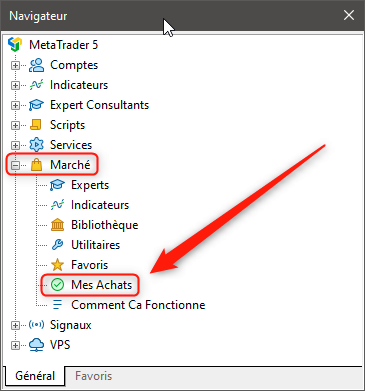
Comme indiqué, même si le produit n'est plus disponible à la vente, il apparaîtra toujours dans la section « Mes achats ».
Hello, thank you and ok but for EAs no longer for sale or download on MQL5 Market with the exception of consulting on my old PC I no longer have the possibility of using on the new one? Isn't there a Windows registry manipulation that can be done to recover the entire folder? especially since it has the same name on the new mq5 installation; MetaQuotes\Terminal\7FFCE38F0E5448455FD4A193320A30E8
As stated, even if the product is no longer available for sale, it will still apear in the section "My Purchases".
Comme indiqué, même si le produit n'est plus disponible à la vente, il apparaîtra toujours dans la section « Mes achats ».
As stated, even if the product is no longer available for sale, it will still apear in the section "My Purchases".
Bonjour, c'est brouillon pour moi je n'ai pas lu que c'est un forum francophone, d'ailleurs je 'ai pas remarqué le forum anglais, anyway, dans tous les cas sur Metatrader 5, j'ai bien mes indicateurs, EA.. dans Marché/mes achats ils sont aussi présent...=> dans l'ancien PC
Dans le nouveau => Rien
A moins de renommer C:\Users\Nom\AppData\Roaming\MetaQuotes en C:\Users\Nom\AppData\Roaming\MetaQuotesXXX
et récupérer sur l'ancien PC mon dossier MetaQuotes que je place ici C:\Users\Nom\AppData\Roaming\MetaQuotes
du coup après cette manipulation j'ai bien mes indicateurs, Ea,.. dans Marché/mes achats et dans mon navigateur mais tous ne marchent pas, je suis oblogé de réinstaller un à un.
d'ailleurs dans les 2 pc en allant sur MQL5.com, mon compte et recharger les services MQL5 (lien https://www.mql5.com/fr/users/MON-NUMERO/market) je n'en ai que 3 sur bien plus que j'utilise ou que j'ai testé.
En résumé, malgré mes manipulation je tourne en rond, mais ce qui me chagrine le plus c'est que j'ai un EA qui n'est plus proposé en téléchargement que j'ai optimisé et qui convient parfaitement à ma stratégie sur un CFD bien spécifique.
Dois-je m'amuser à récupérer les infos dans le registre Windows dans ces 2 emplacements :
HKEY_CURRENT_USER\Software\MetaTrader
HKEY_LOCAL_MACHINE\Software\MetaTrader
Ou alors passer sur des softwares spécifiques de clonage de programmes et de leurs paramètres intégrés à windows ?
Toute aide est la bienvenue.

- Applications de trading gratuites
- Plus de 8 000 signaux à copier
- Actualités économiques pour explorer les marchés financiers
Vous acceptez la politique du site Web et les conditions d'utilisation
Salut MQL5iennes et MQL5iens,
J'ai commencer à utiliser MQL5 il y a quelques mois sur un PC, j'ai télécharger certains indicateurs et EA, dont certains plus proposés au téléchargement.
J'ai tenté de récupéré les dossiers :
C:\Users\NOM\AppData\Roaming\MetaQuotes\Terminal\7FFCE38F0E5448455FD4A193320A30E8\MQL5\Indicators\Market\mon-indicateur-ou EA.ex5 failed [538]
et c:\metatrader5
Pour remplacer ces 2 dossiers après installation.
Ca me donne tous mes indicateurs et EA mais quand je tente d'ouvrir ça ne marche pas.
Dans boite à outils "Journal" j'ai :
loading of "Mon indicateur ou EA" from C:\Users\Nom\AppData\Roaming\MetaQuotes\Terminal\7FFCE38F0E5448455FD4A193320A30E8\MQL5\Indicators\mon-indicateur-ou-EA.ex5 failed [538]
J'ai supprimé MT5 et réinstaller cette fois en allant chercher dans MQ5, fichier "Ouvert Dossier des données" de l'autre pc que j'ai copier sur mon bureau " MetaQuotes\Terminal\ 7FFCE38F0E5448455FD4A193320A30E8\MQL5\Indicators\Market\ mon indicateur ou EA"
Idem même résultat.
Avez-vous une piste à creuser svp ??
Merci d'avance.