Bryan Djoufack Nguessong
5 (9)
  • Information
5+ years
experience
4
products
31
demo versions
12
jobs
0
signals
0
subscribers
Bryan Djoufack Nguessong
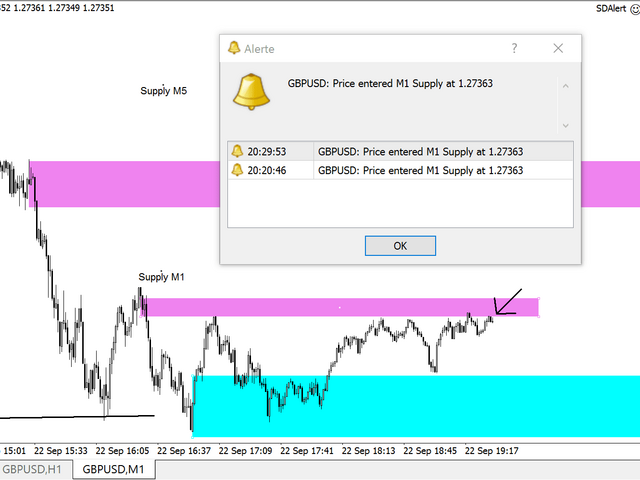
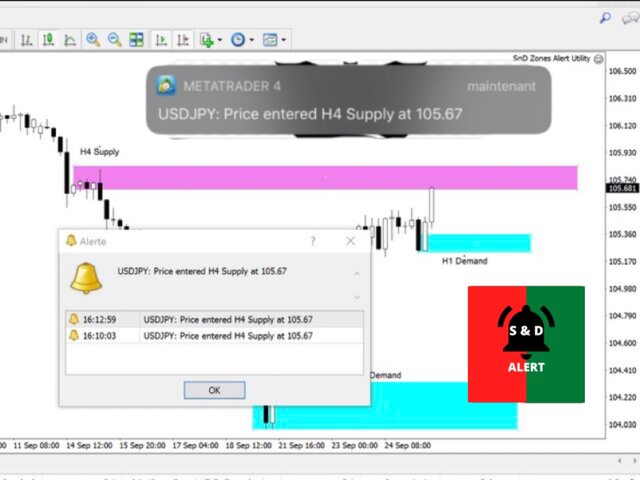
The Supply and Demand Zones Alerter will send you a detailed notification as soon as price reaches a Supply/Demand zone you draw and set. The notification contains the symbol, the price reached and the name of the zone with its respective timeframe.

As you launch the utility, you'll have to set some input parameters:
supplyColor - This will be the color in which your supply zones will be represented on the chart
demandColor - This will be the color in which your demand zones will be represented on the chart.
Now that you have set the input parameters, just 3 steps for the use of the Utility :

-You draw the zone (rectangle)
-You indicate if it is a Supply or Demand with the TF by changing the description (e.g. Supply MN1 for Monthly Supply or Demand M15 for 15 Minutes Demand)
-And you just chill, just RELAX and wait for the detailed notification(Symbol Name with the Supply it touched and it's timeframe, and the price) on your phone and on your MetaTrader 4 Terminal as soon as price reaches your level.
Yeah, no more having to stay in front of the chart. Get yours and enjoy a more relaxed trading.
Link: https://www.mql5.com/en/market/product/55134#!tab=overview
Bryan Djoufack Nguessong
The Supply and Demand Zones Alerter will send you a detailed notification as soon as price reaches a Supply/Demand zone you draw and set. The notification contains the symbol, the price reached and the name of the zone with its respective timeframe.
As you launch the utility, you'll have to set some input parameters:
supplyColor - This will be the color in which your supply zones will be represented on the chart
demandColor - This will be the color in which your demand zones will be represented on the chart.
Now that you have set the input parameters, just 3 steps for the use of the Utility :

-You draw the zone (rectangle)
-You indicate if it is a Supply or Demand with the TF by changing the description (e.g. Supply MN1 for Monthly Supply or Demand M15 for 15 Minutes Demand)
-And you just chill, just RELAX and wait for the detailed notification(Symbol Name with the Supply it touched and it's timeframe, and the price) on your phone and on your MetaTrader 4 Terminal as soon as price reaches your level.
Yeah, no more having to stay in front of the chart. Get yours and enjoy a more relaxed trading. Link: https://www.mql5.com/en/market/product/55134#!tab=overview
Bryan Djoufack Nguessong
Added topic Rectangle price coordinates in MQL5
Hello everyone, please i would like to know how we get the 2 coordinate prices of a rectangle in MQL5. In MQL4, we have OBJPROP_PRICE1 and OBJPROP_PRICE2 for the 2 prices levels, same for the prices. But in MQL5, there's just OBJPROP_PRICE same for
Bryan Djoufack Nguessong
Added topic Product name changed
Hello everyone, i would want to know if it's possible to change the name of a product you have put on the market
Bryan Djoufack Nguessong
Added topic Rectangle Proprerties
Hello everyone, please i would like to know how i can get access to the prices delimiting a rectangle on the chart so that when price touch the rectangle i can code a series of event. Thanks in advance
Bryan Djoufack Nguessong
Added topic EA Timer regulation
Hello guys, i have a problem. In fact i created and ea that's supposed to analyse previous candles(starting from rates[1]) and send a signal( push notification ) but i want the ea to send the signal once and wait for the candle to close before trying
Bryan Djoufack Nguessong
Registered at MQL5.community