Obaforex TrendLine Trader
30 USD
Demo downloaded:
58
Published:
22 September 2020
Current version:
1.50
Didn't find a suitable robot?
Order your own one
on Freelance
Go to Freelance
Order your own one
on Freelance
How to buy а trading robot or an indicator
Run your EA on
virtual hosting
virtual hosting
Test аn indicator/trading robot before buying
Want to earn in the Market?
How to present a product for a sell-through
Version 1.50
2021.01.02
Now lines can be used to easily set dynamic take profit and stop loss at the point of trade entry while lot size (money management) will still be calculated correctly based on the line stop loss.
To use this feature, before a trade is opened draw a trend line, position and name is appropriately according to the parameter you want it to set. Ensure also that the line is extended well enough to the right to enable expert get its value in the future.
buytp sets buy trade take profit
buysl sets buy trade stop loss
selltp sets sell trade take profit
sellsl sets sell trade stop loss
To use this feature, before a trade is opened draw a trend line, position and name is appropriately according to the parameter you want it to set. Ensure also that the line is extended well enough to the right to enable expert get its value in the future.
buytp sets buy trade take profit
buysl sets buy trade stop loss
selltp sets sell trade take profit
sellsl sets sell trade stop loss
Version 1.40
2020.11.07
Improved automatic lot size calculations.
Now setting "StrictRiskMan" (strict risk management) to true will guarantee that your your loss does not exceed your set risk, while false ensures optimum lot sizing which may sometimes exceed set risk a bit.
StrictRiskMan(true) = always round down where approximation is required to determine valid lot size.
StrictRiskMan(false) = normal round up or down
Example
accounts balance $2100 at 2% risk with 25pips (250 point) stop loss is naturally suppose to trade 0.168 (an invalid lot size).
For brokers with 0.01 lot step (most brokers falls in this category)
StrictRiskMan(true) will trade 0.16 risking less than 2%
StrictRiskMan(false) will trade 0.17 risking a bit more than 2%
For brokers with other lot step
same approximation approach applies except that your broker lot step is used to ensure valid lot size calculation.
Now setting "StrictRiskMan" (strict risk management) to true will guarantee that your your loss does not exceed your set risk, while false ensures optimum lot sizing which may sometimes exceed set risk a bit.
StrictRiskMan(true) = always round down where approximation is required to determine valid lot size.
StrictRiskMan(false) = normal round up or down
Example
accounts balance $2100 at 2% risk with 25pips (250 point) stop loss is naturally suppose to trade 0.168 (an invalid lot size).
For brokers with 0.01 lot step (most brokers falls in this category)
StrictRiskMan(true) will trade 0.16 risking less than 2%
StrictRiskMan(false) will trade 0.17 risking a bit more than 2%
For brokers with other lot step
same approximation approach applies except that your broker lot step is used to ensure valid lot size calculation.
Version 1.30
2020.11.05
Trailing Stop now include the option to trail directly or in steps, with ability to set step in pips
Version 1.20
2020.10.24
Added maximum spread filter to improve trade entry price on random spread brokers.
Also this update improves trade handling by allow a trader set in advance how a trade should be entered around specified line. The following options are available.
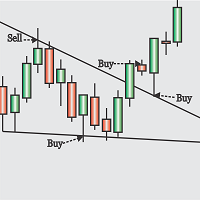
1. Trade on breakout retest (True) : This will enter trade in the direction of a breakout on retest of the breakout trend line, provided that the distance between a candle close in the direction of the breakout and the broken line exceed minimum pips to break. Also it will perform the function of TradeOnLineTest (True) . (so it's recommended to set TradeOnLineTest (false) if this is true, else minimum pips to break will be ignored asTradeOnLineTest will initiate trade on line test regardless).
2. Trade On Breakouts (True) : This will open trades directly on breakout provided that minimum pips to break is satisfied and maximum pips to break is not exceeded or on any candle open that satisfies all this criteria.
3. Trade On Line Test (True) : This option will open trade on line test. (it will open buy trade on "buy" line if previous candle closed above it, and open sell on "sell" line if the previous candle close below it).
Note: settings Trade on breakout retest and trade on breakout to true simultaneously is most recommended
Also this update improves trade handling by allow a trader set in advance how a trade should be entered around specified line. The following options are available.
1. Trade on breakout retest (True) : This will enter trade in the direction of a breakout on retest of the breakout trend line, provided that the distance between a candle close in the direction of the breakout and the broken line exceed minimum pips to break. Also it will perform the function of TradeOnLineTest (True) . (so it's recommended to set TradeOnLineTest (false) if this is true, else minimum pips to break will be ignored asTradeOnLineTest will initiate trade on line test regardless).
2. Trade On Breakouts (True) : This will open trades directly on breakout provided that minimum pips to break is satisfied and maximum pips to break is not exceeded or on any candle open that satisfies all this criteria.
3. Trade On Line Test (True) : This option will open trade on line test. (it will open buy trade on "buy" line if previous candle closed above it, and open sell on "sell" line if the previous candle close below it).
Note: settings Trade on breakout retest and trade on breakout to true simultaneously is most recommended
Version 1.10
2020.10.04
New Breakeven feature introduced.
This is useful in the even that a trader only wants to breakeven on a trade after reaching some level in profit without trailing stop all the way to avoid getting stopped out on potentially more profitable trades. Set to zero to not use this feature
Also introduced AddToBe (Add to breakeven)
This feature when set to a value greater than zero allows to lock in profits (equals the amount of pips set) by the breakeven option.
Also it increases the amount of profit locked in by the trailing stop option (by the amount of pips set).
This is useful when considering commission on brokers where this is applicable and protecting against negative slippage on stop execution. Also it can be set to zero to not use this option
This is useful in the even that a trader only wants to breakeven on a trade after reaching some level in profit without trailing stop all the way to avoid getting stopped out on potentially more profitable trades. Set to zero to not use this feature
Also introduced AddToBe (Add to breakeven)
This feature when set to a value greater than zero allows to lock in profits (equals the amount of pips set) by the breakeven option.
Also it increases the amount of profit locked in by the trailing stop option (by the amount of pips set).
This is useful when considering commission on brokers where this is applicable and protecting against negative slippage on stop execution. Also it can be set to zero to not use this option

You are missing trading opportunities:
- Free trading apps
- Over 8,000 signals for copying
- Economic news for exploring financial markets
Registration
Log in
You agree to website policy and terms of use
If you do not have an account, please register