Autobot Retracement Code

150 USD
Demo downloaded:
341
Published:
26 March 2019
Current version:
4.10
Didn't find a suitable robot?
Order your own one
on Freelance
Go to Freelance
Order your own one
on Freelance
How to buy а trading robot or an indicator
Run your EA on
virtual hosting
virtual hosting
Test аn indicator/trading robot before buying
Want to earn in the Market?
How to present a product for a sell-through

You are missing trading opportunities:
- Free trading apps
- Over 8,000 signals for copying
- Economic news for exploring financial markets
Registration
Log in
You agree to website policy and terms of use
If you do not have an account, please register
Autobot Retracement Code Money Management.
It will rarely open orders in the single pair due to look for its best signals.By installing on several pairs will increase the opportunities of getting orders simultaneously also increasing the opportunities of return of Investment in the same period of time.There is no different the work of the EA for each pair . You may only need some little change the value of Closeinprofits(pips) and CloseTotalProfits(pips) because of the different price range of certain pair.
This is what I do:
Closeinprofits(pips) = 20 and CloseTotalProfits(pips)=35 is for currency GBP such as GBPJPY,GBPAUD,GBPCAD,etc.
And let it by default for the other currency pairs.( Please also read the recommendation of currency pairs in the description of the product )
Then lot size is depended on your current available balance. It is a good idea to do not use more than 20% of your balance.
1. Leverage 1:500 or lower
2. Minimum balance =$500,If your capital less than $500 you can open micro account. If your capital $100,your balance will be $10.000
3. Starter Order Lot = (Balance/contract size) x 2. You can ask to your broker related with this contract size.
Example:
Your Balance = $1000
Broker contract size/Lot = 100.000
Starter Order Lot = (Your Balance/100.000) x 2
= (1000/100.000) x 2
= 0.02
If your balance ≥ $1000 and ≤ $2000,your Starter Order Lot=0.02
If your balance ≥ $2000 and ≤ $3000,your Starter Order Lot=0.04
If your balance ≥ $3000 and ≤ $4000,your Starter Order Lot=0.06
… and so on
You can increase lot size as long as you understand the risk-reward of your decision.Lower lot size will be lower risk.Maximum lot size for balance $1000= 0.1 (high risk).
Next ... >> the Manual Mode
MANUAL MODE
EA will only work if you make order manually.It won’t work till you make new order.Then EA will manage the rest after your manual order.Simply,this is YOU AND ROBOT.
HOW TO TRADE WITH MANUAL MODE
Autobot Retracement Code
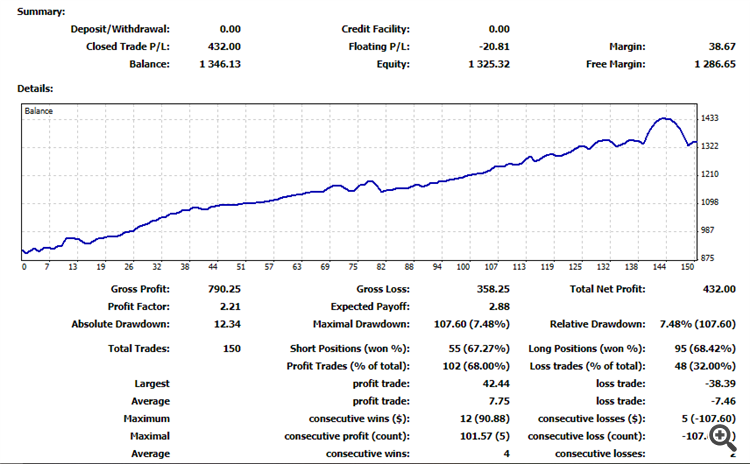
Below is my trading statistic of live account on the latest month of march,2019:
Autobot Retracement Code Money Management.
It will rarely open orders in the single pair due to look for its best signals.By installing on several pairs will increase the opportunities of getting orders simultaneously also increasing the opportunities of return of Investment in the same period of time.There is no different the work of the EA for each pair . You may only need some little change the value of Closeinprofits(pips) and CloseTotalProfits(pips) because of the different price range of certain pair.
This is what I do:
Closeinprofits(pips) = 20 and CloseTotalProfits(pips)=35 is for currency GBP such as GBPJPY,GBPAUD,GBPCAD,etc.
And let it by default for the other currency pairs.( Please also read the recommendation of currency pairs in the description of the product )
Then lot size is depended on your current available balance. It is a good idea to do not use more than 20% of your balance.
1. Leverage 1:500 or lower
2. Minimum balance =$500,If your capital less than $500 you can open micro account. If your capital $100,your balance will be $10.000
3. Starter Order Lot = (Balance/contract size) x 2. You can ask to your broker related with this contract size.Otherway, click CTRL+U on your MT4 -->select Properties and you will see contract size of your account.
Example:
Your Balance = $1000
Broker contract size/Lot = 100.000
Starter Order Lot = (Your Balance/100.000) x 2
= (1000/100.000) x 2
= 0.02
If your balance ≥ $1000 and ≤ $2000,your Starter Order Lot=0.02
If your balance ≥ $2000 and ≤ $3000,your Starter Order Lot=0.04
If your balance ≥ $3000 and ≤ $4000,your Starter Order Lot=0.06
… and so on
You can increase lot size as long as you understand the risk-reward of your decision.Lower lot size will be lower risk.Maximum lot size for balance $1000= 0.1 (high risk).
Next ... >> the Manual Mode
Manual Mode:
EA will only work if you make order manually.It won’t work till you make new order.Then EA will manage the rest after your manual order.Simply,this is YOU AND ROBOT.
Statistic Report March to April 2019
Manual Mode
FILE SET for balance 1000 , Leverage 1:500 , contract size: 100000:
MINOR.SET ---> AUDUSD,USDCHF,AUDCAD,USDJPY,AUDJPY,CHFJPY,USDCAD,CADJPY
EUR.SET ---> EURUSD,EURCAD,EURGBP,EURJPY,EURCHF,EURAUD
GBP.SET ----> GBPCAD,GBPUSD,GBPAUD,GBPCHF,GBPJPY
Note:
- Make a different MagicNumber for each currency pair
- Decrease lot size 0.01 for balance less than 1000. Min. Balance required = $500
- You can play save with lot size 0.01 for balance 1000. Lower lot size will get more orders because the order is limited by margin level.