Zone Risk Planner Core MT4

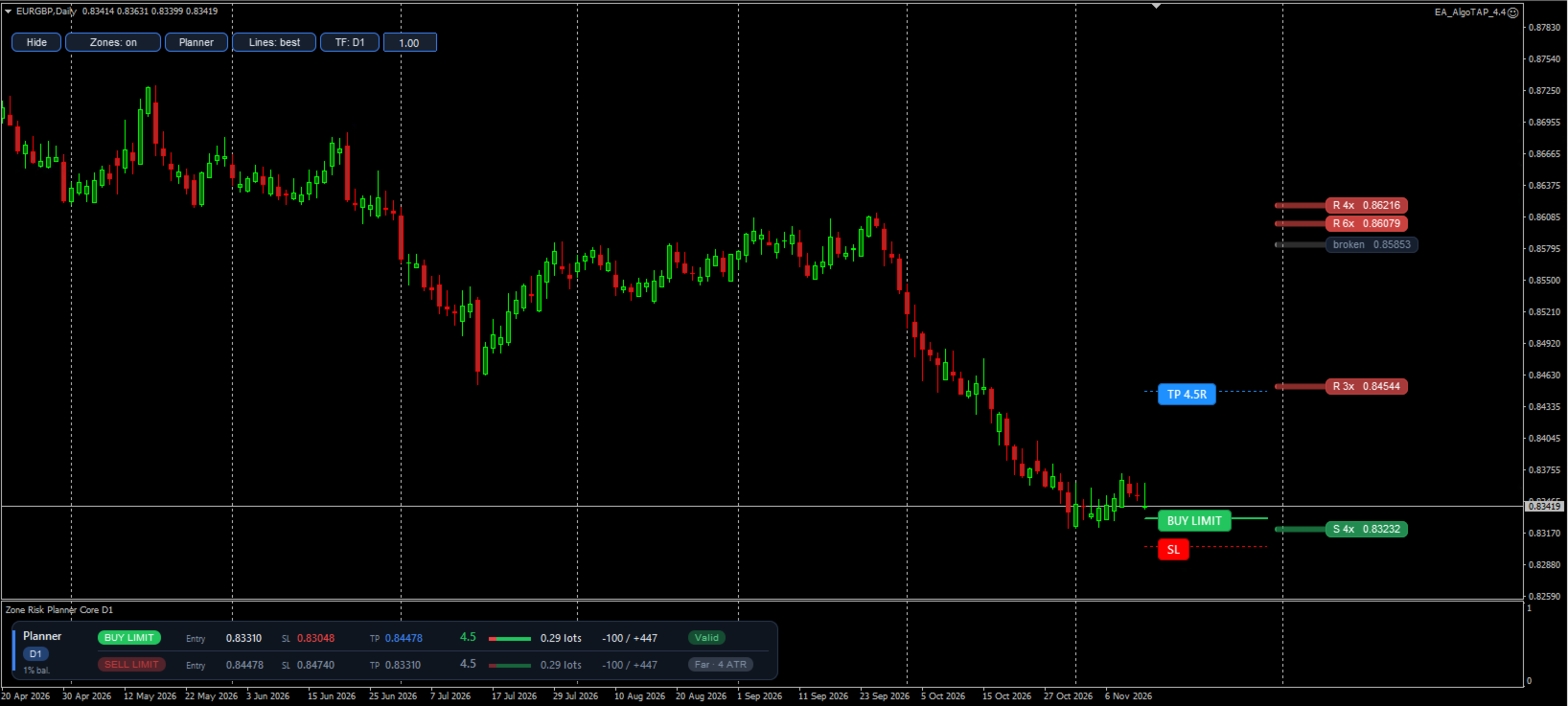
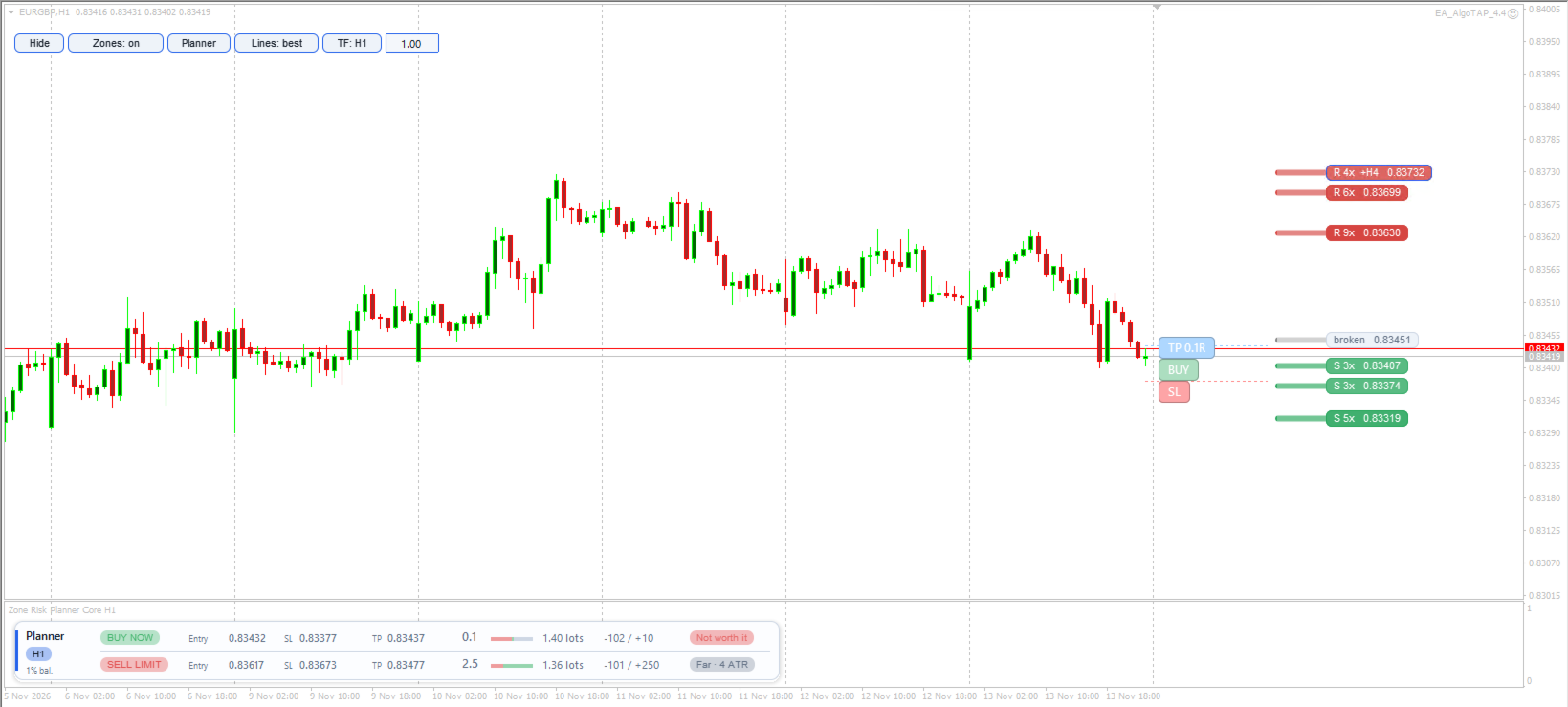
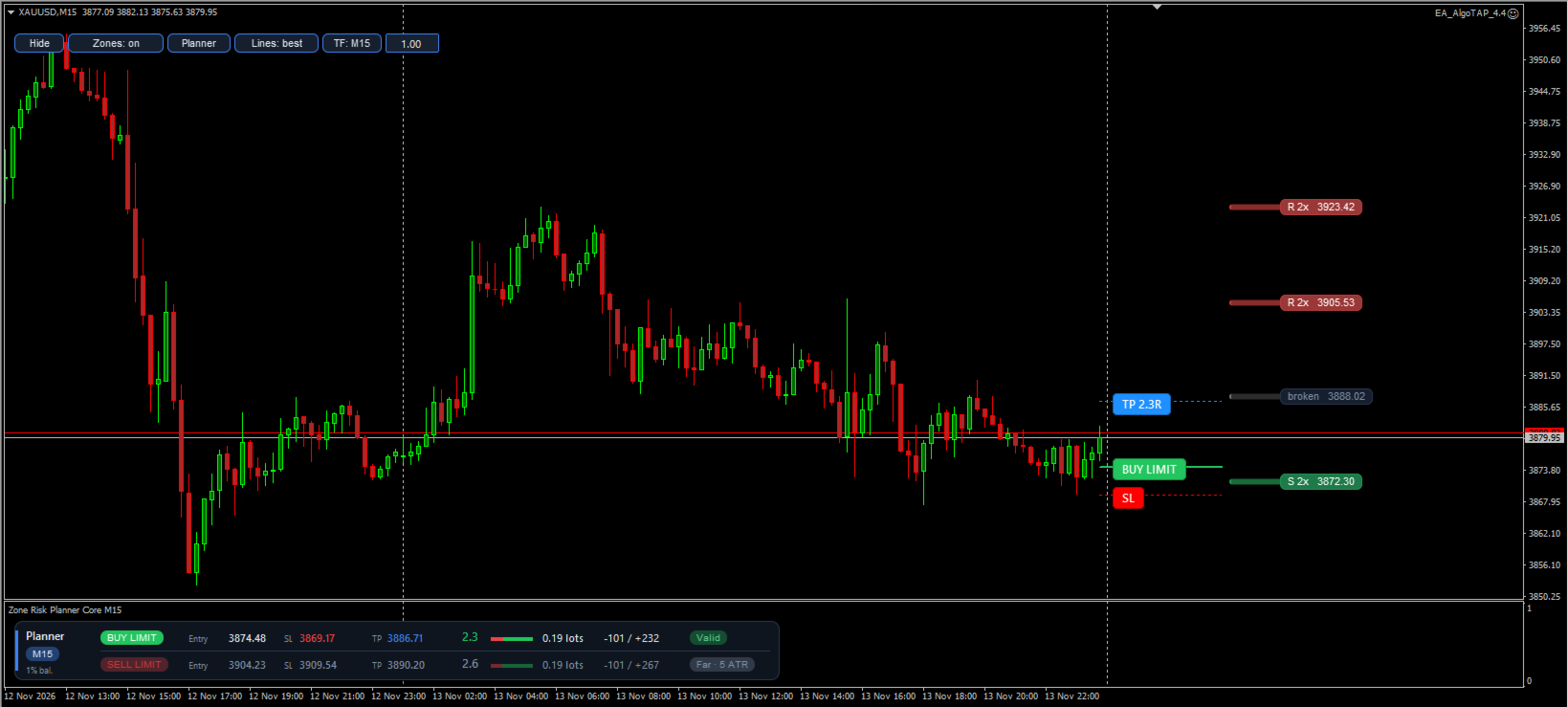
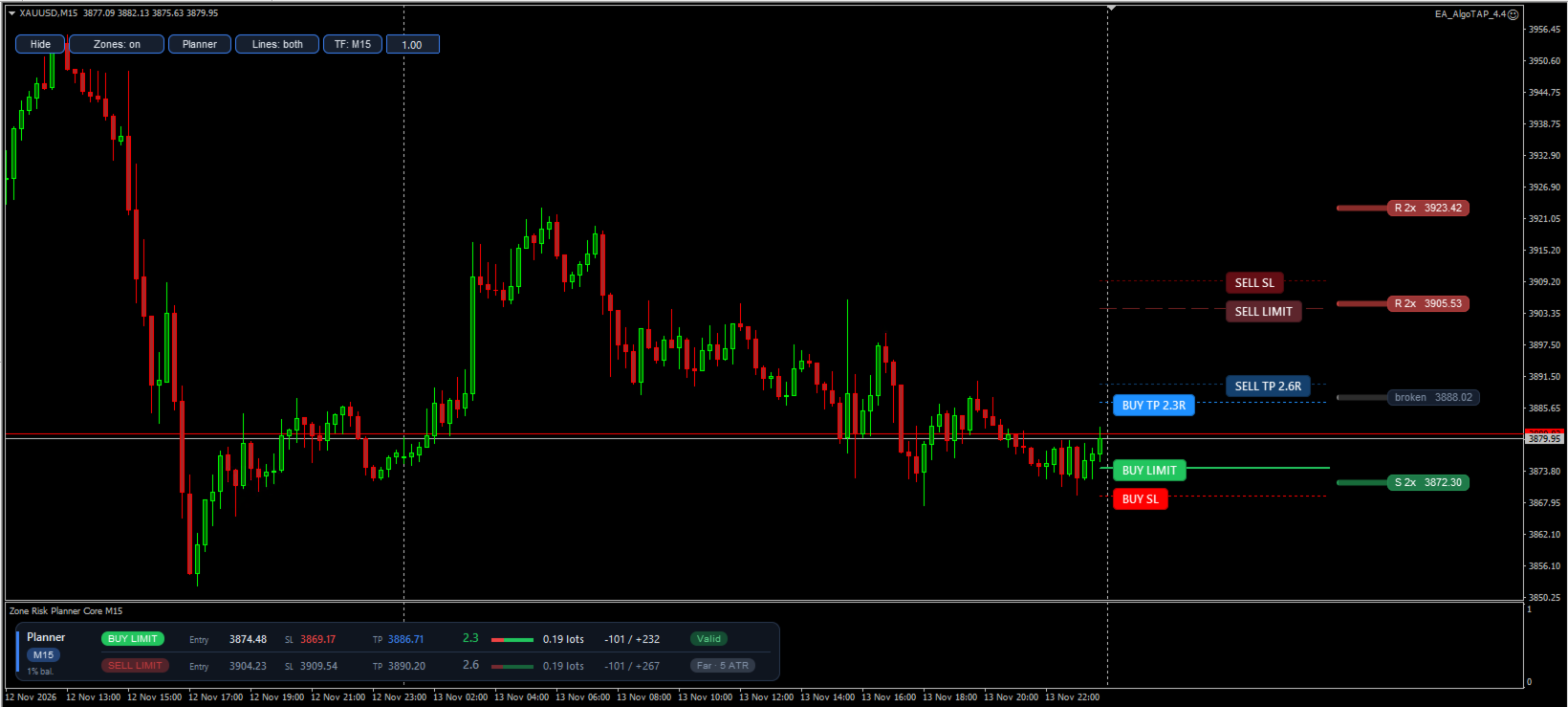
Zone Risk Planner Core turns support and resistance zones into a trade plan: where to enter, where to place the stop loss (SL), where the take profit (TP) goes and how many lots match your risk.
 
It is a planning tool. It does not give buy or sell signals and it does not open, modify or close trades.
 
Support and resistance zones
- Calculated on the timeframe you choose with the TF button (M5 to D1), from confirmed swing highs and lows.
- Zone width adapts to volatility (Average True Range, ATR).
- Each zone shows its touches ("3x") and whether it matches a zone on the higher timeframe ("+H1").
- Broken zones turn grey and stay visible, because price often reacts at them again.
- Zones are drawn on the right side of the chart, so they never hide the candles.
 
Stop loss and take profit planner
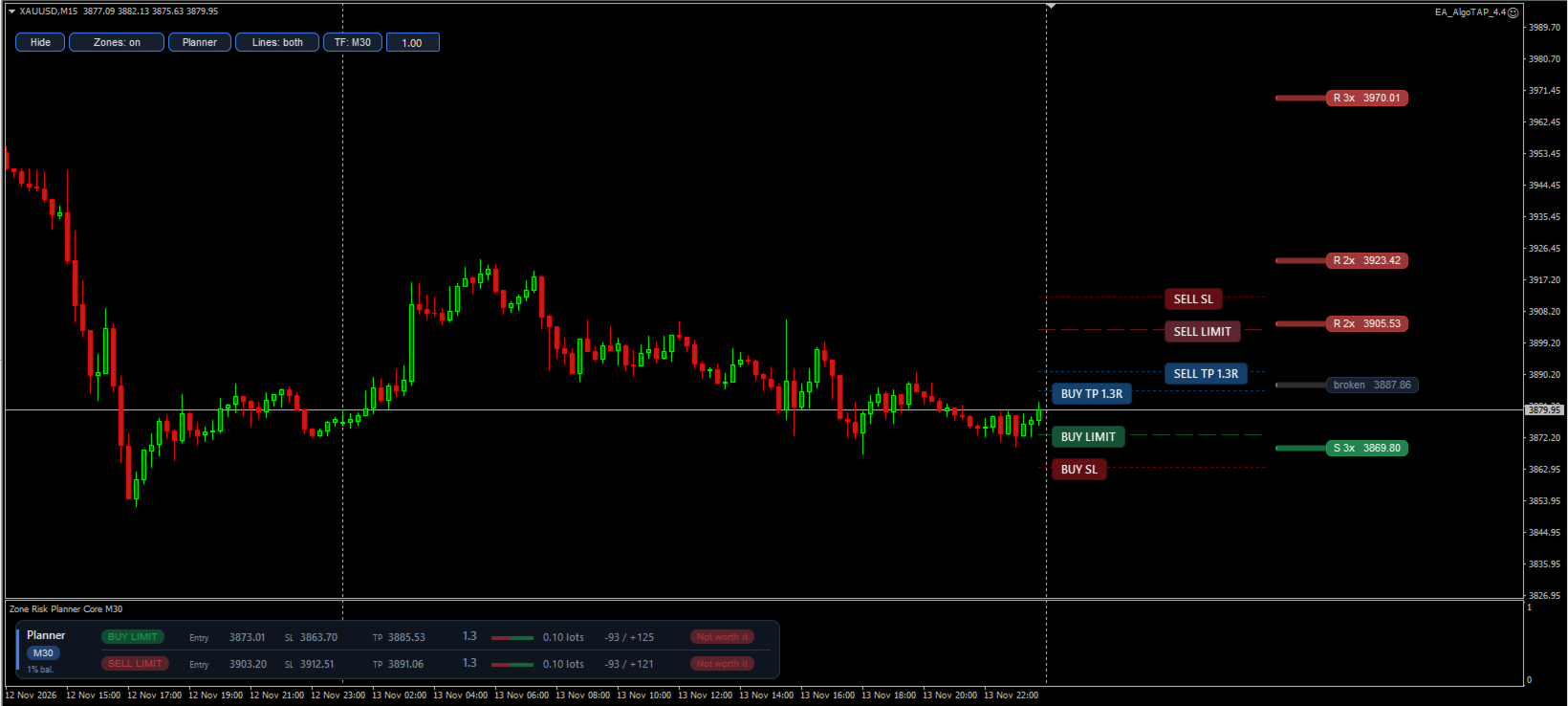
- Buy and sell plan in real time, with a limit order at the zone edge or a market entry.
- Stop loss beyond the zone, never closer than a minimum distance.
- Take profit at the first zone shown after the entry, broken zones included, so the expected result is realistic.
- Net reward-to-risk ratio (R:R) after spread and commission. Plans below your minimum are marked "Not worth it", and limit entries too far from price are marked "Far".
- Lot size from the percentage of your balance you want to risk. Warns when free margin is not enough or the lot exceeds the broker maximum.
 
Interface
- The planner panel sits in its own window under the chart, so it never covers the candles. On a narrow chart it scrolls sideways with the ‹ › buttons.
- Chart buttons to show or hide the zones and the planner, choose the plan lines, change the zone timeframe and the risk.
- Light and dark theme (automatic, following the chart background), English and Spanish.
 
Main inputs
- Language: language of buttons, panels and messages (English or Spanish).
- Profile: asset profile (Auto, Forex, Indices, Metals, Crypto or Custom). Auto adapts by itself.
- Zone timeframe: starting zone timeframe (change it later with the TF button).
- Pivot bars left / right: bars that confirm a swing high or low. More bars, fewer but stronger zones.
- Minimum touches: touches needed for a zone to count.
- Max zones per side: zones drawn above and below price.
- Recommended entry: limit order at the zone edge or market entry.
- Minimum R:R: minimum ratio for a plan to be valid.
- TP stops at the first zone, broken ones included: the TP stops at the first zone shown, even if broken.
- Limit entry farther than this (x ATR) is marked Far: distance from which a limit entry is marked "Far".
- Risk %: percentage of your balance risked on each trade.
- Commission per lot: your broker's commission, so lots and R:R are exact.
 
Important
This indicator helps you plan trades and control risk. It does not predict the market and it does not guarantee results. Always check the lot size in your broker's order window before trading, and test it first on a demo account.
 
Also available for MetaTrader 5.
More from author
Zone Risk Planner Core
Tamara Garcia Infantes
Zone Risk Planner Core turns support and resistance zones into a trade plan: where to enter, where to place the stop loss (SL), where the take profit (TP) goes and how many lots match your risk. It is the basic version of Zone Risk Planner. It is a planning tool. It does not give buy or sell signals and it does not open, modify or close trades. Support and resistance zones - Calculated on the timeframe you choose with the TF button (M5 to D1), from confirmed swing highs and lows. - Zone width
FREE
SnapDraw Drawing Panel
Tamara Garcia Infantes
SnapDraw — every MT5 drawing tool in a panel under your chart Drawing in MetaTrader means hunting through menus and toolbars, and changing the colour of every line by hand. SnapDraw puts the tools you use in a slim panel docked under the chart: drag one onto the chart, or click it and draw, and it lands in your colour, snapped to the candle. What it includes • Every object in the MT5 Insert menu: lines, channels, Gann, Fibonacci, Elliott waves, shapes, arrows, text and graphical objects. • Ex
FREE
ATR Volatility Monitor
Tamara Garcia Infantes
ATR Volatility Monitor  uses the Average True Range (ATR) to show, in one compact panel, how much the market is moving and whether that movement is high, normal or low for the current asset. It also draws an ATR trailing stop (chandelier stop) on the chart. It is an information tool. It does not give buy or sell signals and it never opens, modifies or closes trades. Panel - ATR in price and in points. - ATR as a percentage of price, to compare volatility between assets with very different pri
FREE
Chart Sweeper
Tamara Garcia Infantes
Chart Sweeper — see everything on your chart and remove only what you choose Charts fill up without you noticing: old trend lines, arrows left by scripts, labels from indicators you removed months ago, trade history marks, objects drawn outside the visible area or only on other timeframes. MetaTrader's object list shows them as one long, flat list. Chart Sweeper turns that list into a clear, movable panel where you decide what stays and what goes. What it shows • Every indicator on the chart,
FREE
SnapDraw — every MT4 drawing tool in a panel under your chart Drawing in MetaTrader means hunting through menus and toolbars, and changing the colour of every line by hand. SnapDraw puts the tools you use in a slim panel docked under the chart: drag one onto the chart, or click it and draw, and it lands in your colour, snapped to the candle. What it includes • Every object in the MT4 Insert menu: lines, channels, Gann, Fibonacci, shapes, arrows and text, plus graphical objects such as event,
FREE
Chart Sweeper MT4
Tamara Garcia Infantes
Chart Sweeper — see everything on your chart and remove only what you choose Charts fill up without you noticing: old trend lines, arrows left by indicators and scripts, labels from tools you removed months ago, trade history marks, objects drawn outside the visible area or only on other timeframes. MetaTrader's object list shows them as one long, flat list. Chart Sweeper turns that list into a clear, movable panel where you decide what stays and what goes. What it shows • Every indicator on
FREE
Zone Risk Planner MT4
Tamara Garcia Infantes
Zone Risk Planner — support and resistance zones turned into a complete trade plan   Before placing a trade you need the zone, the entry, the stop loss (SL), the take profit (TP), the lot size for your risk, and a look at the higher timeframes and your other symbols. Doing that by hand on every chart takes time and leads to sizing mistakes. Zone Risk Planner draws the zones and turns them into a plan with lot size and reward-to-risk ratio (R:R), and shows the market context and your account r
Adler Dax Mt4
Tamara Garcia Infantes
Adler is a fully automated Expert Advisor for the DAX index (GER40 / DE40) on the H1 timeframe. It was built with a systematic, quantitative process and is part of the QuantEdgeSys family of market-specific systems, each one named after a bird of prey. Adler enters the market with pending stop orders, sends every trade with a Stop Loss and a Take Profit, risks a fixed amount of money per trade and closes all positions before the weekend. No grid, no martingale, no averaging down. IMPORTANT: Adl
Zone Risk Planner
Tamara Garcia Infantes
Zone Risk Planner — support and resistance zones turned into a complete trade plan   Before placing a trade you need the zone, the entry, the stop loss (SL), the take profit (TP), the lot size for your risk, and a look at the higher timeframes and your other symbols. Doing that by hand on every chart takes time and leads to sizing mistakes. Zone Risk Planner draws the zones and turns them into a plan with lot size and reward-to-risk ratio (R:R), and shows the market context and your account ris
Adler Dax
Tamara Garcia Infantes
Adler is a fully automated Expert Advisor for the DAX index (GER40 / DE40) on the H1 timeframe. It was built with a systematic, quantitative process and is part of the QuantEdgeSys family of market-specific systems, each one named after a bird of prey. Adler enters the market with pending stop orders, sends every trade with a Stop Loss and a Take Profit, risks a fixed amount of money per trade and closes all positions before the weekend. No grid, no martingale, no averaging down. IMPORTANT: Adl
History Bridge
Tamara Garcia Infantes
History Bridge — the full MetaTrader 5 history, ready for MetaTrader 4 backtests MetaTrader 4 only downloads the history your broker keeps on its MT4 server, and for many symbols that is just a few months. Without complete M1 data, the MT4 Strategy Tester cannot run long backtests: it reports "n/a" modelling quality and thousands of mismatched chart errors. History Bridge takes the history that MetaTrader 5 already has and writes it in the formats MetaTrader 4 reads. What it creates • MT4 his
FREE
Filter:
No reviews
Reply to review