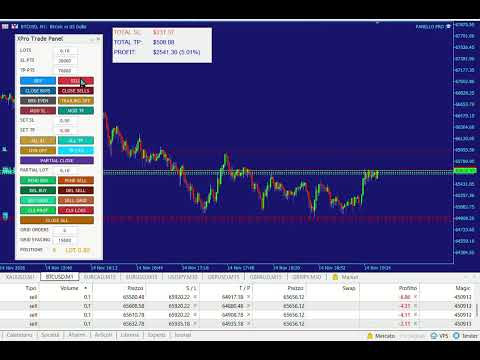
Otay Trade Panel
- Experts
-
Ezzeddine Otay
 ABOUT ME
Trader for over 10 years, specializing in Crypto and Gold. I am also an EA programmer, combining market experience with software development. - Version: 1.0
- Activations: 5
Overview
The panel is an Expert Advisor (EA) for MetaTrader 4 and MetaTrader 5 that provides a complete graphical interface for manual and semi-automatic trade management. It supports both netting and hedging accounts and works on any symbol, with specific configuration for XPT (platinum) but adaptable.
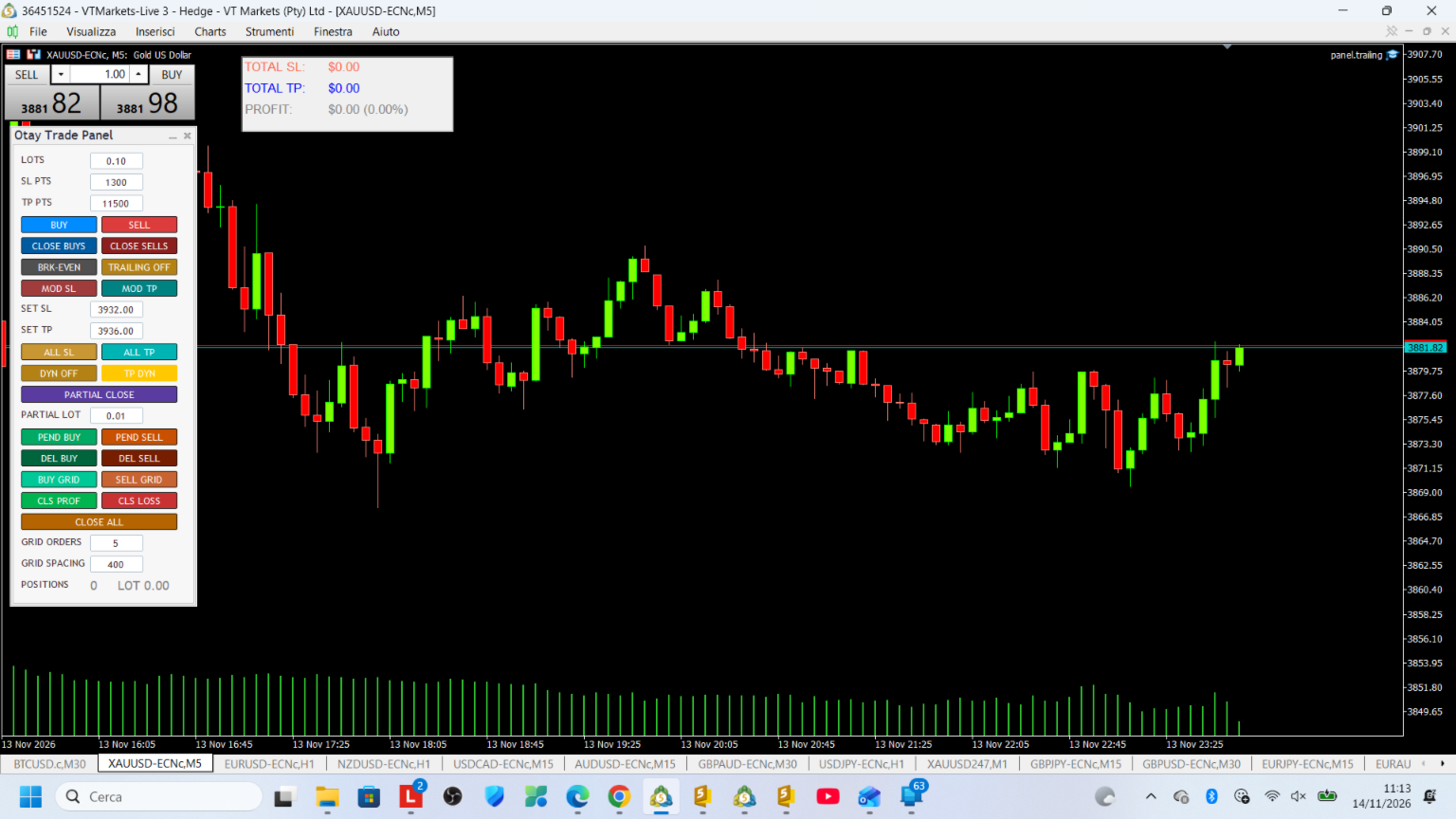
The panel consists of two parts:
-
A control window (dialog) with buttons, input fields, and labels.
-
An on-chart display with a summary of total SL/TP and daily profit.
1. Input Parameters (EA settings)
1.1 Trade Settings
-
xp_riskCalculation: lot calculation mode (FIXED_LOTS = fixed lots, BALANCE_PERCENT = percentage of balance).
-
xp_stop_takeMode: SL/TP mode (ST_DISTANCE = distance in points, ST_PRICE = absolute price).
-
xp_bidAskReference: price reference for calculation (normal, inverted, ask only, bid only).
-
xp_expertDeviation: maximum slippage in points.
-
xp_expertMagic: magic number to identify the EA's trades.
-
xp_affectOtherTrades: if true, the panel acts on all symbol positions, not only those with the magic number.
-
xp_maxPositions: maximum number of simultaneous positions allowed.
1.2 Buttons (button visibility)
Each button group can be shown or hidden via boolean inputs: Buy/Sell, Close Sep, Close Profit/Loss, SL/BE/Close All, Modify, Partial Close, Pending Order, Delete Order, Comment, Grid, Trailing, Dyn Trailing, Dyn TP.
1.3 Grid Settings
-
xp_gridOrders: number of pending orders in the grid.
-
xp_gridSpacing: distance between orders in points.
-
xp_gridSLDistance: common stop loss distance.
-
xp_gridLotMultiplier: lot multiplier for each grid level.
1.4 Display
-
xp_grabSLwithDrag: enables setting SL by dragging the mouse on the chart.
-
xp_fontSize: font size.
-
xp_autoSetTP / xp_autoSetSL: optional automatic values.
-
xp_chartDisplayX / Y: on-chart display position.
1.5 Auto Close
-
xp_autoCloseProfitPercent: daily profit percentage at which to automatically close all positions.
-
xp_enableAutoClose: enables/disables automatic closing.
1.6 Trailing Stop
-
xp_enableTrailingStop: enables fixed trailing stop.
-
xp_trailingDistance: trailing distance in points.
-
xp_trailingStep: minimum update step.
-
xp_enableDynamicTrailing: enables ATR-based dynamic trailing.
-
xp_atrMultiplier / xp_atrPeriod / xp_atrTimeframe: ATR parameters for dynamic trailing.
1.7 Dynamic TP
-
xp_enableDynamicTP: enables ATR-based dynamic take profit.
-
xp_atrTPMultiplier: ATR multiplier for dynamic TP.
2. Control Window Functionality
2.1 RISK / LOTS row
Edit field to enter:
-
In FIXED_LOTS mode: the number of lots to use.
-
In BALANCE_PERCENT mode: the balance risk percentage.
2.2 SL PTS / SL PRICE row
Edit field for stop loss:
-
In ST_DISTANCE mode: distance in points.
-
In ST_PRICE mode: absolute price.
2.3 TP PTS / TP PRICE row
Edit field for take profit, with the same modes as SL.
2.4 BUY / SELL buttons
Open a market buy or sell order respectively, calculating lot, SL, and TP based on settings. If Dynamic TP is active, TP is overridden with the ATR distance.
2.5 CLOSE BUYS / CLOSE SELLS buttons
Close all buy or sell positions on the symbol (with or without magic number filter). Uses asynchronous mode in MT5 for speed.
2.6 BRK-EVEN button
Moves the stop loss to the open price of all positions in profit.
2.7 TRAIL button
Toggles the fixed trailing stop on/off. Color changes based on state (aqua = active, orange = inactive).
2.8 MOD SL / MOD TP buttons
Modify the SL or TP of all open positions based on the current values in the SL/TP fields.
2.9 SET SL / SET TP fields
Edit fields to enter an absolute SL or TP price to apply to all positions.
2.10 ALL SL / ALL TP buttons
Apply the price entered in the SET SL / SET TP fields to all open positions, with validation (for BUY, SL must be below current price, etc.).
2.11 DYN TRAIL / DYN TP buttons
-
DYN TRAIL: activates ATR-based dynamic trailing stop. If active, disables fixed trailing. Green when active, aqua when fixed trailing is active, orange when both are off.
-
DYN TP: activates ATR-based dynamic take profit. Yellow when active, aqua when manual TP is active, orange when off.
2.12 PARTIAL CLOSE button (full width)
Partially closes all positions by the volume specified in the PARTIAL LOT field.
2.13 PARTIAL LOT field
Enters the volume to partially close for each position.
2.14 PEND BUY / PEND SELL buttons
Activates pending order placement mode: the next chart click creates a limit or stop order based on the clicked price relative to market.
2.15 DEL BUY / DEL SELL buttons
Delete all pending buy or sell orders on the symbol (with or without magic filter).
2.16 BUY GRID / SELL GRID buttons
Open a grid of pending limit buy or sell orders with configurable number, spacing, common SL, and lot multiplier.
2.17 CLS PROF / CLS LOSS buttons
Close all positions in profit or in loss.
2.18 CLOSE ALL button (full width)
Closes all positions on the symbol (with or without magic filter).
2.19 GRID ORDERS / GRID SPACING fields
Grid order count and spacing in points.
2.20 POSITIONS row
Shows the number of open positions and total open lots. Color changes based on position count (gray, green, aqua, orange).
2.21 COMMENT field (full width)
Comment applied to orders. Saved to file and restored on restart.
3. On-Chart Display
A panel on the chart shows in real time:
-
TOTAL SL: total risk in USD calculated as the sum of SL distances times volume and point value.
-
TOTAL TP: total potential profit in USD.
-
PROFIT: total daily profit (closed + open) in USD and as a percentage of balance, with color varying by magnitude.
The display updates every second (every 10 ticks) and on every chart change.
4. Automatic Features
4.1 Daily Auto Close
If enabled, when the daily profit percentage reaches the configured threshold, the panel automatically closes all positions and shows an alert. The flag resets when there are no open positions.
4.2 Daily Reset
At the start of each day, closed profit is automatically reset via persistent global variables.
4.3 Trailing stop
On every tick (with throttle), the panel applies trailing stop to all positions:
-
Fixed: configurable distance in points.
-
Dynamic: distance = ATR * multiplier, with minimum and maximum limits.
4.4 Dynamic TP
If active, when opening an order the TP is calculated as current price +/- (ATR * TP multiplier). Also works for pending orders.
5. Settings Persistence
All main settings (risk, SL, TP, partial lots, trailing state, dynamic TP state, set SL/TP, grid orders/spacing, daily profit, last reset, panel position) are saved in MT4/MT5 global variables and restored on restart. The comment is saved to a text file.
6. Error Handling and Validations
-
Maximum position count check before opening.
-
SL/TP price validation before applying (correct direction relative to market).
-
Min/max lot checks and normalization to symbol step.
-
Alerts via Alert/MessageBox on errors or failed modifications.
-
Fallback to fixed distance if ATR is unavailable.
7. Compatibility
-
MT5: uses CTrade, CPositionInfo, COrderInfo, CiATR; supports asynchronous mode for fast closes.
-
MT4: uses native OrderSend, OrderClose, OrderModify, iATR.
-
Supports netting accounts (one position per symbol) and hedging (multiple positions).
8. Operational Notes
-
The panel is designed for assisted manual trading, not for fully automated strategies.
-
The "affectOtherTrades" mode allows managing positions opened manually or by other EAs.
-
Dynamic TP and dynamic trailing are based on ATR of the current (or configurable) timeframe and are designed to adapt to volatility.
-
Daily profit auto close is useful for risk management discipline.
In summary, the panel offers complete control over opening, modifying, closing, and protecting positions, with optional automations (trailing, dynamic TP, auto close) and a clear real-time view of risk and profit.