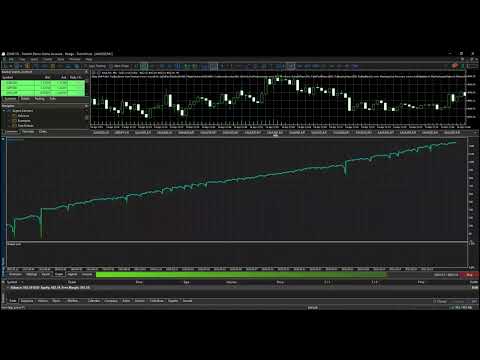
Sleep Well Gold Scalping EA
- Experts
- Version: 2.8
- Activations: 5

Copy the sections below into the Description tab of your MQL5 Market product page (the built-in editor supports bold/lists, so formatting will carry over). Adjust price, "copies remaining," and any claim you can't personally stand behind before publishing — see the honesty notes at the bottom.
Main description
Sleep Well Gold Scalping is a fully automated trading system built specifically for XAUUSD (Gold), designed to catch sudden volatility spikes and manage every trade with strict, broker-verified risk control from entry to exit. Instead of reacting to every small tick, the robot waits for a genuine momentum spike — a bar range that clears a configurable pip threshold with a strong directional body — before it ever considers an entry. That patience is the whole idea behind the name: the EA is built to run unattended, with hard stops, take-profit, and multiple independent safety filters doing the work, so you're not watching the chart every time gold moves.
Every position opens with a fixed Take Profit and a hard Stop Loss — no trade is ever sent without a defined worst case. Once a trade moves far enough into profit, a trailing stop takes over automatically to lock in gains, and the trailing logic constantly checks the live broker-reported minimum stop distance and spread before every adjustment, so it never fires off a modification your broker would reject.
Key features:
-
Spike Detection Engine Enters only when a bar's range clears your configured pip threshold, with an optional body-to-range ratio filter to skip indecisive, wick-heavy candles and favor clean directional moves.
-
Hard Stop Loss & Take Profit Every position is protected the moment it opens — no trade is ever sent to the market without a defined stop loss.
-
Broker-Compliant Trailing Stop Secures profit automatically once a trade reaches your trailing-start threshold, while continuously respecting the broker's live minimum stop distance and current spread — so trailing adjustments succeed instead of silently failing.
-
Optional H1 Trend Filter Confirms the spike direction against a configurable H1 moving average before entering.
-
Optional Higher-Timeframe Trend Confirmation A second, independent trend check on a higher timeframe of your choice (H4/D1/etc.), requiring both price position and MA slope to agree with the trade direction.
-
H4 ATR Range Filter Optionally blocks entries when the higher-timeframe market is compressing or ranging, avoiding low-quality breakout attempts.
-
News Blackout Filter Uses MetaTrader 5's built-in economic calendar to automatically pause entries around high-impact USD news events, with configurable pre- and post-event windows.
-
Session Filter Restricts trading to the hours you choose, in server time.
-
Same-Direction Cooldown After a losing trade, blocks new entries in that same direction for a configurable number of hours — avoiding "revenge" re-entries into a direction that just failed.
-
Intraday Loss Protection Automatically stops opening new trades once a configurable number of losses has been hit for the current trading day, resetting fresh the next day.
-
Optional Martingale Lot Recovery (hard-capped) After consecutive losses, lot size can scale up by a configurable multiplier to help recover faster on the next signal. This is capped on two independent levels — a maximum number of consecutive steps, and an absolute maximum lot size — so recovery scaling can never run away unchecked. This feature increases risk and is not required — it can be fully disabled by setting the multiplier to 1.0.
-
Engineered for Real-World Execution Every order is validated against the broker's actual live volume step/minimum/maximum, current spread, minimum stop distance, and free margin before it's ever sent — not just at a fixed default. This means the EA behaves correctly across different brokers and account sizes, instead of assuming one fixed contract spec.
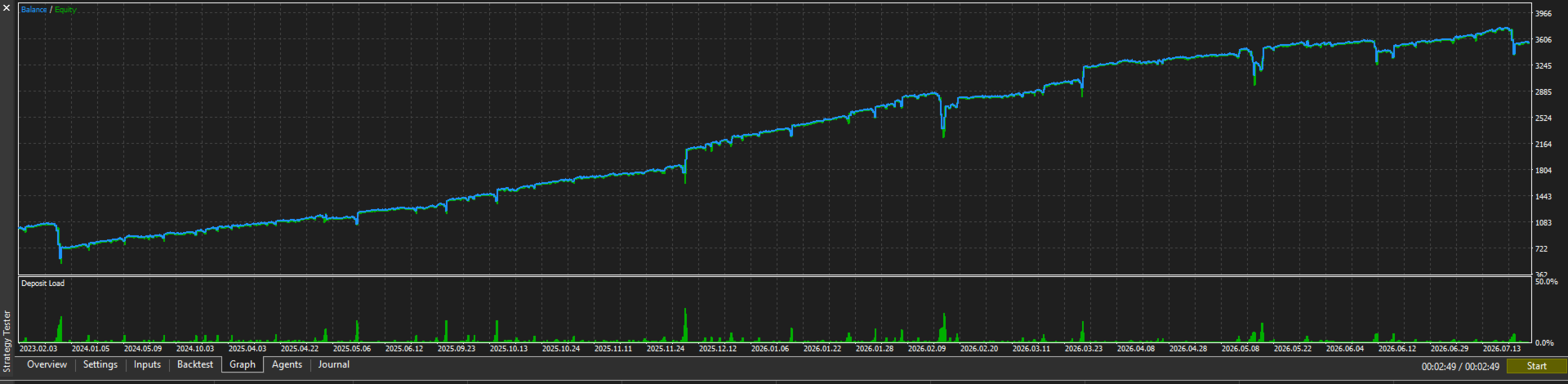
How to backtest Sleep Well Gold Scalping in the MetaTrader 5 Strategy Tester
Open the Strategy Tester panel in MetaTrader 5 (View → Strategy Tester, or Ctrl+R) and set it up exactly like this:
- Expert — select Sleep Well Robot Trading.ex5 (or your published product name) from the dropdown.
- Symbol / Timeframe — set to XAUUSD and M1. This EA is built and tuned for gold on the 1-minute chart; other symbols/timeframes are not supported.
- Date — choose Custom period and pick the range you want to test (e.g. 2023.01.01 to today). Longer ranges give a more reliable picture across different gold volatility regimes.
- Forward — leave as No unless you specifically want to reserve part of the range for forward (out-of-sample) testing.
- Delays — "Zero latency, ideal execution" is the tester's default and assumes instant order fills with no slippage or requotes. It's fine for an initial pass, but for a more realistic picture of live performance, also run a second test with a small delay selected here to see how the results hold up with real-world execution lag.
- Modelling — set this to "Every tick based on real ticks." This is the single most important setting on this screen — see the explanation below.
- Deposit / Leverage — start with the deposit and leverage you actually plan to trade with live (see the minimum-deposit recommendation further down — don't just leave the tester's default).
- Optimization — leave Disabled unless you're deliberately running the built-in optimizer to search parameter ranges.
- Check "visual mode with the display of charts, indicators and trades" if you want to watch trades open and close in real time; leave it unchecked for a faster, non-visual run once you're just after the final statistics.
Click Start and let it run to completion.
Why "Every tick based on real ticks" matters
MetaTrader 5's Strategy Tester offers a few different modeling modes. "Every tick based on real ticks" replays the actual historical bid/ask ticks your broker recorded — the real order flow, including genuine spread behavior and price gaps, exactly as it happened. Plain "Every tick" (without the real-ticks flag) is used when true tick history isn't available for that symbol/period; in that case, MetaTrader synthesizes an approximate intrabar price path by interpolating between the Open/High/Low/Close of each minute bar using a generic algorithm — it's a reasonable estimate, but it is not what actually happened in the market.
For a spike-detection strategy like this one — where entries depend on the exact shape of a bar and trade management depends on real, live spread — testing on synthetic ticks can noticeably overstate or understate results compared to genuine market conditions. Always check the "Modelling quality" percentage shown after a backtest; a result close to 99% on real ticks means you're looking at a faithful replay of actual historical trading conditions, not an approximation.
Information:
- Pairs: XAUUSD
- Timeframe: M1
- Platform: MetaTrader 5
- Account type: Netting or Hedging (test both if you plan to offer either)
Inputs reference
All inputs are grouped and fully configurable. The values below are the suggested starting configuration; adjust to your own risk tolerance before going live.
Core Settings
| Input | What it does | Suggested value |
|---|---|---|
| Lot size (base) | Starting lot size; resets here after a profitable trade | 0.01 |
| Min bar range (pips) to trigger spike | Minimum M1 bar range required to consider an entry | 360 |
| Cooldown after a trade (seconds) | Minimum wait between trades | 180 |
| Max one position at a time | Restrict to a single open position | On |
SL / TP
| Input | What it does | Suggested value |
|---|---|---|
| Hard SL on entry (pips) | Stop loss set the moment every trade opens — keep this above 0 | 700 |
| Fixed TP on entry (pips) | Take profit set on entry; 0 disables it | 1000 |
| Profit (pips) needed before trailing starts | How far a trade must run before the trailing stop activates | 550 |
| Trailing stop distance once active (pips) | Distance the trailing stop follows behind price | 5 (auto-widens if your broker's live spread requires more) |
Martingale Lot Recovery (optional — see risk note below)
| Input | What it does | Suggested value |
|---|---|---|
| Multiply lots by this on each SL | Lot multiplier applied after consecutive losses. Set to 1.0 to disable recovery scaling entirely | 3.0 |
| Hard cap on consecutive doublings | Maximum number of martingale steps allowed | 3 |
| Absolute max lot size | Lot size can never exceed this, regardless of steps | 4.0 |
Trend Filter (H1 MA)
| Input | What it does | Suggested value |
|---|---|---|
| Enable H1 trend filter | Require the H1 trend to agree with the spike direction | On |
| H1 MA period | Moving average period used for the check | 3 |
| MA method | Moving average type | Exponential |
Spike Quality Filter
| Input | What it does | Suggested value |
|---|---|---|
| Require candle body >= ratio of range | Filters out indecisive, wick-heavy spikes | On |
| Min body/range ratio | Minimum body-to-range ratio required | 0.7 |
Session Filter (Server Time)
| Input | What it does | Suggested value |
|---|---|---|
| Restrict to trading hours | Only trade within a defined server-time window | On |
| Session open / close hour | Trading window | 8 – 20 |
News Blackout Filter (MT5 Calendar)
| Input | What it does | Suggested value |
|---|---|---|
| Block entries around high-impact news | Pauses entries around high-impact USD calendar events | Off by default — enable for extra caution |
| Minutes to block before / after | Blackout window size | 30 / 60 |
Same-Direction Cooldown
| Input | What it does | Suggested value |
|---|---|---|
| Block same-direction re-entry after SL hit | Prevents re-entering the same direction right after a loss | On |
| Hours to block same direction after a loss | Cooldown length | 4 |
Intraday Loss Protection
| Input | What it does | Suggested value |
|---|---|---|
| Stop trading after N losses in same day | Caps how many losses are allowed per trading day | Off by default — enable for extra caution |
| Max losses allowed per trading day | Daily loss cap | 2 |
H4 ATR Range Filter
| Input | What it does | Suggested value |
|---|---|---|
| Block entries when market is ranging on H4 | Avoids entries during low-volatility, ranging conditions | On |
| ATR period for H4 range detection | Lookback period | 100 |
| Block if H4 ATR < this ratio of its 20-bar avg | Ranging-market threshold | 0.9 |
HTF Trend Confirmation Filter
| Input | What it does | Suggested value |
|---|---|---|
| Enable higher timeframe trend filter | Second, independent trend check on a higher timeframe | On |
| HTF timeframe | Timeframe used for the confirmation | D1 |
| HTF MA period | Moving average period | 20 |
| HTF MA method | Moving average type | Smoothed |
Recommended minimum deposit (1K)
There's no single "right" number here — it depends on your broker's leverage, minimum lot size, and the live gold price at the time — but the martingale settings above are worth sizing deliberately rather than guessing, since the effective worst-case exposure is larger than the 0.01 base lot suggests.
Worked example, using the suggested settings above (Multiplier 3.0, max 3 steps, base lot 0.01) at 1:500 leverage and a gold price around $2,400:
- Lot size across a losing streak: 0.01 → 0.03 → 0.09 → 0.27 (capped at step 3). Some brokers enforce a higher minimum lot for XAUUSD (0.10 or 0.20 is common) — if yours does, the smaller steps above are rounded up to that minimum instead, which raises real exposure earlier in the sequence.
- Margin for the largest single position in that sequence (0.27 lots): roughly $130 at 1:500 leverage. At 1:100 leverage the same position needs roughly $650.
- Loss at the 700-pip hard stop across that same 4-trade losing streak (0.01, 0.03, 0.09, 0.27 lots): roughly $609 total, before spread and commission.
Adding a safety margin on top of that (for open-position margin, spread costs, and simply not running an account right at its floor), a reasonable starting point is:
- 1:500 leverage or higher: minimum $1,500–$2,000
- 1:100 leverage: minimum $4,000–$5,000
- Lower leverage or a broker with a higher minimum lot: scale up further — recompute using your own broker's actual margin requirement (MetaTrader 5 shows this directly via the Trade tab, or you can request it from your broker) before committing real funds.
If you'd rather run this with a smaller account, reduce Multiplier and Max Lot Size accordingly, or set Multiplier to 1.0 to disable lot recovery entirely — the strategy still runs on fixed lot size, no martingale required.
Frequently Asked Questions
-
What makes Sleep Well Gold Scalping different from other gold robots? It only acts on genuine volatility spikes rather than trading every candle, and every trade — entry, trailing stop, and lot size — is checked against your broker's real, live trading conditions before being sent, not just a fixed assumption.
-
Do I need advanced trading knowledge to use it? No. Default settings are ready to run. You can adjust lot size and risk settings, but the entry, exit, and trade management logic is fully automatic.
-
Does it use Martingale? It has an optional, hard-capped lot-recovery feature that can increase position size after consecutive losses, bounded by both a maximum number of steps and an absolute maximum lot size. It can be turned off entirely by setting the multiplier to 1.0. We believe in being upfront about this — any recovery-style money management increases risk, and you should size it (or disable it) according to your own risk tolerance.
-
Which market does it trade? XAUUSD (Gold) only, on the M1 timeframe.
-
What's the minimum deposit? It depends on your broker's leverage and lot minimums, and on how aggressively you configure the martingale recovery settings — see the worked example above. As a starting point: roughly $1,500–$2,000 at 1:500 leverage with the default settings, or less if you reduce the lot multiplier / disable martingale entirely.
-
Can I customize the risk settings? Yes — lot size, hard Stop Loss, Take Profit, trailing distance, martingale multiplier and caps, session hours, and every filter (trend, HTF confirmation, news blackout, range filter, loss cooldowns) are all independently configurable.
-
Can I use it with any broker? Yes. It reads your broker's real symbol specification (volume steps, stop levels, spread, margin) at runtime rather than assuming fixed values, so it adapts automatically. A low-spread broker is still recommended for scalping performance.
-
Will I receive updates? [State your actual update policy here.]
-
What do I receive after purchase? [State your actual delivery — manual, support access, etc.]
Honesty notes before you publish (please read)
A few things worth deciding deliberately, since MQL5 buyers (and MQL5's own review moderators) look closely at these:
- Don't copy specific numbers from the Scalping Robot Pro listing (price, "$X special until [date]," bonus products, purchase counts, reviewer quotes). Those belong to that seller's product and account — reusing them would be misleading at best.
- The martingale disclosure is included on purpose. Buyers who discover undisclosed martingale after the fact tend to leave the harshest reviews and refund requests. Disclosing it plainly, with the hard caps you've already built in, tends to build more trust than it costs sales.
- Fill in the bracketed placeholders ( [set your recommended figure] , update policy, delivery details) with things that are actually true for your product — I've left them open rather than inventing numbers.
- Live results / track record: if you don't have a verified live signal yet, don't claim one. It's fine to omit that section entirely until you do. https://jumpshare.com/s/rVYdclPYFxLoQhVvf8TY