MT4 Trendline Trading ATM

Trade with Confidence Using the Trendline Trading ATM (Advanced Trade Management)!

Master entries, exits, and risk management with the powerful tools of the MetaTrader Trendline Trading ATM. This expert advisor equips you with a comprehensive suite of tools to trade consistently smarter, not harder. 

Take control of your trading risk and drawdown, capture profitable entries, and let your winners run.

This innovative Trade Entry/Exit and Risk Management utility empowers you to: 

  • Precision Entry & Exit: Identify high-probability entry points with dynamic trendline entry and manage open positions seamlessly and let the winners run with the dynamic trendline exits. This enhances your reward to risk ratio significantly.
  • Lightning-Fast Order Control: Place, manage, and close all trades with a single click for unmatched efficiency.

  • Automated Risk Management: Reduce emotional decision-making by automatically setting Stop Loss and Take Profit levels and calculating trade size based on your risk tolerance.
  • Curb Overtrading: Set limits on the number of trades you open to maintain discipline and avoid impulsive decisions.
  • Visualize Key Levels: Gain valuable market context with Dominant Range Bars, historical OHLC data, and live profit/loss tracking directly on the chart.
  • MT4 Trendline Trading ATM is built by traders, for traders. It simplifies complex tasks and streamlines your workflow, allowing you to focus on making strategic trading decisions.

Introducing the Advanced Metatrder Trendline Trading ATM

MetaTrader 4 and 5 are undeniably popular trading platforms offering a robust feature set for most traders. While user-friendly and easy to use, the need for additional functionalities to support evolving analytical strategies and trading styles is ever-present. The Trendline Trading ATM addresses this need head-on. This advanced tool boasts special capabilities designed to significantly improve your trading efficiency and profitability.

Advanced Features of MetaTrader Trendline Trading ATM:

In the following sections, we'll delve deeper into the features and functionalities of this powerful Advanced Trade Management utility.

  1. Enhanced Trading Entry Points:
    • Improve entry points by analyzing price reversals and dynamic trend line breaks.
  2. Efficient Trade Management:
    • Manage and exit trades opened by dynamic close trendlines effectively.
  3. Streamlined Order Placement:
    • Place and manage limit orders using customized keyboard shortcuts.
  4. Quick Trade Execution:
    • Close all trades with a single button, simplifying the process.
    • Delete all orders instantly when needed.
  5. Risk Management Automation:
    • Automatically set Stop Loss and Take Profit levels for all positions and orders on the chart.
  6. Optimized Trade Volume Calculation:
    • Calculate the correct trade volume based on the trader’s risk level.
  7. Prevent Over Trading:
    • Limit the number of trades to maintain discipline.
  8. Visual Insights:
    • Display the Dominant Range Bar based on trader-defined values.
    • Show OHLC (Open, High, Low, Close) levels from previous days’ candles as static support and resistance.
  9. Real-Time Profit and Loss Monitoring:
    • View daily and momentary profit and loss directly on the chart.


MetaTrader Trendline Trading ATM​ Control Pannel

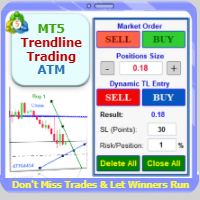
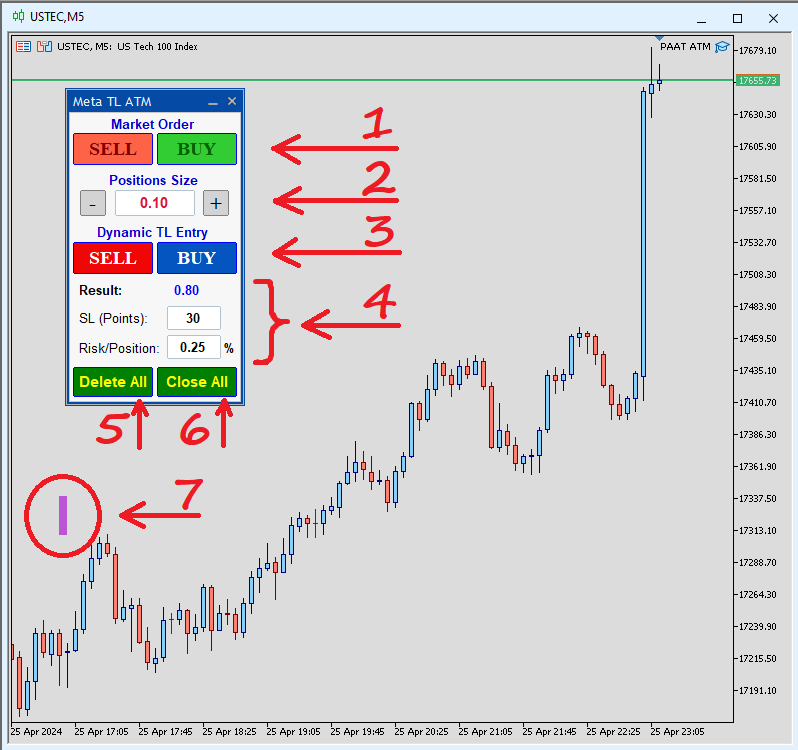
The following image shows the Trendline Trading ATM interface on your chart:

https://c.mql5.com/31/1110/mt5-trendline-trading-atm-screen-7329.png


The various sections and capabilities of the Trendline Trading ATM control panel, based on the numbered sections above, are explained below:

Section 1: Manual Order Entry

  • Buy/Sell Buttons: Open trades at the current market price with adjustable volume (set in Section 2).
  • Dynamic Trendlines: Positions opened here will have an associated trendline for automated exit management.

Section 2: Volume Adjustment

  • Volume Control: Adjust the volume or lot size for all orders and positions executed by the ATM.
  • Initial Volume: Defaults to the minimum allowed volume for the current symbol on your chosen broker.
  • Volume Rounding: Entered volumes may be rounded to the nearest acceptable value.
  • Volume Buttons (+/-): Easily adjust the desired volume.

Section 3: Trendline Entry

  • Buy/Sell Buttons: Similar to Section 1, but allows user-drawn dynamic trendlines for automated entry.
  • Trendline Activation: Positions open upon specific chart conditions (e.g., breaking the trendline).
  • Dynamic Trendlines: Trades opened here will also have a trendline for exit management.

Section 4: Risk-Based Volume Calculator

  • Advanced Calculator: Calculates the trade volume based on your desired Stop-Loss (SL-Points) and risk percentage per trade (Risk/Position).

Section 5: Order Management

  • Delete All Button: Removes all unfilled orders sent to the broker.
  • Keyboard Shortcut (Shift + Up): Quickly delete all orders using a keyboard shortcut (customizable in settings).
  • Order Scope: Selectable deletion of orders (current symbol only or all broker symbols).

Section 6: Position Management

  • Close All Button: Closes all open positions.
  • Keyboard Shortcut (Shift + Down): Quickly close all positions using a keyboard shortcut (customizable in settings).
  • Position Scope: Selectable closing of positions (current symbol only or all active symbols).

Section 7: Dominant Range Bar Display

  • This feature allows you to display a horizontal bar on the chart for the Dominant Range Bar. Dominant Range is defined by user based on normal range of smooth price move and is instrument/market session/time-frame-dependent. It helps to analyze market volatility and filter highly volatile situations that leads to losses. 
  • Location and Display: You can enable or disable this feature and define its location on the chart.
  • You can adjust the Bar height (in points) and Color of the bar.


ATM Tool Settings (Inputs)

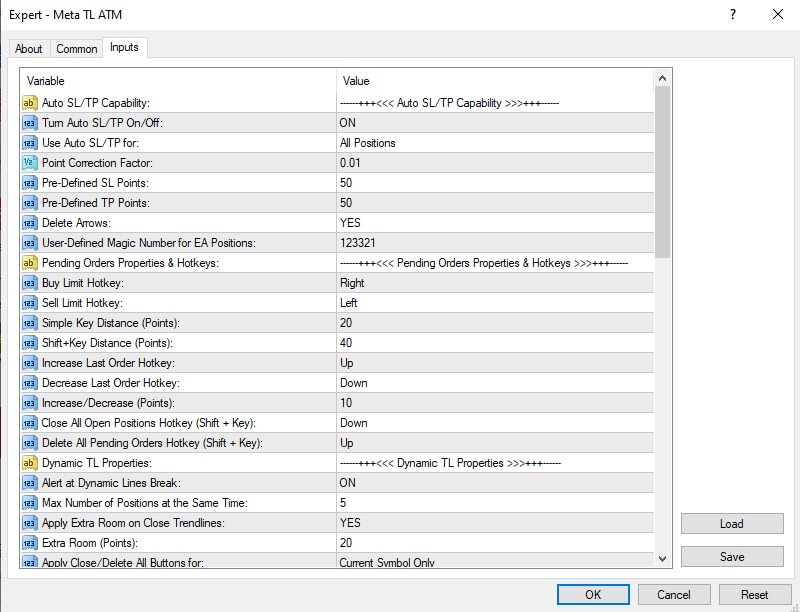
As shown in the figure below, Trendline Trading ATM has various input sections. We'll explain each of them in the following.


https://c.mql5.com/31/1290/mt5-trendline-trading-atm-screen-6967.png


Auto SL/TP Settings

This section controls automatic Stop Loss (SL) and Take Profit (TP) placement on the chart. You can:

  • Enable/disable automatic SL/TP
  • Choose which order types receive automatic SL/TP
  • Set default SL and TP values
  • Adjust the Point Correction Factor: This accounts for differences in "Point Values" of various trading instruments. For example, if a 50-point SL on your platform translates to 5000 points on the chart, enter a Point Correction Factor of 0.01.
  • Define a Magic Number: This unique identifier distinguishes Trendline Trading ATM from those of other experts, especially in the MetaTrader Strategy Tester.
  • Enable/disable deleting limit orders after the price reaches the order's profit target (TP).
  • Set maximum draw down limit (MDD) based on percent of account balance.
  • Enable/disable alert and auto close positions at reaching MDD.


Pending Orders & Hotkeys

Customize keyboard shortcuts for:

  • Open new buy long or sell short positions at the market current price
  • Placing limit orders near or far from the market price (with or without Shift key)
  • Adjusting order entry price (moving orders up/down)
  • Delete All and Close All functions.

Available shortcuts include numbers (0-9), letters (A-Z), and arrow keys.


https://c.mql5.com/31/1110/mt5-trendline-trading-atm-screen-9732.png


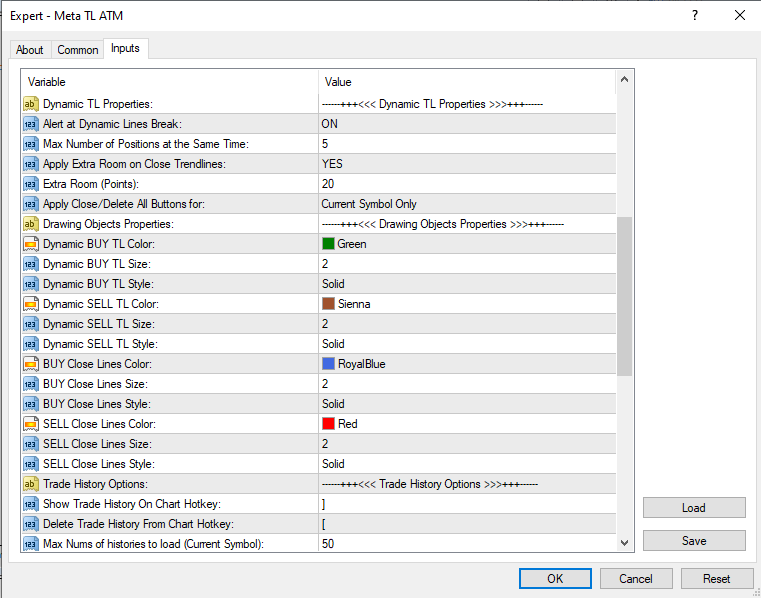
Dynamic Trendline Properties

  • Trendline Alarms: Enable/disable alarms for positions opened by dynamic trendlines (plays every 5 seconds, user-dismissible by clicking).
  • Maximum Trades: Set the maximum number of trades Trendline Trading ATM can open simultaneously.
  • Extra Room: This setting creates a buffer zone around dynamic trendlines. Price movement within this zone won't trigger entry or exit signals. Define the buffer size in points.
  • Delete All/Close All Scope: Choose whether these functions apply to the current chart symbol only or all active symbols.
  • Drawing Object Properties
  • Customize the appearance of trendlines on your chart, including Color, Thickness, and Line style (separate styles for buy/sell and closing lines)

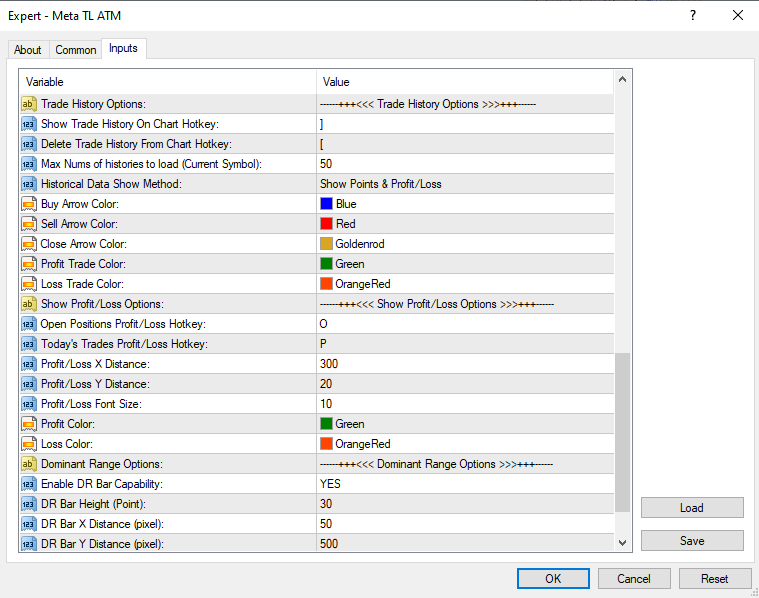
Trade History Options (MT4 Only)

Since MT4 already displays trade history graphically, these settings are only relevant for the MT4 version of Trendline Trading ATM.

  • Enable/Disable Trade History: Use the keyboard shortcuts "]" (show) and "[" (hide) to toggle trade history visibility on the chart.
  • Customize Trade History Display: Adjust the number of displayed trades, profit/loss display (points or dollars), and color schemes for entry/exit points and profitable/losing trades.
  • Show Profit/Loss Options

https://c.mql5.com/31/1110/mt5-trendline-trading-atm-screen-4941.png


Show Profit/Loss Options

This section controls the display of profit/loss (P/L) information:

Enable/Disable P/L Display: Use the keyboard shortcuts "O" (current P/L) and "P" (daily P/L) to toggle visibility.

Customize P/L Display: Adjust the location, font, and color of P/L information on the chart.


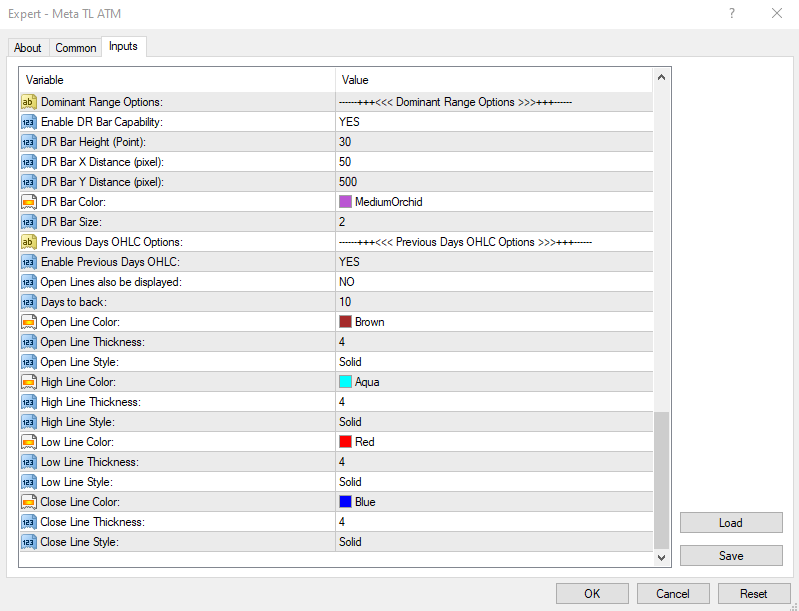
Dominant Range Bar

Enable/Disable Display: Activate or deactivate the Dominant Range Bar on the chart.

Customize Appearance: Adjust the bar's height, location, color, and thickness.


Previous Days' OHLC

Enable/Disable Display: Show or hide the Open, High, Low, and Close (OHLC) levels of previous days on the chart.

Customize Appearance: Choose which OHLC levels to display, the number of days back to consider, and the color, size, and line style.


https://c.mql5.com/31/1110/mt5-trendline-trading-atm-screen-6196.png


Master the art of trading with the Meta Trendline Trading ATM! This expert advisor utility equips you to navigate different financial markets and develop winning strategies and helps you pinpoint ideal entry and exit points, maximizing your profit potential.
Recommended products
L   H E D G E R   S C A L P E R    A fully automated Expert Advisor that uses counter-trend scalping, managed semi-martingale strategy and lock hedging to execute a complete trading scheme from entry analysis to risk-calculated money management to exit analysis plan execution.         V E R Y  I M P O R T A N T    You can use only ECN type of account. Otherwise, it's a disaster. You can use only the GBPJPY currency pair. Open and attach with 1 chart only. Use a minimum of $5
Ilan MT4
Andrey Khatimlianskii
5 (1)
The original Ilan EA for MetaTrader 4 This is the original Ilan EA for the MetaTrader 4 trading terminal. The strategy needs no advertising as it is well known even to novice traders. Settings of the Expert Advisor The Expert Advisor can easily be set, while allowing you to adjust any important parameters of the strategy. Available Features: Unique  MagicNumber  for identification of trades; Trade direction option ( Trade direction ): buy only, sell only, or both directions simultaneously; Step

Max ScalperSpeed
Paranchai Tensit
Max ScalperSpeed   is a fully automated expert advisor. This system has been developed to improve the efficiency of generating more returns. Rely on scalping trading strategies and recovery strategies with appropriate trading frequencies, and also able to work well in all market conditions, whether trend or sideways, able to trade full time in all conditions. Enable or disable news filtering according to user needs. Added a proportional lot size adjustment function, where users can choose to ad
The Dynamic Fibonacci Grid Dashboard ( DFG-360 ) is a multi functional trading app designed for work primarily in the Forex market. The app combines several modules and tools into one complete trading system. The unique interface of the app is optimized for active day trading, scalping, news trading, short term trend following as well as counter trend and grid trading. Main features Advanced Multi Time Frame and Multi Market analysis. Quick and efficient position management. Semi-Automated trad
Protect your account from Margin Call when the market is going opposite with your trades. Manage your risk when you're using Martingale, Grid, Average . They are not dangerous anymore, but manageable  Use this EA utilities to accompany your every MT4 installation This EA is a utility to protect your capital when your trading are unfavorable : Maximum loss in money, Maximum Draw-down/ equity loss in percentage, Your minimum equity reached Those are whichever reached first It's simple, straightfor
FREE
The basis of the strategy is the identification of quick corrective movements between the crosses of a working currency pair or metal. At the moment of differences in prices of trading instruments, the adviser analyzes the possible direction of price movement on a working instrument and starts work. Each position has a stop loss and take profit. A unique position tracking algorithm allows you to control the superiority of profit over loss. The adviser does not use dangerous trading methods.

VR Smart Grid
Vladimir Pastushak
4.29 (168)
VR Smart Grid is a full-featured Expert Advisor for MetaTrader 4 and MetaTrader 5, built on the classical grid trading strategy. The robot independently opens positions, manages them and closes them in parts, creating an efficient order grid that adapts to changing market conditions. Over 15 years of development, the EA has gone through thousands of variations and tests — it is the result of systematic refinement on real and demo accounts. Set files, demo versions of the product, instructions an
Trade Reverse Copie4
Chukwuemeka Kingsley Anyanwu
Feel free to contact me for any extra features :) [SEE MT5 VERSION  https://www.mql5.com/en/market/product/128846 The Local Reverse Copier is an Expert Advisor designed to synchronize positions between a Master account and a Slave account with a twist: it reverses the trades. When a buy position is opened on the Master account, the EA opens a sell position on the Slave account, and vice versa. This allows for a unique form of trade copying where positions are mirrored in opposite directions bet
Speedy Tiger
Che Jeib Che Said
SPEEDY TIGER https://www.mql5.com/en/users/earobotkk/seller#products Speedy Tiger is a fully automated EA that uses our innovative algorithm combined with our money management concept. This EA is designed for easy to use with simple inputs parameters. INPUTS Trade Comment: user comment Magic No: unique EA Number Time Frame: default is H1 Min Lot: EA will execute not less than the minimum lot size for starting lot, taking into account the calculated risk set in percentage trade risk feature. Max
So many EA and Copy Signal are using Averaging Grid system with martingale or even using flat lot size, they have pips difference in vary, also the way they put order 3-5 in same time at one time, that's all make a time bomb soon or latter will blow your account. Iam here with my experience about more than 8 years, i've found new way of grid averaging system, not like anyother grid averaging EA or any copy signal that use grid averaging system. My Grid have more dynamically pips difference for e
FoxterAI
Serhii Shal
FoxterAI — Grid Trading EA with ATR-Adaptive Step and Interactive Control Panel FoxterAI is an automated grid trading robot for MetaTrader 4 built on an averaging grid strategy. The grid step is calculated from the ATR indicator rather than a fixed pip value: during high volatility orders are placed wider, during low volatility — closer together. The EA manages two independent series simultaneously — BUY and SELL. Key Feature: Control Panel Fully Works Inside the Strategy Tester The built-in int
By :ForextraderEanow   Green Mower 10.0                                                                                                                                                                                                                                                                                                        This EA is Famous Grid Strategy that open grid of trades with the same size (not martingale)  and make PROFIT even when the Forex price moves in the WRONG Direction
BBMA Grid Combination
Kahfi Pangariduwan
5 (1)
BBMAGC   BBMAGC  is an automatic trading system with a work strategy obtained from famous BBMA indicator combine with advance grid system . This EA use dangerous trading systems like martingale and grid so please understand the risk before using this EA Time Frame: H1 Symbol: best result on EUR/USD, GBPUSD, GBPCAD VPS recommended 4/5 digit broker Min Deposit 1000$ Low spread always better Since you using Grid system, always trade using money that you are willing to lose. When you use an expert a
GRV Grid
Roman Gergert
GRV Grid expert Advisor is a regular grid trader trading in both directions. The peculiarity of this grid is that subsequent orders in the grid are opened not only upon reaching the set step but also on the basis of the signal, which allows not to accumulate a lot of orders that can very quickly drain the entire Deposit. The EA makes a decision based on the signals from THE mA indicator and the trend filter. The EA trades almost non-stop, i.e. there are almost always open orders, so for stable
JumpLump
Olga Zhdanova
A great addition to your lucrative portfolio of expert advisors. The strategy is based on an algorithm for breaking through the built levels for a certain period of time. The EA has a fixed StopLoss, which allows you to keep the minimum drawdown. Tested on all ticks using the Tick Data Suite , with the closest possible real trading conditions, watch the video. Price for the first 10 buyers $ 75 (I beg you to post your reports in the comments) Recommendations: Good ECN broker with low spread.
Elastic Grid
Aliaksandr Charkes
4.86 (7)
Elastic Grid MT4 is a multi-functional grid Expert Advisor, designed for full or partial automation of various ideas related to grid trading. The EA trades on any timeframe and symbol. It can also trade several symbols with any amount of decimal places. It does not interfere with manual trading and other EAs' operation or any indicators. It allows to adjust its settings on the fly, works only with its own orders displaying all necessary data on them when needed, and for some situations it can be
Cyberosaur Ex
Maryna Shulzhenko
The     Cyberosaurus  bot is an innovative next-generation bot that serves as a powerful tool for trading in the classic Forex market and with cryptocurrencies (for corresponding brokers). It operates with the majority of pairs, so it is advisable to test it before using it on a specific pair. It is specifically designed to work with these markets, without the ability to trade other assets such as stocks or indices. The main control parameters of the bot are presented in a convenient and conci
MT4 Version : https://www.mql5.com/en/market/product/99489 MT5 Version : https://www.mql5.com/en/market/product/99490 Hedging Locking — Multi-Symbol Hedging Grid EA Hedging Locking is an automated trading system for MetaTrader 4/5 designed around a hedged entry + adaptive locking/grid management concept. The EA starts a cycle by opening BUY and SELL simultaneously on selected symbols, then manages the exposure using a dynamic step distance. This approach is built to work best in ranging / osc
Fibo pending EA
Thanat Thitithammaphong
"Fibo Pending EA is an Expert Advisor that places pending limit orders based on Fibonacci levels. You can configure it to enter orders according to specific Fibonacci levels. For any level that you don't want to use, simply set its value to zero (0). Once the EA has placed all pending orders, please remove the Fibonacci object from the chart. The various 'Close' buttons on the chart will trigger a pop-up confirmation before closing orders. If you don't want these confirmation alerts, you can dis
The algorithm of the adviser's work: When the Expert Advisor is launched at a specified distance from the price (first_step), BuyStop and SellStop orders are placed. Further, depending on which way the price went, one of them becomes market, and the other begins to crawl after the price. When the price rolls back, it also becomes market. If we have reached a set profit in some direction, the order is closed and a creeping pending order of the same direction is placed again. If the profit is no
Stream Z50
Evgeniy Zhdan
Scalping trading robot. The EA monitors the stable direction of the trend and works in its direction. The maximally optimized code of the advisor allows you to work with minimal delays and minimal terminal load. The Expert Advisor has been successfully tested since 2015 with basic settings. It is recommended to use basic settings for EURUSD and GBPUSD trading instruments (with any prefixes and postfixes), timeframe 5 minutes. Trading results will be better with low spreads and low commissio
The Moving Average Convergence Divergence (MACD) is a popular technical analysis tool used by traders and analysts to identify trends and potential buy or sell signals in a financial instrument, such as a stock, currency pair, or commodity. It's essentially a combination of two moving averages, often referred to as the "fast" and "slow" moving averages. Here's how the MACD is calculated: Fast Moving Average (12-period EMA): This is a 12-period Exponential Moving Average (EMA) of the asset's pric
Magic Win
Reni
4 (2)
EA MAGIC WIN is the advanced trading system which was tested for long on different market conditions with heavy load tests. Based on our custom indicator which is backed with mean reversion concept along with few other algorithm this products fits itself into the current market conditions and act accordingly.  Supported currency pairs: EURUSD, GBPUSD, AUDCAD, AUDNZD, NZDCAD Recommended TF: M15. Setfile can be downloaded from here : Click Here Features Easy Setup: You just need to drag the EA
Averager 12
Ruslan Eivazov
️Online broadcasts of the testing will be conducted on this channel:  https://youtube.com/live/evf3h866CEM?feature=share A fully automated Expert Advisor for trading franc currency pairs on the MetaTrader 4 terminal. It uses trade averaging, so there is no Stop Loss, and there is a risk of losing your entire deposit. The program has proven to be most effective on the USD/CHF and EUR/CHF currency pairs. It can be used on other franc pairs, but the results will be slightly worse. The current "k"
US30 Break Scalp
Vitor Manuel Goncalves Pinto
This Expert Advisor trades based on a specific range breakout within a specific hour using scalp techniques. It does not use dangerous techniques like martingale. It only opens a maximum of 3 trades per day (default settings). The default settings are optimized for IcMarkets, FTMO and MFF (set file in the comments) although it can be used with other brokers, you just need to confirm the hours input. Despite this Expert Advisor presents good results in backtesting and for this month (January 2023
Gold Zilla AI MT4
Christophe Pa Trouillas
5 (1)
Generate controlled returns with an  AI-assisted , risk-diversified and Gold-optimized EA . GoldZILLA AI is a multi-strategy algorithm detecting market regimes to dynamically select from five distinct strategies, optimizing returns while minimizing drawdown on XAUUSD. [ Live Signal ] - [  Dedicated group | Version MT5 - MT4 ] After the purchase, please send me a private message to receive the user manual and the AI setup instructions. Why choose this EA? Dynamic multi-strategy approach Advanced
Trendline Trading
Victor Christiaanse
3 (1)
If you use Resistance and Support Trendlines in your trading, this tool will be very useful for you!  The Trendline Trading EA is a smart and easy tool to helps you in your trading using trendlines on your chart. Just create a trendline for the Resistance and Support, and the EA will create pending orders when the price touch the trendline. The following orders will be created when the price touch the trendline: Pending order in case the price breaks the trendline Pending order in case the price
EA specially made for currency pair XAUUSD. It uses artificial intelligence and complex mathematical operations, all with the goal of as little risk as possible and constant profit. I am an electrical engineer and a professor of informatics, so everything with me is calculated to the maximum and there must be no mistakes. The EA will provide mathematically processed information with the aim of as little risk as possible, , and if you wish, you can increase the Lot in order to achieve the desired
Currency EURUSD . Timeframe H1 The minimum deposit is $ 200 when trading 1% per trade.  Classic trend advisor.  The Expert Advisor is based on classic, time-tested indicators . Also, some strategies use Price Action . Every trade is protected by a stop loss  No martingale, no grid, no high risk strategies. All strategies used here are trend following and reversal. Compliance with MM = 4% for each trade is recommended. Question: - Why is testing so slow? Answer: - Be patient, 15 very diff
Lock Recovery MT4
Sugianto
3.67 (3)
Lock Recovery is created with the aim of to recover a position that suffered a loss. Live Monitoring | Lock Recovery Complete Guide & Setfile: Click here | MT5 Version : Click here Input Settings: 1. Manage Open Positions + Trade Buy: allow buy + Trade Sell: allow sell + Smart Multi Symbol Control : Enable/disable maximum allow forex pair on risk + Maximum allowed number of fx pairs on risk: if Smart Multi Symbol Control = true, fill in max allow fx pairs on risk + Trade At New Bar :open and
Buyers of this product also purchase
Custom Alerts AIO: All-in-One Market Scanner – No Setup Required Overview Custom Alerts AIO is the fastest and easiest way to monitor multiple markets for real-time trading signals—without any setup or extra licenses. It comes with all required Stein Investments indicators already embedded, making it the perfect plug-and-play solution for traders who value simplicity and performance. Just load it to any chart and start receiving alerts across Forex, Metals, Crypto, and Indices. Shares can be a
Unlimited Trade Copier Pro is a tool to copy trade remotely to multiple MT4, MT5 and cTrader accounts at different computers/locations over internet. This is an ideal solution for you if you are a signal provider and want to copy your trades to other receivers globally on your own rules. One provider can copy trades to multiple receivers and one receiver can get trade from multiple providers as well. The provider can even set the subscription expiry for each receiver, so that receiver will not b
The product will copy all telegram signal to MT4   ( which you are member  ) , also it can work as remote copier.  Easy to set up, copy order instant, can work with almost signal formats, image signal, s upport to translate other language to English Work with all type of channel or group, even channel have "Restrict Saving Content", work with  multi channel, multi MT5 Work as remote copier: with signal have ticket number, it will copy exactly via ticket number. Support to backtest signal. How to
Smart Channel M4
Vahidreza Heidar Gholami
The trend in the market can be predicted using trend lines but the problem is you don’t know where exactly the price is going to touch the trend line where you can put your pending orders on. Smart Channel Expert Advisor makes it possible to put an advanced channel around the price data, which can be configured to handle placing orders, opening and closing positions, managing risk per trade, spread, slippage, and trailing stop-loss and take-profit automatically. Features Money Management (Calcul
ManHedger MT4
Peter Mueller
5 (2)
THIS EA IS A SEMI-AUTO EA, IT NEEDS USER INPUT. Manual & Test Version Please TEST this product before   BUYING  and watch my video about it. Contact me for user support or bug reports, or if you want the MT5 version! MT5 Version I do not guarantee any profits or financial success using this EA. With this Expert Advisor, you can: Implement your own   Zone Recovery   strategy to capitalize on trending markets. Create   Grid   trading strategies, to profit from ranging markets. Place orders easil
Crystal Trade Manager PRO – Advanced MT4 Risk & Trade Control System Overview Free :- https://www.mql5.com/en/market/product/150632 Crystal Trade Manager PRO (CTM) is a fully–featured trade execution and risk management utility for MetaTrader 4. It is built for traders who require disciplined execution, strong risk protection, and intelligent automation on MT4. The system manages risk, protects equity, enforces daily limits, automates SL/TP logic, and provides a fast one-click trade panel with p
The product will copy all  Discord  signal   to MT4   ( which you are member  ) , also it can work as remote copier.  Easy to set up. Work with almost signal formats, support to translate other language to English Work with multi channel, multi MT4. Work with Image signal. Copy order instant, auto detect symbol. Work as remote copier: with signal have ticket number, it will copy exactly via ticket number. How to setup and guide: Let read all details about setup and download Discord To MetaTrader
RedFox Copier Pro
Rui Manh Tien
4.7 (10)
Time saving and fast execution Whether you’re traveling or sleeping, always know that Telegram To Mt4 performs the trades for you. In other words, Our   Telegram MT4 Signal Trader  will analyze the trading signals you receive on your selected Telegram channels and execute them to your Telegram to MT4 account. Reduce The Risk Telegram To Mt4   defines the whole experience of copying signals from   Telegram signal copier to mt4 platforms. Users not only can follow all instructions from the signa
Dashboard Trade Manager
Moegamat Luqmaan Titus
Dashboard.mq4 – The Ultimate All-In-One Trading Command Center In trading, time is money. Stop wrestling with clunky interfaces, scattered tools, and slow execution. **Dashboard** is not just a trade manager; it is a complete professional trading terminal designed for MT4. It combines execution, risk management, technical analysis, and market news into one lightning-fast, intuitive interface. Designed for the serious manual trader, Dashboard replaces your chart clutter with precision tools that
The FFx Hidden Manager panel will help you to manage easily your orders directly on the chart. Below all features described: TP, SL and TrailingStop are hidden Each order has its own lines on chart Drag & Drop any line to change the TP/SL as per your need Option to move automatically the SL line at breakeven when TP #1 is reached Option to choose the TP/SL type (by pips or price) Option to choose the TrailingStop type (by pips, MA, Fractals, PSAR or ATR) Define which order(s) you want to manage
FFx Risk Calculator
Eric Venturi-Bloxs
FFx Risk Calculator panel will help you to calculate very easily your trades size, SL or the risk directly on the chart. All features are described below: Option to select which parameter to calculate: Risk, Stop Loss or Lot Size The panel will show if the lot size is allowed according to the current account free margin Button to maximize/minimize the panel Drag and Drop the panel anywhere on the chart How to use it? Select the parameter you want to be calculated. It will be based on the 2 other
Trade Copier Pro
Vu Trung Kien
4.29 (14)
Trade Copier Pro is a tool to copy trade remotely to MT4, MT5 and cTrader accounts at different computers/locations over internet. This is an ideal solution for you if you are a signal provider and want to copy your trades to other receivers globally on your own rules. One provider can copy trades to multiple receivers and one receiver can get trade from multiple providers as well. The provider can even set the subscription expiry for each receiver, so that receiver will not be able to receive t
News Trader Pro
Vu Trung Kien
4.38 (16)
News Trader Pro is a unique robot that allows you to trade the news by your predefined strategy. It loads every piece of news from several popular Forex websites. You can choose any news and preset the strategy to trade it, and then News Trader Pro will trade that news by selected strategy automatically when the news comes. News release gives opportunity to have pips since the price usually has big move at that time. Now, with this tool, trading news becomes easier, more flexible and more exciti
FFx Watcher PRO
Eric Venturi-Bloxs
The FFx Watcher PRO is a dashboard displaying on a single chart the current direction of up to 15 standard indicators and up to 9 timeframes. It has 2 different modes: 1. Watcher mode: Multi Indicators User is able to select up to 15 indicators to be displayed User is able to select up to 9 timeframes to be displayed 2. Watcher mode: Multi Pairs User is able to select any number of pairs/symbols User is able to select up to 9 timeframes to be displayed This mode uses one of the standard indicat
Transaction Repeater Full
Alexandr Bryzgalov
5 (4)
Copies transactions between MT4 terminals. Possibilities: quick copy start minimum processor load direct and reverse (reverse) copying. copying Take Profit and Stop Loss levels copying deferred and their changes copy transactions one to many copy trades many to one local copy only Attention: The product is designed for copying trades only within a single computer or VPS with access to the desktop. The product will not work on the built-in Virtual Hosting of the terminal. We will help you set up
The product combines a manual trade panel with the ability to perform actions automatically in a highly configurable way. Actions include capturing indicator values and then based on those values raising alerts, open/close or partially close trades, scale-in, setting up pending orders, adjusting stop loss, take profit and more. On-chart controls can be configured, such as tick boxes and buttons, so can be fully interactive. The EA also handles money management, news events, hidden stop loss, tak
Binary Options Copier Remote is an EA that allows to copy binary options trades between MT4 accounts at different computers. This is an ideal solution for signal provider, who want to share his trade with the others globally on his own rules. Provider can give free bonus license to 10 receivers. That means those 10 receivers can copy from provider by using Binary Options Receiver Free (no cost). From 11th one, receiver have to buy Binary Options Receiver Pro (paid version) in order to copy from
Price Action DashBoard
Chantal Sala
4.17 (6)
The Price Action Dashboard is an innovative tool to help the trader to control a large number of financial instruments. This tool is designed to automatically suggest signals and price conditions. The Dashboard analyzes all major Time Frame suggesting price action conditions with graphic elements. The Dashboard can suggest you the strength of the trend identifying directional movement, it is an indispensable tool for those who want to open position themselves using market trends identifiers. The
Elliott Wave Counter is a panel for rapid and user-friendly manual markup of Elliott waves. One can select a color and a level of marks. There are also functions for removing the last markup and the entire markup made by the tool. Markup is made in one click. Click five times - have five waves! Elliott Wave Counter will be a great instrument both for beginners and professional analysts of Elliott waves. Elliott Wave Counter Installation & Inputs Guide if you want to get   notifications  about th
If you wish to draw Support and Resistance lines, view: daily market opening, classical pivot levels, Fibonacci pivot levels, trend lines, Fibonacci levels, the remaining time to candle closing, and current spread. If you seek to place your orders with the exact lot that meets your desired stop loss risk. If you wish to do all this and more with just one click, then this is the perfect tool to use. This tool will allow you to feel more relaxed when deciding to open orders, as well as predicting
Partial Close Expert
Omar Alkassar
5 (1)
Partial Close Expert is tool combines many functions into one automated system. This EA can help traders manage their positions more effectively by offeringmultiple options for managing risk and maximizing potential gains. With Partial Close Expert, traders can set a   partial close   level to lock in profits, a   trailing stop   level to protect profits and limit losses, a   break-even   level to ensure that the trade will break even if the price moves against them, and several other functions
Master Trend Dashboard
Chantal Sala
4.67 (3)
Master Trend Dashboard is a new generation indicator, compact, light and efficient. Each element of this Dashboard is designed to return specific signals as: Price Action, Breakout, Net Change (performance of the instrument), algorithmic studies, correlations and statistical calculations. This tool will change your way of trading allowing you to receive important information. See the Graphic Signals to understand every single signal below: Graphic Signals Symbol name and arrow color Green = Cur
Trade Copier Agent is designed to copy trades between multi MetaTrader(4/5) accounts/terminals. With this tool, you can act as either a provider (source) or a receiver (destination). All trading actions will be copied from the provider to the receiver with no delay. This tool allows you to copy trades between multiple MetaTrader terminals on the same computer with lightning-fast copying speeds of under 0.5 seconds. Trade Copier Agent Installation & Inputs Guide Please Apply the settings on the
Unlimited Binary Options Copier Remote is a powerful tool to copy binary options trades remotely between multiple accounts at different locations over internet. This is an ideal solution for signal provider, who want to share his binary options trades with the others globally on his own rules. One provider can copy trades to unlimited receivers and one receiver can get trade from unlimited providers as well. The provider can set the subscription expiry for each receiver, so that receiver will no
This is an Expert Adviser use for manual trading as a background EA or combine with external EA to open orders. Loss Recovery Trading is one of your options to handle the lose positions instead of using stop loss by setting a zone recovery area and target to exit the turn rounds sequence. How It Work? If the market goes against your first positions direction at the specific of losing points, the EA will open an opposite direction position with calculated larger lot size and also keep the first
RoboTradeSoft Panel
Volodymyr Hrybachov
Professional and highly customizable utility for automated trading. It can become an indispensable to any trader regardless of the skills. It will help to save the time that would be required for daily routine activities and it will allow to develop custom strategies. The utility can also work manually opened orders and orders opened by any other EAs. This can be applied to attempt to recover the losing trades or even save the trader form losing the deposit. The utility allows to automate the tr
Great for scalper/intraday weapon for your ease daily trading. Scalper weapon will suit's you for any trading condition, whether it's intraday / scalper this tool is important for you which providing the missing function on the native MT4 platform. You have to check Allow Auto Trading by pressing Ctrl+O, going to Expert Advisors tab, and checking " Allow automated trading" . also to ensure the " auto trading " is green. Input Parameters _MINIMIZED_AT_START: to chose whether the panel is minimiz
Market Pressure Dashboard is a new generation utility. Its main function is to assist you and give you operational ideas optimizing your analytical work. Using this utility you could monitor a lots of financial instruments (max 28 symbols FOREX) in a very simple way. The Market Pressure indicator allows you to customize the internal list of the symbols to be monitored. The opening function and position management with this panel will be much more comfortable and navigation charts very powerful.
Contact/message me if you encounter any issue using the product or need extra feature to add on the base version. There is a demo version of this panel Dashboard Trading Made Simple Demo in my product list, please try it out to get familiar with all functionalities free, LINK . This system basically utilizes TDI as the main indicator to generate trading signal mainly on H1 and H4 timeframes. The signal will be further filtered and trimmed. Stochastic; Heiken Ashi candle direction and candle siz
Telegram Publisher Agent  is an add-on that allows traders to send signals to their Telegram channels and groups in real-time. With customizable messages, chart screenshots, and other features, the tool helps traders share their trading insights and strategies with their followers. The tool also features a beautiful design with light and dark theme switch, providing users with an aesthetic and functional trading experience. Telegram Publisher Agent was designed to Publish all your trades as sig
More from author
MT4 Sync Tools
Mohammad Reza Anari
Supercharge Your MetaTrader Analysis and Trading with Meta Sync Tools! Struggling to analyze price action across different timeframes? Meta Sync Tools eliminates the frustration of unsynced crosshairs and charts, allowing seamless multi-timeframe analysis. Missing key correlations between assets and constantly switching between charts? Meta Sync Tools empowers you to visualize relationships between instruments effortlessly.  Tired of wasting time on repetitive tasks? With 30+ Customizable Short
MT5 Sync Tools
Mohammad Reza Anari
Supercharge Your MetaTrader Analysis and Trading with Meta Sync Tools! Struggling to analyze price action across different timeframes? Meta Sync Tools eliminates the frustration of unsynced crosshairs and charts, allowing seamless multi-timeframe analysis. Missing key correlations between assets and constantly switching between charts? Meta Sync Tools empowers you to visualize relationships between instruments effortlessly.  Tired of wasting time on repetitive tasks? With 30+ Customizable Short
Trade with Confidence Using the Trendline Trading ATM (Advanced Trade Management)! Master entries, exits, and risk management with the powerful tools of the MetaTrader Trendline Trading ATM. This expert advisor equips you with a comprehensive suite of tools to trade consistently smarter, not harder.  Take control of your trading risk and drawdown, capture profitable entries, and let your winners run.  This innovative Trade Entry/Exit and Risk Management utility empowers you to:   Precision Entr
Filter:
No reviews
Reply to review