 All orders
 Rules
Rules
Job finished
Specification
I need the following requirements mades on an existing EA:
- "Move Candle Behind Buttons" parameter =
Having the candlesticks shown behind the Dashboard Interface when set on "True", and when set on "False" the candlesticks are shown in fount of the Dashboard Interface.
- Enable One Click Buttons =
Make it disappear from the chart once the user has set it on "False" and reappear once the user resets it back to "True".
- Let say that the EA has placed Pending Order onto the account and its still active.
-----------------------------------------------------------------------------------------------------------------------------------------------------------------------------------------------------------------------------------
If i decide to disable the Stoploss, then the EA must remove the Stoploss from the Account.
If i decide to re-enable the Stoploss, the EA must now reset the Stoploss back onto the Account.
-----------------------------------------------------------------------------------------------------------------------------------------------------------------------------------------------------------------------------------
If i decide to readjust the Stoploss Pip Buffer, then the EA must readjust the Stoploss on the Account.
If i decide to readjust it again then the EA must continue readjusting it.
-----------------------------------------------------------------------------------------------------------------------------------------------------------------------------------------------------------------------------------
If i decide to disable the Take Profit, then the EA must remove the Take Profit from the Account.
If i decide to re-enable the Take Profit, the EA must now reset the Take Profit back onto the Account.
-----------------------------------------------------------------------------------------------------------------------------------------------------------------------------------------------------------------------------------
If i decide to readjust the Take Profit Multiplier, then the EA must readjust the Take Profit on the Account.
If i decide to readjust it again then the EA must continue readjusting it.
-----------------------------------------------------------------------------------------------------------------------------------------------------------------------------------------------------------------------------------
If i change the Risk Percentage / Risk Account Type or if i change the Custom Account Balance when the Risk Account Type has been set on "Custom Account Balance".
Then the EA will need to remove the active Pending Order and replace it with a new one.
- Risk Percentage =
The Risk Percentage should be in a list format, so if I place more than one Risk Percentage on the list, then the EA will need to take more then 1 order. So for example if I set the following onto the Risk Percentage list "1.0, 2.0" the EA will need to take two orders one with 1.0% and the other at 2.0%.
- Visual Stoploss Line = True/False
- If I place a horizontal line with an embedded text, for example "sl" then the EA will need to use this horizontal lines price level as the Stoploss Level for any new orders.
- If the horizontal line is removed from the chart, then the EA goes back to using the EA Settings for any new orders.
- If the price level of the horizontal line makes the Stoploss level of any order invalid then the EA will be required to use the EA Settings. An invalid order is considered when the Stoploss is set above a Buy Position or below a Sell Position.
- Two Additional Buttons =
I require two new buttons:
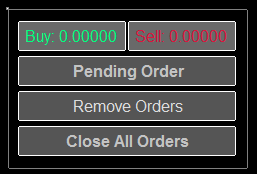
The first button will act as a switch, that switches between three of the following options:
- Option 1: Market Order, when set on this switch the Buy and Sell Buttons will immediately place a Market Orders when clicked upon.
- Option 2: Candle Close, when set on this switch the EA will do exactly what option 1 does but only at the open of the new candle.
- Option 3: Pending Order, when set on this switch the Buy and Sell Buttons will only place Stop Orders exactly like the original EA.
- The second button will be known as our "Close All Position" button, this will immediately Close all positions that are currently active for the Currency Pair the EA is attached onto.
- If i switch to neither a Market Order or Candle Close, then the EA will need to show the "Live" Bid and Ask prices on the Buy and Sell Buttons.
- The Remove Order Button will need to be readjust so that in also includes orders that were made through the Candle Close switch option, so for example if I click the Buy Button and then decided not to go through with the order, I should be able to simply press the Remove Order button, to make the EA not take that Buy Market Order as long as the next candle hasn't opened.
- Manual Pending Order Type =
- Market Order = Once i've manually place a Pending Order onto the Account, the EA will need to immediately enter into a Market Order in the direction of the pending order, and once entered the EA will need to remove the manually placed pending order.
- Candle Close = Once i've manually place a Pending Order onto the Account, the EA will need to immediately enter into a Market Order in the direction of the pending order but only at the Candle Close, and once entered the EA will need to remove the manually placed pending order.
- A manually placed Pending Order should remain active if the user has selected the Candle Close option from the above parameter "Manual Pending Order Type", now if the user decides to remove this Pending Order before the Candle Closes then the EA shouldn't take the position. However once the EA has already taken the order it should remove the Pending Order from the account.
- Pending Order = Once i've manually place a Pending Order onto the Account, the EA should readjust the order, this is exactly how the Original EA is already performing.
- Manual Pending Order Risk Converter = True/False
Once this parameter becomes enabled, the EA should convert the Lot Size into a Risk Percentage based solely on Pending Orders that were placed manually by me. So for example if I place a Pending Order with a lot size of 1.00 then the EA should use a Risk Percentage of 1% or if I set the lot size to 1.50 then the EA should use a Risk Percentage of 1.50%.