 All orders
 Rules
Rules
Watch how to order a trading robot
Read the Rules before you post an order or execute it
How to Order a Trading Robot in MQL5 and MQL4
See a sample Requirements Specification to order a robot
New orders in the category:
100+ USD
40 - 60 USD
100+ USD
50 - 125 USD
Job finished
Execution time 9 days

Feedback from customer
Competent coder, absolutely advised. Matteo
Feedback from employee
the Highest communication to developer, he spend full time to help developer about all details of project.
Thank you !
Specification
Hi guys.
I'm looking for an EA/position manager for mt4 which allows me to:
1)open trades fast
2)manage open trades fast.
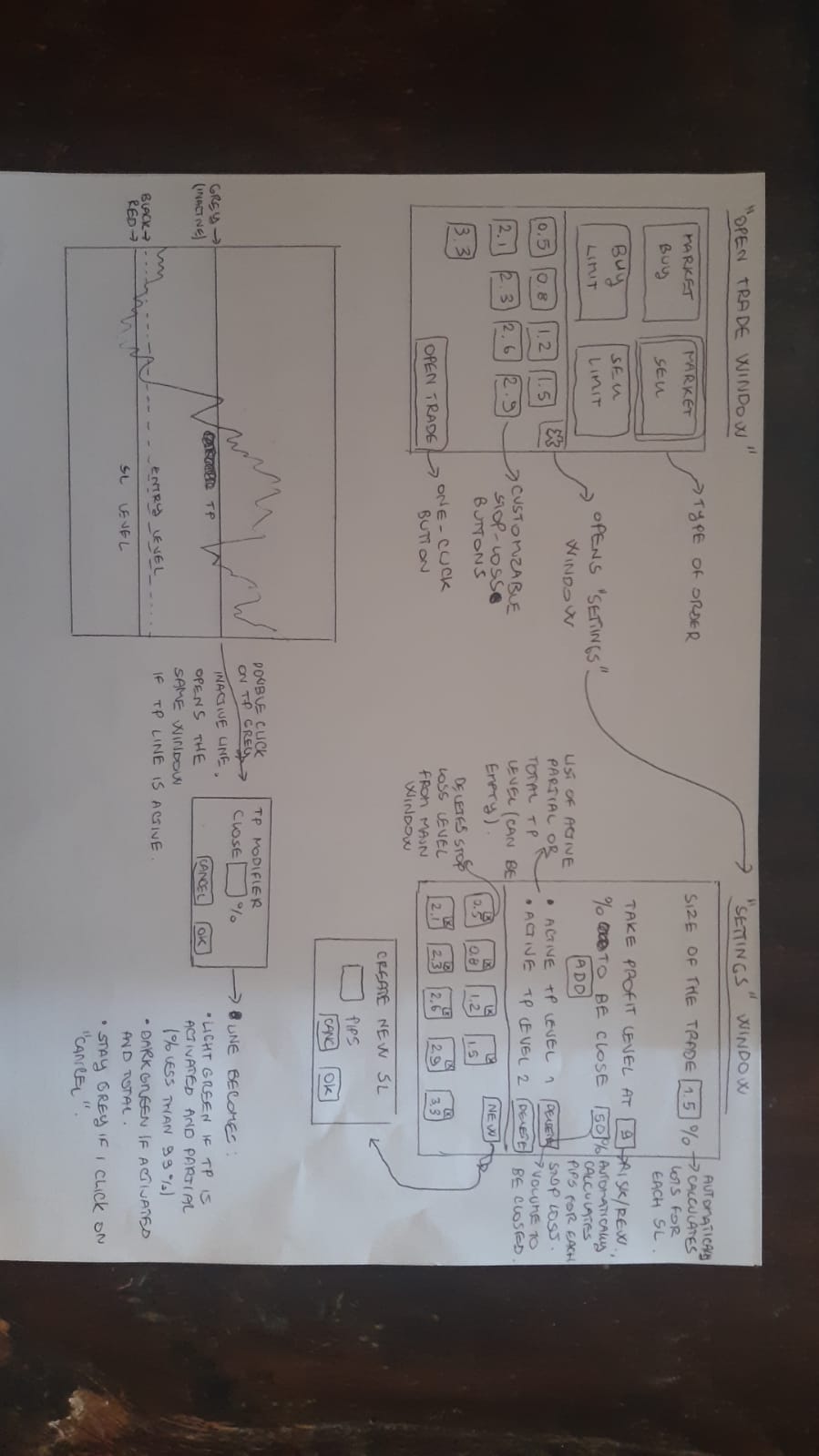
Every time I open the EA, a window displays in the upper left corner of the chart.
Upper half of the window has 4 buttons for "BUY", "SELL", "BUY LIMIT", "SELL LIMIT".
One of the 4 buttons is always selected. Selecting one new button will de-select the previous one.
Buy and buy limit will become green when selected, sell and sell limit will become red when selected.
The lower part of the window will have a series of buttons representing sizes of stop losses.
These buttons are customizable which can be done from "settings" window. Their representation must have one decimal digit (stop loss of 0.4, 1.3, 3.0 etc.).
As default, none of the buttons is selected.
If none of the stop loss buttons is selected, no order can be sent from the EA and the "send order" button in the lower right corner of this window must be represented faded.
If "buy limit" or "sell limit" is selected, a yellow line representing the entry level is shown on the chart and can be moved to the desired level by dragging it.
In the upper right corner of the window, a settings symbol links to the settings of the EA.
In the settings, following properties can be managed:
1) Size of the position: expressed in % of the capital on the account, defines how many lots should be opened for every Stop Loss size. If for example 1% is selected, it must open 1% of the capital for every stop loss size, by calculating the correspondents lots.
This field is mandatory and can't be left empty. An error message should appear if so.
2)Automatic take profit levels. (total or partial). Expressed in integers which represent risk reward ratio. If for example "7" is digited, a TP order must be opened at a distance 7 times bigger of the stop loss. So if the stop loss is 2.2 pips, the take profit will be at 15.4 pips from the opening price level.
A second field expressed in % of the total volume opened defines how many lots should be closed at the level.
If 100 is digited, for example, it is a common take profit.
If 25 is digited, it should close 25% of the position at the selected level.
In case a partial take profit level is set, a + sign at the right side of the field allows the creation of a new partial or total automatic TP.
This fields are not mandatory, a position can be opened even if no automatic TP is set.
3)list of stop loss active buttons, each of them can be deleted. A "+" button allows creation of new ones
If no TP is set, a draggable grey line will be represented on the chart at the default distance of 1:10 compared to the stop loss. If I click on the line, a message appears asking which size of the volume I wanna close (expressed in % 0/100) and if I want to activate the TP. Clicking "yes" activates it.
If I click on an active green TP line, a windows appears where I can modify the % of the volume to close at the level. It has to display the actual percentage when the window appears.
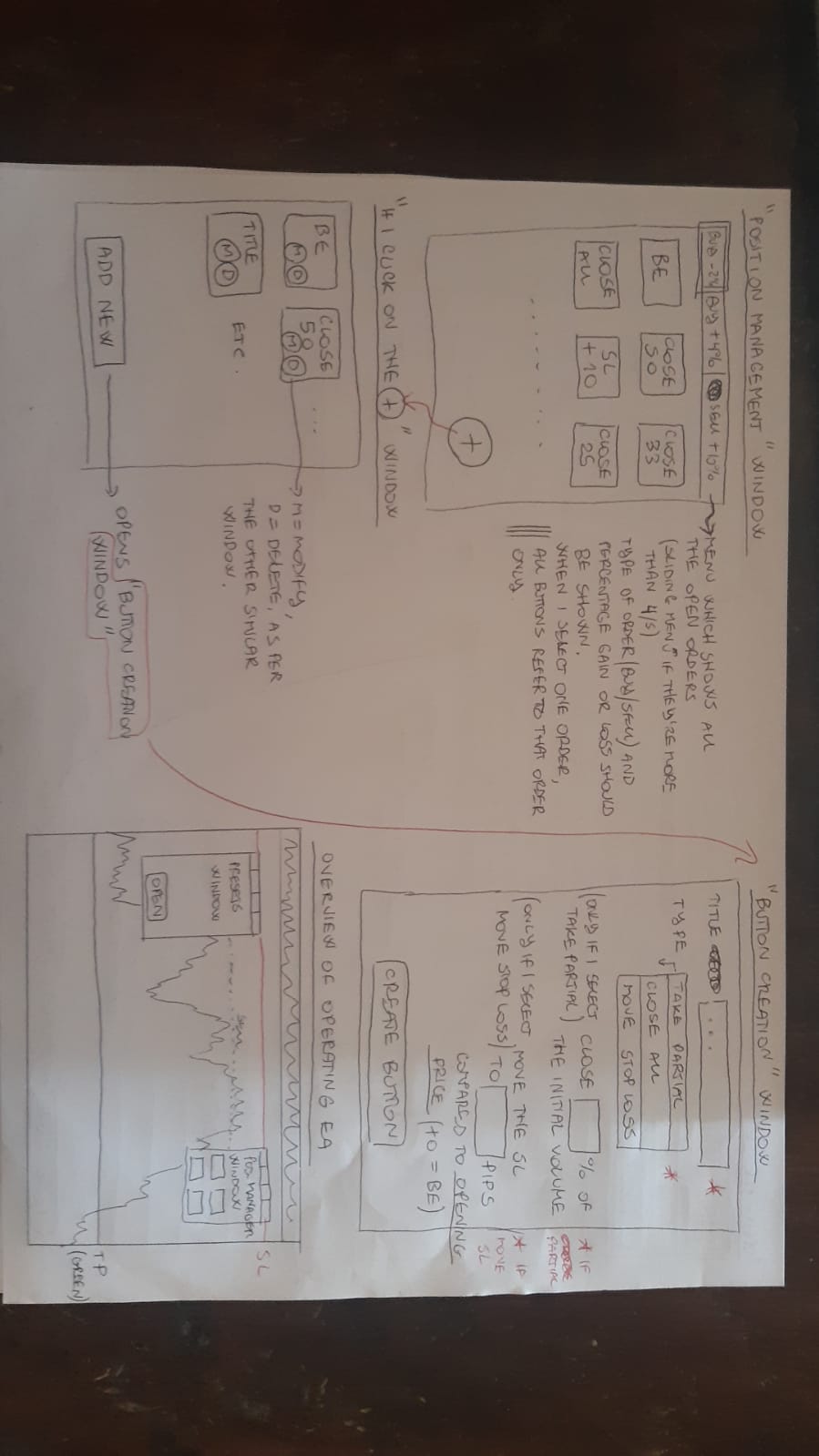
Every time I have an open order, another window displays on the screen which is a position manager tool which uses customizable buttons to manage the position quick.
Look at the attachments to see how I imagine it.
There should be an upper bar which shows the various open orders.
For every order, it is displayed if it's buy or sell and the gain or loss at every moment in % of the capital of the account.
When I click on one of these orders on the bar, the underlying buttons refer ONLY TO THAT ORDER.
All the buttons are customizable and I can add or modify existing ones by clicking on a "+" at the lower right of the window.
When I click on +, the customization window opens and it shows me the various existing buttons and a "ADD NEW BUTTON" option.
The button creation/customization window gives me these options.
-title of the button (shown in the main window)
-type of the button (take partial, close all, move sl)
If I select take partial, it asks the % of the total volume, creates the button.(I confirm the creation by clicking on "CREATE")
If I select close all, it creates a button which close 100% JUST OF THE SELECTED TRADE.
If I select move SL:
-insert where the SL needs to be moved compared to the trade opening price level (es. +0 means SL to BE, etc.)
All the buttons are oneclick.
If I ask to partial close more than what's open (es. I ask to close 50% of the initial volume by clicking on the button, but I only have 30% open), the whole position should be closed.
If I ask to move the SL over where the price is now (es. I click on a "breakeven" button but the price is 5 pips under that level), nothing should be done and an error message should appear.
SL and TP should be shown by RED and GREEN lines on the chart, I can drag the lines to modify SL and TP.
There should be the possibility to customize the lines and instead of showing lines, it should show faded red and green areas between the open price and SL/TP. (exactly as the tools "long position" and "short position" on Tradingview platform).
The intensity of the colored area has to be customizable and I always have to be able to modify SL and TP by dragging the lines at the end of the colored area.
As I said before, double clicking on a TP line opens a window where I can see and modify the % of the total volume that should be closed at that level.
Responded
1
Rating
Projects
72
22%
Arbitration
13
46%
/
15%
Overdue
5
7%
Free
2
Rating
Projects
169
38%
Arbitration
9
78%
/
22%
Overdue
15
9%
Free
3
Rating
Projects
68
25%
Arbitration
12
42%
/
42%
Overdue
4
6%
Free
4
Rating
Projects
74
50%
Arbitration
5
0%
/
60%
Overdue
19
26%
Free
5
Rating
Projects
26
54%
Arbitration
1
0%
/
0%
Overdue
4
15%
Working
Published: 3 codes
6
Rating
Projects
91
25%
Arbitration
26
19%
/
54%
Overdue
25
27%
Free
7
Rating
Projects
91
13%
Arbitration
34
26%
/
59%
Overdue
37
41%
Free
8
Rating
Projects
945
47%
Arbitration
309
58%
/
27%
Overdue
125
13%
Free
Similar orders
I am looking for an experienced MQL5 developer to build a professional MT5 Expert Advisor specifically for XAUUSD (Gold) and other indices. I saw that XAUUSD is one of your primary areas of specialization, so I would like to discuss a custom EA with you. My priority is NOT extremely high returns. I want a robust EA designed for controlled risk and long-term survival. Requirements: • MT5 / MQL5 • XAUUSD, usoil,btc and
VENOM EA
35 - 50 USD
So, im a beginner and I'm pleading you to built me a bot that runs 24hrs and that can buy and sell at the same time, choose a better and profitable strategy. I will do anything thing it takes to get the bot. I hope you take my request into consideration
Je cherche un développeur MQL4 / MQL5 expérimenté pour créer un robot de trading automatique (Expert Advisor) performant et sécurisé. Validation de comptes Prop Firm capable de trader sur le forex et les matière première
XAUUSD Digger
50 - 300 USD
I want you to create a strategy that fits for my funded account conditions like winrate of 60%+ with good risk reward ratio min 1:2 and max drawdown per day is 2% or 3% and overall should be less then 10% with less consecutive losses should be able to finish the funded stage in of phase 1 8% target and phase 2 of 10% target in a month with good number of trades in a month need journal of all the back tested data and
RSI-Based Forex Trading EA (MetaTrader 5)
30 - 200 USD
I need a simple Expert Advisor for MT5 that trades based on RSI overbought/oversold levels. - Entry: Buy when RSI(14) < 30, Sell when RSI(14) > 70 - Exit: Take Profit and Stop Loss as adjustable input parameters (default 50/25 pips) - Position sizing: Risk 1% of account balance per trade, auto-calculated from stop-loss distance - Timeframe and currency pair: adjustable inputs, not hardcoded - Should include basic
1. Trading Instruments: - The robot should trade exclusively on the following currency pairs: - NZD/CHF - NZD/USD - GBP/USD 2. Trading Style: - The robot should implement a day trading strategy, focusing on short-term trades. 3. Risk Management: - Maximum drawdown percentage: 10%. - Stop loss settings: Adjustable based on volatility (suggested default: 30 pips). - Take profit settings: Adjustable
I have an existing working MQL5 Expert Advisor and require an experienced MQL5 programmer/trading-system analyst to independently analyse its historical performance. This is NOT initially a request to rewrite the EA or simply optimize parameters. Current strategy: - MetaTrader 5 - M15 timeframe - EMA / ADX / ATR based - Approximately 1,337 historical trades - Gross Profit approximately USD 271,000 - Gross Loss
Gold robot
30 - 1000 USD
Hello everyone, I’m looking for a developer who has an algorithm in their arsenal that generates quick profits over the long term. I’m interested in a scalping expert advisor—it can be a one-shot, averaging, or grid strategy, with or without TP/SL. Please share your ideas and results; I’ll consider all options. The most important thing is the result. Good luck
Zwivhuya
100+ USD
I would like to be part of this trade because i want to help my family out of the hopeless life we are living now . i thoughts going to school will help me get better job but no i am still sitting for us to eat at home i have to sell my body to someone and get pay with that small money i can buy bread and cooldrink for my family that we can not sleep with emyter stomach
Expert advisor for indicator
50+ USD
I need an Expert Advisor that trades by signal of ADX and Moving Average indicators. It must check and correctly process possible errors in trading operations. The main criteria of opening and closing positions , direction of Moving Average, Price of last bar . Set the number of lots to trade as an input parameter
Project information
Budget
100 - 200 USD
Deadline
from 1 to 10 day(s)