All orders
 Rules
Rules
Job finished

Specification
I will:
Provide detailed EA specs including screenshots of all trade scenario’s
Be happy for suggestions if any inputs/specs seem clumsy
Need the actual code for the EA
Need basic direction on strategy testing and installing the EA
You will:
Need to commit to timely completion of EA
Communicate in a timely way
Commit to a realistic completion date
Allow the EA to be tested with the MT4 strategy tester
GENERAL COMMENTS
Definition of terms for the EA Position / Trade:
I need an MT4 Expert Advisor (EA) coded that enters single long/short positions with a target value to determine entry’s/exits. In some instances, I’ll make several attempts to jump onto a trend, only to be stopped out. Each of these trades has a set Initial Stop Loss, which if hit, closes the trade and activates another entry signal where the original Trade Entry Trigger was.
Multiple use:
The same account will have the EA simultaneously run with different instruments
Flexibility:
All inputs/parameters need to be variable within the EA settings window.
Strategy Tester info:
Info to be displayed on the strategy tester are (lines/values/trigger types).
Platforms to be used
The EA will be used on the Citi Index, IG Markets and Interactive Brokers platforms but needs to run on any MT4 platform.
Real money account:
The EA will be tested in the strategy tester before being rolled over to a real money account.
Process to activate EA:
The EA will be activated (switched on) manually.
Process to de-activate EA:
The EA can be deactivated (switched off) manually.
EA will close all positions and not open any if:
Number of consecutive losses occur (X)
A single loss exceeds (X) percentage of account balance
A drawdown exceeds (X) percentage of account balance
These above variables will be included in the EA settings window
EA TRADING SPECIFICATIONS
Definitions:
Triggered:
The definition of triggered is when price trades at, or above/below, the defined trigger value. All actions, except for the Initial Stop Loss, are sent to the platform as At-Market orders when triggered by the EA.
Initial Stop Losses are automatically generated once the trades’ Actual Entry Price is available and sent to the platform as Conditional Buy/Sell orders.
All triggers remain active until triggered or cancelled by the EA.
Gaps:
· Entries: When price gaps above/below the entry trigger, the trade is entered at the first price thereafter.
· Initial Stop Losses: When price gaps above/below an Initial Stop Loss trigger, the trade is closed at the first price thereafter and a new Buy/Sell Entry Trigger calculated.
All entry/exit triggers are calculated using the following Bid/Ask:
|
|
Buy |
Sell |
|
Entry: |
Bid |
Ask |
|
Initial Stop Loss: |
Ask |
Bid |
Decimal Points:
I only trade stock indices so all triggers are entered and activated to one decimal point.
Number of Units:
The number of units per trade will be confirmed/changed within the Settings screen.
Actual Entry Price:
This is the price the units were actually bought/sold at. It’s often slightly different to the Buy/SellEntry Trigger due to slippage and occasional momentary platform outages etc.
Variable Inputs as seen on the EA Settings Window:
· Number of Units (X)
· Target Value (X)
· Initial Stop Loss (dist) (X)
· Buy/Sell Entry Triggers (dist) (X)
· Number of consecutive losses occur (X)
· A single loss exceeds (X) percentage of account balance
· A drawdown exceeds (X) percentage of account balance
Target Value:
The Target Value is used as the activation point for trade set-ups. Once price trades at, or above/below, the Target Value, Buy/Sell Entry triggers are calculated to be a pre-determined, and equal, distance from the Target Value (i.e. Buy and Sell Triggers will always be the same distance from the Target Value). The Target Value has three components:
· Target Value (variable): This is the level in the market that I decide to calculate my trade setups from
· Buy Entry Trigger (variable): Is set at a predetermined level from the Target Value
· Sell Entry Trigger (variable): Is set at a predetermined level from the Target Value
All three components will appear in the EA Setting window.
The Target Value will be shown on the screen as a line and draggable. When dragged, the Buy/Sell Triggers are automatically recalculated.
Position Entry Specs:
· Buy - when price rises above the Target Value by the pre-determined distance
· Sell – when price falls below the Target Value by the pre-determined distance
VERY IMPORTANT: If price gaps through the Buy/Sell Entry Trigger the trade is entered at the first tradable value.
VERY IMPORTANT: Buy/Sell triggers are only generated after price trades at, or above/below, the Target Value.
Buy/Sell Entry Triggers:
When price trades at, or above/below, a Buy/Sell Entry Trigger (It’s hit), Buy/Sell orders are:
· Sent to the market as an At-Market order
· All Buy Triggers are based on the bid price
· All Sell Triggers are based on the ask price
Exit Specs:
Initial Stop Loss:
Initial Stop Loss values are calculated by adding/subtracting the Initial Stop Loss (dist) value from the Actual Entry Price. It’s automatically calculated as soon as the Actual Entry Price is available and immediately sent to the market as a Conditional Buy/Sell order.
Once active, a trade is closed as soon as price trades at, or above/below, its Initial Stop Loss value. Another Buy/Sell Entry Trigger is then automatically created, which if triggered, would see a new At-Market Buy/Sell order generated and sent to the market. Then, as soon as an Actual Entry Price is available a Conditional Initial Stop Loss order is automatically generated and sent to the market.
IMPORTANT: Conditional-Buy/Sell Initial Stop Loss orders are alwaysgenerated and sent to the market as soon asan Actual Entry Price is available.
TRADE EXAMPLE
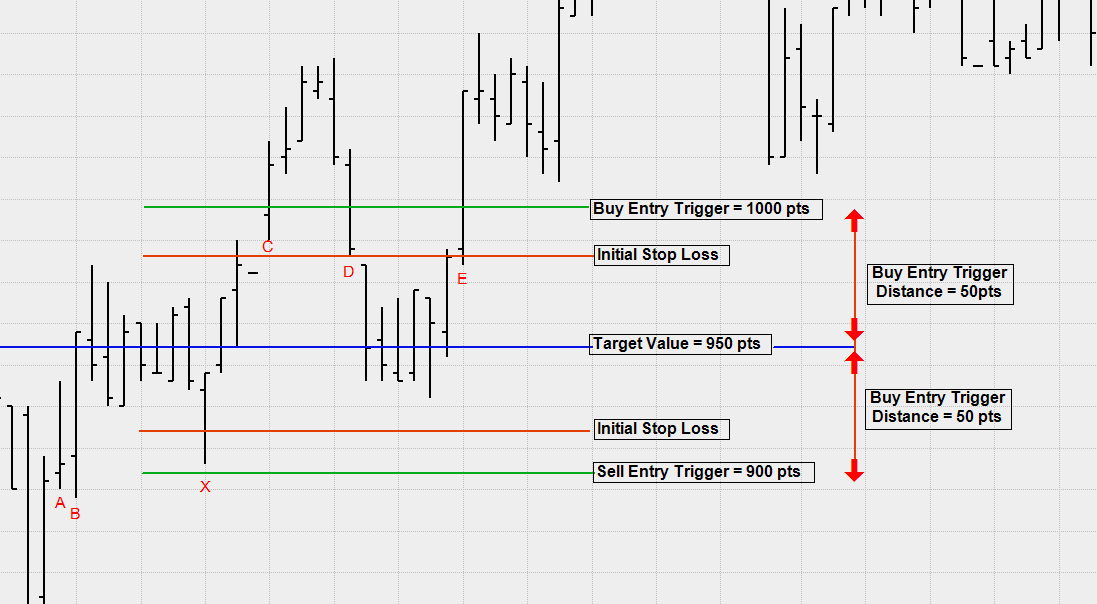
Now that all the variable and automatic inputs are covered let’s look at an example as follows:
System specs to be used:
Number of Units: 1
Buy/Sell Trigger (dist): 50 pts (50pts from the Target Value)
Trade type: Long
Target Value: 950 pts
Buy Entry Trigger: 1000 pts (Target Value + Buy Trigger (dist)) = (950 pts + 50 pts)
Sell Entry Trigger: 900 pts (Target Value - Sell Trigger (dist)) = (950 pts - 50 pts)
Initial Stop Loss (dist): 50 pts
On this occasion we’ll assumed that the EA was activated with a Target Value of 950 pts and there was no slippage with any of the transactions.
Let’s go through the above example on the chart:
(A) The EA was activated with a Target Value of 950 pts
(B) Price traded at the Target Value, triggering the creation of respective Buy/Sell Entry Triggers
(C) Price traded at the Buy-Entry Trigger. The EA would’ve sent an At-Market buy order to the market. Then, as soon as an Actual Entry Price was available a Conditional-Sell Initial Stop Loss order would’ve been sent to the market.
(D) Price traded at the Initial Stop Loss thereby closing the trade. This in turn would’ve seen a new Buy-Entry Trigger generated at the same level as the first one.
(E) Price traded at the Buy-Entry Trigger for second time. The EA would’ve sent an At-Market buy order to the market. As soon as an Actual Entry Price was available a Conditional-Sell Initial Stop Loss order would’ve been sent to the market. Price then continued moving away from the trade setup area.
(X) Price falls close to the Sell trigger before reversing (note the Sell Trigger is notactivated).
A screen shot of the example trade is attached