 All orders
 Rules
Rules
Job finished

Specification
this EA will use a simple breakout strategy with reverse entries.
the EA should be coded manually. no EA generators are allowed.
Q:
what are the reverse entries ?
A: these will be pending Stop orders. these pending stop orders will be put in some price levels if the main entry failed. it will be
explained in details later.
first, i will explain the inputs (parameters) in order. then the entry rules. each parameter will be explained in details.


Public
Parameters (can be edited by the user)
Auto_MM (Boolean)
1: True (will use auto money management according to
the risk ratio and type. explained below)
1: False (will use the manual lot parameters for the main entry and the reverse entry. this will also be explained)
Risk_Ratio
(Number):
the EA will risk a given % of the Equity or Balance for every trade.
Risk_Type: (Drop down list)
1:
Equity (the EA will risk a given % of the Equity for every trade.)
2: Balance (the EA will risk a given % of the Balance for every trade.)
Reverse_Multiply_Factor: (number)
this will
be the multiply factor for the reverse lot size. for example, if the multiply factor is 2.0 and the lot size for the main entry was (0.10) then
the reverse lot size will be (0.20).
Main_Lot (number):
this will be used when AutoMM is False.
Reverse_Lot (number):
this
will be used when the Reverse_Multiply_Factor is set to 0
Starting_Hour (number):
this is when the EA will start to check for the entry rules. the entry rules will be
explained in details later.
for example, if set to 10, then the EA will start looking for the entry rules if the previous hour is 10.
Signal_Timeout
(number):
if set to 10 for example and no signals were found after 10 candles, the EA will wait for another day.
Main_Take_Profit
(Number):
this will be the take profit for the main entry.
Main_Stop_Loss (Number):
this
will be the stop loss for the main entry.
Reverse_Take_Profit (Number):
this will be the take profit for the reverse entry.
Reverse_Stop_Loss
(Number):
this will be the stop loss for the reverse entry.
Reverse_Shift (number):
this
will move the pending order x pips away from price level specified (reverse orders will be explained in details below)
for example, if set to 10: the pending buy order will move 10 pips up and the pending sell order will move 10 pips down if the main order hit SL
(reverse orders will be explained in details below)
Gap_Killer (True/False)
if set to true, the EA will close any buy order if the price is above the TP or below the SL and will close any sell order if the price is below the TP or above the SL.
Use_Double_Reverse (True/False)
when set to True, the EA will allow the 2 reverse orders to be executed together
when set to false, the other reverse order will get cancelled if one is triggered
Main_Break_Even (number)
applies break even for main orders
Reverse_Break_Even (number)
applies break even for reverse orders
Magic_Number (number)
magic number


Hidden
Parameters (cannot be edited by the user. embedded into the code)
Account_Number (number):
the EA will work only if the running account number matched the account number specified
inside the code.
Comment (Text):
will show comment on order


Main
Entry Rules:
if the previous bar time = Starting_Hour then
the EA will wait for the price to close above
the
Starting_Hour candle high or below the Starting_Hour candle low.
buy entry: when the price closes above the Starting_Hour candle high
sell
entry: when the price closes below the
Starting_Hour candle low
example:
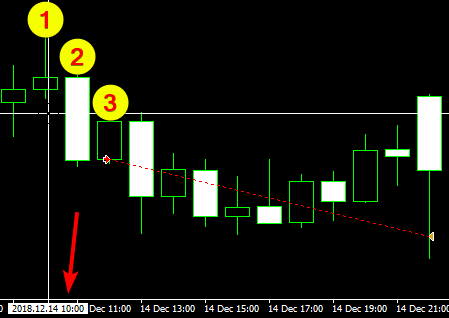
example 1
in the example above.
number 1: is the Starting_Hour candle (assuming we selected 10
o'clock)
number 2: the price closed blow the Starting_Hour low
number 3: order opened and hit the TP


Reverse Pending orders
the Reverse Pending orders will be placed once the main order hit the SL.
and
will not be placed at allof the main order hit the TP.
Reverse Pending orders price level:
the
reverse pending orders will be placed as such:
if the main order hit the SL:
1 pending
buyorder will be put x pips
abovethe SL if the main order has been closed. (x pips = Reverse_Shift input from the parameters)
1
pending
sellorder will be put x pips
belowthe SL if the main order has been closed. (x pips = Reverse_Shift input from the parameters)
example:
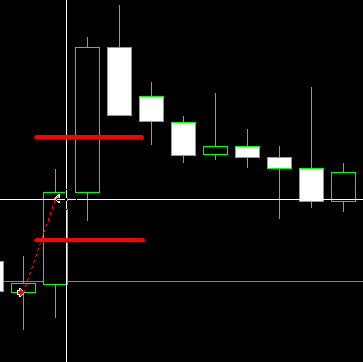
these 2 red lines represents the reverse order placement according to our Reverse_Shift
reverse orders takes the SL price level as its base point and move the pending buy order x pips above it and the pending sell order x pips below it (according to Reverse_Shift)
if one reverse order hit TP, the other will be cancelled
if one reverse order hit SL, it will NOT cancel the other reverse order