Discussion of article "Library for easy and quick development of MetaTrader programs (part XXII): Trading classes - Base trading class, verification of limitations"
Artem, I need to get the properties of a position in mql4 after opening it or activating an order. I found how to get the event index
ENUM_TRADE_EVENT engine.LastTradeEvent()
and at this point I need to get the available properties.
I even found the enum, but how to get... I can't find something.
Artem, I need to get the properties of a position in mql4 after opening it or activating an order. I found how to get the event index
and at this moment I need to get the available properties.
I even found the enum, but how to get... I can't find something.
If the last event is opening a position? We need to get the last opened position and access to all its properties? Right?
If so, it's easy (without checking the results of getting the list and object):
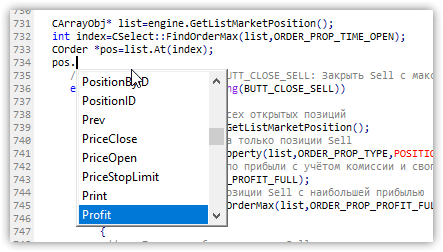
I'm getting somewhere. Thank you, very useful library.
Next question (not stupid): we have two pending orders. We received an event on activation of one of them, then the second one was activated.... And there is no change of the event. How to make the watchman back after receiving the event? Tried
last_event = WRONG_VALUE; after processing the event, but I got a nonsense...
I'm getting somewhere. Thank you, very useful library.
Next question (not stupid): we have two pending orders. We received an event on activation of one of them, then the second one was activated.... And there is no change of the event. How to make the watchman back after receiving the event? I tried
after processing the event, but I got a nonsense...I'm not controlling the events correctly. The library catches them all, then the test EA checks the difference between the past event and the current one. And you have two identical events.
In principle, after sending an event, the library resets the event itself. Try to receive the event again after receiving it - it should be written to the variable that there is no event, then the next event should be caught.
But I have long ago written in my plans that trade events should be done in the same way as the events of symbols or account - they just return a flag that there is an event. And then in the programme we can see what the event is. Everything is already prepared for this in the Expert Advisor, only for trading events there is a stopper in the OnDoEasyEvent() function of the Expert Advisor, because the flag is not returned yet - I can't get my hands on it:
//--- Processing of trade events
   else if(idx>TRADE_EVENT_NO_EVENT && idx<TRADE_EVENTS_NEXT_CODE)
     {
      event=EnumToString((ENUM_TRADE_EVENT)ushort(idx));
      int digits=(int)SymbolInfoInteger(sparam,SYMBOL_DIGITS);
     }
I have the event control going wrong here. The library catches them all, then the test EA checks the difference between the past event and the current one. And you have two identical events.
In principle, after sending an event, the library resets the event itself. Try to receive the event again after receiving it - it should be written to the variable that there is no event, then the next event should be caught.
But I have long ago written in my plans that trade events should be done in the same way as the events of symbols or account - they just return a flag that there is an event. And then in the programme we can see what the event is. Everything is already prepared for this in the Expert Advisor, only for trading events there is a stopper in the OnDoEasyEvent() function of the Expert Advisor, because the flag is not returned yet - I can't get my hands on it:
That's for sure, the morning is wiser in the evening.... If an event is received, in my particular case, we should react to it somehow. In particular, put another pending order. So much for the new event.
I have the event control going wrong here. The library catches them all, then the test EA checks the difference between the past event and the current one. And you have two identical events.
In principle, after sending an event, the library resets the event itself. Try to receive the event again after receiving it - it should be written to the variable that there is no event, then the next event should be caught.
But I have long ago written in my plans that trade events should be done in the same way as the events of symbols or account - they just return a flag that there is an event. And then in the programme we can see what the event is. Everything is already prepared for this in the Expert Advisor, only for trading events there is a stopper in the OnDoEasyEvent() function of the Expert Advisor, because the flag is not returned yet - I can't get my hands on it:
But event is a variable available only in OnChartEvent, and it is not processed in the tester.
I want to do something like this in OnTick():
//--- If the last trade event has changed
 if(engine.LastTradeEvent() != last_event)
  {
   switch(last_event)
    {
     case TRADE_EVENT_PENDING_ORDER_PLASED :
      // call the corresponding function
     break;
     case TRADE_EVENT_PENDING_ORDER_REMOVED :
      // call the corresponding function
     break;
     case TRADE_EVENT_PENDING_ORDER_ACTIVATED :
      // call the corresponding function
     break;
     case TRADE_EVENT_POSITION_OPENED :
      // call the corresponding function
     break;
     case TRADE_EVENT_POSITION_CLOSED :
      // call the corresponding function
     break;

     default :
      break;
    }
But event is a variable available only in OnChartEvent, and it is not processed in the tester.
I want to do something like this in OnTick():
So after event processing - at the end of the event type check module, what do you have in the last_event variable? This variable should be reset in the Expert Advisor. Instead of forcibly calling the method of resetting the last event of the library - the library itself calls it right after sending the event to the chart and writing it to the list of events.
But event is a variable available only in OnChartEvent, and it is not processed in the tester.
I want to do something like this in OnTick():

- Free trading apps
- Over 8,000 signals for copying
- Economic news for exploring financial markets
You agree to website policy and terms of use
New article Library for easy and quick development of MetaTrader programs (part XXII): Trading classes - Base trading class, verification of limitations has been published:
In this article, we will start the development of the library base trading class and add the initial verification of permissions to conduct trading operations to its first version. Besides, we will slightly expand the features and content of the base trading class.
To check the work of the methods checking trading limitations, we need to artificially create them.
For example:
Click the position opening button in the EA trading panel. The following entry appears in the journal:
Let's eliminate the restrictions one by one.
After enabling the Internet connection, we obtain the following message when attempting to open a position:
Enable auto trading in the terminal clicking the AutoTrading button. When attempting to open a position, we obtain the following:
Press F7 and allow the EA to trade in its settings. When attempting to open a position, we are finally successful:
Other limitations can be checked in the tester or a demo account by creating a situation when one of the limitations is activated, for example, a limitation by the maximum number of pending orders on the account.Author: Artyom Trishkin