Kim Hoang / 프로필
- 정보
|
9+ 년도
경험
|
5
제품
|
353
데몬 버전
|
|
1
작업
|
0
거래 신호
|
0
구독자
|
Kim Hoang
AI Chat Bot Trade Builder
Experts Kim Hoang
Version: 1.0 Activations: 5
AI Chat Bot Trade Builder
Build any trading strategy just by chatting — no coding required.
AI Chat Trade Builder is a next-generation Expert Advisor powered by AI. Instead of programming complex indicators and conditions, simply describe your strategy in plain language and the AI builds it for you automatically — in seconds.
How It Works
Open the chat panel directly inside MetaTrader 4
Describe your strategy in your own words (any language)
AI parses and deploys the strategy to a dedicated chart instantly
Monitor live — indicators draw automatically, real-time values update every tick
No MQL4 knowledge needed. No settings files. Just chat.
Fully Custom Entry & Exit Conditions
Define exactly when to open and when to close — independently, in plain language. The AI builds the full condition logic automatically.
Orders open at the start of each new bar when your entry condition is met
Orders close automatically when your exit condition triggers — no manual intervention needed
SL and TP remain active as a safety net alongside your exit condition
If no exit condition is specified, the AI infers a logical reversal automatically
Build Any Strategy You Can Imagine
The AI understands virtually any technical analysis method. Here are real examples:
Trend Following:
"Buy EURUSD H1 when MA20 crosses above MA50, RSI14 below 60. Close when MA20 crosses below MA50."
Multi-Timeframe:
"Buy XAUUSD when MA20 crosses MA50 on H4, AND RSI14 on H1 is below 40. SL 150 pips, TP 300 pips."
Oscillator-Based:
"Buy when RSI14 crosses above 30 on M15. Close when RSI reaches 70. Lot size 0.1."
Breakout:
"Buy GBPUSD H1 when price closes above Bollinger upper band, volume above average. Close when price returns to the middle band. SL 80 pips."
MACD Reversal:
"Sell USDJPY H1 when MACD histogram turns negative and RSI14 is above 60. Close when MACD histogram turns positive. SL 50 pips."
Consecutive Bar Confirmation:
"Sell EURUSD M30 when RSI14 stays below 40 for 3 consecutive bars. Close when RSI rises above 50."
AI Trade Suggestions
Ask the AI for trade ideas based on current market conditions: "What opportunities do you see on EURUSD right now?"
Get entry, SL and TP recommendations with reasoning: "Suggest a trade setup for XAUUSD H1"
AI analyzes live indicator values and price action before making suggestions
One-click confirmation to deploy the suggested strategy instantly: "Apply it to slot 1"
Ask for second opinion on your own idea: "I want to buy EURUSD now, is this a good entry?"
Supported Indicators
Moving Averages (SMA, EMA, SMMA, LWMA) — any period, any timeframe
RSI, CCI, Stochastic, WPR, Momentum, MACD
Bollinger Bands, ATR, Parabolic SAR
OHLC price conditions (open, high, low, close of any bar)
Multi-timeframe combinations (M1 to MN)
Key Features
Strategy Builder (Chat AI)
Natural language input — describe strategies the way you think
Multi-language support: English, Vietnamese, Spanish, Chinese, Japanese, and more
AI understands complex multi-condition and multi-timeframe strategies
Modify existing strategies anytime by chatting: "Change RSI period to 21" or "Change exit to RSI above 65"
Run up to 5 strategies simultaneously on separate charts
Live Indicator Panel
Each strategy gets a dedicated chart with all indicators drawn automatically
Oscillator values (RSI, CCI, Stochastic...) update in real-time every tick
Color-coded signals: green = bullish zone, red = bearish zone
MA trend lines redrawn every bar
Instant Order Execution
Place market orders directly from the chat: "Buy 0.1 EURUSD now"
Set Stop Loss and Take Profit in pips or price
Modify or close positions by chatting
Order History & Analysis
Query your trade history: "Show my last 10 orders"
Ask for performance summary: "How many pips did I make this week?"
Current indicator readings on demand: "What is RSI14 on XAUUSD H1 right now?"
Multi-Device Access
Full functionality on Windows desktop via MetaTrader 4
Monitor strategies and chat from mobile via the companion web dashboard (included)
Real-time sync between desktop EA and mobile interface
Note: It only works in a real-time live environment and does not function in a backtesting environment.
Link: https://www.mql5.com/en/market/product/177678?source=Site+Market+MT4+Expert+New+Rating006#description
Experts Kim Hoang
Version: 1.0 Activations: 5
AI Chat Bot Trade Builder
Build any trading strategy just by chatting — no coding required.
AI Chat Trade Builder is a next-generation Expert Advisor powered by AI. Instead of programming complex indicators and conditions, simply describe your strategy in plain language and the AI builds it for you automatically — in seconds.
How It Works
Open the chat panel directly inside MetaTrader 4
Describe your strategy in your own words (any language)
AI parses and deploys the strategy to a dedicated chart instantly
Monitor live — indicators draw automatically, real-time values update every tick
No MQL4 knowledge needed. No settings files. Just chat.
Fully Custom Entry & Exit Conditions
Define exactly when to open and when to close — independently, in plain language. The AI builds the full condition logic automatically.
Orders open at the start of each new bar when your entry condition is met
Orders close automatically when your exit condition triggers — no manual intervention needed
SL and TP remain active as a safety net alongside your exit condition
If no exit condition is specified, the AI infers a logical reversal automatically
Build Any Strategy You Can Imagine
The AI understands virtually any technical analysis method. Here are real examples:
Trend Following:
"Buy EURUSD H1 when MA20 crosses above MA50, RSI14 below 60. Close when MA20 crosses below MA50."
Multi-Timeframe:
"Buy XAUUSD when MA20 crosses MA50 on H4, AND RSI14 on H1 is below 40. SL 150 pips, TP 300 pips."
Oscillator-Based:
"Buy when RSI14 crosses above 30 on M15. Close when RSI reaches 70. Lot size 0.1."
Breakout:
"Buy GBPUSD H1 when price closes above Bollinger upper band, volume above average. Close when price returns to the middle band. SL 80 pips."
MACD Reversal:
"Sell USDJPY H1 when MACD histogram turns negative and RSI14 is above 60. Close when MACD histogram turns positive. SL 50 pips."
Consecutive Bar Confirmation:
"Sell EURUSD M30 when RSI14 stays below 40 for 3 consecutive bars. Close when RSI rises above 50."
AI Trade Suggestions
Ask the AI for trade ideas based on current market conditions: "What opportunities do you see on EURUSD right now?"
Get entry, SL and TP recommendations with reasoning: "Suggest a trade setup for XAUUSD H1"
AI analyzes live indicator values and price action before making suggestions
One-click confirmation to deploy the suggested strategy instantly: "Apply it to slot 1"
Ask for second opinion on your own idea: "I want to buy EURUSD now, is this a good entry?"
Supported Indicators
Moving Averages (SMA, EMA, SMMA, LWMA) — any period, any timeframe
RSI, CCI, Stochastic, WPR, Momentum, MACD
Bollinger Bands, ATR, Parabolic SAR
OHLC price conditions (open, high, low, close of any bar)
Multi-timeframe combinations (M1 to MN)
Key Features
Strategy Builder (Chat AI)
Natural language input — describe strategies the way you think
Multi-language support: English, Vietnamese, Spanish, Chinese, Japanese, and more
AI understands complex multi-condition and multi-timeframe strategies
Modify existing strategies anytime by chatting: "Change RSI period to 21" or "Change exit to RSI above 65"
Run up to 5 strategies simultaneously on separate charts
Live Indicator Panel
Each strategy gets a dedicated chart with all indicators drawn automatically
Oscillator values (RSI, CCI, Stochastic...) update in real-time every tick
Color-coded signals: green = bullish zone, red = bearish zone
MA trend lines redrawn every bar
Instant Order Execution
Place market orders directly from the chat: "Buy 0.1 EURUSD now"
Set Stop Loss and Take Profit in pips or price
Modify or close positions by chatting
Order History & Analysis
Query your trade history: "Show my last 10 orders"
Ask for performance summary: "How many pips did I make this week?"
Current indicator readings on demand: "What is RSI14 on XAUUSD H1 right now?"
Multi-Device Access
Full functionality on Windows desktop via MetaTrader 4
Monitor strategies and chat from mobile via the companion web dashboard (included)
Real-time sync between desktop EA and mobile interface
Note: It only works in a real-time live environment and does not function in a backtesting environment.
Link: https://www.mql5.com/en/market/product/177678?source=Site+Market+MT4+Expert+New+Rating006#description
Kim Hoang
Change lot size of Signals
If you use trading signals regularly, you probably know that a signal provider's trading lot volume often differs from that of a subscriber. The provider may apply a volume that is too large or too small relative to your deposit. This utility automatically changes a lot size when following signals.
Click here: https://www.mql5.com/en/market/product/18367
How to get rich (my way):
VPS + multiple accounts + multiple signals + change lot size tool = Safe and High profits / month
If you use trading signals regularly, you probably know that a signal provider's trading lot volume often differs from that of a subscriber. The provider may apply a volume that is too large or too small relative to your deposit. This utility automatically changes a lot size when following signals.
Click here: https://www.mql5.com/en/market/product/18367
How to get rich (my way):
VPS + multiple accounts + multiple signals + change lot size tool = Safe and High profits / month
소셜 네트워크에 공유 · 8
Kim Hoang
Change lot size of Signals
If you use trading signals regularly, you probably know that a signal provider's trading lot volume often differs from that of a subscriber. The provider may apply a volume that is too large or too small relative to your deposit. This utility automatically changes a lot size when following signals.
Click here: https://www.mql5.com/en/market/product/18367
If you use trading signals regularly, you probably know that a signal provider's trading lot volume often differs from that of a subscriber. The provider may apply a volume that is too large or too small relative to your deposit. This utility automatically changes a lot size when following signals.
Click here: https://www.mql5.com/en/market/product/18367
소셜 네트워크에 공유 · 3
Kim Hoang
Change lot size of Signals
If you use trading signals regularly, you probably know that a signal provider's trading lot volume often differs from that of a subscriber. The provider may apply a volume that is too large or too small relative to your deposit. This utility automatically changes a lot size when following signals.
Click here: https://www.mql5.com/en/market/product/18367
If you use trading signals regularly, you probably know that a signal provider's trading lot volume often differs from that of a subscriber. The provider may apply a volume that is too large or too small relative to your deposit. This utility automatically changes a lot size when following signals.
Click here: https://www.mql5.com/en/market/product/18367
소셜 네트워크에 공유 · 3
Kim Hoang
Change lot size of Signals
If you use trading signals regularly, you probably know that a signal provider's trading lot volume often differs from that of a subscriber. The provider may apply a volume that is too large or too small relative to your deposit. This utility automatically changes a lot size when following signals.
How to get rich (my way):
VPS + multiple accounts + multiple signals + change lot size tool = Safe and High profits / month
Click here: https://www.mql5.com/en/market/product/18367
If you use trading signals regularly, you probably know that a signal provider's trading lot volume often differs from that of a subscriber. The provider may apply a volume that is too large or too small relative to your deposit. This utility automatically changes a lot size when following signals.
How to get rich (my way):
VPS + multiple accounts + multiple signals + change lot size tool = Safe and High profits / month
Click here: https://www.mql5.com/en/market/product/18367
소셜 네트워크에 공유 · 3
Kim Hoang
Kim Hoang | Yesterday
Change lot size of Signals
If you use trading signals regularly, you probably know that a signal provider's trading lot volume often differs from that of a subscriber. The provider may apply a volume that is too large or too small relative to your deposit. This utility automatically changes a lot size when following signals.
Click here: https://www.mql5.com/en/market/product/18367
Change lot size of Signals
If you use trading signals regularly, you probably know that a signal provider's trading lot volume often differs from that of a subscriber. The provider may apply a volume that is too large or too small relative to your deposit. This utility automatically changes a lot size when following signals.
Click here: https://www.mql5.com/en/market/product/18367
소셜 네트워크에 공유 · 1
Kim Hoang
Change lot size of Signals
If you use trading signals regularly, you probably know that a signal provider's trading lot volume often differs from that of a subscriber. The provider may apply a volume that is too large or too small relative to your deposit. This utility automatically changes a lot size when following signals.
Click here: https://www.mql5.com/en/market/product/18367
If you use trading signals regularly, you probably know that a signal provider's trading lot volume often differs from that of a subscriber. The provider may apply a volume that is too large or too small relative to your deposit. This utility automatically changes a lot size when following signals.
Click here: https://www.mql5.com/en/market/product/18367
소셜 네트워크에 공유 · 1
Kim Hoang
Change lot size of Signals
If you use trading signals regularly, you probably know that a signal provider's trading lot volume often differs from that of a subscriber. The provider may apply a volume that is too large or too small relative to your deposit. This utility automatically changes a lot size when following signals.
Click here: https://www.mql5.com/en/market/product/18367
If you use trading signals regularly, you probably know that a signal provider's trading lot volume often differs from that of a subscriber. The provider may apply a volume that is too large or too small relative to your deposit. This utility automatically changes a lot size when following signals.
Click here: https://www.mql5.com/en/market/product/18367
소셜 네트워크에 공유 · 3
Kim Hoang
공유 제품
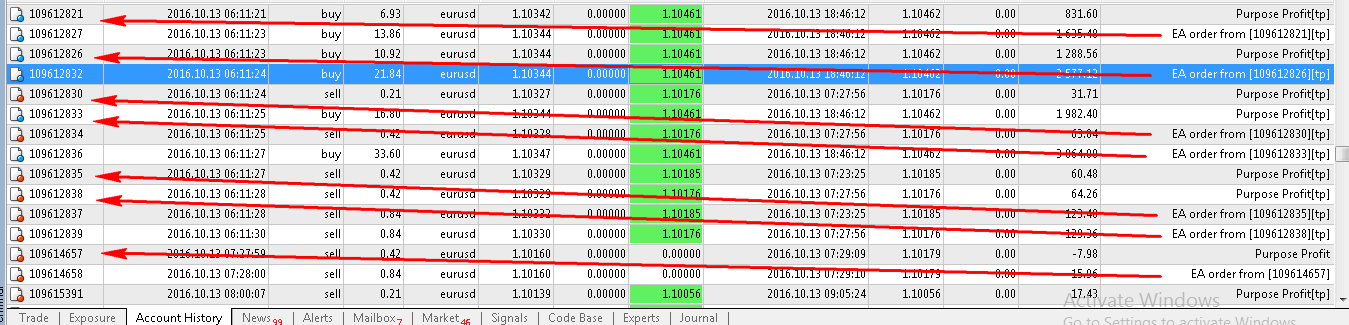
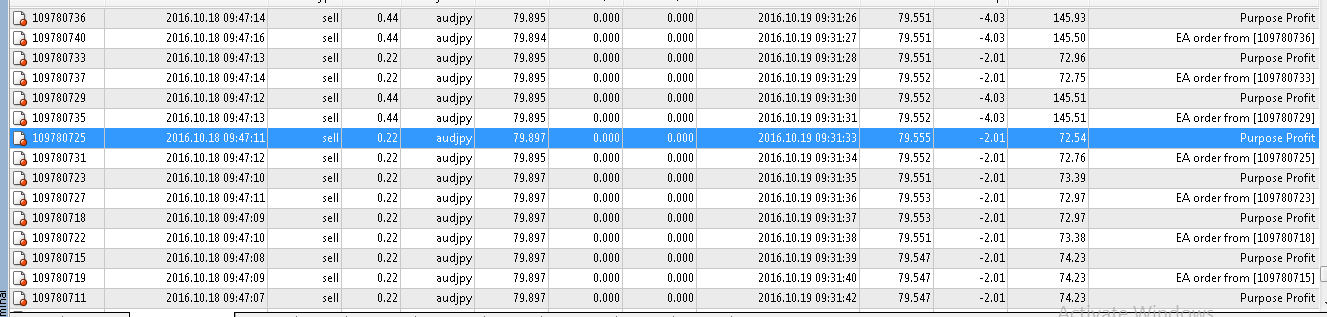
If you are hiring the signal at website mql5.com to earn investment profits, the lot size on your MT4 software received from the signal will be limited to reduce risk. Because the lot size is too small, investment profits will be very small. This is a tool to increase the lot size of the order. This tool will automatically copy the order from the original order. The copied order will have the lot multiplier according to the parameters you declare. All the process of opening and closing the order
소셜 네트워크에 공유 · 2
: